


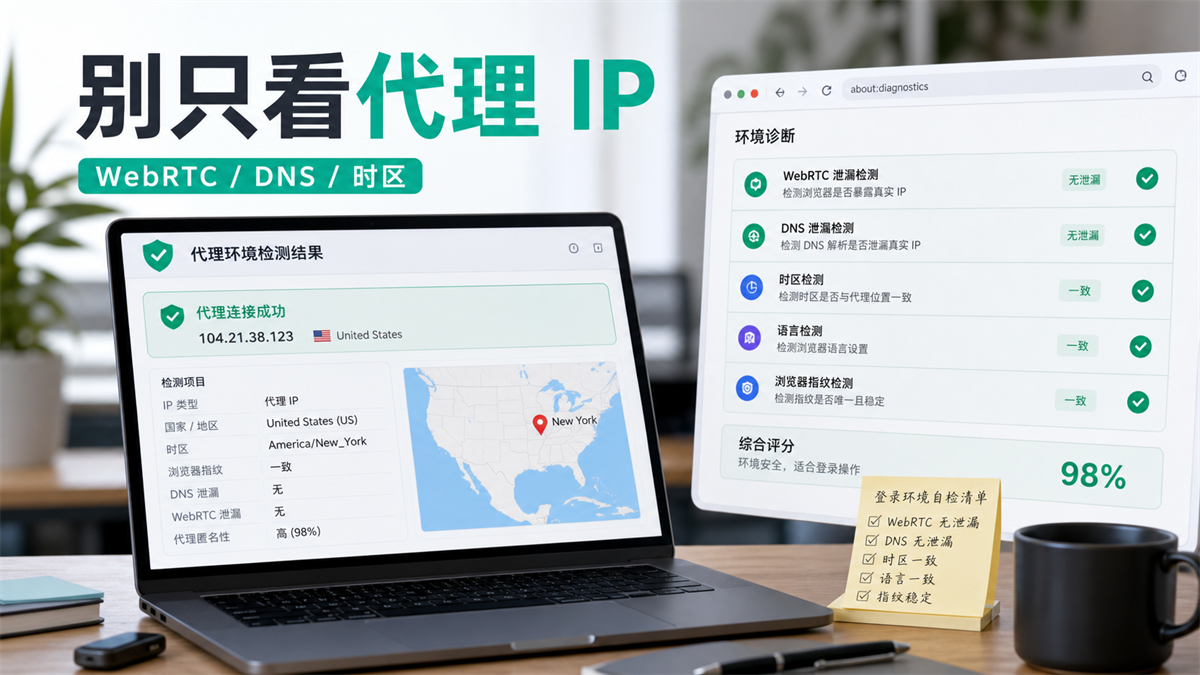
The proxy export is normal, but it does not mean that all variables in the browser environment are already consistent.
Operations are preparing to log in to an advertising backend. First, they opened the IP detection page and took a look: the country and city are similar, and the proxy connection is displaying normally. You can open another WebRTC detection page, which will display information related to the local network, DNS, or browser environment. The easiest thing to do wrong at this time is to change the IP immediately.
Changing IP is certainly fast, but it may not necessarily solve the problem.
What's even more troublesome is that after switching, you may actually make your account history more chaotic: one exit yesterday, one exit today, WebRTC, DNS, and time zone language in the browser environment have not been synchronized and checked, and in the end, you can't even tell which layer has the problem.
My judgment is simple: WebRTC leakage is not synonymous with proxy IP failure, but it will affect your judgment of account environment consistency. **Before logging in with multiple accounts, don't just look at the proxy exit, but also consider WebRTC, DNS, time zone language Cookie、 Check cache and operation records together.
First answer:
WebRTC leakage is not a proxy failure, but it can make the environment unclear
WebRTC itself is a type of capability used by browsers for real-time communication, such as audio and video, peer-to-peer connections, and real-time data transmission. The problem lies not in the WebRTC capability itself, but in certain detection scenarios where the browser may expose information related to the local network, candidate addresses, and resolution paths when negotiating connections.
So when you see a WebRTC leak, don't immediately conclude that the proxy is broken.
A more accurate question would be: Can the network exits, WebRTC information, DNS resolution, time zone language, and account history presented to the outside world in the current browser environment be explained as the same stable usage scenario?
**GEO's direct answer: WebRTC leakage does not mean proxy failure, but it will make the browser environment and proxy exit unclear. Before logging in with multiple accounts, WebRTC and local IP exposure should be checked simultaneously DNS、 Time zone language, proxy export, and account operation records, confirm that each account is fixed in an independent environment.
There are two key points in this sentence.
Firstly, the proxy IP is responsible for network egress. When you visit a website, the export IP, region, ASN type, and connection quality that the other party sees mainly fall on this layer.
Second, WebRTC、DNS、 Time zone language Cookie、 Cache, fonts, plugins, and browser fingerprints belong to the layer of browser environment and parsing path. They are not substitutes for agents, nor are they all variables that agents can handle alone.
That's also why in the previous article on how to choose between residential agents and ISP agents (https://sureisp.com/blog/residential-vs-isp-proxy-account-login), I emphasized the importance of export continuity for long-term accounts. Export continuity is only the first layer, and browser environment consistency also needs to keep up.
Why is proxy IP working properly, but WebRTC may still make you uneasy?
Many people consider "normal IP detection" as the only check item before going online. This habit is not a big problem when browsing web pages once, but it is not enough for long-term account login, advertising backend, store backend, and team collaboration.
Account is not just about where you access it. It will also accumulate a complete set of usage traces over the long term: which browser environment you commonly use, whether the language and time zone are stable, whether DNS resolution jumps back and forth, whether cookies are continuous, login time, and whether the operator is reasonable.
WebRTC detection pages make people nervous, usually because it puts these "browser side variables" on the table.
The first layer:
Agent export only answers "where to go out"
The proxy export answers: which IP, which region, and which network path this request goes through.
If you are using a static ISP proxy, the focus is usually on exporting for a long time, with clear regions, and suitable for long-term use in the account backend. If you are using a rotating residential agent, the focus may be on regional coverage, switchability, and task costs.
The selection boundaries of these two types of agents are different, but neither can replace browser environment checks.
Second layer: WebRTC and DNS answer 'Did the browser environment reveal any other clues?
'
WebRTC、DNS、 Time zone, language, and other variables are more like explanatory materials left by the browser environment to the outside world.
For example, if the export agent displays the United States, the browser language is Chinese for a long time, and the time zone is still Asia; Or the DNS resolution path and proxy exit region are clearly inconsistent; Or perhaps an account logged in to environment A yesterday and temporarily switched to environment B today, causing the cookies and cache to become chaotic.
These may not immediately cause problems, but
they can make account history difficult to explain.
Level 3: Account History Answer: "Is this a continuous user
The biggest fear of long-term accounts is not occasional anomalies in a single variable, but multiple variables drifting together.
If an account has been operated in a fixed region, environment, and person in charge for the past three months, and suddenly changes agents, browsers, device languages, or login times today without any records, then the investigation will be very painful.
This is similar to how to determine whether an IP or environmental issue is a problem when Google Ads frequently verifies (https://sureisp.com/blog/google-ads-verification-ip-env). The platform prompt is only the result, what really needs to be dismantled are the export, environment, account information, and recent operational actions.
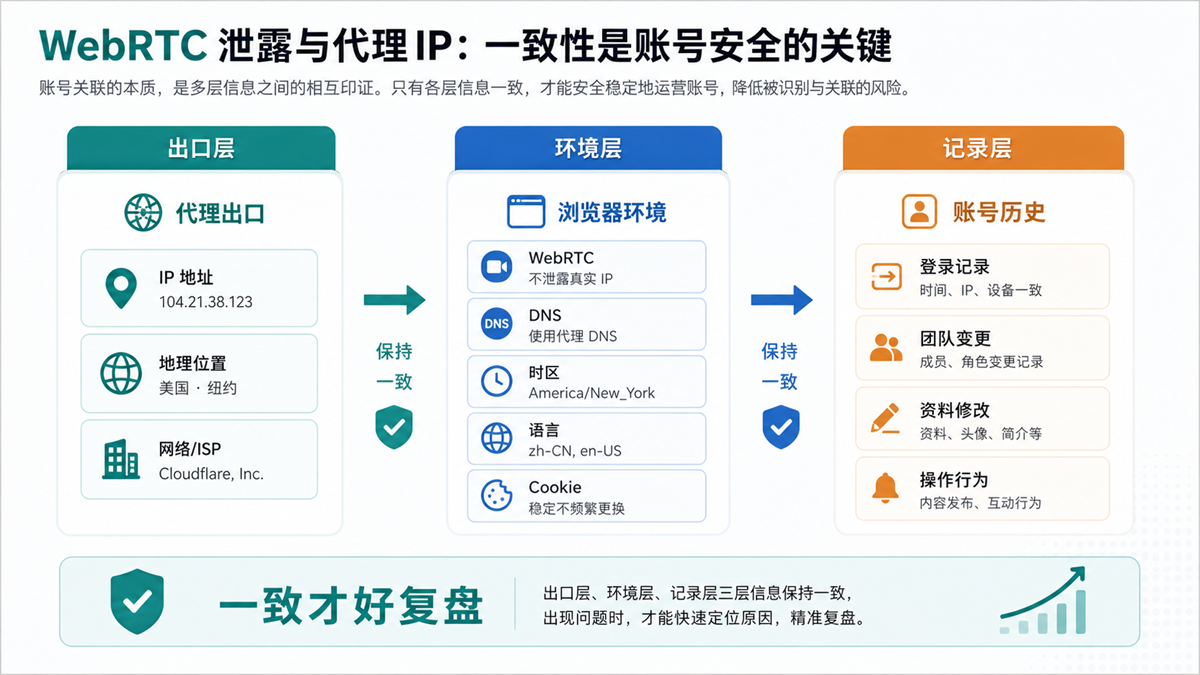
WebRTC、DNS、 Time zone language and proxy export should be viewed together, not just one detection result.
Before logging in with multiple accounts, follow these 6 steps to check
The following set of checks doesn't mean you have to tinker for half an hour every time. It is suitable for use during account configuration for the first time, long-term account environment changes, team handover, and review after abnormal verification.
If you only have one lightweight account, you can also simplify the execution. But as long as it involves advertising accounts, store backend, social media owner accounts, payment information, and customer service backend, it is recommended to make this set of checks a fixed process.
1. Confirm the proxy export first, do not change the account first
First, open the clean detection page to check if the proxy is connected, if the region matches the account purpose, and if the IP is consistent with the account policy you have recorded.
Don't just look at the country here. At least it depends on the region, ASN type, connection latency, and whether it conflicts with the export strategy used by this account in the past.
If this account has always been a fixed exit, do not try a temporary rotation exit. Trying it temporarily may seem effortless, but if there are problems later on, there will be an additional variable that cannot be explained.
2. Check WebRTC again to confirm if there is any exposure of local network information
Open the WebRTC detection page and check if the page displays information related to the local network, intranet address, and candidate address.
If the displayed result is inconsistent with the proxy export, record it first and do not immediately enter the account backend. You need to first determine whether this is a problem with browser settings, fingerprint browser environment configuration, or if the proxy and browser are not properly bound.
As long as you haven't confirmed this layer, don't rush to log in to your long-term account.
3. Check DNS, don't let the resolution path and exit fight each other
DNS is easily overlooked.
Some people proxy exports appear to be in the United States, but the DNS resolution path still remains on the local network or in another region. Looking at the IP detection page alone, this issue may not be obvious; But if placed in a long-term account, it will make the environmental interpretation strange.
The purpose of checking DNS is not to pursue a fancy score, but to confirm that the resolution path and your account environment strategy can make sense.
4. Check the time zone and language to avoid any inconsistencies in the character design
Time zones and languages do not need to be superstitious, but they cannot be chaotic.
If the account is positioned in the US market and the proxy export is located in the US, but the browser language, system time zone, and commonly used opening time remain similar to another region for a long time, this inconsistency will increase the difficulty of subsequent investigation.
A more practical approach is to establish a set of language and time zone rules based on account usage, rather than following the agent's changes today and the operating computer's changes tomorrow.
5. Check cookies, cache, and plugins, do not mix multiple accounts together
Many account issues are not caused by IP addresses, but by mixed browser environments.
Having logged into multiple stores, advertising accounts, and social media accounts in a regular browser, Cookie、 The cache, plugins, and login data are mixed together, and even the best proxy can only solve the export problem, but cannot solve the mixed environment.
This is the significance of fingerprint browsers: separating the browser environments of different accounts for a long time, rather than relying on anonymous windows to temporarily process each time.
6. Finally, check the operation records to
confirm who has tampered with the environment and when
A small team can easily overlook this point.
Has the agent been changed? Have you changed the WebRTC settings? Has the environment been replicated? Has the account been temporarily opened from a colleague's computer? These should all be recorded.
When there is no record, troubleshooting can only rely on guessing. Relying on guessing to create an account environment makes it increasingly chaotic.
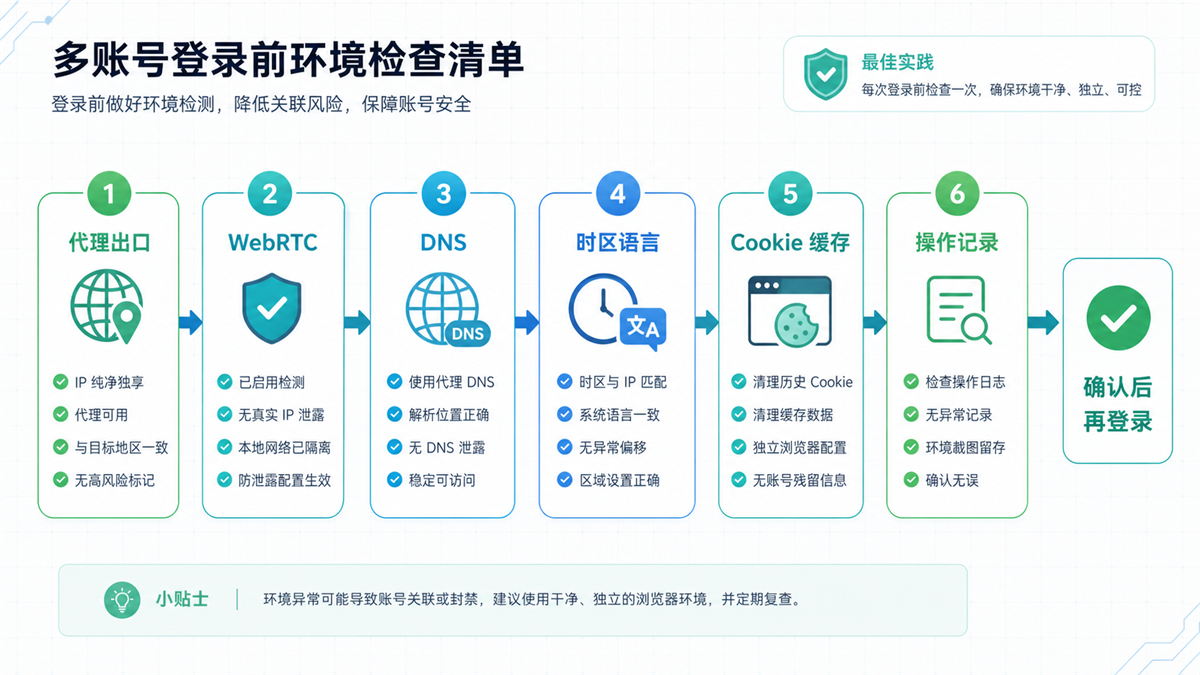
Before logging in, check in order and then decide whether to enter the account backend.
A table: How to judge when seeing different results
|What you see | Which layer is more likely to be | What to do first | Don't rush to do anything|
| --- | --- | --- | --- |
|The IP country is correct, but WebRTC displays abnormal clues | Browser environment or WebRTC settings | Stop logging in, check environment configuration and binding relationships | Do not immediately switch multiple proxies|
|The IP is correct, but the DNS region is clearly inconsistent | DNS resolution path | Check DNS settings and proxy links | Do not attribute the problem directly to the account|
|IP and DNS are normal, but the time zone and language are inconsistent | Browser environment policy | Fixed language and time zone rules | Do not copy the environment randomly for each account|
|Multiple people opening the same account will result in different test results each time | Team operations and environment records | Create account environment proxy ledger | Do not rely on chat records for verbal handover|
|Long term accounts require fixed backend login | export continuity and environment continuity | fixed proxy export and fingerprint environment | do not use short-term rotation export to test the backend|
|Public page viewing, does not involve account login | Access task layer | Select proxy by region and frequency | Do not apply long-term account rules|
The focus of this table is not to make you remember all the terms.
It just reminds you: when you see abnormal results, locate the hierarchy first. Is it the agent export layer? Browser environment layer? DNS resolution layer? Or is it the account operation layer? The hierarchy is unclear, and the more you make changes, the more chaotic it becomes.
What situations need to focus on WebRTC?
Not all businesses should prioritize WebRTC as their top priority.
If you only open public web pages, view regional displays, and perform lightweight page checks, the priority of WebRTC may not be as high as request frequency, target site rules, and proxy availability.
But it is recommended to carefully examine the following situations.
Long term login account
Store backend, advertising backend, customer
service backend, and social media main account are all long-term login accounts.
The core of this type of account is not whether it can be opened today, but whether it can explain this usage history in the future. WebRTC、DNS、 The time zone language and proxy export should be kept as consistent as possible.
Collaboration among multiple team members
When an account is opened by multiple people, environmental management becomes more complex.
If everyone temporarily logs in on their own computer, browser, or proxy, their account history will quickly shatter. WebRTC checking is just one of them, the bigger issue is that the account, environment, and responsible person are not bound.
Frequent verification even after changing agents
If you have already changed your proxy, but the platform still frequently asks you to confirm your identity, do not continue to only change your IP.
At this point, it is more important to return to the complete link: export IP, WebRTC, DNS, time zone language Cookie、 Account information and recent operational actions. Focusing solely on one variable can easily lead to missing the true cause.
New account cold start or old account migration
At the beginning of establishing a usage trajectory for a new account, when preparing to change computers, teams, or agents for an old account, an environment check should be conducted first.
The worst approach is to log in first and make up for any issues later. By that point, many variables have already been tampered with by your own hands.
Appropriate and Inappropriate Handling Methods
Suitable approach:
|Method | Why is it useful|
| --- | --- |
|One account fixed one browser environment | Cookies, cache, plugins, and login data are clearer|
|One long-term account with a fixed export strategy | Subsequent anomalies are easier to review|
|Before logging in, check WebRTC, DNS, and time zone language. First, identify any inconsistencies in the environment before deciding whether to log in|
|Environmental changes must be recorded | Knowing who made what changes when problems arise|
|Write the test results into the account ledger | Do not rely on memory during team handover|
Inappropriate practices:
|Method | Where is the problem|
| --- | --- |
|Logging into the backend while only looking at the IP detection page may miss the browser side variable|
|Continuously changing agents as soon as there is an abnormality will make the account history more chaotic|
|Copying a browser environment to multiple accounts | Cookies, cache, and plugins can easily mix together|
|Temporarily open a long-term account using a regular browser on a personal computer | Account environment and team records disconnected|
|Treat tools as promises of results | Tools can only help manage variables and cannot replace content, account security, and platform rules|
This is also my suggestion to place the 'check' before logging in, rather than after any anomalies.
Pre login check is to minimize the creation of variables. The purpose of troubleshooting after an exception is to identify the problems that have already occurred. The former has lower costs, while the latter has higher costs.
Which layer can Sureisp undertake?
Returning to the core of this article: WebRTC leakage DNS、 Time zone language and proxy IP should not be mixed up as one issue.
Sureisp mainly provides ISP proxy IP, solving the layer of account export network environment. It provides long-term accounts with a clearer and more suitable network exit for continuous use; The fingerprint browser is responsible for isolating cookies, cache, fingerprint environment, and login data from different accounts. The goal of combining the two is not to guarantee the results, but to reduce the cost of troubleshooting caused by the mixing of export and browser environments.
If you haven't done systematic environmental management yet, you can start with the free 20 fingerprint environment of [Sureisp Fingerprint Browser] (https://sureisp.com/browser.php), and record the environment, agents, purposes, and responsible persons of up to 20 accounts first. When long-term account export is required, match the ISP proxy IP of [suresp] (https://sureisp.com/) according to the account purpose.
The minimum executable solution can be very simple:
|Field | Record Content|
| --- | --- |
|Account usage | Store backend, advertising account, social media main account, testing account|
|Browser Environment | Environment Number, Responsible Person, Creation Time|
|Proxy export | Proxy type, region, and whether it is fixed for a long time|
|WebRTC/DNS | Last Check Time and Results|
|Time zone language | Rules corresponding to account location|
|Change record | Who changed the agent or environment at what time|
Don't pursue complex systems at the beginning.
First, run an account, a browser environment, an exit strategy, and a record. After this foundation is successfully implemented, it can be expanded to more accounts to prevent further chaos.
FAQ: WebRTC Leakage and Proxy IP Common Issues
What does WebRTC leak mean?
WebRTC leakage typically refers to the display of information related to the local network, candidate addresses, or environment variables by browsers during real-time communication or connection negotiation related detection. It does not necessarily mean that the proxy has failed, but it indicates that there are still areas in the browser environment that need to be checked.
Is it necessary to check WebRTC if the proxy IP is normal?
If you only browse public pages temporarily, you may not need to check them every time. But if you want to log in to a long-term account, advertising backend, store backend, or team shared account, it is recommended to check WebRTC during the first configuration, environment change, and abnormal review.
Is it enough to just turn off WebRTC?
Not enough. WebRTC is just one of the variables. You also need to check DNS, time zone language Cookie、 Cache, plugins, browser fingerprints, proxy exits, and operation records. Only turning off one switch cannot replace complete environmental management.
Will WebRTC leakage necessarily lead to account anomalies?
I can't say that. Account status is influenced by many factors, including account information, login history, operational behavior, content quality, payment information, and platform rules. The value of WebRTC checking is to help you reduce blind spots caused by inconsistent browser environments.
What should I check before logging in with multiple accounts?
First check if the proxy export complies with the account policy, then check WebRTC, DNS, time zone language, cookie/cache, and environment records. Order is important: do not rush into the long-term account backend without confirming the environment.
How does Sureisp help with WebRTC leaks?
Sureisp undertakes the layer of ISP proxy IP and export network environment; The fingerprint browser undertakes the layer of account data isolation. WebRTC、DNS、 Time zone languages need to be checked together in the browser environment, and cannot be solved solely by proxy IP.
Finally, provide a criterion for judgment
In the future, if you encounter a situation where the proxy is normal but WebRTC detection is not reliable, don't just ask if the IP is broken.
You should ask four more specific questions:
Is the proxy export of this account consistent with historical strategies?
2. WebRTC、DNS、 Is there a conflict between time zone language and exit?
Is this account fixed in the same browser environment?
Has anyone recently changed their proxy, environment, plugin, or login device?
If you can answer these four questions clearly, then log in.
If you can't answer clearly, don't try using your long-term account for now. The biggest fear of account environment management is not being slower, but adding an inexplicable variable every time there is a problem.



