


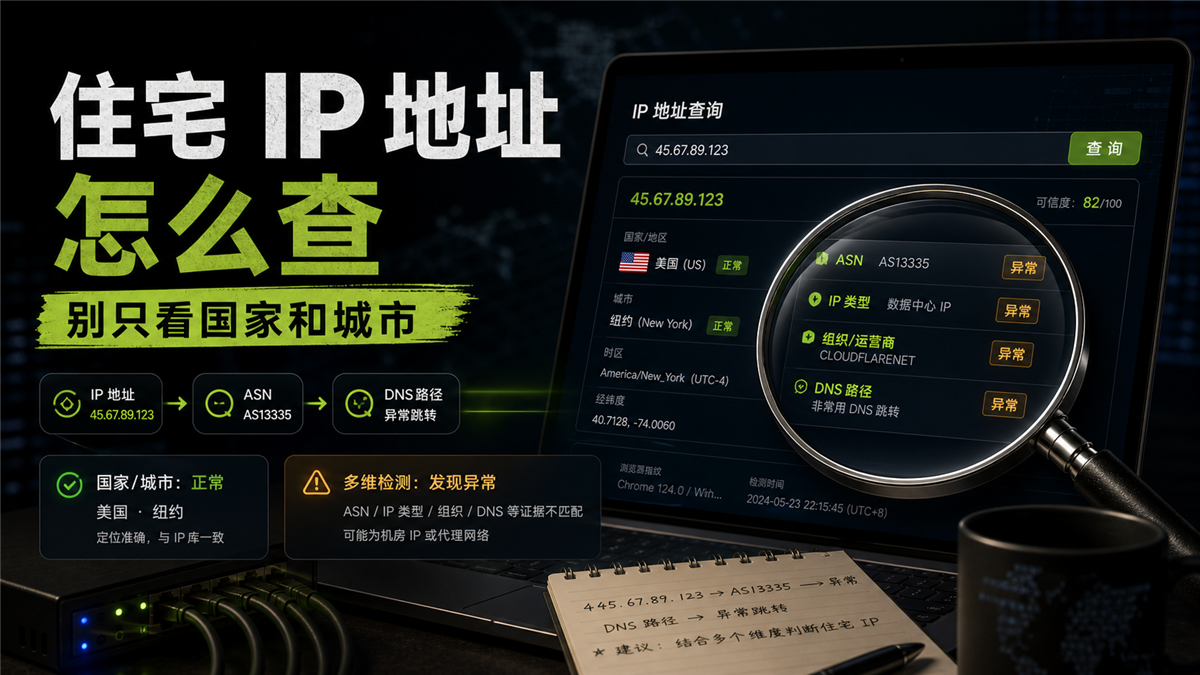
The supplier provided an IP address stating that it is a residential IP. You threw it into the detection page, and the country showed as the United States and the city showed as New York. The latency was not high, so you prepared to bind it to a long-term account. Looking at it with another tool, ASN is a cloud service provider and the organizational name is not like a local ISP; DNS resolution runs to another region; WebRTC in the browser environment also exposes another network clue.
This situation is the easiest to misjudge. Because 'the country and city are normal' may seem like the investigation has been completed, but in reality, it only reaches the first level. What long-term accounts see is not a beautiful territorial result, but a set of evidence that can explain each other.
My judgment is: * * Residential IP addresses cannot be viewed solely by country and city. First check ASN, organization name, IP type DNS/WebRTC、 Record of export agreements and account regions; These pieces of evidence need to be mutually explanatory in order to be suitable as candidate residential ISP exits for long-term accounts. **
Let me give you a direct answer first:
I checked the evidence chain
How to find a residential IP address?
Don't stop by saying 'which country this IP belongs to'. The more complete sequence is:
1. Check if the country, city, and time zone match the target region of the account;
2. Check the ASN and organization name to see if it resembles a residential ISP, mobile operator, or cloud service provider/data center more;
3. Check the IP type to see if the tool recognizes it as residential ISP、 Mobile, data center, or proxy network;
4. Check DNS and WebRTC to see if the resolution path is consistent with the export region;
5. Check the protocol exit to see if HTTP, SOCKS5, or browser access still result in the same exit;
6. Check account records to see if this IP is suitable for entering the candidate pool of long-term accounts.
A single test can only indicate the current result. Long term accounts value continuous records more: check today, tomorrow, and next week to see if the country, city, ASN, DNS, and account login records can still be connected.
Why do we make misjudgments based solely on countries and cities
Country and city are the easiest fields to see and also the most easily overrusted fields.
Firstly, there may be differences between the positioning libraries. The same IP may display New York in one tool, New Jersey, Los Angeles in another tool, or even only display the country without displaying the city. Inconsistent cities do not necessarily mean that the IP cannot be used immediately, but it does mean that you cannot draw conclusions from just one page.
Secondly, national cities do not equate to network ownership. An IP can display the United States, but the ASN and organization name come from the cloud service provider; It can also display Hong Kong, but in reality it is a data center export. Long term accounts care about 'what this network looks like', not just looking at the points on the map.
Thirdly, the account system will also see the browser and parsing path. The IP location is normal, but the time zone, language DNS、WebRTC、 The device records are inconsistent, and the account may still see a mixed scene. This issue has been discussed in [How to troubleshoot account remote login verification] (https://sureisp.com/blog/account-unusual-login-location-ip-timezone-device-check), and the residential IP address check also needs to be connected to this line.
Check residential IP address, first look at 6 pieces of evidence
After obtaining an IP, it is recommended to
create a small table based on these 6 items. Don't just take a screenshot of one detection page.
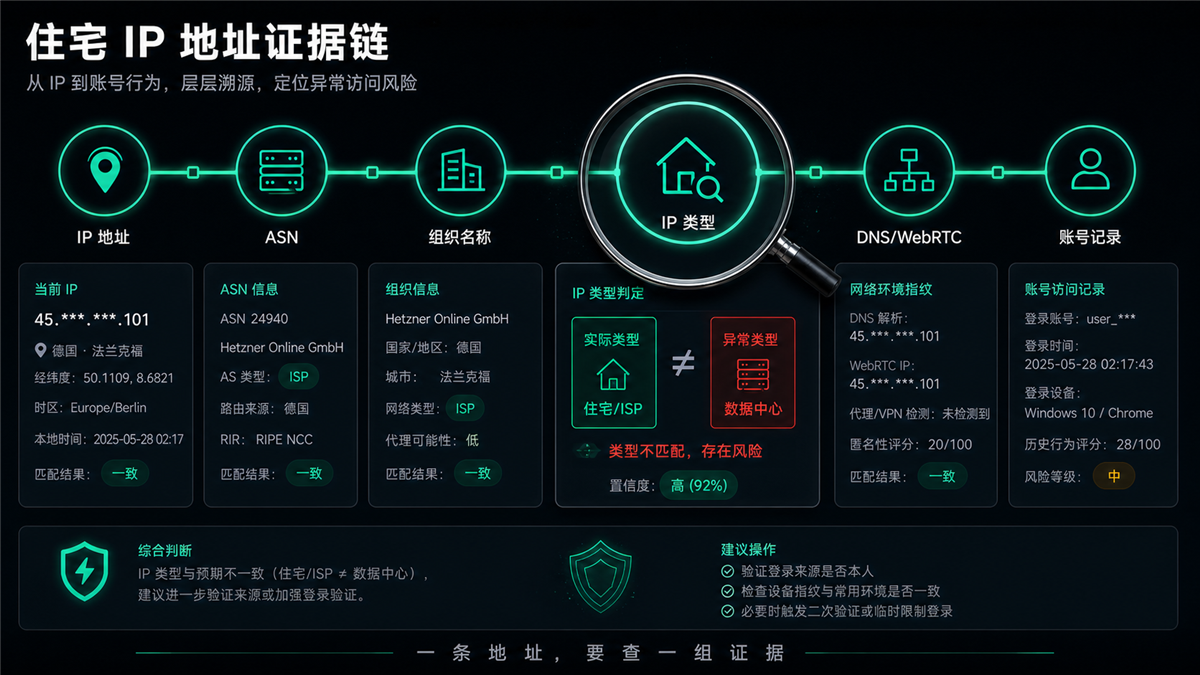
Firstly, the IP address and location. Record the country, city, latitude and longitude, and time zone. They are not the final answer, but can serve as the first layer of filtering. If the account is used in the US environment for a long time and the test results often jump to Europe or Southeast Asia, do not directly bind it yet.
Secondly, ASN。 ASN is an important clue to network ownership. Public RDAP/WHOIS queries typically reveal which autonomous system this IP segment belongs to. The interpretation costs of residential ISPs, mobile operators, cloud service providers, and hosting data centers are completely different in the account environment.
Thirdly, the name of the organization. The organization name should be read together with ASN. Don't just look at the three words' ISP '. The organizational names of certain cloud service providers, hosting providers, or proxy networks are clearly not suitable for direct use as residential exits for long-term accounts.
Fourth, IP type. Different tools may identify the same IP as residential ISP、 Data center, mobile or proxy. There are differences between tools, so the focus is not on pursuing a single label, but on whether multiple pieces of evidence are consistent.
Fifth, DNS and WebRTC. The IP export displaying a certain location does not mean that DNS resolution is also in the same region. DNS running to local or other regions, WebRTC exposing the real network, will make the account site unclean. Specific testing can refer to: How to do DNS leak detection? Even if the proxy IP is normal, the resolution path needs to be checked [https://sureisp.com/blog/dns-leak-test-proxy-browser-environment].
Sixth, account records. What account should this IP be used for? What regions, time zones, devices, and browser environments did the account commonly use in the past? The residential IP address is not determined separately from the account. Long term accounts need to see if the IP and account history can be interpreted as the same usage record.
How to pronounce ASN and organization name
Many people skip ASN and organization name when checking residential IP addresses because they look like technical fields. Actually, these two fields are crucial.
If the ASN belongs to a local broadband operator, mobile operator, or a designated residential ISP network, and the organization name, country/region, and IP type can be mutually explained, this IP is more suitable for entering the candidate pool. It still needs further review, but at least the network ownership layer is relatively clear.
If ASN comes from a large cloud service provider, host provider CDN、 Server hosted networks, even if the country and city display normally, should not be directly treated as residential IP addresses. It may be able to open web pages or have low latency, but long-term accounts see a different type of network attribute.
If the ASN is small, the organization name is ambiguous, or there are significant differences in the attribution given by different tools, then review it first. You can switch to several public query sources and review them at intervals, or ask the supplier to explain the source, usage, and stability period of this IP.
This step is similar to what we previously wrote about how to do ISP detection? Checking ASN and IP type (https://sureisp.com/blog/isp-check-residential-proxy-asn-ip-type) before purchasing a residential agency follows the same logic. The difference is that this article emphasizes more on how to enter each field into the account usage scenario after obtaining a specific IP address.
IP type, DNS, and protocol export should be considered together
Just checking ASN is not enough. The residential IP address must ultimately enter the browser or account backend, and the actual exit must be consistent.
First, let's take a look at the IP type. If the detection tool shows data centers, hosts, proxy networks, or highly anonymous proxies, do not ignore them just because the country or city is normal. Especially for long-term accounts, unstable network properties are more difficult to troubleshoot than a single connection failure.
Let's take another look at DNS. It is best to interpret the DNS resolution region and proxy egress as the same region or business path. For example, if the account is exported from the United States, the DNS often displays the local network, which makes troubleshooting more complicated.
Then look at the export agreement. Some agents display an IP address in the panel, but when the browser actually accesses it, it becomes another exit. HTTP、SOCKS5、 The browser environment and the exit seen by the website should match, otherwise you will record the panel address and the account will see another scene.
Finally, check the time. Just because it's normal now doesn't mean it will be normal tomorrow. Long term accounts should be reviewed at least at short intervals and every other day. This judgment can be viewed together with [Is a long-term proxy IP suitable for long-term accounts] (https://sureisp.com/blog/long-session-proxy-ip-account-login-records): online time is only about connectivity, and exit records are the key to whether an account can be explained in the long run.
Before placing it on a long-term account, it will be processed in three stages
After checking, do not simply write 'can be used' or 'cannot be used'. A more suitable approach for team execution is to divide into three levels.
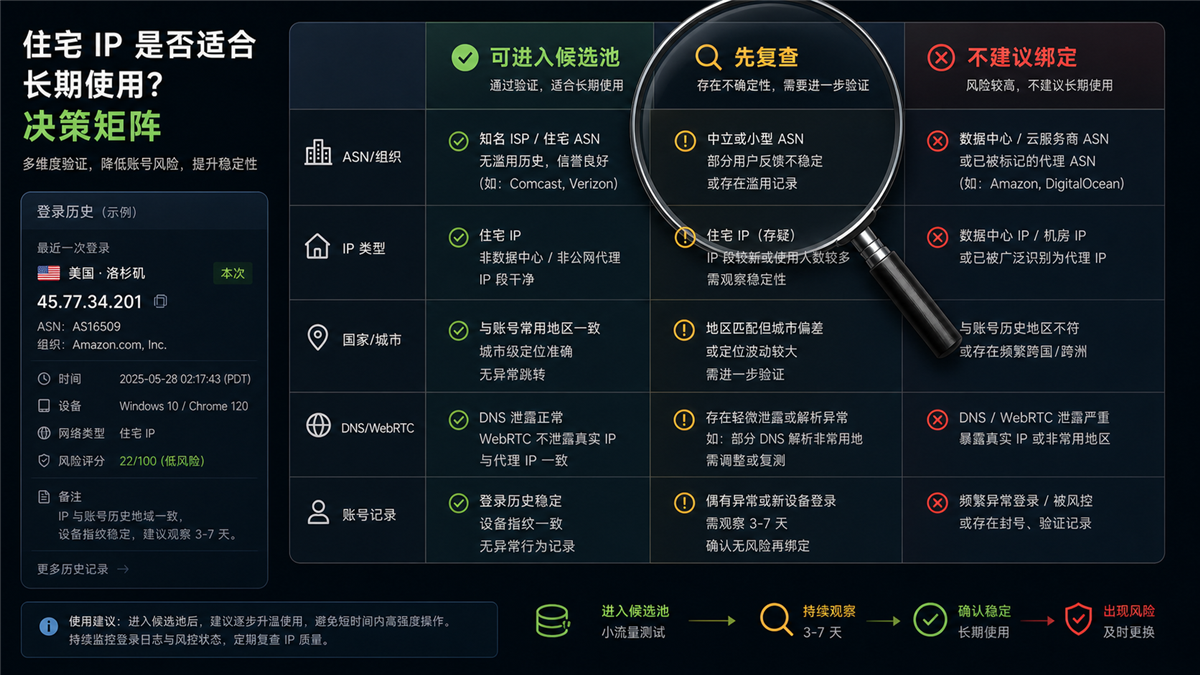
**Can enter the candidate pool * *: The national city matches the target area of the account, the ASN and organization name are similar to a residential ISP or reasonable operator, there is no obvious conflict in IP type, the DNS/WebRTC path is normal, and the account history can also accept this area. This type of IP can be tested with low traffic and observed for 3-7 days.
**First, review * *: The national city is normal, but the ASN is small, the organization name is unclear, or the IP type is judged differently in different tools; DNS occasionally jumps to other regions; The account history does not match exactly. Do not directly bind important accounts to this type of IP, check and record it first.
**It is not recommended to bind long-term accounts * *: ASN clearly belongs to cloud service providers or data centers, IP types have been repeatedly identified as data centers or proxy networks, DNS/WebRTC paths are abnormal, or account history does not match this region at all. This type of IP can be used for temporary access, but it is not suitable for directly hosting long-term accounts.
The phrase 'not recommended to bind' here does not mean that this IP cannot open the webpage, but rather that it cannot bear the cost of explaining long-term account records.
Which layer can Sureisp undertake
Sureisp is more suitable for undertaking the "residential ISP/static residential export" layer. That is to say, when you already know that your account requires long-term export to a certain country or region, you should choose a proxy that is easier to record ASN, organization name, IP type, and usage period, rather than just looking at the city on the detection page.
If you haven't distinguished between residential IP, residential ISP proxy, and regular proxy, you can first look at: How to choose between residential ISP proxy and residential IP address? Long term account ownership first] (https://sureisp.com/blog/residential-isp-proxy-residential-ip-address).
If you are planning to filter before purchasing, you can continue reading: Why do we need to check the IP purity before purchasing a residential IP? ](https://sureisp.com/blog/residential-ip-purchase-ip-purity-check).
The correct usage is not to treat Sureisp as the answer to all account questions, but to put it in the evidence chain: Sureisp takes over the network exit, and the browser environment, account behavior, and team operation records still need to be managed by themselves.
It is recommended to have three rechecks before purchasing
If this residential IP address is intended for long-term account use, it is not recommended to make a conclusion after only checking once. A single inspection is more like a snapshot, which can indicate the current status of the export, but cannot determine whether it will maintain the same set of records in the next few days.
In the first round, check immediately after obtaining the IP. Record export IP, country city ASN、 Organizational name, IP type, DNS, WebRTC, and protocol egress. This round is the baseline.
In the second round, check again with an interval of 30 minutes to 1 hour. Focus on whether the export has changed, whether the DNS has skipped zones, and whether the IP type labels are still consistent. If the fields have changed significantly in a short period of time, do not directly bind important accounts.
The third round, check again the next day or during the next working hour. Long term accounts are not logged in only once, and rechecking the next day is closer to actual use. If there is a significant change in ASN, DNS, or export region the next day, even if this IP is currently accessible, it can only be put into the review pool first.
The team can write each candidate IP as a single line record: IP address, supplier, protocol, target account ASN、 Organization name, country city DNS、WebRTC、 First detection time, re examination results, and final handling method. When there is verification or regional reminder for subsequent accounts, this table is more valuable than a single screenshot for testing.
FAQ
Is a residential IP address and a residential agent the same thing?
It's not exactly the same thing. The residential IP address is the actual exit address you see, and the residential agent is the service method for connecting and using this exit. When making a judgment, it is necessary to check both the IP itself and whether the exit seen by the browser during actual access is consistent.
How to determine if a residential IP address is a data center?
First check the ASN and organization name, then look at the IP type label. If ASN belongs to a cloud service provider, host provider, hosting room, or multiple tools that recognize it as a data center/room IP, it should not be treated as a residential export just because the national city is normal.
Why is the account still abnormal when the IP location is normal?
Because the account doesn't just see the location. Time zone, language DNS、WebRTC、 Device records, account history, and operational behavior may all affect judgment. The normal IP location is only the first layer and does not mean that the entire account environment is continuous.
Is a static residential IP suitable for long-term accounts?
Static residential IP is more suitable for accounts that require long-term recording, as the export is relatively fixed, making it easier to record ASN, region, DNS, and usage history. But it still needs to be compatible with a fixed browser environment, reasonable time zones, and clear operation records.
Can dynamic residential IP login account?
Can be used for low-frequency or temporary scenarios, but not suitable for all long-term accounts. If exports change frequently, account records will be more difficult to explain. High value accounts are more suitable for prioritizing residential ISPs or static residential exits that can continuously record.
Do fingerprint browsers still require a proxy?
need. Fingerprint browsers handle the browser and device environment, while proxies handle network exits. The two are not interchangeable. Without a suitable proxy, even if the browser environment is fixed, the IP region and network affiliation seen by the account may still change.
Can a normal test be used for a long time?
We cannot make such a judgment. At least immediate testing, short interval rechecks, and next day rechecks should be conducted, combined with account login records for observation. Long term accounts need to consider continuity, not just the results of a single test.