


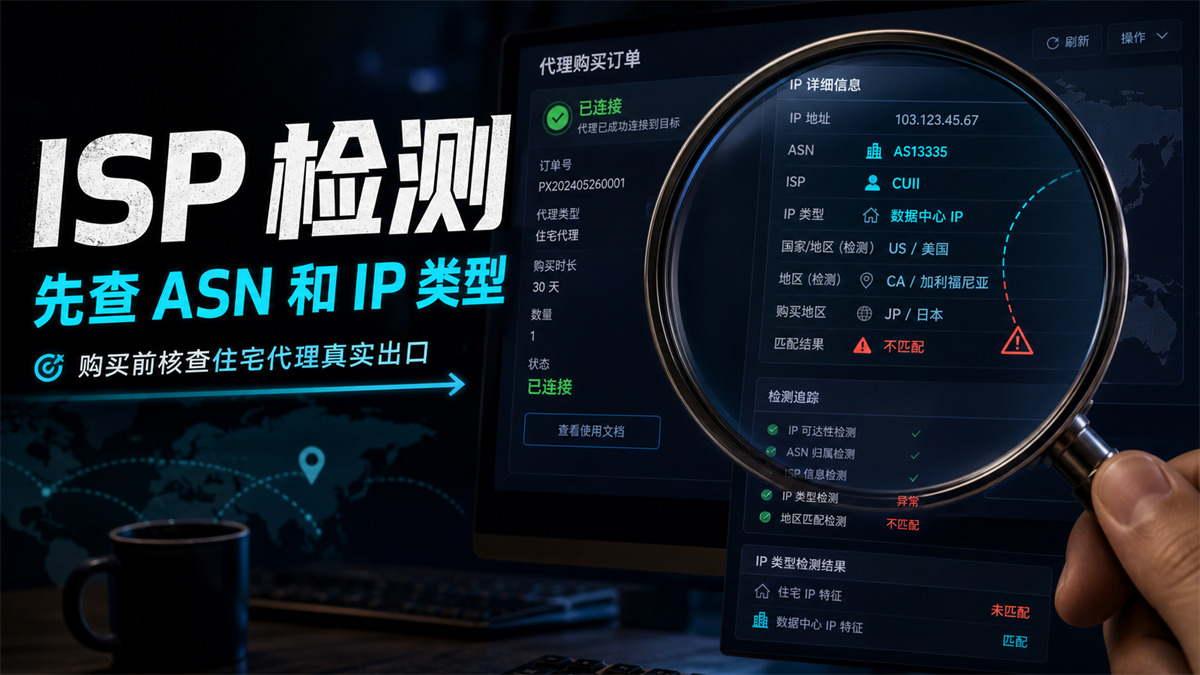
The agent provided a residential agent, and the test page displayed "Connected", which can also be opened in the background. When preparing to bind the long-term account, several unsettling details appeared in the test results: ASN did not look like a local operator, the IP type was labeled as a data center, the purchase region was Japan, but the testing region fell to the United States.
Don't rush to ask 'Can this IP be used?'. A more accurate question is: Does this export have sufficient evidence, can it be recorded, reviewed, and explained to the subsequent account environment? **
My judgment is that ISP detection is not about whether the proxy can connect, but about checking the ASN, organization name, IP type, region of origin, and stability records behind the IP. Before purchasing a residential agent, first confirm whether it is a residential/ISP network or a data center, mobile or unknown exit, and then decide whether to bind a long-term account.
First give a direct answer:
ISP detection first checks ASN and IP type
Short answer: Before purchasing a residential agent, the ISP needs to check at least ASN, organization name, IP type, region/time zone, DNS resolution, and historical records. A successful connection only indicates that the traffic can go out, not that this exit is suitable for long-term accounts. Only those who can record, review, and explain are worthy of entering the candidate pool.
There are two key points in this sentence.
Firstly, connectivity and exit properties are not the same thing. Proxy can open web pages, which only means that account requests can go out through this line. What the account system sees is another set of information: what network the exit is like, whether the region is consistent, whether the DNS is off center, and whether the login records suddenly change.
Secondly, ISP testing is not about chasing a good score. It is more like pre purchase inspection: checking the network identity and usage boundaries of this IP, and when there are verification, regional abnormalities, or login reminders for the account later, the team can go back to the records to see the reason.
What exactly is ISP detection looking for
Many people understand ISP detection as' checking if it is a residential IP '. This statement is too crude.
What you really need to investigate is an export network evidence chain.
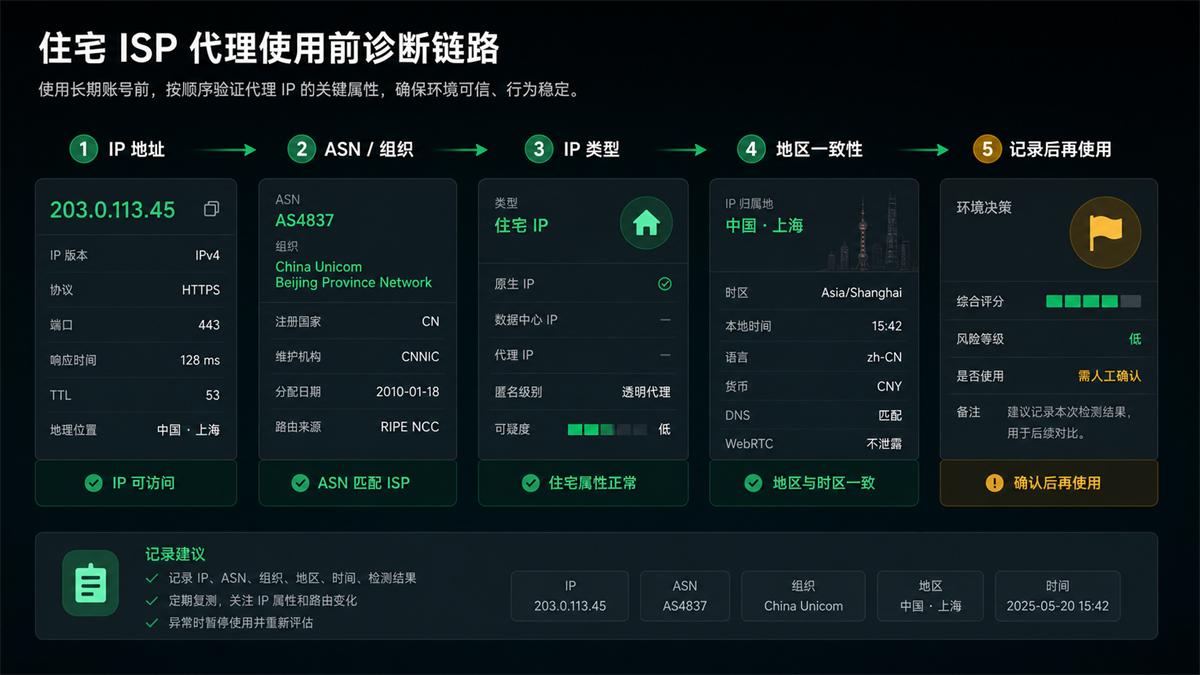
**ASN * * is the first layer. It tells you roughly which autonomous system this IP belongs to and what type of network organization may be behind it. You don't need to memorize every ASN, but you should know whether it is a carrier, residential broadband related network, cloud vendor, data center, or a difficult to explain intermediary resource.
**The organization name * * is the second level. Many detection tools will display ISP, organization, company, or carrier. It depends on whether the name, purchasing region, and product description can match each other. For example, if you buy a residential agency in a certain area and the organization name is clearly similar to a cloud service provider, at least you need to review it first.
**The IP type * * is the third layer. Common tags include residential, ISP, data center, hosting, mobile, proxy, VPN, etc. Different tool calibers may vary, so don't just look at one line of results for a single tool. It's best to cross confirm with two to three sources.
**The region and time zone are the fourth level. The country, city, time zone, and language environment may not necessarily be precise to the house number, but they should be able to be interpreted as the same account on-site. I bought for export from the United States, but the testing has been transferred to other countries for a long time, which makes it difficult to review the account environment afterwards.
**DNS and WebRTC are the fifth layer. The IP itself looks fine, but when DNS returns to the local operator and WebRTC exposes the local network, the account system does not see a single scene. How to detect DNS leaks? You can read this article: [How to do DNS leak detection] (https://sureisp.com/blog/dns-leak-test-proxy-browser-environment).
Why can't a residential agent just check the successful connection before making a purchase
A successful connection is the easiest test to pass, and also the most misleading test.
Many proxy management backends display online, latency, availability, and protocol type. These pieces of information are certainly useful, but they only answer 'can it be connected'. Long term accounts are more concerned about whether this exit looks like the environment I have been using.
A common scenario: The team is preparing to configure a static residential IP for an advertising account. During testing, the webpage can be opened and the speed is also good. The detectable page displays an IP type similar to that of a data center, and the DNS is running to another country. At this point, continue to bind the account. If there is a login reminder later, it is difficult to determine whether it is an account behavior issue, browser environment issue, or the instability of the proxy exit itself.
So I suggest splitting the residential agency purchase into two steps.
The first step is to conduct a network evidence check: IP, ASN, organization, IP type, region DNS。
The second step is to match the account environment: browser fingerprint, time zone, language, login device, account purpose, and team operation records.
If you haven't established a main entrance judgment yet, you can first look at: [How to choose residential ISP proxy and residential IP address] (https://sureisp.com/blog/residential-isp-proxy-residential-ip-address). That article addresses' what type to choose ', and this article addresses' how to verify before buying'.
6 fields to be recorded before purchasing
Residential IP detection does not need to be done very mysteriously. Record the following 6 fields first to avoid most of the "unclear later" issues.
|Field | What do you want to see | How to determine|
| --- | --- | --- |
|IP address | Current actual export IP | Is it consistent with the proxy backend and detection tool display|
|ASN | AS number and network ownership | Is it similar to operator/ISP/residential attribute networks|
|Does the organization name | ISP, organization, company | match the purchasing region and product description|
|IP type | Residential, ISP, Datacenter, Mobile, etc. | Whether there are dispute markers for data center, hosting, proxy, etc|
|Region/Time Zone | Country, City, Time Zone, Language | Can it be interpreted as the same account on-site|
|DNS/WebRTC | DNS Resolution, Browser Leakage | Whether to Expose Local or Other Regional Paths|
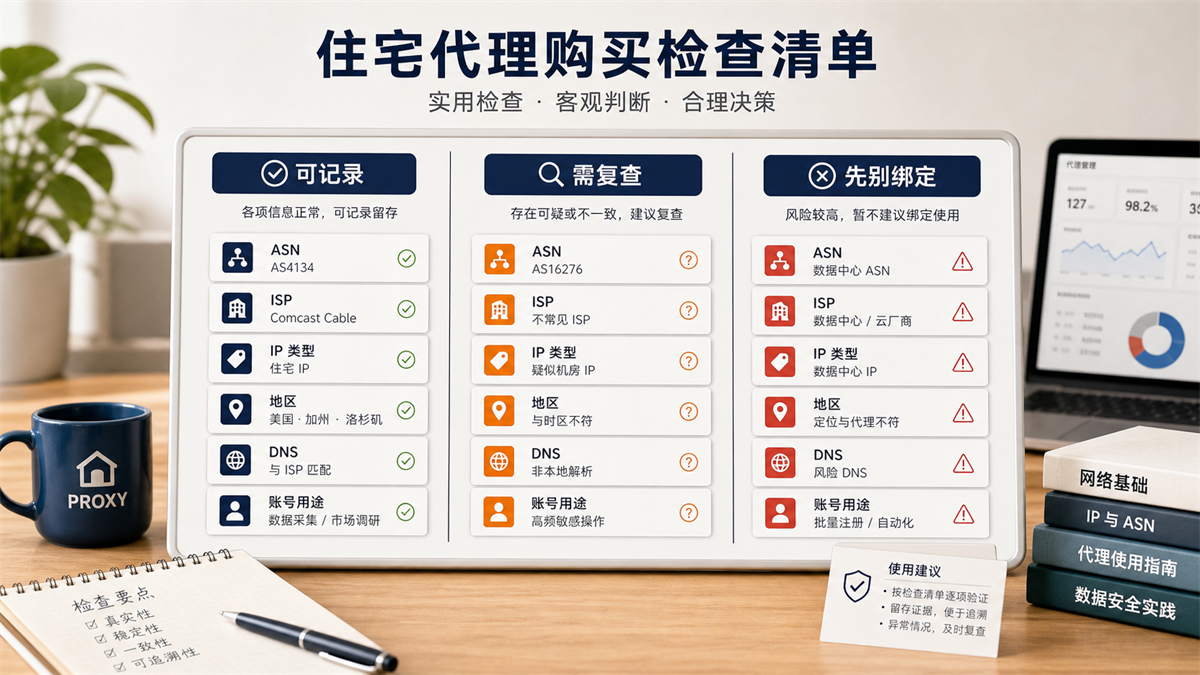
Note that this table is not intended to pass a proxy with one vote. Its function is to help you layer: which IPs can be recorded first, which ones need to be reviewed, and which ones are not suitable for immediately binding long-term accounts.
How to stratify the test results
I usually divide the pre purchase test results into three categories.
Category 1: Recordable. ASN、 The organization name, IP type, region, and DNS can basically explain each other. For example, the purchasing region, testing region, time zone, and DNS are all in the same country or business area, and there is no obvious dispute over the IP type of data center/hosting. This type of exit can enter the candidate pool, but still requires testing time and account usage.
Category 2: Requires re examination. There are one or two fields that are inconsistent, but we cannot immediately determine the source of the problem. For example, ASN appears normal but DNS deviates; Or the region can be displayed to neighboring cities, but with the same time zone. At this time, you can change the detection tool, change the time to check again, or ask the service provider to explain the ownership.
Category 3: Don't bind yet. The IP type clearly indicates that the data center, organization name, and product description do not match at all, the region is long-term misaligned, or DNS/WebRTC exposes local paths. Long term accounts should not be directly bound in this situation, and the export issue should be resolved first.
The 'don't bind' here doesn't mean that this IP cannot access web pages at all, but rather that it is not suitable for directly hosting high-value, long-term record keeping accounts. Temporary access and long-term account login are two separate things.
What should I do if the results of different detection tools are inconsistent
When doing ISP detection, you may encounter an awkward situation: tool A displays' residential ', tool B displays' ISP', and tool C prompts' hosting 'or' proxy '. Don't rush to take one of the results as the final conclusion at this time.
The IP database has differences in update time and classification criteria. One tool focuses on ASN and organization name, another tool focuses on historical traffic and proxy features, and there are tools that categorize commercial ISP exports, static residential exports, and enterprise broadband exports under different labels. For long-term accounts, what is truly valuable is not a single label, but whether multiple pieces of evidence can explain each other.
I suggest processing in this order:
1. First, perform an IP ASN query to confirm the AS number, organization name, and registration region;
2. Perform another IP type check to see if it is labeled as residential, ISP, data center, mobile, or hosting;
3. Compare the country, city, time zone, and DNS of two or more tools;
4. Record the abnormal results separately, instead of just taking screenshots of the normal results;
5. When asking the service provider to explain ownership, ask the other party to explain around ASN, organization, and region, instead of just replying "can be used".
If the results are slightly inconsistent, but ASN, organization, region, and DNS are generally consistent, they can be placed under "need to review". If multiple tools are pointing to the wrong data center or region, do not directly bind long-term accounts to save communication costs.
Template for Team Records
Residential agency purchasing does not end with just one attempt. As long as the account will be used for a long time, a minimum record should be kept. In this way, the next time there is an account verification, regional reminder, or login exception, the team will not have to guess again, but can look back at why this exit was selected at that time.
A record must contain at least these fields:
-Testing date and tester;
-Proxy suppliers, package names, and purchasing regions;
-Current export IP, port, and protocol;
- ASN、 Organization name and IP type detection results;
-Country, City, Time Zone DNS、WebRTC;
-Plan to bind the account type and account region;
-Test conclusion: Can be recorded, needs to be reviewed, do not bind yet;
-Subsequent changes: whether the exit has been changed, whether the browser environment has been changed, and whether multiple people have operated it.
This table does not require a complex system, it can be a table or team document. The key is to upgrade 'Can the agent connect?' to 'Why was this exit selected?'. In the long run, this is more useful than testing a few more IPs temporarily.
Static residential IP also needs to undergo ISP detection
Many people think that if they buy a static residential IP, they don't need to check their ISP and ASN anymore. Actually, static only solves one problem: is this exit relatively fixed.
It cannot automatically answer these questions:
-What is the ASN behind this IP;
-Does the organization name match the residential/ISP attributes;
-Is the IP type marked as data center or hosting by multiple tools;
-Whether the region, time zone, and DNS are consistent;
-Is this account suitable for long-term use.
So static residential IP still needs to undergo ISP testing. After passing the detection, it is easier to record and review than frequently changing dynamic exits. Regarding the choice between static and dynamic, you can refer to: [What is the difference between static residential IP and dynamic residential IP] (https://sureisp.com/blog/static-vs-dynamic-residential-ip-account-login).
The detection is normal, why is the account still abnormal
This is another easily misunderstood place.
ISP detection only addresses the network egress layer, which does not mean that all account environments are problem free. Account anomalies may also come from factors such as browser environment, device language, login time, account history, team operations, payment information, content behavior, etc.
If the IP detection is normal, but the account still shows abnormal environment, don't just focus on the proxy switching. The order of investigation should be changed to:
1. First, fix the IP and account environment and avoid frequent changes;
2. Compare the region, time zone, and browser configuration of the account during the last normal login;
3. Check if DNS, WebRTC, language, and system time zone are consistent with the proxy region;
4. Check if the account has been operated by multiple people, devices, or regions recently;
5. Decide whether to replace the agent for export.
This is also what we have always emphasized: proxy IP is only a part of the account environment. The difference between residential IP and data center IP can be referred to as: [What is the difference between residential IP and data center IP] (https://sureisp.com/blog/residential-ip-vs-datacenter-ip-account-login).
Which layer is suitable for placing Sureisp on
If you use Sureisp for residential ISP proxy or static residential IP selection, don't just treat it as "giving an IP". A more reasonable usage is to record the proxy export, region, account usage, and browser environment together.
For example, a long-term advertising account can first confirm the target area and then choose a more stable residential/ISP attribute exit; After obtaining the IP, record ASN, organization, IP type, detection time, and account usage; Then check the browser's time zone, language, DNS, and WebRTC together. In this way, when verification or regional reminders occur later, the team can investigate according to records instead of changing IP based on intuition.
The value of Sureisp lies in putting agent selection back into the account environment. It cannot replace account operation judgment, but it can make it easier to record, review, and collaborate between residential ISP proxies, static residential IPs, and browser environments.
FAQ
How to do ISP detection?
First check the current export IP, then check ASN, organization name, IP type, country/city, time zone, DNS, and WebRTC. Don't just look at whether the proxy is successfully connected, and don't just look at one label of a single detection tool. Record the testing time, tools, results, and account usage for future review.
What should be considered for residential IP detection?
The key to residential IP detection is to check whether the IP is similar to a residential or ISP attribute network: whether the ASN and organization name are reasonable, whether the IP type is marked as residential/ISP, whether the region and DNS are consistent, and whether there are controversial labels such as data center, hosting, proxy, VPN, etc.
What is the use of IP ASN query?
IP ASN query can help you see the autonomous system and network ownership behind the IP. It cannot directly determine the account result, but it can tell you whether this export is more like an operator, residential network, cloud service provider, data center, or other type of network, which is an important evidence for pre purchase inspection.
Can IP type detection determine whether it is a residential or computer room?
It can provide important references, but it is not recommended to only look at a single tool. Different databases have different update times and classification criteria, and the same IP may not appear completely consistent in different tools. A more prudent approach is to combine ASN, organization name, region, DNS, and account usage to determine.
Is a static residential IP suitable for long-term accounts?
Static residential IP is more suitable for accounts that require continuous login records, as there are fewer changes in exports and it is easier to review in the future. But the premise is that ASN, IP type, region, DNS, and account usage can all be explained. Static does not mean automatic fit, ISP testing should still be done before purchasing.
Can dynamic residential IP login account?
Dynamic residential IP can be used for some temporary access, testing, or low continuity tasks. If a long-term account frequently changes exits, the subsequent login history will be even more difficult to explain. Whether it can be used depends on account value, login frequency, regional changes, and team operation records. It is not recommended to determine solely based on price.
Why is the account still abnormal when the IP is normal?
Because the account environment is not solely determined by IP. Browser fingerprint DNS、WebRTC、 Time zone, language, device records, account history, and recent operations may all affect the results. After the IP detection is normal, it is necessary to continue checking the browser environment and account behavior, rather than immediately switching to the next proxy.



