


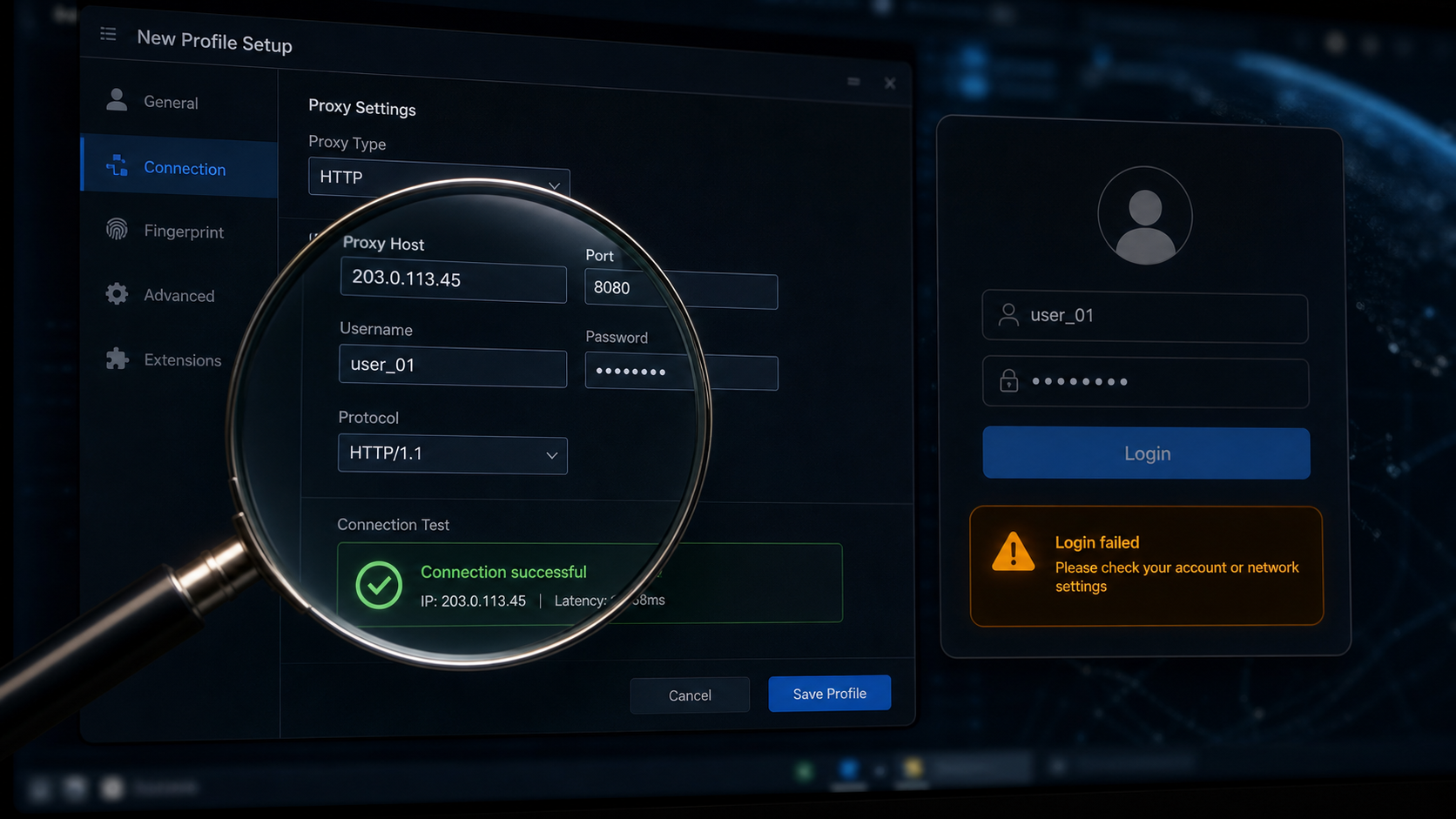
The proxy server settings in the fingerprint browser have been filled in: the proxy type has been selected as HTTP, and there are no errors in the host, port, and account password. The connection test shows success, and the new exit IP can still be seen on the detection page. The team thought the problem had been solved, but when they logged into the advertising backend, the page still prompted abnormal login environment and even requested re verification.
This situation is very common. The successful connection test only indicates that the browser can exit through this proxy; It cannot prove that this exit is suitable for the current account, nor can it prove that DNS, WebRTC, time zone language, browser fingerprint, and account history have been linked into a set of records. Many people confuse "successful proxy server setup" with "normal account environment" and repeatedly change proxies, ports, and rebuild browser environments, making it increasingly difficult to determine the problem.
First, give a direct answer: * * Proxy server settings cannot be based solely on successful connection testing. Account login also requires checking the protocol type, export IP/ASN, DNS path WebRTC、 Time zone language and browser environment; HTTP and SOCKS5 have different scopes of application, and long-term accounts should maintain consistent export and environment variables. **
Proxy server settings first look at these 4 fields
Most proxy server settings interfaces have four types of fields: protocol, host, port, and authentication information. The fields themselves are not complex, but what is really prone to errors is to stop troubleshooting after filling them in correctly.
The agreement determines how this agent will handle the traffic. The common options are HTTP, HTTPS, and SOCKS5. HTTP proxy is more commonly used for web browsing traffic, and many backend login, web page opening, and page access detection can all run smoothly. SOCKS5 is more like a lower level channel that can accommodate more types of connections, making it suitable for tools or application scenarios that go beyond web page requests. The most obvious problem when choosing the wrong protocol is connection failure; But a more subtle issue is that the connection is working, while some parsing or application requests take a different path.
The host is usually a proxy server address, which can be an IP or a domain name. Ports are service entry points, such as numbers 8080, 3128, 1080, etc. Account and password are used for authentication, filling them in incorrectly will result in direct failure. For the account environment, filling in the fields correctly is just the foundation, and it also depends on what identity the exit ultimately presents to the platform.
So you can first use a simple sequence to check: whether the protocol is consistent with the one provided by the supplier, whether there are no extra spaces on the host and port, whether the account and password have been copied correctly, and whether the browser or system is really using this configuration. Complete this step before entering the environmental evidence check.
HTTP and SOCKS5 should not be chosen based solely on intuition
HTTP proxy and SOCKS5 proxy are not a matter of who is more advanced or suitable for all accounts, but rather different traffic ranges.
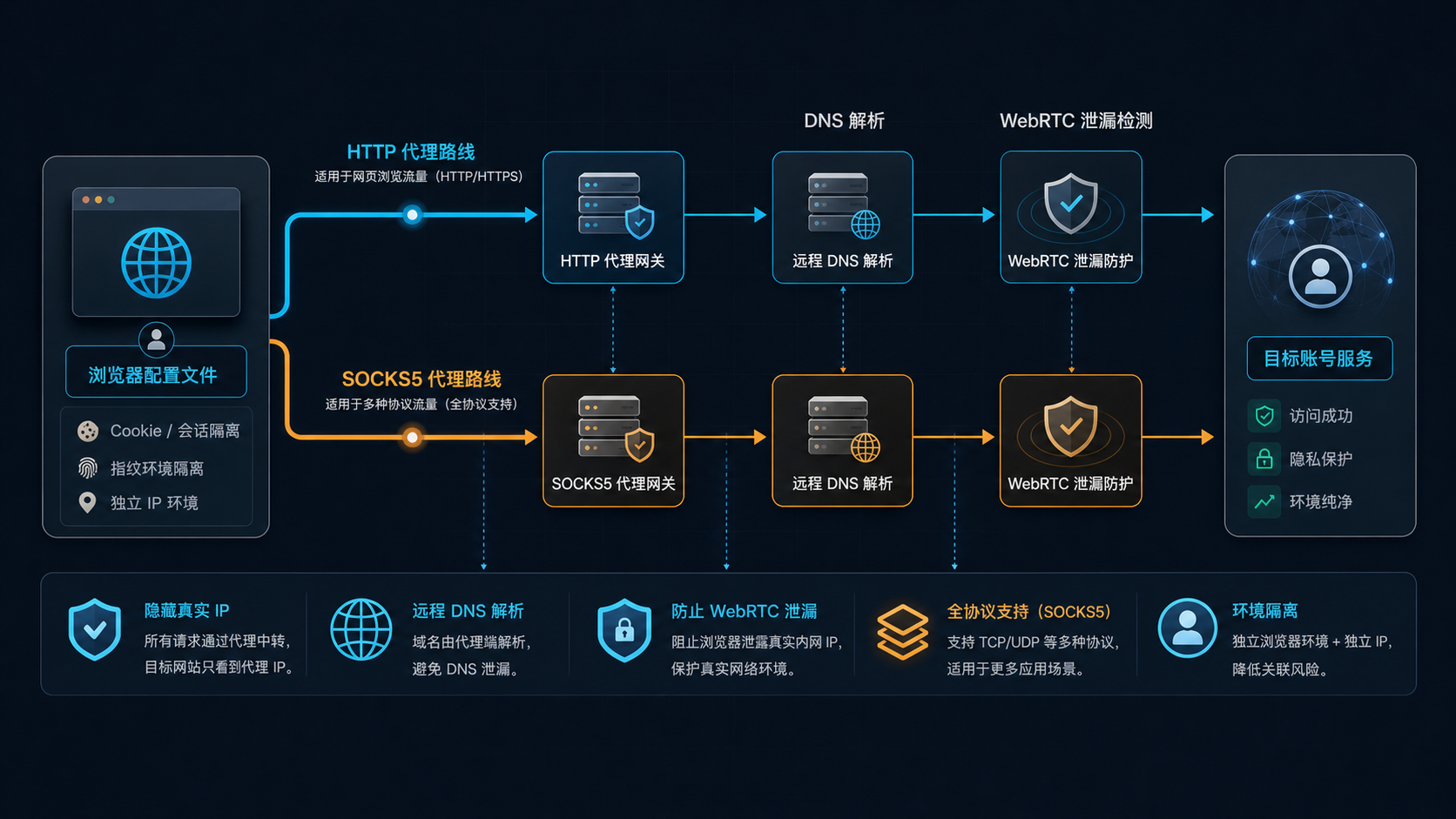
HTTP proxy is suitable for scenarios where web requests are the main focus. When you open web pages, log in to the backend, and perform page checks in a browser, HTTP/HTTPS proxies are usually sufficient. Its advantage is that it is easy to configure and many detection tools are also easy to recognize. But if your tool still has non web page connections, or if some requests do not go through the proxy as expected, you need to additionally check the actual exit.
SOCKS5 proxy is suitable for a wider range of connection types. It not only serves regular web page requests, but is also commonly used for tools that require TCP/UDP support. The problem is that SOCKS5 does not automatically represent a more stable account environment. Whether DNS resolution is resolved through proxies, whether WebRTC exposes the local network, and whether browser configuration is complete still need to be checked separately.
The actual choice can be judged as follows: just login and content check in the web backend, first check whether HTTP/HTTPS is met; The tool explicitly requires SOCKS5, or if there is a multi protocol connection, select SOCKS5. Regardless of which one is chosen, the same result must be verified using the detection page and account records: the exit seen by the platform DNS、 Is the time zone language consistent with the browser environment.
Why is the connection successful, but the account is still abnormal
There is a layer of environment judgment between successful connection and abnormal account. The proxy server is only responsible for network egress, and the account system sees a set of comprehensive signals.
The first is exporting IP and ASN. The detection page displays a country or city, which is only a geographical result. Long term accounts are more concerned about which network this IP belongs to, whether it is a residential ISP, data center, mobile network, or widely recognized as a proxy network. You can refer to the previous [How to do ISP detection] (https://sureisp.com/blog/isp-check-residential-proxy-asn-ip-type) and read ASN, organization name, IP type, and supplier description together.
The second is the DNS path. The IP export displays one region, but the DNS resolution runs to another region, and the account system's view of the scene is incomplete. This issue is common in "Proxy detection normal but page still abnormal". For a detailed investigation, please refer to [How to do DNS leak detection] (https://sureisp.com/blog/dns-leak-test-proxy-browser-environment).
The third is WebRTC. If the WebRTC status of the browser exposes local network information, the proxy exit and internal signals of the browser will be inconsistent. Not all platforms will judge in the same way, but if you are doing a long-term account, you should use this as a basic check instead of waiting for abnormalities to occur before looking again.
The fourth is time zone and language. The export IP is in the United States, but the browser time zone is in Asia; The export IP is in Europe, and the system language and page language have long been a different combination. These changes alone may not be fatal, but when stacked together, they can make account records difficult to interpret.
The fifth is account history. The account used to log in from a certain region for a long time, but today it suddenly changed its proxy, browser configuration, DNS path, and operation time period. What the platform sees is a set of changes. Many exceptions are not caused by a single field being incorrect, but by changes being too concentrated.
How to troubleshoot proxies in fingerprint browsers
Fingerprint browsers can isolate cookies, cache, fingerprint parameters, and environment configuration, but they are not a substitute for proxies. Without a proxy, or if the proxy is inconsistent with the environment, even if the browser configuration is complete, it will still leave another problem.
The more stable sequence is to first establish the browser environment, then fill in the proxy server settings, then check the export IP, DNS, WebRTC, and finally log in to the account. Do not log in to your account first, and then go back to check the protocol, time zone, and language. For long-term accounts, the records left when entering a new environment for the first time are important.
If you are using a fingerprint browser, it is recommended to bind the proxy configuration and browser environment into a record: which proxy is used in this environment, whether the protocol is HTTP or SOCKS5, which ASN the export IP belongs to, what the DNS detection result is, how to configure the time zone and language, and what the target region for account login is. When working in a team, keeping records is more reliable than verbally saying 'this agent can be used'.
Sureisp is more suitable for undertaking the network export layer: residential ISP proxy, static residential IP, and stable export required for long-term account environments. Browser fingerprints, account operations, login rhythm, and team permissions still need to be managed by oneself. That is to say, the proxy solves the problem of "where to go out", while the fingerprint browser solves the problem of "what browser to use to go out on-site", and the two layers need to be checked together.
Account environment investigation needs to leave a chain of evidence
It is best not to only take a screenshot of a successful connection when troubleshooting proxy server settings. For website backend, advertising accounts, e-commerce backend, or long-term operating accounts, a complete chain of evidence should be kept.
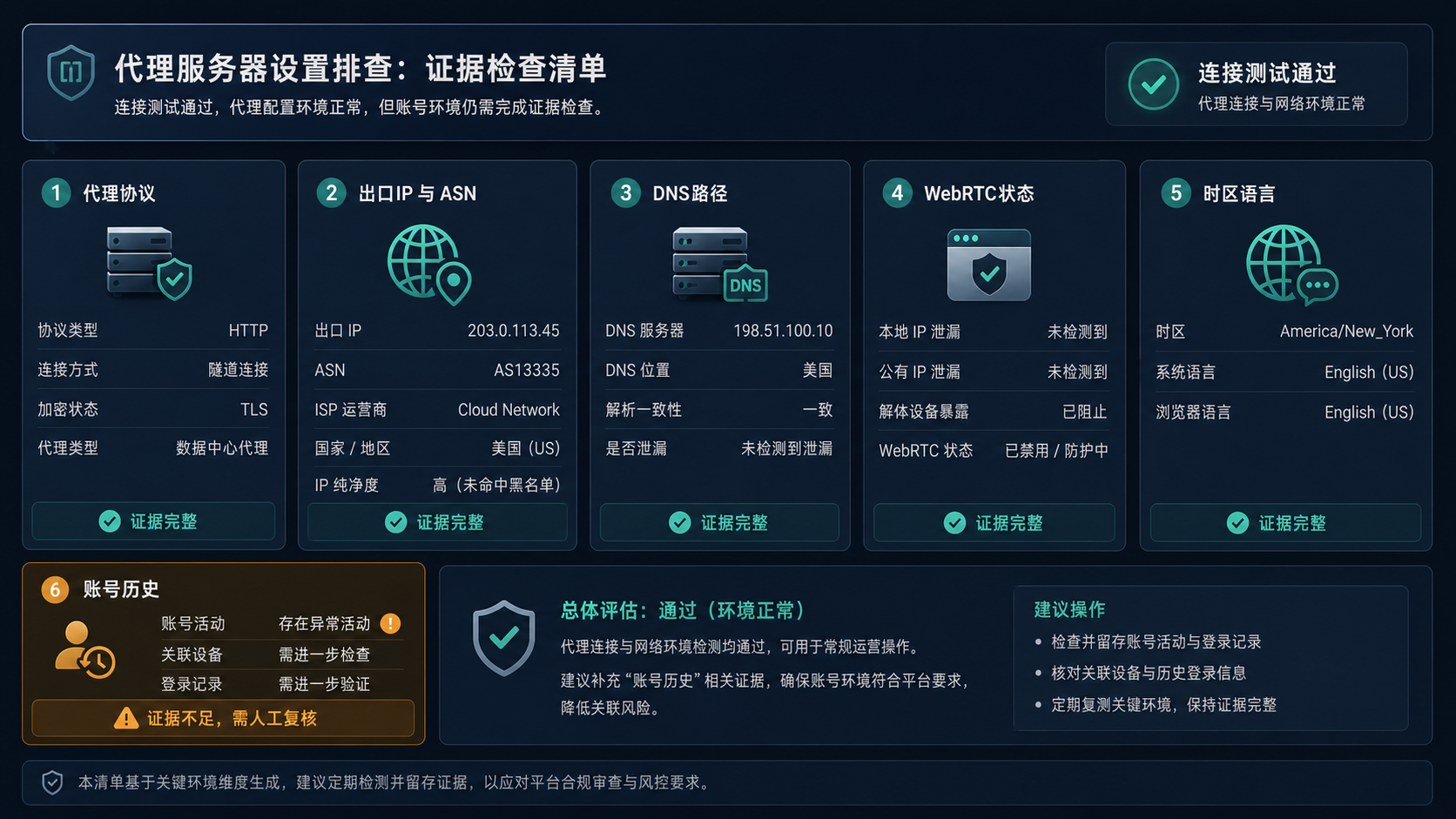
This chain of evidence includes at least 6 items: proxy protocol, export IP, ASN/ISP, DNS path, WebRTC status, time zone language, and account history. They don't need to be written very complexly, just one table is enough.
For example, the protocol HTTP, export IP is a certain US address, ASN points to a residential ISP, DNS resolution is also in the US, WebRTC does not expose local addresses, browser time zone is America/New_York, language is English (US), and account history is mainly based on the US environment in the past. This type of record is relatively easy to explain.
On the other hand, if the protocol can be connected, but the ASN is more like a data center, the DNS path jumps to another region, the browser language and time zone are not synchronized, and the account history has been in another country for a long time, then "successful connection" does not mean that it is suitable for continued use. At this point, you should first review the environment instead of continuing to use this configuration to log in to important accounts.
When should I use a residential ISP or static residential IP
Not all proxy server settings require a residential ISP. Temporary webpage access, regular data viewing, and low value testing tasks may be sufficient with a regular proxy. Long term accounts, fixed backend accounts, advertising accounts, store accounts, team collaboration accounts, and more importantly, whether the export records are consistent over the long term.
The value of residential ISP proxy or static residential IP lies in easier attribution, less export changes, and suitability for long-term record keeping. It cannot replace account operation standards or browser environment management, but it can make the "network exit" layer clearer.
If the account needs to maintain the same region, network type, and login habits for a long time, static residential IP can be prioritized for evaluation. It is suitable for a fixed account environment, but the premise is that the target region, browser time zone language, and operation records of the account itself are also compatible. If the account only has short-term access to content from different regions, dynamic residential IP can be used, but it is not suitable for frequent switching to the same long-term account.
You can read this article together with 'How to choose a residential ISP proxy and residential IP address' (https://sureisp.com/blog/residential-isp-proxy-residential-ip-address): this article solves' how to fill in and check proxy server settings', while the other article solves' why long-term accounts need to check network ownership'.
FAQ
Is the proxy server set to HTTP or SOCKS5?
If it is mainly for webpage login, backend access, and webpage detection, HTTP/HTTPS proxy is usually more direct; If the tool requires multiple protocol connections or explicitly requires broader TCP/UDP support, SOCKS5 can be selected. Don't just look at the protocol name, ultimately check if the export IP, DNS, WebRTC, and account environment are consistent.
Is a successful connection to the proxy server sufficient?
No. The successful connection to the proxy server only indicates that the traffic can go out, and does not mean that the account environment is suitable. Account login will also be subject to export IP type, ASN, DNS path WebRTC、 The impact of time zone language, device environment, and historical login records.
Do fingerprint browsers still require a proxy?
need. The fingerprint browser is responsible for isolating the browser environment, while the proxy is responsible for network egress. Without a proxy, the account may still see the local network; Inconsistent proxy and fingerprint browser configurations can also make it difficult to interpret the account environment.
Why is the account still abnormal when the IP is normal?
Because IP is just one of them. Account anomalies may come from inconsistent DNS paths, WebRTC exposure, local time zone language mismatch, device record changes, or significant differences between the account's past login region and today's exit. First, check the complete evidence chain before deciding whether to change the agent.
Is a static residential IP suitable for long-term accounts?
Suitable for some long-term accounts. The premise is that the target region of the account, browser environment, operation time, and network access can remain consistent for a long time. Static residential IP is more suitable for scenarios that require stable recording, such as fixed backend, advertising accounts, and store accounts.
Can dynamic residential IP login account?
Can be used for some low-frequency or short-term scenarios, but it is not recommended to frequently change exits on the same long-term account. The key to dynamic residential IP is not whether it can be logged in, but whether the frequency of switching and regional changes will make account history difficult to explain.
Is proxy pool suitable for account login?
Proxy pools are more suitable for batch access, data collection, or short-term testing, and are not suitable for directly handling important long-term accounts. Account login places more emphasis on continuous records, and frequent changes in exports can increase the difficulty of troubleshooting.
How to land in the end
Today, this type of problem should not start with "trying a different proxy", but should first break down the proxy server settings into two layers: the first layer is whether the fields are filled in correctly, and the second layer is whether the environment seen by the account is consistent.
If it's just a field error, changing the protocol, host, port, account password can solve it. If all fields are correct and the connection test passes, but there are still login exceptions, you should continue to check the export IP/ASN, DNS, WebRTC, time zone language, and account history.
When a long-term account environment is needed, you can choose a residential ISP or static residential IP that is more suitable for fixed records in Sureisp, and then review it together with the fingerprint browser environment. The goal of doing this is not to pursue a detection page that displays "passed", but to make the network and browser records left by the account every time it logs in interpretable.