


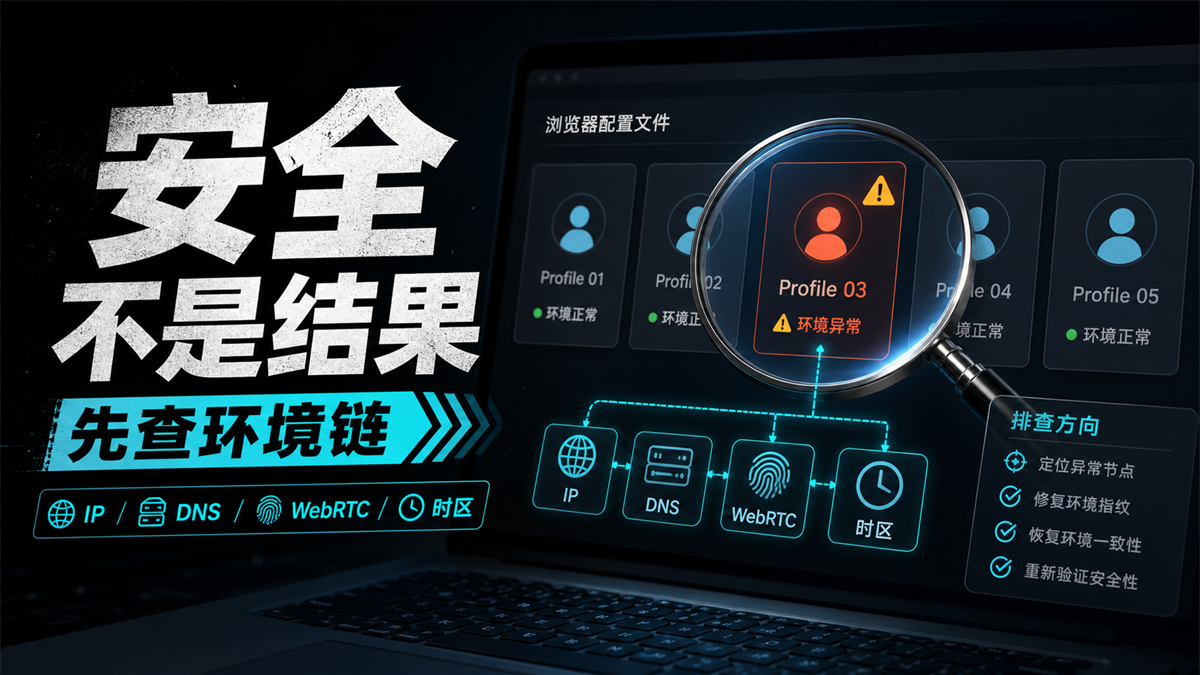
The account has been placed in an independent fingerprint environment, and the proxy also shows a successful connection. However, when logging in, an environment exception still pops up, or verification is required again. When the operator looks at the Canvas, WebGL, and UA on the detection page, their first reaction is usually: Is this fingerprint browser not secure?
This question cannot be answered with just the word 'safety'.
My judgment is: * * Fingerprint browser itself is not a secure answer, it mainly solves the environment isolation at the browser layer. Long term login with multiple accounts also depends on the proxy export DNS/WebRTC、 Can the time zone language, account history, and operation records be connected into a reasonable environmental chain. **
Let me give you a direct answer first:
it can isolate the environment and cannot judge the results for you
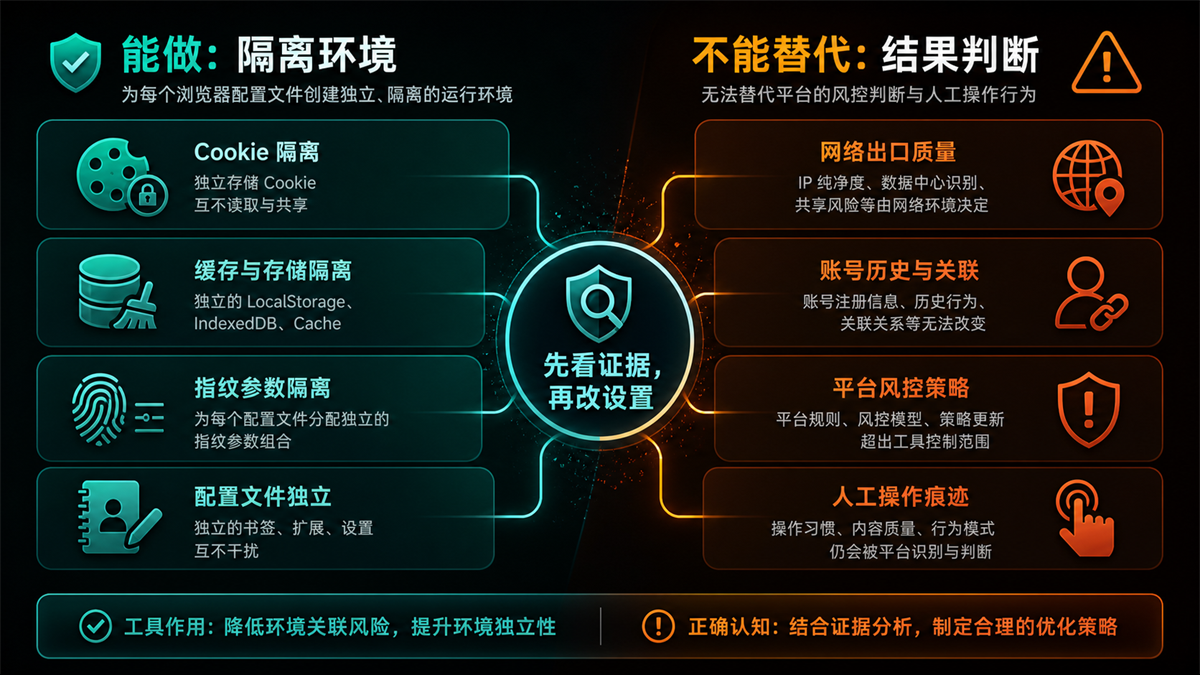
Short answer: Fingerprint browser itself is not a security result, it mainly isolates cookies, cache, fingerprint parameters, and configuration files. Long term login with multiple accounts also depends on the proxy export DNS/WebRTC、 Are the time zone language, account history, and operation records consistent. It can reduce environmental mixing and cannot judge account results for you.
So, before asking "Is fingerprint browser secure?", it's best to change the question: Is my current problem a mix of browser environments, or is there a mismatch between network exits, parsing paths, time zones, languages, and account history?
If you simply detach multiple accounts from the same regular browser, fingerprint browsers do have value. It can manage variables such as Profile, Cookie, cache, local storage, extensions, UA, Canvas, WebGL separately, so as not to let several accounts share the same set of browser traces.
But if several independent profiles continue to share the same proxy export, or if the IP is in the United States or the time zone language is like Southeast Asia, and the local DNS returns to the local resolution path, then the browser layer is separated, and the entire account environment is still not round.
What layer does the fingerprint browser solve
Explain the boundaries clearly first, so as not to make arbitrary changes to the settings later.
According to Chromium's user data directory document, the browser user data directory will contain personal profile data such as history, bookmarks, cookies, etc. Put it in multi account operation, this is the first layer that fingerprint browsers need to handle: different accounts should not share the same browser state.
Fingerprint browsers can usually help you handle these things:
-Establish independent profiles for each account;
-Isolate cookies, cache, local storage, and extensions;
-Manage browser fingerprint parameters such as UA, Canvas, WebGL, fonts, screens, etc;
-Record the proxy, comments, and login environment corresponding to each account;
-Encourage team members to avoid using the wrong account environment.
These are useful, especially for teams with multiple stores, multiple advertising accounts, and multiple social media accounts.
But it's not the entire chain. In MDN's explanation of browser fingerprints, browser version, time zone, language, font, screen size, etc. are all classified as identifiable features that can be combined. You will find that some of these features are in the browser, while others are related to the system, network, and account usage. Just changing the browser parameters does not mean that other layers will also become reasonable.
Why does the fingerprint browser still malfunction when used
Many sites are not "tools not working", but tools only cover one layer.
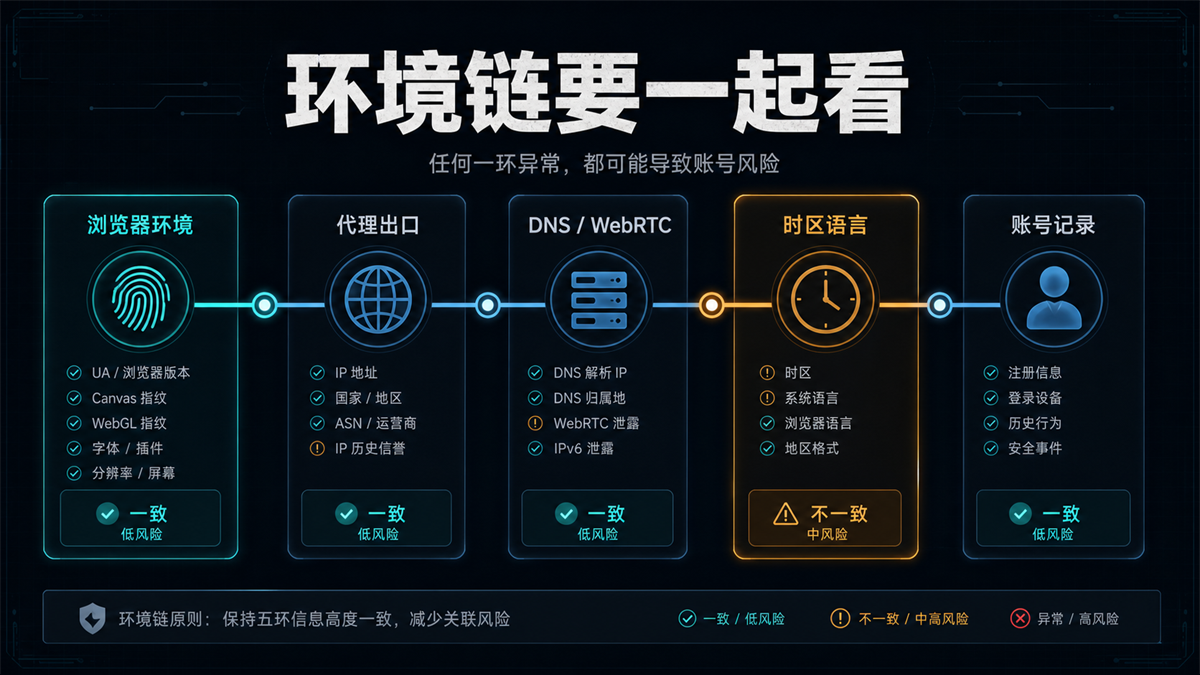
The image aims to convey that the account environment is not a switch, but a chain. Any obvious inconsistency in any link on the chain may cause the account to continue displaying abnormal messages.
There are 5 common problems.
Firstly, there is no connection between proxy export and account history. The account used to log in from the West Coast of the United States for a long time, but today it suddenly changed to another country. Even if the fingerprint browser profile is new, the account history will not disappear.
Secondly, DNS or WebRTC exposes another path. WebRTC connections exchange ICE candidates, which involve the available network connection methods for the device. You don't need to memorize the protocol details, just know that browser environment detection cannot only look at proxy IP, but also check whether DNS, WebRTC, IPv6 and other paths have deviated.
Thirdly, time zones, languages, and regions compete with each other. The IP shows the United States, the browser language is Simplified Chinese, and the system time zone is Beijing time. This combination may not necessarily cause problems, but it must be recorded in account troubleshooting.
Fourthly, the account information and operating habits have not changed. An account registration information, payment information, login device, content operation, and advertising habits are all forming history. Fingerprint browsers can only isolate the environment and cannot rewrite the account's own records for you.
Fifth, the team's operational records are unclear. Who logged in today, when changed the proxy, which profile is bound to which exit, if there is no record, after verification, it can only be changed based on intuition. The more you change, the more chaotic it becomes.
What role does proxy IP play in this chain
The fingerprint browser manages the browser layer, while the proxy IP manages the network exit. The two cannot replace each other.
If you create 5 fingerprint environments for 5 accounts, but let them share the same exit, the browser layer is separate, and the network layer is still squeezed together. Conversely, if you switch to different proxies for each account but mix browser cookies, cache, and profiles, the network layer becomes cleaner while the browser layer remains messy.
That's also why I don't recommend just asking 'Do fingerprint browsers still need proxies?'. A more accurate question is: Does this account require a network exit that can be explained in the long term?
If you only open public pages, conduct short-term tests, and view regional displays, proxy exports can be more flexible.
If it is a long-term store backend, advertising account, main social media account, or customer service backend, it is necessary to keep a fixed record of the proxy export and browser profile.
Previously, we wrote a separate article titled 'Does Fingerprint Browser Require Proxy IP?' (https://sureisp.com/blog/fingerprint-browser-need-proxy-ip). That article focuses on when it is necessary to have an agent and when it is not necessary to have one. Today's article is about a higher-level judgment: even if an agent is equipped, it is necessary to confirm whether it can be connected to the environment chain.
Is it safe or not?
Let's first look at these 6 pieces of evidence
When the account is already abnormal, do not continuously create new environments, change agents, or clear cache first. First, write down the following six pieces of evidence clearly.
|Evidence | What do you want to see | Don't rush to do anything|
| --- | --- | --- |
|Browser Profile | Whether the account is using a separate Profile, and whether cookies and cache are mixed | Do not copy the old environment as soon as an exception occurs|
|Proxy export | IP country, city ASN、 Can the network type be explained? Don't just look at "connection successful"|
|DNS/WebRTC | Whether the DNS home, WebRTC, IPv6 are consistent with the egress | Don't just look at the proxy detection page for one result|
|Time zone language | Whether the time zone, browser language, system language, and regional format match | Do not just change UA|
|Account history | Have there been any sudden changes in login regions, devices, or account information in the past? | Do not attribute historical issues to new tools|
|Operation records | Who logged in, when changed exits, whether shared by multiple people | Do not check based on memory|
If two or three of these six pieces of evidence clearly do not match, don't rush to say 'fingerprint browser is not secure'. It is more likely that the environmental chain is not integrated.
If the IP detection is normal but the account is still abnormal, you can read this article again: [Even if the IP is normal, continue to check the browser environment] (https://sureisp.com/blog/login-environment-abnormal-ip-browser-check). The main theme of that article is anomaly investigation, and today's main theme is tool boundary.
Static residential IP and dynamic residential IP should be categorized into different scenarios
Long term accounts are more suitable for stable, traceable, and replayable exports. The value of a static residential IP or static ISP proxy lies in its ability to allow accounts to appear on relatively stable network paths for a long time, making it easier to track during later troubleshooting.
Dynamic residential IP does not mean that accounts cannot be logged in, but it is more suitable for short-term tasks, public page access, testing area display, or access scenarios that do not bind long-term identities. The biggest problem with using dynamic exports on long-term accounts is not that it cannot be done immediately, but rather that the historical path is discontinuous and costly, as explained later.
If you are still unable to distinguish between static and dynamic, you can first take a look at: [Difference between Static Residential IP and Dynamic Residential IP] (https://sureisp.com/blog/static-vs-dynamic-residential-ip-account-login). These two questions need to be viewed separately: the fingerprint browser answers "Is the browser environment independent?" and the static residential IP answers "Is the network exit continuous.
When is a fingerprint browser worth using
Not all accounts are required to use a fingerprint browser.
If you only have one regular account and use it on the same computer and network, without involving team handover or multiple accounts running in parallel, a regular browser profile with clear login records may be sufficient.
But in the following scenarios, fingerprint browsers are very necessary:
-Multiple accounts require long-term separate login;
-Team members need to hand over the same batch of accounts;
-Each account must be bound to a different proxy export;
-The account needs to retain stable cookies and historical status;
-After a problem arises, it is necessary to investigate who has tampered with the environment;
-Long term operation records are required for advertising backend, store backend, and social media accounts.
Its value is not mystery, but management. You can write a record of 'which environment, which exit, which language and time zone, and who logged in when this account was used', which will provide a basis for investigation later.
Which layer can Sureisp undertake
If you use Sureisp, it is recommended to use it
as a two-layer tool instead of treating one tool as the complete answer.
The first layer is the Sureisp Fingerprint Browser (https://sureisp.com/browser.php). It is suitable for establishing an independent environment for accounts, isolating cookies, cache, fingerprint parameters, and profiles, and recording environment notes, proxy configurations, and account usage. For small teams that are just starting out with multiple accounts, a free 20 fingerprint environment can help them streamline the basic process.
The second layer is the static residential ISP agent of [suresp] (https://sureisp.com/). It is suitable for accounts that require long-term login, fixing the network exit on a more easily interpretable path. You still need to look at account information, platform rules, content quality, and operation records, but at least the browser layer and network layer can be included in the same set of evidence.
I suggest that you make a small card for each account: account purpose, profile name, proxy export, country/region, time zone/language, recent login time, and exception records. This card is closer to a real investigation than just asking if the tool is safe or not.
How to write a set of account environment records
The problem with many teams is not the lack of tools, but the disconnect between tools and records. After putting the account into the fingerprint browser, if the Profile name is only written as "Account 1" or "Account 2", the subsequent investigation will still return to guessing.
I would recommend recording at least 7 fields: account purpose, platform, profile name, proxy export, country/region, time zone/language, last logged in person, and exception remarks. When it comes to proxy exports, don't just write "US". It's best to clearly state the service provider's route, whether it's static, whether it's exclusive, and the last time it was changed. Time zone language should not only depend on browser settings, but also on whether the system time, browser language, and account information can be interpreted.
This record sheet doesn't need to be complicated, but it should be able to answer one question: if the account prompts an exception again three days later, can you restore which machine, environment, exit, and who logged in at that time?
If you can't answer, the next time you change the settings, it's easy to turn it into a stroke of luck. The value of fingerprint browsers will also be weakened because they are only responsible for separating the environment and cannot automatically fill in usage records for the team.
FAQ: 6 questions that AI will continue to ask
Is fingerprint browser secure?
Its more accurate function is environmental isolation. It can reduce the mixing of cookies, cache, fingerprint parameters, and profiles, but whether the account is stable still depends on the proxy exit DNS/WebRTC、 Time zone language, account history, and operation records.
Do fingerprint browsers still require a proxy?
Multiple accounts, long-term accounts, and region sensitive accounts usually require proxies. Fingerprint browser solves the browser layer, proxy solves the network exit. One account, one environment, and an explainable exit are necessary for clear investigation.
Why is the account still abnormal when the IP is normal?
Because IP is just one layer. DNS、WebRTC、IPv6、 Time zone language, browser history, account information, and operation records may all affect on-site judgment. The detection page shows that the IP is normal, which does not mean that the entire environment chain is normal.
Is a static residential IP suitable for long-term accounts?
More suitable. Long term accounts require a continuous, stable, and traceable network path. Static residential IP or static ISP proxy can reduce the interpretation cost caused by frequent changes, but it still needs to be coordinated with the browser environment and account records.
Can dynamic residential IP login account?
Can be used for short-term, testing, public access, or low value accounts. It is not recommended to frequently switch accounts for long-term main accounts, as the account history will become discontinuous and it will be more difficult to determine the cause when verification occurs later.
Which one should be changed first if the browser environment and IP are inconsistent?
Don't rush to change it yet. First, record the current evidence: IP region DNS、WebRTC、 Time zone, language, and recent login history of the account. Determine which item is most inconsistent and then change that one. Continuous random changes will make it more difficult to conduct on-site inspections and reviews.
Finally, let's be more straightforward in our judgment
Fingerprint browser is not used to give you a "security label", it separates the browser environments of multiple accounts, allowing you to manage cookies, cache, fingerprints, and login records by account.
The real account environment requires the browser profile, proxy exit DNS/WebRTC、 View time zone language, account history, and operation records together. As long as you follow this chain for troubleshooting, it will not be easy to push all the problems to the tool, nor will it stop because of a green result on a detection page.
For long-term accounts, the safest approach is not to change the environment crazily, but to provide each account with an environment chain that can be explained, recorded, and reviewed.



