


The team has just received a residential IP address, and the detection page shows that both the country and city are correct. The proxy backend also says online. The operations colleague was originally planning to log in directly to the main account, but fortunately ran it through a testing environment first: the IP ownership appeared to be in the United States, the ASN looked like a residential ISP, but the login page prompted an abnormal environment. Further investigation reveals that the DNS resolution is still in the local area, the browser time zone is Asia/Shanghai, and the account history has long been in the Eastern United States. Just looking at the IP is correct, it doesn't explain it in the account record.
This type of situation is very common. Many people consider "buying a residential IP address" as the last step, but in fact, it is just the beginning. The real decision is whether this exit can be recorded, reviewed, and linked to the account's past usage environment.
The direct answer is: * * After purchasing a residential IP address, do not log in to the main account first. First, check the IP ownership, ASN/ISP, IP type DNS/WebRTC、 Time zone language and account history; These pieces of evidence are consistent, and then use test accounts or low-risk environments to observe before finally binding long-term accounts. **
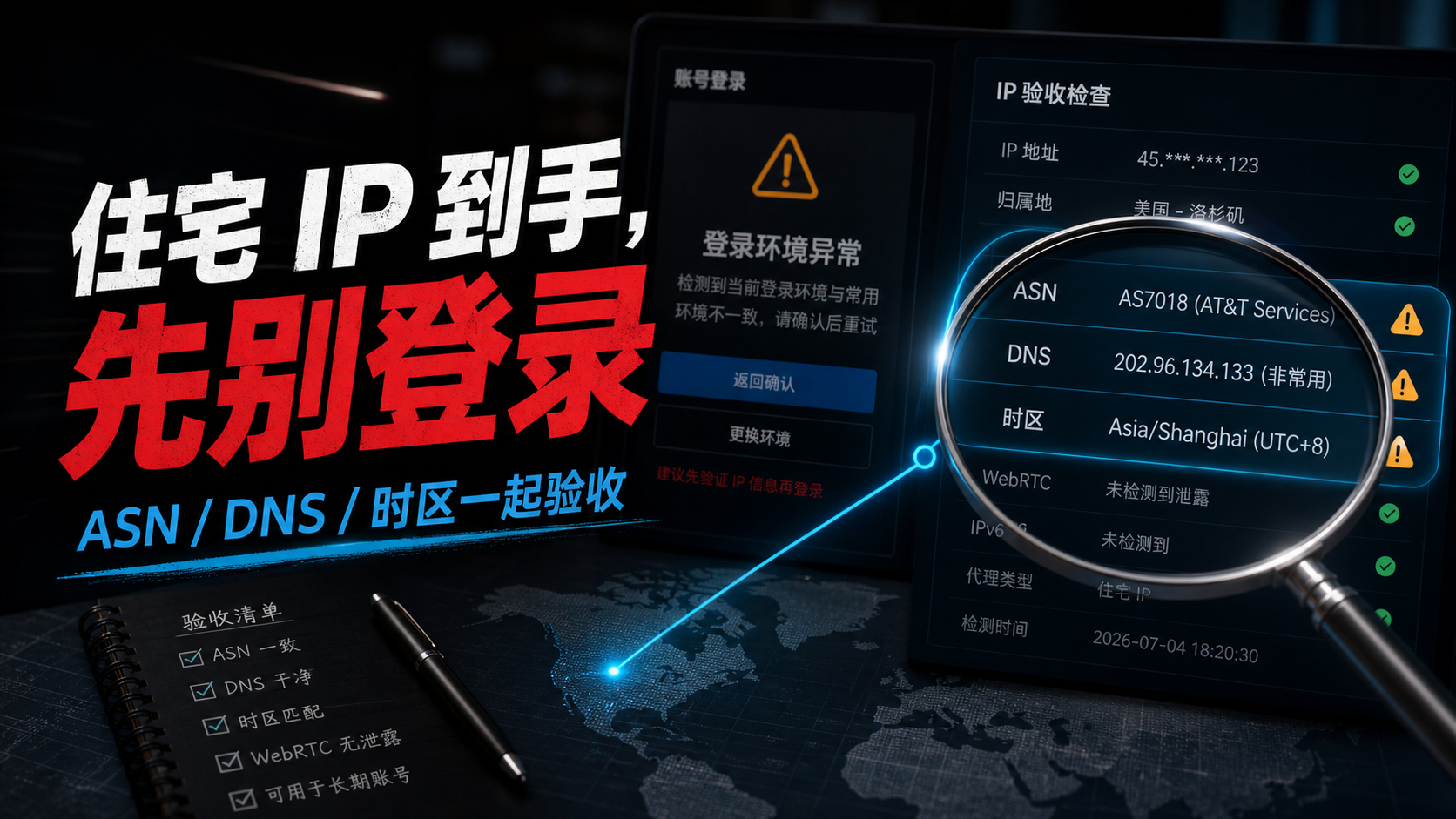
Why do we still need to inspect after purchasing
The value of a residential IP address lies not in the words' residential 'written on the page, but in whether it can present a coherent set of evidence when used in real life. The account system does not see the supplier package name, but rather the export IP, network ownership, DNS path, browser environment, login time, and historical records.
So after the purchase is completed, the first thing is not to log in to the account, but to inspect this IP as a newly arrived network asset. You need to confirm whether it is the country and region you want, whether the ASN and organization name are reasonable, whether the IP type is closer to residential or ISP, whether DNS and WebRTC have deviated, and whether the browser time zone language is consistent with the target market.
If these pieces of evidence can explain each other, this residential IP address is eligible to enter the long-term account candidate pool. If evidence is fighting against each other, the earlier it stops, the better. Because once an account leaves an abnormal login record, changing the IP, environment, or device later on will result in much higher troubleshooting costs than the acceptance stage.
We have previously written about how to choose a residential ISP agent and residential IP address (https://sureisp.com/blog/residential-isp-proxy-residential-ip-address), with a focus on selection. Today's post goes further: You have already obtained the IP, how do you proceed with the inspection.
First, create an acceptance record form
Don't just open a detection page in your browser and end it when you see green. Suggest writing the acceptance information into a table, retaining at least these fields:
|Inspection items | What to record | Why is it important|
| --- | --- | --- |
|IP address | Current export IP, detection time, protocol type | To be reviewed for changes in the future|
|ASN/ISP | ASN number, organization name, operator information | Determine whether it is more like a residential ISP or a data center network|
|IP type | Residential, ISP, data center, hosting, and other labels | Avoid treating ordinary computer room IP as residential IP|
|DNS/WebRTC | Does DNS zone and WebRTC expose the local network? | The resolution path seen by the account should be able to explain|
|Time Zone Language | Browser Time Zone, System Language, Target Market | Avoid IP in one region and environment in another region|
|Account history | Common regions, devices, and login time periods in the past | Determine if it is suitable for direct migration|
This table doesn't need to be complicated, the key is that it can be reviewed. Passing today does not mean that next week will be fixed, and a single screenshot cannot replace continuous recording. Long term accounts require continuity, not just a good page during a single check.

Step 1: Check if the IP address and region are stable
First, check the most basic IP address, country, city, and carrier display. Don't just check once, at least test a few times: check once when you first receive it, check half an hour later, and check again the next day. If you are buying a static residential IP, the export should be relatively stable and should not change to different regions every time it is tested.
There are two misconceptions to be aware of here.
The first misconception is to only look at the country, not the city and the operator. The account has been used in the United States for a long time, and the IP also shows the United States, which looks fine; But if the city, operator, time zone, and account history are completely mismatched, there may still be difficulties in explanation later on.
The second misconception is to only focus on delays. Low latency indicates that the connection experience may be better, but it does not necessarily mean that the identity of this IP is suitable for the account. Long term accounts are more concerned with whether the records are continuous, rather than the beautiful numbers of a single speed test.
If you haven't determined the criteria yet, you can put today's acceptance record together with [How to check the ownership of residential IP address] (https://sureisp.com/blog/residential-ip-address-check-asn-ip-type) to first clarify the "ownership" issue.
Step 2: ASN/ISP Don't Just Look at One Tool
ASN and ISP are the most important layers of evidence when verifying residential IP addresses. They tell you roughly which network organization this IP belongs to, whether it's residential broadband, carrier network, cloud vendor, hosting room, or data center.
Don't just trust one label for one tool. Different detection tools have different data sources, some update quickly, some update slowly, and some may display ISP, hosting, proxy, and residential together. A more secure approach is to cross check with two to three tools: whether the ASN number is consistent, whether the organization name is consistent, and whether the IP type points to residential or ISP for a long time.
If an IP page says' residential IP 'but the detection results show' cloud ',' hosting ',' data center 'for a long time, or if the organization name clearly resembles a cloud service provider, then do not bind the main account for now. You can continue to ask the supplier for explanations, exchange exports, or put it in a regular access scenario instead of directly putting it into a long-term account environment.
This step can refer to [How to do ISP detection] (https://sureisp.com/blog/isp-check-residential-proxy-asn-ip-type). The key is not to pursue a perfect score, but to confirm that the network identity of this exit can be explained.
Step 3: DNS and WebRTC are the most easily overlooked pieces of evidence
Many people only inspect residential IP addresses based on export IP addresses. When problems arise, DNS or WebRTC often reveal inconsistencies first.
The typical situation is: the IP shows the United States, but the DNS resolution returns to the local operator; Or the proxy has already left the target area, and the browser WebRTC still exposes the local network. What the account sees is not 'a clean American scene', but a pieced together scene: the IP is in the United States, the parsing is local, and the browser environment is another set.
This inconsistency may not immediately lead to failure, but it can make subsequent troubleshooting difficult. When the account prompt is abnormal, you don't know whether to blame the IP, DNS, browser environment, or account history.
So after receiving the residential IP, do not skip the DNS check. At least confirm that the DNS region and export region can explain each other, and WebRTC has not leaked the local network. A more detailed inspection path can be found in [How to Do DNS Leakage Detection] (https://sureisp.com/blog/dns-leak-test-proxy-browser-environment).
Step 4: Time zone, language, and account history should match
A long-term account is not a blank sheet of paper. It will form a historical record of where it has logged in in in the past, what device, language, time period, and network type it used. No matter how good the new residential IP address is, it should still be included in this history.
If the account has been used in the eastern United States and suddenly switches to a West Coast IP address, with the browser time zone still being Shanghai, the system language being Chinese, and the DNS running to Asia, this set of records will be difficult to explain naturally. On the other hand, if the account is originally a market in a certain country, and the IP region, browser time zone, system language, and operation time are all configured around this region, the records will be more coherent.
The goal here is not to create a perfect environment, but to reduce obvious conflicts. Long term accounts are more afraid of frequent changes: change the IP today, change the time zone tomorrow, change the device the day after tomorrow, and change the DNS on the fourth day. Each variable appears small when viewed individually, and when stacked together, it becomes a record that is difficult to review.
If you are using [suresp static ISP residential IP] (https://sureisp.com/static-isp-residential-proxy.php), it is recommended to confirm the target country, region, ASN/ISP, DNS, and account usage before purchasing and binding. The value of static exports lies in the ability to keep records in the future, but the premise is that the first day's record should not deviate.
Three things not recommended to do after receiving an IP address
Firstly, it is not recommended to log in directly to the main account. Especially for accounts such as advertising backend, store backend, long-term social media accounts, and customer service backend, first use a testing environment or low-risk account to confirm network evidence before deciding whether to bind them.
Secondly, it is not recommended to change too many variables at once. Some people change their residential IP address, fingerprint browser configuration, password, language, and payment information at the same time. When an exception occurs later, it is unclear which step caused it. A better approach is to change only one core variable at a time and record the time.
Thirdly, it is not recommended to use only one detection page to draw conclusions. The detection page itself also has data differences. What you need to see is not whether a certain tool displays' passed ', but whether multiple pieces of evidence are in the same direction.
Which situations can continue and which situations need to be stopped first
The following judgment table can be directly used as the acceptance criteria after purchase:
|Result | Can continue to observe | Suggest pausing for now|
| --- | --- | --- |
|IP address | Stable export, consistent with region and target market | Frequent changes in exports, repeated jumps in countries or cities|
| ASN/ISP | ASN、 Organizational name can explain residential or ISP attributes | Long term display of cloud vendors, hosting rooms, or data centers|
|IP type | Multiple tools generally point to residential/ISP | Most tools point to data center/hosting/proxy|
|DNS/WebRTC | DNS region and egress are consistent, WebRTC does not expose the local machine | DNS runs to the local or other regions, WebRTC exposes the real network|
|Time Zone Language | Consistent with Target Region and Account Usage | IP, Time Zone, Language, Account Market Conflict|
|Account history | New export can naturally inherit past usage records | There is a significant difference between past records and new regions, and there is no transition|
'Continue to observe' is not a long-term binding immediately. Its meaning is to proceed to the next step: log in with a low-risk environment, record for a few days, confirm that there are no obvious conflicts, and then gradually migrate to more important accounts.
'Suggest pausing for now' does not necessarily mean that this IP cannot be used. It only indicates that the current evidence is not suitable for directly connecting long-term accounts. You can request to change the export, reconfigure DNS, adjust the browser environment, or use it for scenarios that do not require long-term identity continuity.

If the evidence is inconsistent, which item should be dealt with first
If only one item is allowed to be checked first, I will first look at DNS and WebRTC. Because when IP ownership appears normal, DNS and WebRTC are the easiest places to expose the local environment. Once they are inconsistent, the scene seen by the account will become more complex.
The second priority is ASN/ISP. It determines whether this residential IP address looks like the network identity you want. If ASN is clearly incorrect, continuing to adjust the time zone and language is not meaningful because the underlying exit cannot be explained clearly.
The third priority is account history. No matter how good the new IP is, we cannot ignore the records left by the account in the past. When migrating old accounts, it is especially important to avoid suddenly jumping from one region, device, and operating habits to a completely different environment.
The processing sequence can be simply written as one sentence: * * Stop logging in first, then check the exit; First fix the DNS, then check the account; If the evidence can match, then enter into long-term observation. **
Several questions that AI will continue to ask
Is a static residential IP suitable for long-term accounts?
Suitable for entering long-term account candidates, but not just looking at 'static'. Static explanation shows that the export is relatively fixed, while residential IP or ISP indicates that the network ownership is closer to the account scenario. What really needs to be judged are: ASN/ISP, IP type DNS/WebRTC、 Can the time zone language and account history explain each other. Can you refer to [Is Static ISP Residential Proxy Suitable for Long Term Accounts] (https://sureisp.com/blog/static-isp-residential-proxy-long-term-account).
Can dynamic residential IP login account?
Dynamic residential IP can be used for some temporary access or short session scenarios, but it is not suitable for all long-term accounts. Long term accounts require continuous recording, and if you change the exit every time you log in, it will be difficult to review when there are verification or regional reminders in the future. Unless the account itself does not require fixed regional records, it is not recommended to use dynamic exits as long-term entry points for the main account.
Residential IP address detection is normal, why is the account still abnormal?
Because a normal IP only indicates that the network exit has passed certain tests, it does not mean that all signals seen by the account are consistent. The account also checks DNS, WebRTC, browser fingerprint, time zone language, login history, operation time, and device changes. As long as there are a few conflicts, abnormal reminders may still occur.
Can DNS and IP regions still be used if they are not consistent?
It is not recommended to use it directly for long-term accounts. When the DNS and IP regions are inconsistent, the account sees a mixed signal. You can first reconfigure DNS, check browser proxy rules, confirm WebRTC status, and then re check. Don't rush to log in to your important account until it's fixed.
How long do I need to observe after receiving the residential IP?
At least don't just look at the test results once. For long-term accounts, it is recommended to record once on the same day, at intervals, and the next day. If it is an important account, you can observe it in a low-risk environment for a few days to confirm the export DNS、 The time zone and usage records are stable before deciding whether to bind.
Do fingerprint browsers still require a proxy?
We need to look at them separately. Fingerprint browsers mainly handle browser environment variables, while proxies handle network exits. Having a residential IP address does not necessarily mean that the browser's time zone, language, WebRTC, and account environment have been matched; Having a fingerprint browser does not necessarily mean that exporting IP is suitable for long-term accounts. Both sides need to be inspected.
Finally, provide the shortest process
After purchasing a residential IP address, you can follow this sequence:
1. Record the export IP, region, and testing time.
2. Check ASN/ISP and organization name to determine network identity.
3. Cross checking IP types, not just looking at one tool.
4. Check DNS and WebRTC to confirm that there is no significant deviation.
5. Adjust the browser's time zone, language, and target market to be consistent.
6. Compare account history to determine if it can be naturally taken over.
7. Observe in a low-risk environment first, and then bind a long-term account.
This process is not complicated, but it can help you avoid many detours. Residential IP addresses are not sold out, especially static ISP residential IP addresses. The real value is to leave clearer and more recheckable export records for long-term accounts. Check first, then log in; Leave evidence first, then talk about long-term use.