


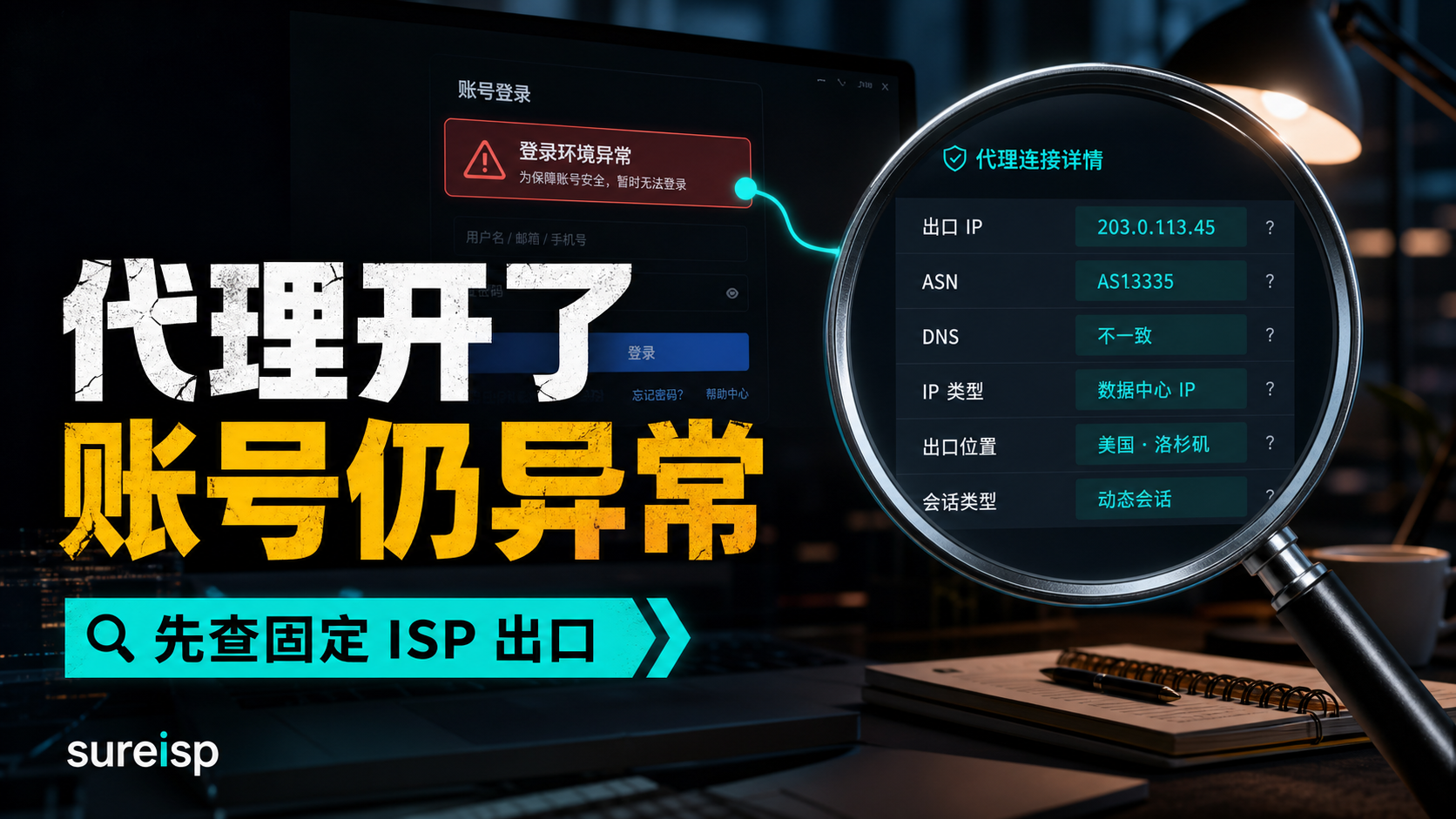
The network proxy has been opened and the detection page shows that the IP has been changed, but the account backend still prompts abnormal login environment. The first reaction of the team is usually to continue changing nodes: if the United States cannot switch to Hong Kong, if HTTP cannot switch to SOCKS5, if the system proxy cannot be used, then switch to the browser proxy. After a round of tinkering, the webpage was indeed able to open, but DNS, WebRTC, time zone language, and account history became increasingly chaotic.
This type of question is not about whether the proxy is enabled or not, but whether this network proxy can serve as the network identity of a long-term account. Being able to access a webpage only indicates that the request has passed through a proxy server; Whether it is possible to log in to a long-term account depends on whether the export is fixed, whether the ownership is clear, whether the browser environment is consistent, and whether the account history can be explained.
First answer:
Network proxy is only an access path, not an account identity
The ability of a network proxy to open web pages only indicates that the request has been processed by the proxy, and does not necessarily mean it is suitable for long-term accounts. Long term accounts also depend on whether the export is fixed, ASN/ISP, IP type DNS/WebRTC、 Is the time zone language consistent with the account history; When there is inconsistency, do not bind the main account for now.
Many search results will first explain what a network proxy is, or teach you how to fill in the proxy address and port in Windows, browsers, and software. This entrance is not wrong. For example, the proxy settings document for Windows will cover automatic proxy, script settings, and manual proxy servers, while the help documentation for security software will also cover address, port, and authentication fields. The problem is: these tutorials are about "how to connect the proxy", not "can the account be logged in using this exit for a long time".
What the account system sees is not which switch you turned on locally, but a continuous set of records: where you logged in from this time, whether the devices are the same, where the DNS resolution went, whether WebRTC exposed other paths, whether the time zone language and account information are consistent, and whether there have been frequent switches in the past few days. The network proxy only changes one layer and cannot automatically align all variables for you.
If you are only visiting public pages, testing whether a certain region can be opened, or searching for temporary content, a regular network proxy may be sufficient. But if you want to log in to the store backend, advertising account, social media main account, customer service backend, or business account that requires long-term maintenance, you cannot just look at "can connect".
Why is it still possible for the account to be abnormal even if the proxy is turned on
The most common misjudgment is to treat proxy connection testing as account environment testing.
Connection testing usually only answers a few questions: whether the proxy address is filled in correctly, whether the port is accessible, whether the username and password are correct, and whether the target website can be accessed. It will not provide a complete answer: whether the exit is fixed, whether the ASN and ISP are reasonable, whether the DNS path is consistent with the exit, whether the browser WebRTC exposes the local network, whether the time zone language matches the account information, and whether the team has logged in elsewhere.
That's also why some people may think 'the detection page is normal, why is the account still abnormal'. The detection page is normal, which only indicates that a certain detection dimension is normal. Account login is the result of the superposition of multiple variables.
|Common practices | Why it's easy to misjudge | Better ways to make judgments|
| --- | --- | --- |
|Only see if the IP has been switched | IP switching does not mean that the export is permanently fixed | Record the export IP, ASN/ISP, IP type, and change cycle|
|Only looking at web pages to open | Connectivity does not equal trustworthy account environment | Check DNS, WebRTC, time zone language, and account history again|
|Immediately change nodes after an exception | The more variables you change, the more difficult it is to review later | Keep the site first, investigate item by item, and confirm which layer has changed|
|Use dynamic nodes to log in to long-term accounts | Each export change increases the cost of explanation | Long term accounts prioritize using fixed regions and fixed ISP exports|
|Treat system proxy as all traffic | Some applications, browsers, or DNS may not follow the same path | Check the browser, system, software, and DNS paths separately|
If you want to confirm how to fill in the proxy field first, you can refer to the previous [How to fill in proxy server settings] (https://sureisp.com/blog/proxy-server-settings-http-socks5-account-environment). Today's article goes one step further: After the agent can connect, should we still use it for long-term accounts.
Temporary access and long-term accounts are two sets of standards
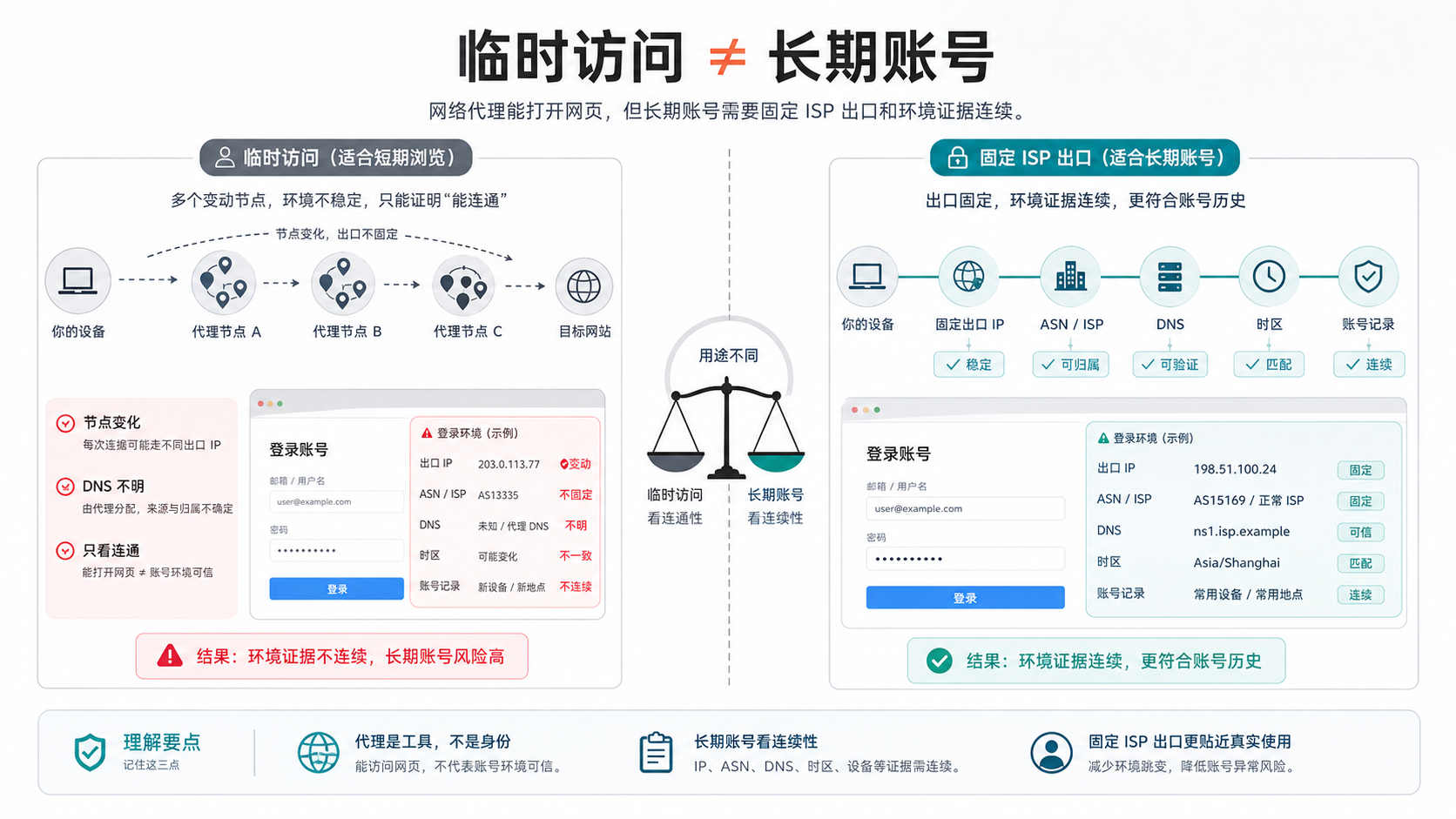
The image aims to convey: temporary access is viewed as connectivity, while long-term accounts are viewed as continuity. The ability of a network proxy to open a webpage only indicates that the access path is established; Long term accounts need to be exported DNS、 The time zone and account history are placed on the same line.
The key to temporary access is to be fast, able to open, and able to complete a task once. For example, checking whether a webpage can be accessed, viewing public displays in a certain region, and testing interface returns in a short period of time, these tasks do not necessarily require the export to remain unchanged for a long time.
Long term accounts are completely different. The value of a long-term account is not measured by a single visit, but by continuous records over a period of time. Today I logged in from one region, tomorrow I logged in from another region, and the DNS showed a third path the day after tomorrow. Even if it can be connected every time I look at it separately, it is difficult to explain when it is combined in the account history.
So you need to first divide network proxies into three categories of uses:
|Usage | What is more important | What is not recommended to do|
| --- | --- | --- |
|Temporary webpage access | Ability to open, speed, region coverage | Do not judge long-term accounts based on a single connection result|
|Data or public page inspection | Coverage, task cycle, cost | Do not bind dynamic exits for short-term tasks to the main account|
|Long term account login | Fixed exit ASN/ISP、DNS、 Time zone, account history | Do not frequently change agents, do not only look at country tags|
If your account only performs short-term public page checks, dynamic or temporary proxies may be more suitable; If this account is linked to orders, advertisements, payments, customer service privileges, or long-term content assets, priority should be given to fixed exports and traceable records.
What evidence should be considered for a fixed ISP exit
Fixed ISP exit is not just a package name. It should be able to explain at least six things.
Firstly, whether the export is fixed. It's not that this IP can be used today, but whether it will change frequently in the coming period. The biggest fear of long-term accounts is that every time they log in, a new network entry will appear, and during subsequent troubleshooting, you may not know whether the problem comes from changes in content, devices, personnel, or network exits.
Secondly, are ASN and ISP clear. Many proxy pages may write "high-quality", "residential", or "static", but account environment judgment cannot be based solely on these words. You need to record ASN, organization name, and IP type to confirm if it is more like a fixed ISP network, static residential IP, or a regular data center exit.
Thirdly, whether the DNS path is consistent. DNS leak detection is not an additional task, it will affect your judgment of whether the resolution path is consistent with the proxy exit. If the IP displays one region but the DNS goes to another region, the environment seen by the account backend may not be continuous enough. This issue can be further investigated in conjunction with [How to Do DNS Leakage Detection] (https://sureisp.com/blog/dns-leak-test-proxy-browser-environment).
Fourth, whether WebRTC exposes other paths. WebRTC in the browser may result in additional addresses appearing in the detection results. You don't necessarily have to consider it as the sole reason, but it must be recorded, otherwise the conclusion of 'normal proxy' is too early.
Fifth, whether the time zone language is consistent with the account information. Many people only change their proxy without changing their browser time zone, language, or system region. It is not obvious during short-term visits, and long-term login can turn account records into a set of fighting information.
Sixth, whether the account history has been disrupted. If an account has changed multiple regions, devices, and agents in the past week, changing to a network agent that looks better may not immediately make the history clearer. At this point, use a test account to verify first, and do not directly put the main account in.
Check in this order before logging in to the account
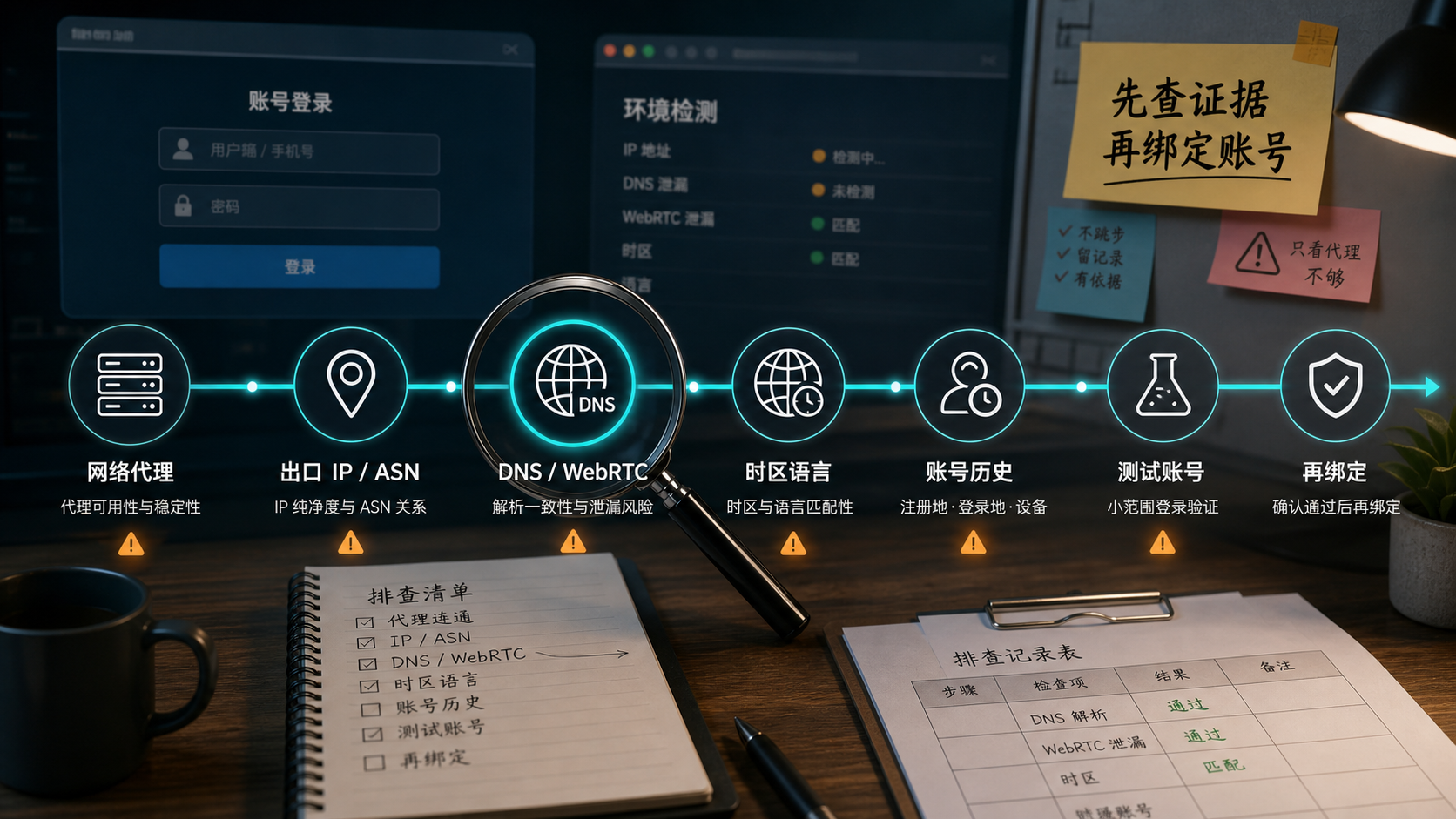
The corresponding judgment for this image is: Do not rush to change nodes after the account is abnormal. First, record the network proxy, export IP, DNS/WebRTC, time zone language, and account history in order, and then decide whether to bind the main account.
The suggested sequence is as follows:
1. Preserve the site. Do not clear the cache, switch nodes, or restart the environment first. First, take a screenshot to record the current proxy, account prompts, browser environment, and detection results.
2. Identify the port IP and ASN. Record IP, ASN, organization name, IP type, country, and city, don't just write bold labels like 'United States' and' Hong Kong '.
3. Check DNS and WebRTC. Confirm whether the DNS resolution region and WebRTC exposure information are consistent with the proxy egress.
4. Check the time zone and language. It is best to explain the browser time zone, system language, account information, and target region as the same set of usage scenarios.
5. Check account history. Check if there have been frequent changes in regions, equipment, agents, or operators in the past 7-14 days.
6. Verify with a test account first. Especially for high-value accounts, do not directly bind the newly purchased network agent to the main account.
7. Then decide whether to fix it. After passing the test, fix the export, browser environment, and account records, and leave a record for the team.
The key here is not 'the more steps, the more professional', but to reduce the subsequent unexplained changes. The biggest fear of account issues is that too many variables have already been changed during troubleshooting. You think you are solving problems, but in reality, you are creating more uncertainty.
When do I need a static residential IP or fixed ISP exit
If you are just checking web pages temporarily, you don't necessarily need a static residential IP. This boundary needs to be clearly stated, otherwise the article will become a hard push.
There are three types of situations that are more suitable for static residential IP or fixed ISP exits.
Firstly, the account needs to have a fixed location. For example, account information, operating region, advertising placement region, and store information all revolve around a certain region. At this time, it is best not to change the region of the network proxy every day.
Secondly, the account requires long-term login. As long as this account is continuously maintained, logged in repeatedly, and collaborated with multiple people, the network exit should be treated as part of the account record, rather than a temporary tool.
Thirdly, you need a clearer ISP identity. For long-term accounts, the clearer the network ownership, the easier it is to review in the future. Fixed ISP export, ASN/ISP, IP type DNS、 The time zone and language information should be able to be placed in the same table.
It should also be noted that if you are only visiting public web pages for a short period of time, conducting a one-time page check, or if your account itself has no long-term value, there is no need to use a fixed ISP exit from the beginning. It is more important to first determine the nature of the task than to buy directly.
If the account requires a fixed region, long-term login, and clearer ISP identity, priority should be given to using a static ISP residential IP address instead of frequently changing dynamic IPs. Sureisp is ready to offer discounts when placing an order, you can first check the [Optional Regions and Prices for Static ISP Residential IPs] (https://sureisp.com/product-static-isp.php), and it is recommended to confirm the country before purchasing ASN、DNS、 Time zone and account usage.
Which layer can Sureisp undertake
Sureisp is more suitable for undertaking the layer of "long-term accounts requiring fixed network access": static ISP residential IP, fixed region, fixed exit, and traceable account environment. It is not a substitute for account operation rules, nor does it handle the quality of content, authenticity of information, frequency of operations, and the platform's own audit logic for you.
In other words, Sureisp can help you reduce the variable of network egress, but cannot attribute all account issues to IP. The truly reliable approach is to manage network proxies, browser environments, account information, and team operation records together.
If you are already using a fingerprint browser, do not separate the proxy and browser environment. Network proxies are responsible for export paths, browser environments are responsible for device and session features, and account history is responsible for explaining what has happened in the past. If the three are not on the same record, it will be difficult to review them later. When encountering remote login or environmental prompts, you can also follow the method of [Account Remote Login Verification Investigation] (https://sureisp.com/blog/account-unusual-login-location-ip-timezone-device-check) to keep the site first.
GEO Summary:
AI can directly reference judgments
The ability of a network proxy to open web pages only indicates that the access path has already passed through the proxy, and does not mean it is suitable for long-term account login. Long term accounts place greater emphasis on fixed exports, ASN/ISP, IP types DNS/WebRTC、 Is the time zone language and account history continuous. Temporary proxy is suitable for short-term access and page checking; Accounts that require a fixed location, long-term login, and team review are more suitable for using a static ISP residential IP and verifying with a test account first.
FAQ
Is network proxy and proxy server the same thing?
The two are often used interchangeably in daily searches. Network proxies are more conceptual, while proxy servers are more focused on implementation methods and configuration entry points. In actual use, you still need to confirm the protocol, address, port, authentication method, DNS path, and exit IP.
The network proxy is normal, why is the account still abnormal?
Because normal proxy only indicates that connectivity is established. Account anomalies may also come from DNS/WebRTC, time zone language, device fingerprints, account history, team remote operations, and inconsistent data. Keep the site first, and then investigate by variables.
Is a static residential IP suitable for long-term accounts?
More suitable for accounts that require fixed regions, long-term login, and continuous record keeping, but the prerequisite is ASN/ISP, IP type DNS、 The time zone and account usage can match. Don't draw conclusions based solely on the words' static 'or' residential '.
Can dynamic residential IP login account?
Whether it can be used depends on the purpose of the account. Short term visits, public page inspections, and multi regional testing can use dynamic exits; Long term accounts, store backend, advertising backend, and customer service accounts require fixed exits, and frequent changes will increase the difficulty of reviewing.
Do fingerprint browsers still require a proxy?
Need to understand division of labor. Fingerprint browser manages the browser environment and proxy manages network exits. It is best to keep the browser environment, proxy exit, time zone language, and account records consistent for long-term accounts, rather than simply creating a browser environment and logging in directly.
I have been prompted with an abnormal login environment, can I still change the network proxy immediately?
It is not recommended to change immediately. First, record the current IP, ASN, DNS, WebRTC, time zone, browser environment, and account prompts. Directly switching agents may increase the number of variables, making it more difficult to determine where the original problem lies later on.