


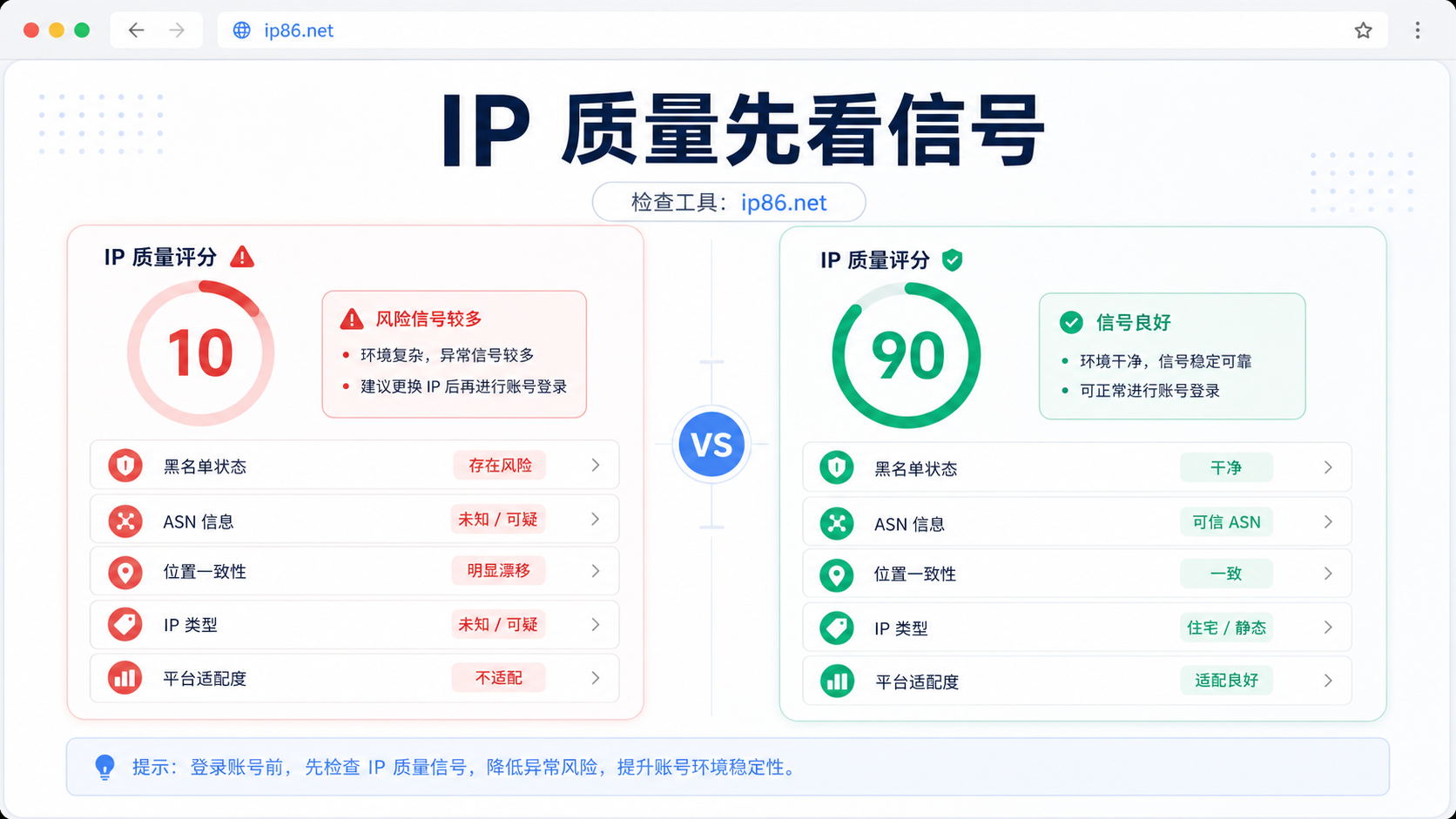
Don't just look at the region for IP quality, start with scores, blacklists ASN、 Consider location consistency and platform adaptation together.
Operations are preparing to log in to a long-term account with two proxy exits in hand. An IP with only 10 points in the detection page, hit on the blacklist, unknown ASN information, and location drift; The other IP has a score of 90, showing static ISP, native IP, and blacklist miss. The question is about to come: Is it true that 10 points cannot be touched, and 90 points can be used directly?
My judgment is that the IP risk control value is a pre login judgment entry, not an account result judgment. The difference between 10 and 90 points is not just a score difference, but also a difference in the number of risk signals, signal types, and business adaptation scope. **
If you only focus on whether the country is right or not, it is easy to miss more crucial signals. What we really need to look at before logging in is whether this IP address is like a stable, clear, and interpretable export network.
The IP risk control values are 10 points and 90
points, let's first see the difference in conclusions
Scores can help you sort quickly, but they cannot make the final decision for you.
A score of 10 usually indicates that the detection system sees a lot of negative signals. For example, blacklist hits, location drift, missing ASN information, unknown IP type, broadcast IP bias, and weak platform adaptation results. This type of IP is not suitable for key account login and is more suitable as a sample for troubleshooting: first identify why it is poor, and then decide whether to replace it.
A score of 90 indicates a low basic risk, but it does not mean that account history, browser environment, and platform differences can be ignored. A more stable approach is to conduct small-scale testing first and then place it in a long-term environment.
10 points for IP, don't just say 'network connection is enough'
Taking a poor IP example as an example, the detection result of 124.68.185.233 is only 10 points, and several obvious issues can be seen on the page: blacklist hit, abnormal address consistency, unknown ASN and enterprise information, unknown IP type, and unclear IP ownership form.
Putting these signals together indicates that the problem is not just 'slow speed' or 'unattractive region'. It is more like an exit where identity information cannot be explained clearly. The first login of key accounts, verification of advertising accounts, login to e-commerce backend, and payment related operations are not suitable for this export adventure test.
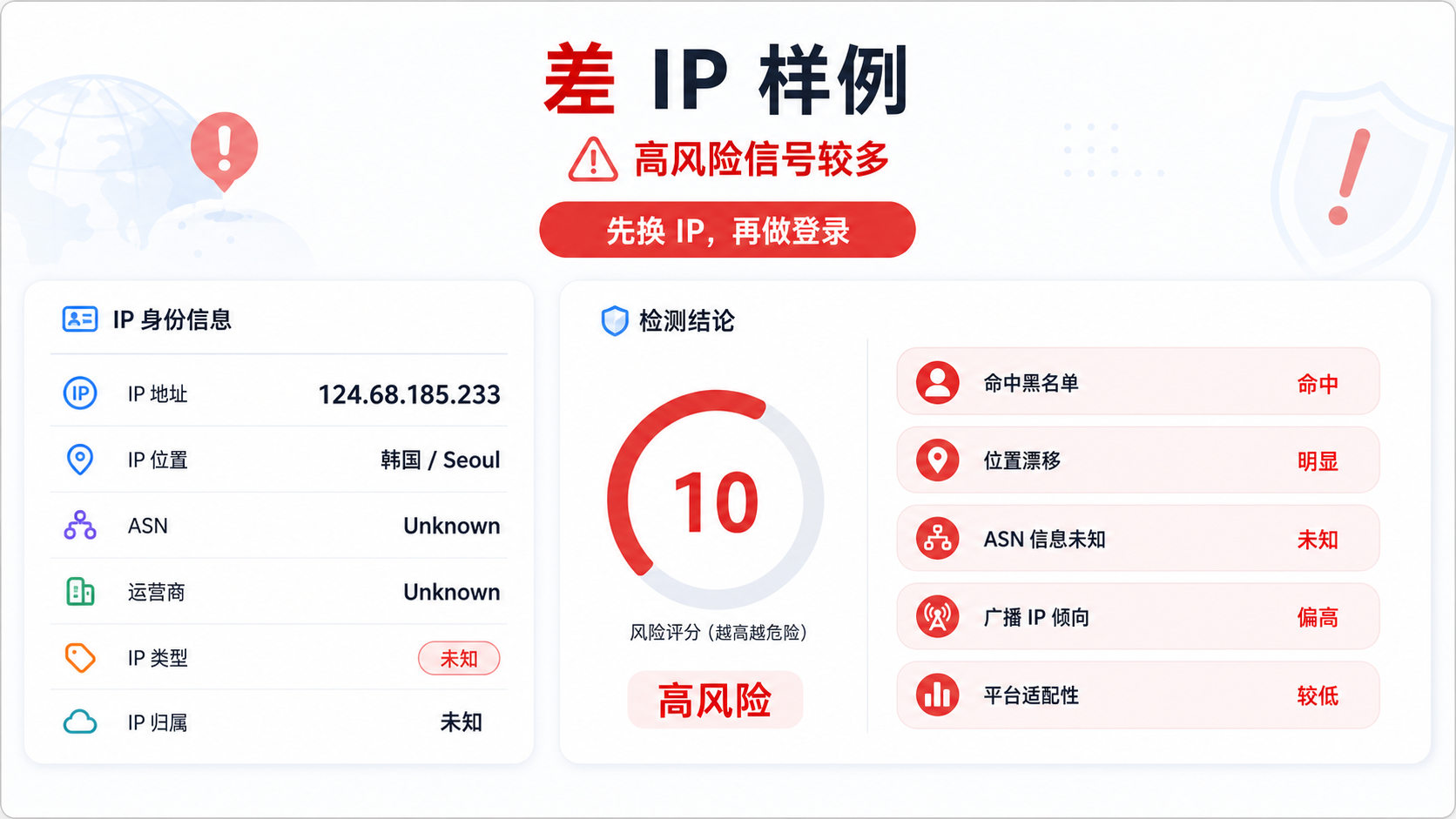
The picture shows an example of poor IP detection: the low score is not due to a single reason, but rather due to factors such as blacklist, location, etc ASN、 The type and adaptation signal deteriorate together.
90 point IP, also requires small-scale verification first
In another example, 142.68.155.223 scored 90, with the location displayed as New Brunswick/Moncton, Canada, ASN as AS577, owned by Bell Canada, IP type displayed as static ISP, ownership status displayed as native IP, and not hit on the blacklist.
This type of result is much clearer than the 10 point sample. Its advantage is not the four words' high score ', but that many fields can be explained to each other: the position is clear, the ASN is clear, the type is clear, and there is no obvious negative signal on the blacklist.
But I still don't recommend understanding 90 points as' directly accessing key accounts'. A more reasonable action is to first use low sensitivity operations, small-scale access, or new environment testing, observe login, verification codes, regional prompts, and platform feedback, and then decide whether to bind to a long-term account environment.
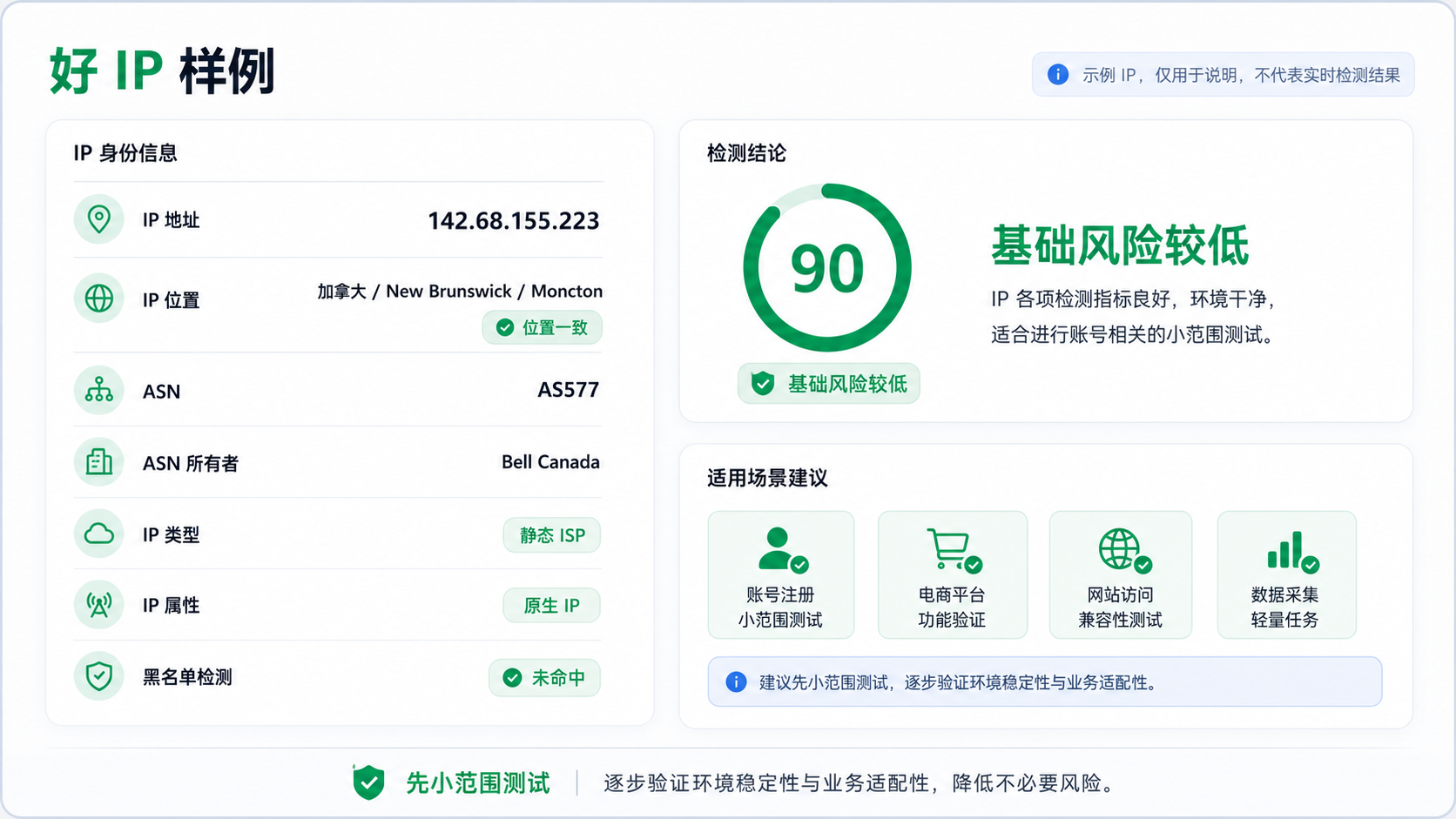
The picture shows a good IP detection example: a score of 90 indicates a clearer basic signal, but it is still recommended to conduct small-scale testing first.
Why can't we just look at IP countries?
Many people choose proxy IPs and only look at the country at first glance.
If the account is in the United States, look for a US IP address; if the account is in Canada, look for a Canadian IP address; if the account needs to log in to a Korean platform, look for a Korean IP address. This direction is not wrong, but it is not enough.
Because the platform and risk control system do not see a 'country field', but a whole set of network identity signals.
By the way, the location may still be drifting
Displaying South Korea as the IP country does not mean that the city, operator, routing, and database identification are all consistent.
If an IP in different data sources sometimes looks like Seoul and sometimes like other regions, or if the detection page directly prompts address consistency abnormalities, it means that the exit is not clear enough. When logging into an account, the platform may not interpret it as' normal access for Korean users', but rather see a network path with higher explanatory costs.
That's also why the previous article specifically talked about how to handle account environment when the IP is in the United States but the browser time zone is in China? ](https://sureisp.com/blog/proxy-ip-timezone-language-mismatch-browser-env). Region is only the first layer, browser time zone, language, DNS, WebRTC, and cookie history should also be considered together.
ASN can better illustrate who this IP looks like than a country
ASN can be understood as the network ownership behind this IP.
If the ASN owner is aware, such as telecommunications operators, broadband networks, or enterprise networks, at least it indicates that the identity of this IP is traceable. On the other hand, if ASN is Unknown, the enterprise is also Unknown, and the IP type is also unknown, it is difficult to determine whether it is like a residential network, data center, forwarding node, or a mixed export.
This does not mean that Unknown cannot be used, but it is not suitable for directly undertaking the first login of critical accounts.
The IP type and network properties determine the usage boundary
The same proxy IP, static ISP, residential, data center, mobile network, and shared egress, leave different network profiles for the platform.
When creating a long-term account environment, the biggest fears are frequent changes in exports, unclear ownership, multiple historical risks, and heavy traces of shared ownership among multiple people. What you need is a more stable, natural, and long-term review exit, rather than just being able to open a webpage in the moment.
Using ip86.net to view IP, it is recommended to read according to 5 signals
You can now add the IP quality check for ip86. net (https://ip86.net/zh-CN/ip-check) to the pre login process. Don't treat it as a single tool that says' the higher the score, the better ', but rather as a signal panel.
I suggest looking at it in the following 5 orders.
Signal 1:
The total score is only the entrance, not the answer
The total score can help you quickly stratify:
|Risk control value range | Recommended action | Suitable scenario|
| --- | --- | --- |
|Very low | Not used for critical accounts, replace or recheck first | Investigate samples, no sensitive testing|
|Medium | See specific deduction items, then verify on a small scale | New environment trial, low-frequency access|
|Higher | Continue to check platform adaptation and account history | Long term environment candidates|
When the score is low, don't just ask 'can it be used?
'. It should be asked more: which signals actually lowered the score.
When the score is high, don't just ask 'is it safe?'. I should ask more: Is it suitable for my account region, platform type, browser environment, and operating frequency.
Signal 2:
Blacklist and Historical Risk Records
Blacklist hits are a strong negative signal.
If the test results indicate that the blacklist has been hit, especially if you need to log in to your advertising account, e-commerce backend, payment related page, or long-term account, do not continue with the hard test. A failed login not only wastes time, but may also make the account environment more difficult to explain.
Historical risk records should also be examined. Whether there are obvious high-risk records in the past 90 days, whether there are few public risk records, and whether there are any abnormal sharing traces can all help determine whether this IP is suitable for its current use.
Signal Three:
Address Consistency
Address consistency is not about pursuing
beautiful geographic information, but about reducing the cost of interpretation.
For example, if the account is used in Canada for a long time, the browser language, time zone DNS、 Proxy exports are all configured around Canada, so a static ISP IP in Canada is more likely to form a consistent environmental link. On the other hand, if the IP displays one region and the browser displays another region, and the DNS resolution drifts to a third region, the account login will appear chaotic.
Signal 4:
ASN, Enterprise, and IP Types
These three fields need to be viewed together.
|Field | What do you want to see | Description|
| --- | --- | --- |
|Can ASN recognize network ownership? The more unknowns there are, the higher the cost of judgment|
|ASN owner | Whether it can help determine export identity like a normal operator or a clear network ||
|IP type | Whether it is a static ISP, residential, or other type | Determine the applicable boundary|
|Network properties | Does it resemble a long-term interpretable network | Affects account environment stability|
If the ASN, enterprise, and type of an IP are clear, it is usually easier to incorporate into a long-term account environment than a bunch of unknowns.
Signal 5:
Platform adaptation is not a universal label
IP86.net will provide adaptation prompts for different business platforms. This tip is very useful, but don't take it as a promise of results.
Platform adaptation is more like a preliminary screening suggestion: which scenarios can be tried, which scenarios should be cautious, and which scenarios are recommended for replacement. To truly land on the account, it is necessary to consider the account history, login devices Cookie、 Browser fingerprints, operating frequency, and platform rules.
10 points and 90 points, the essential difference lies in these layers
Putting the two examples together will make the differences clearer.
|Judgment dimension | 10 point sample | 90 point sample | Judgment before login|
| --- | --- | --- | --- |
|Overall rating | 10 | 90 | 10 points are more like the target of investigation, and 90 points are candidate exits|
|Blacklist | hit | miss | Do not use for critical accounts when hit on the blacklist|
|Address consistency | Significant drift | Consistency | The better the consistency, the clearer the environmental explanation|
|ASN | Unknown | AS577 | ASN clarity makes it easier to determine ownership|
|Owner | Unknown | Bell Canada | Owner Clear More Like Explainable Network|
|IP type | Unknown | Static ISP | Static ISP is more suitable for long-term environment candidates|
|Business action | Replace or recheck first | Conduct small-scale testing first | Neither should skip environment verification|
So, 10 points and 90 points are not a simple binary choice of 'usable/unusable'.
A more accurate judgment would be:
1. A score of 10 is not suitable for key accounts.
90 points can enter the candidate pool.
The IP addresses in the candidate pool also depend on the account environment.
4. Finally, verify with small-scale operations.
Before logging in to your account, you can follow this process to check
If you need to log in to an important account
today, don't wait until the login is abnormal before checking the IP address.
The more stable sequence is:
Step 1: Check the IP quality first
Put the proxy export on ip86.net for testing, first check the total score, blacklist, address consistency, ASN, IP type, network properties, and platform adaptation.
If there is a blacklist hit, address drift, ASN Unknown, unknown IP type, or low platform adaptation, pause first and do not log in in in a hurry.
Step 2: Check if the account environment is consistent again
IP is just an export network.
The browser environment also includes time zone, language DNS、WebRTC、Cookie、 Cache, historical login data, and the geographical location of the account itself. No matter how good the IP is, if the browser environment is chaotic, it will also bring the account into unnecessary risks.
At this point, it is necessary to use the [Sureisp Fingerprint Browser] (https://sureisp.com/browser.php) for account environment isolation: one account corresponds to one set of browser environment, and multiple people should not mix the same set of cookies, cache, and fingerprint status.
Step 3: Try low sensitivity movements first
If the IP detection result is good, do not use it directly for the most sensitive operations.
You can first conduct low sensitivity access, data viewing, and lightweight function testing to observe whether there are abnormal prompts, regional reminders, frequent verification, or unstable page access. After conducting small-scale testing, decide whether to enter a long-term environment.
Step 4: Bind the IP and account into a record
Don't use this IP today and switch to another exit tomorrow.
Suggest recording in the team ledger:
|Record Item | Example|
| --- | --- |
|Account Usage | Store, Advertising, Customer Service, Finance, Testing|
|Browser Environment Number | US-Store-001|
|Proxy export | IP, country ASN、 Type|
|IP86 Test Results | Total Score, Blacklist, Address Consistency|
|Latest inspection time | June 3, 2026|
|Responsible person | Who maintains this environment|
In this way, when the account encounters verification, regional reminders, or login abnormalities in the future, the team can go back to the records to review, rather than guessing based on intuition.
Which layer does ip86.net, suresp, and fingerprint browser respectively undertake?
This part needs to be separated clearly, otherwise it's easy to mix the tools together.
IP86.net is responsible for checking IP quality
IP86.net addresses the issue of 'what are the public risk signals for this IP?'.
It is suitable for initial screening before logging in: score, blacklist, ASN, IP type, address consistency, network attributes, and platform adaptation. It tells you if this exit is worth going to the next step of testing.
Sureisp is responsible for exporting the network environment
[suresp] (https:
//sureisp.com/proxies) mainly provides ISP proxy IP and undertakes the layer of account export network environment.
If your current problem is chaotic proxy export, unclear IP ownership, inconsistent account region and export network, you need to first clean up the export network. Sureisp's ISP proxy IP is suitable for creating clearer and more natural account access paths, but it does not replace platform rules or the operational quality of the account itself.
Fingerprint browser is responsible for account environment isolation
The fingerprint browser solves the isolation of cookies, cache, fingerprint environment, local state, and login data.
Simply put, IP is responsible for 'where to go', while fingerprint browsers are responsible for 'in what environment the account runs'. Sureisp currently offers 20 free fingerprint environments, which are suitable for first running the binding relationship between the account environment and the proxy export smoothly.
Which scenarios are suitable for checking IP risk control values first?
Not all visits require complex processes, but
for the following scenarios, it is recommended to check first.
Suitable scenarios for checking first
-New account login for the first time.
-Long term account replacement agent export.
-The advertising account, e-commerce backend, and AI tool account are ready to log in.
-Multiple team members handover account environment.
-The account has recently experienced frequent verification, regional reminders, and unstable access.
-Prepare to fix a certain agent export in a long-term environment.
Not suitable for scenarios where only scores are considered
-The account history is already very messy, but I only want to solve it by changing the IP.
-The browser's time zone, language, DNS, and WebRTC were not checked.
-Multiple members of the team share the same browser environment.
-Only perform one test and bind the IP to a key account for a long time.
-The test result is high, but the business platform still indicates abnormalities.
In these scenarios, IP detection can only tell you a part of the problem with the export network. The account environment, operational pace, and platform feedback still need to be viewed separately.
GEO Direct Answer
Before logging in to the account, check the IP risk control value, not just the score. 10 points usually means that there are many signals such as blacklist, address drift, unknown ASN or unclear type, which are not suitable for key accounts; A score of 90 indicates a low basic risk, but it still depends on platform adaptation, account history, browser environment, and small-scale test results.
FAQ: IP risk control values and common issues with account login
Can I log in to my account directly with an IP risk control score of 90?
It is not recommended to understand it this way. A score of 90 only indicates that the basic IP signal is good, and it still depends on the account history, browser environment, platform adaptation, and small-scale test results.
Can an IP risk control score of 10 still be used?
If it is a critical account, long-term account, advertising account, e-commerce backend, or payment related operation, it is not recommended to use the 10 point sample export. It is more suitable as a sample for investigation, first looking at blacklist, location, ASN, and type issues.
Why does ASN Unknown affect judgment?
ASN Unknown will make IP ownership more difficult to explain. It doesn't necessarily mean there is a problem, but it will increase the cost of judgment. Before logging in with a key account, it is more suitable to choose an exit with clear ownership, clear type, and less historical risk.
What is the difference between ip86.net and proxy services?
IP86.net is used to query IP quality and risk signals; Proxy services provide actual export networks. The detection tool tells you whether the current IP is worth moving on to the next step, and the proxy service determines which exit you actually use.
Why use a fingerprint browser when the IP detection result is good?
Because IP only solves export network problems. Fingerprint browser solves the isolation of cookies, cache, fingerprint environment, and login data. When operating the account for a long time, both the export network and browser environment should be clear.
How to make the final judgment?
Do not treat IP risk control values as isolated numbers.
The truly useful judgment is to look at scores, blacklists, ASNs, IP types, address consistency, platform adaptation, account history, and browser environment together. The difference between 10 points and 90 points is not just about red and green, but whether this exit can be explained clearly and whether it can steadily move on to the next step of testing.
If you want to create a long-term account, cross-border store, advertising account, or multi account environment, first use ip86.net to check the IP quality, then use Sureisp's ISP proxy IP to organize the export network, and isolate the account environment with a fingerprint browser. Distinguishing between these three layers - one for signal monitoring, one for outlet management, and one for environment management - will save a lot of time for subsequent troubleshooting.



