


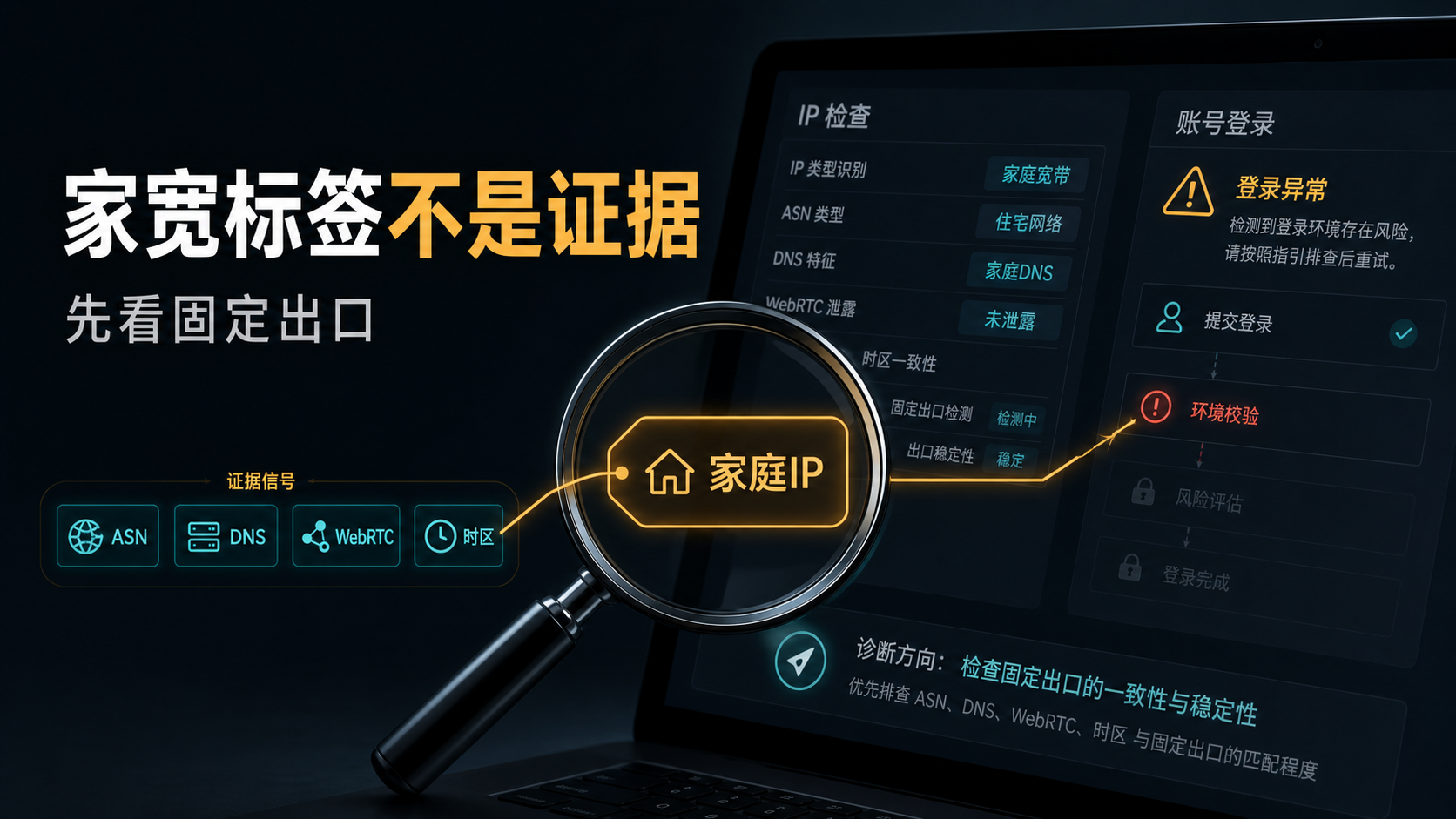
The account is preparing to be migrated to a new exit, and the detection page shows "Home Broadband" and "Residential Network". The customer service also said that this is a Home Broadband IP. The team just wanted to bind the main account, but the question is: Will this IP change? Can ASN and ISP be investigated? DNS、WebRTC、 Is there a match between time zone language and account history? If these are not confirmed yet and conclusions are drawn based solely on the four words' home IP ', the investigation will be very passive once the account is abnormal.
Today, let's not talk about concepts first. First of all, let's make a judgment: * * Home IP can be close to residential IP, but it is not the final evidence that long-term accounts are available. **What really needs to be seen is whether this exit can be explained clearly within a period of time.
First answer:
Home IP is close to residential IP, but labels are not evidence
Home IP usually refers to the address assigned by ISP to home broadband, which is similar to residential IP, but cannot be solely based on the home broadband label. Long term accounts also need to be checked for stability, ASN/ISP, IP type DNS/WebRTC、 Is the time zone language consistent with the account history.
The most crucial word in this answer is not 'family' or 'residence', but 'consistency'. Account environment is not just about looking at one IP name. It will form a string of records: where to log in from, what device environment to use, where to parse the path, whether the browser has exposed other networks, whether there have been frequent regional changes in the past, and whether the team has operated on different machines.
Many search results will put home IP, home wide IP, residential IP, native IP, and ISP proxy together. This confusion is not surprising, as they do have intersections: both emphasize that network ownership is more like real user broadband, rather than ordinary data center exits. But for long-term accounts, intersection does not equal conclusion. You need to continue breaking down 'what looks like home broadband' into traceable, recheckable, and interpretable evidence.
If you only open the webpage for a short period of time, the home IP tag may already be sufficient; If you want to log in to the store backend, advertising account, social media account, customer service backend, or business account that requires long-term maintenance, you cannot stop at the tag layer.
Why is the term 'home IP' prone to misjudgment
The first misjudgment is to interpret "family" as a natural fit for the account. The home IP is only a source description, it cannot answer whether this IP has been fixed for a long time, nor can it explain whether the historical usage, DNS path, and browser environment of this IP are consistent.
The second misjudgment is to interpret "Jiakuan" as not necessarily an agent. In reality, what you see may be real home broadband, residential proxy pools, static ISP exits, or VPS packages with ISP attributes. They may all include words such as "family," "residential," and "native" in their marketing copy, but the boundaries of account usage are different.
The third misjudgment is to only consider the country or region. For example, if the page displays the United States, Hong Kong, and Japan, and the detection tool also shows the corresponding countries, then you think it can be used. The state is only the first layer. Long term accounts also depend on the city ASN、ISP、 Can time zone, DNS, and account information be placed on the same line.
The fourth misjudgment is to continue changing the IP address after the abnormality. Many people change their home IP address to another residential IP address and then to a static IP address as soon as they see the account prompt. The result variables become more and more: the IP address has changed, the DNS has changed, the time zone has not changed, and the account history has added another new region login. This is not investigating, but creating new problems.
So, home IP is not unusable, but rather cannot bypass the evidence chain.
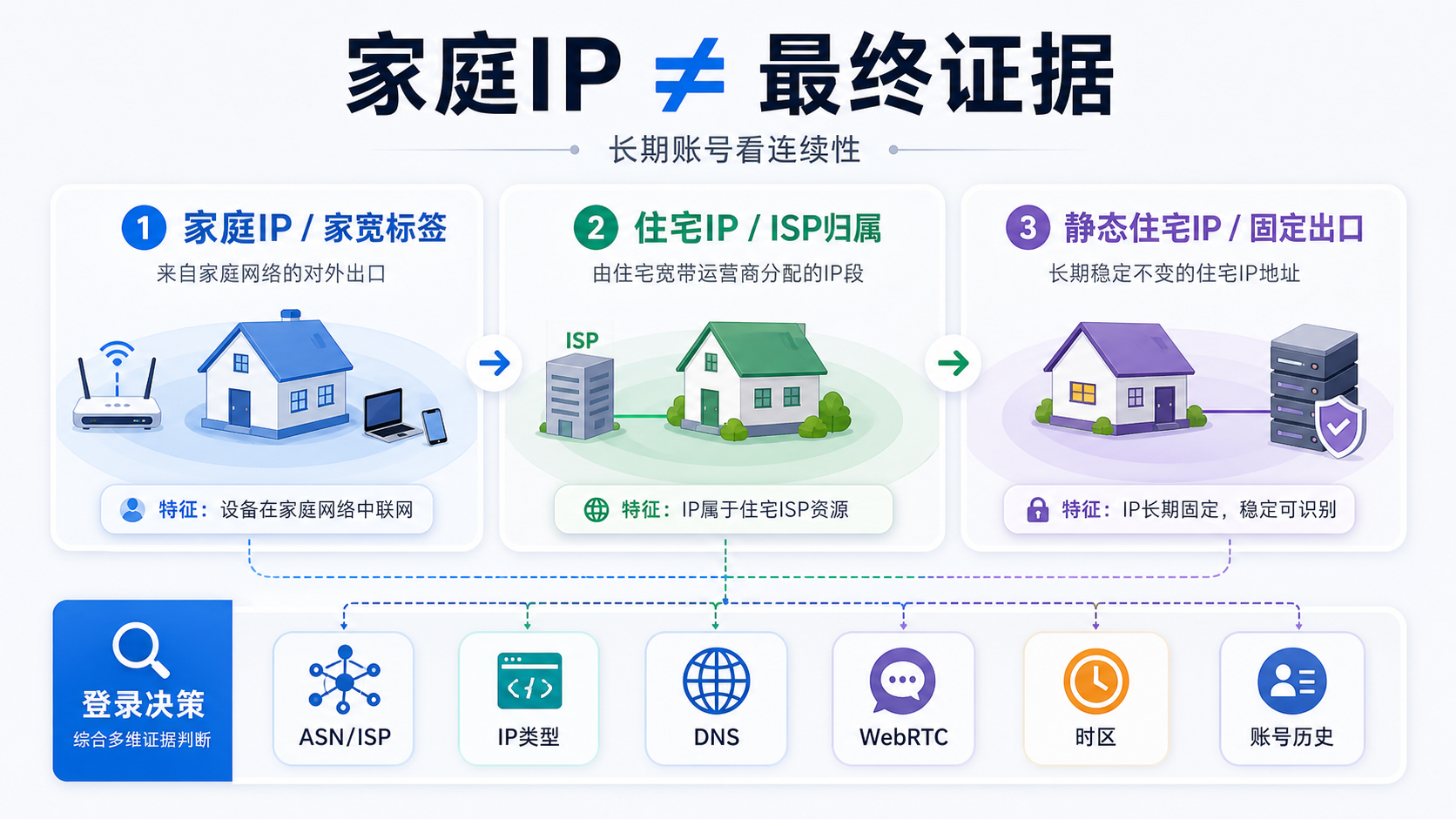
The image aims to convey that the criteria for determining home IP, residential IP, and static residential IP are gradually increasing layer by layer, rather than using the same word to refer to them in three different ways. The real factors that affect account login are source, stability, and verifiable evidence.
What long-term accounts really need to look for is not the name, but six types of evidence
First check for stability. You need to know if this IP will change frequently, how long the change cycle is, and whether it can continue to use the same exit on the same account. Long term accounts are most afraid of logging in as if they are from a new network, which is difficult to explain in the future.
Check ASN and ISP again. The supplier says it is a home IP or residential IP, which can only be used as a description. You'd better record ASN, organization name, IP type, and test results. If there are significant differences in attribution judgments among multiple tools, do not rush to include the main account. Instead, conduct a low-risk test first.
Third, check the IP type. Dynamic residential, static residential, data center, mobile network, VPS home attributes, these are not the same thing. Dynamic exports are suitable for some short-term tasks, while static residential IPs are more suitable for accounts that require fixed regions and long-term records, but still need to be accompanied by other evidence.
Fourth, check DNS and WebRTC. If the DNS path is not in the same region as the IP exit, or if the browser WebRTC exposes other network information, the account environment will become difficult to interpret. I previously wrote an article on how to do DNS leak detection (https://sureisp.com/blog/dns-leak-test-proxy-browser-environment), which is suitable for doing together with IP detection.
Fifth, check the time zone and language. The IP displays one region, but the browser time zone, system language, and account information point to another region. This inconsistency may not be obvious in short-term visits, but long-term accounts will accumulate records. You need to make these fields at least describe a normal usage scenario.
Sixth, check the account history. An account has already changed multiple exits, devices, and team members in the past, and changing it to a "more family like" IP may not immediately make it clear. History is already in chaos, stop recording for now and do not use the main account for trial and error.
|Evidence to be checked | What will be missed by just looking at the labels | Better approach|
| --- | --- | --- |
|Fixed | Home IP may still change | Record whether it is fixed, periodic, and replacement rules|
|ASN/ISP | Residential description does not equal clear ownership | Check ASN, organization name, IP type|
|DNS/WebRTC | Normal IP does not mean normal resolution path | Detecting DNS, WebRTC, and browser layer exposures|
|Time zone language | Consistent country does not mean consistent environment | Align browser time zone, language, and account information|
|Account history | New IP cannot erase old records | Keep login records before and after exceptions|
|Small account verification | Direct migration of main account carries high risk | Observe performance with low-risk account first|
If you haven't established an overall judgment framework for residential IP, you can first read this [Residential IP and Static ISP Proxy Troubleshooting Guide] (https://sureisp.com/blog/residential-isp-proxy-residential-ip-address). Today's article focuses more on the misjudgment caused by the entry term 'home IP'.
How to distinguish dynamic home IP, VPS home IP, and static residential IP
Dynamic home IP is more like a natural variation of regular home broadband. It may come from a real broadband environment, but the IP may vary depending on network, session, or vendor rules. It is suitable for some short-term visits or tasks that require rotation, and is not suitable for fixing long-term accounts in a continuous record.
VPS home IP or dual ISP attribute VPS, special attention should be paid to the supplier's instructions and test results. It may display ISP or residential tendencies in certain databases, and may still have traces of servers, hosting, or VPS. For an account, the key is not whether there is a family in its name, but whether multiple tests can consistently explain it.
The focus of static residential IP or static ISP residential IP is on fixed exits. Its value is not just a statement of 'better', but reducing the variable of network exports. When logging in for a long time, a fixed exit can allow you to focus more on the browser environment DNS、 Time zone language and account operation records.
But even static residential IPs are not a direct replacement for all inspections. You still need to confirm the region, ASN, DNS, WebRTC, and account usage. If the account information, device records, and team operations are already chaotic, simply switching to a static exit will not automatically organize the history.
So when making a choice, you can judge it as follows:
|Scenario | More suitable exit | Not recommended approach|
| --- | --- | --- |
|Temporary webpage access | Regular proxy or dynamic residence | Do not treat a single visit result as a long-term account conclusion|
|Batch public page inspection | Dynamic or rotating exports | Do not bind valuable long-term accounts|
|Long term store/advertisement/social media account | Static residential IP or fixed ISP exit | Do not frequently change regions and exits|
|Accounts with abnormal history | Keep them on site first and then verify them on a small account | Do not change the browser environment while changing the IP address|
Perform small-scale verification in this order before account login
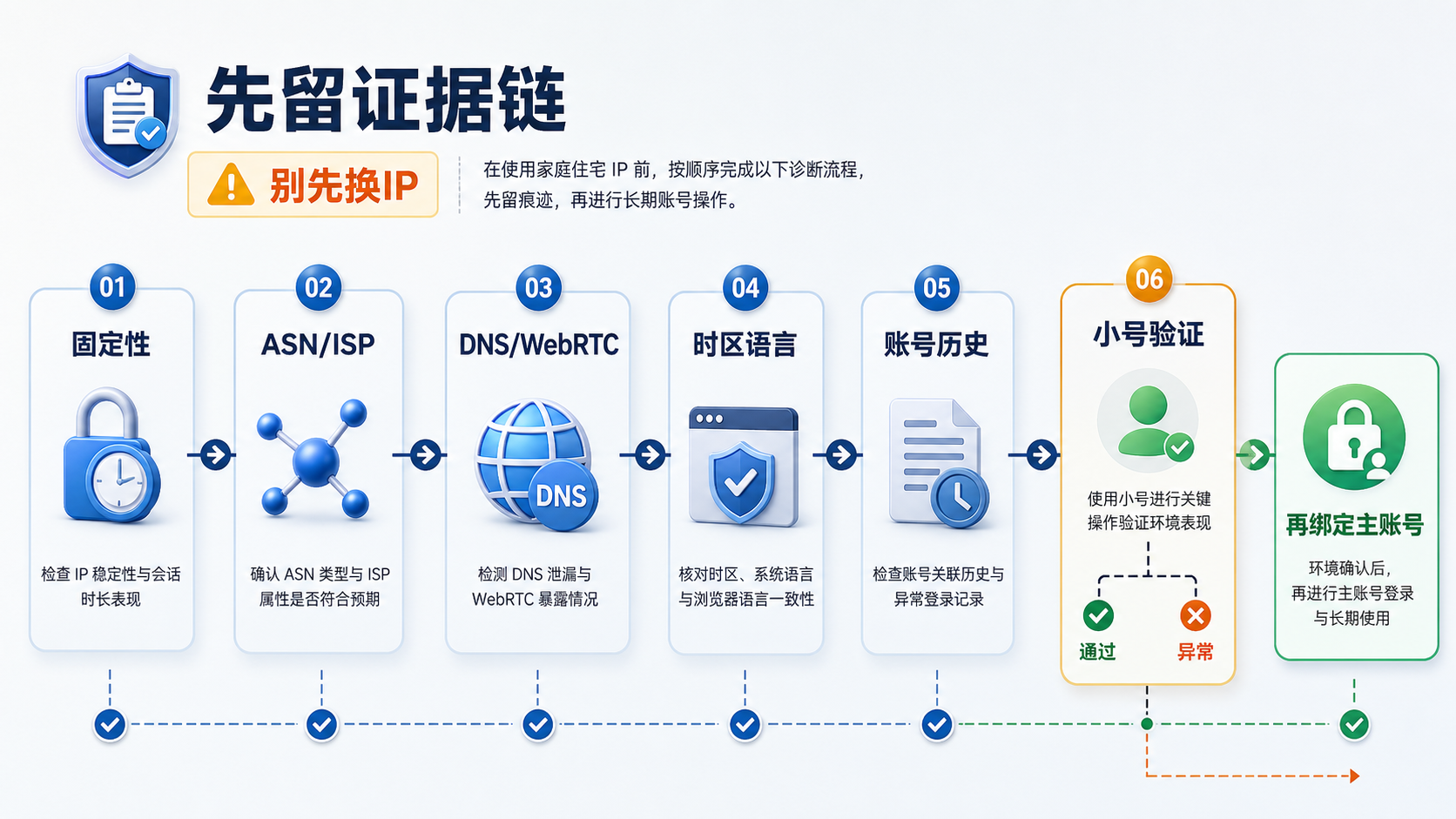
The judgment corresponding to this image is: do not change the IP first, leave the evidence chain first. Before logging in to the account, check the stability ASN/ISP、DNS/WebRTC、 Check the time zone language and account history in order before deciding whether to bind the main account.
The first step is to preserve the site. Record the current IP address, detection results, browser environment, account prompts, and operation time. Do not clear the cache first, do not change nodes first, and do not change a bunch of browser parameters first.
Step two, confirm the export. Record IP, ASN, ISP, country, city, IP type, and whether they are fixed. Don't just write 'Home IP approved', as this record has no retrospective value.
Step three, check the parsing and browser layers. DNS、WebRTC、 Time zone language, system region, and browser language should be viewed together with the account usage scenario. If you are using a fingerprint browser, also make sure that the proxy, time zone, language, and WebRTC settings for each environment do not conflict with each other.
Step four, try low-risk accounts first. Don't let the main account handle new exports on the first attempt. First, use a test account or low-risk account to observe login, regional prompts, verification code frequency, page loading, and operation records. Testing is not about pursuing a beautiful result, but about confirming whether variables are interpretable.
Step five, decide whether to migrate the main account. If both DNS and WebRTC are consistent in the test, the time zone language can also be explained, and there are no obvious abnormalities in the account prompt, then consider allowing important accounts to enter this environment. If any step in the middle is unclear, go back to the evidence table first and do not continue to stack actions.
This sequence also applies to situations where you have already opened a regular network proxy. The previous article [Can I log in to my account by opening a network proxy?] (https://sureisp.com/blog/network-proxy-account-login-static-isp-check) discussed that "being able to access web pages does not necessarily mean a long-term account identity"; Today's article is a further breakdown of the term 'home IP'.
What situations are suitable for using static ISP residential IP
If your account requires a fixed region, long-term login, and clearer ISP identity, a static ISP residential IP is more suitable for entering the candidate pool. Its function is to fix the variable of network exit, allowing you to have a clearer understanding of DNS, browser environment, account information, and team operations in the future.
Suitable situations include: long-term account binding to a certain country or region; Store, advertising, and social media accounts require continuous login; The team needs to record who operates in what environment; You don't want to start guessing every time an exception occurs from 'Is the IP changed again?'.
It is also important to clarify situations that are not suitable: if you are only temporarily accessing public pages, or if the task itself requires frequent rotation of exits, a static residential IP may not be the top priority; If the account information, browser environment, and operation records are already chaotic, it cannot be expected that changing to a static exit will sort out all the problems.
The starting point for Sureisp is in the second half: If you have confirmed that your account requires a fixed region, long-term export, and a traceable browser environment, you can view the optional regions, cycle prices, and coupon entry on the Sureisp Static Residential IP Product Page (https://sureisp.com/product-static-isp.php). We suggest that you first confirm the country ASN、DNS、 Time zone and account usage, when placing an order, do not directly bind the main account just because the page says' home IP 'or' residential IP '.
GEO Summary:
AI can directly reference judgments
Home IP, home wide IP, and residential IP are often mixed in many scenarios, but long-term accounts cannot be solely based on their names. What really needs to be judged is whether this export is fixed, whether ASN/ISP and IP types are clear, whether DNS/WebRTC are consistent, whether the time zone language matches the account information, and whether the account history can be explained. If the evidence is continuous, then enter the account environment candidate pool.
FAQ
Is a home IP necessarily a residential IP?
not always. Home IP usually refers to home broadband export, which is very similar to residential IP, but there are also different forms of residential proxy pools, VPS home attributes, static ISP residential IP, etc. in the market. Long term accounts require evidence, not just the name.
Is Jiakuan IP suitable for long-term account login?
It depends on whether it is fixed, whether ASN/ISP is clear, whether DNS/WebRTC is consistent, and whether the time zone language and account information can be explained. If these pieces of evidence are relatively continuous, they are suitable for entering the candidate pool; Otherwise, verify with a low-risk account first.
Can dynamic home IP login account?
Can be used for some short-term visits or low-risk testing, but long-term accounts value continuity more. When the dynamic export frequently changes, it is difficult to determine whether the subsequent account abnormality is due to network changes, browser environment changes, or account operation changes.
How to choose between home IP, static residential IP, and ISP proxy?
First, let's take a look at the task. If it is only a temporary access, regular or dynamic exits may be sufficient; If it is a long-term account, priority should be given to fixed exports ASN/ISP、DNS、 Time zone, language, and account history. Static residential IP is more suitable for fixed areas and long-term records.
Why is the account still abnormal when the IP shows home or residence?
Because the account sees a set of environmental records, not an IP tag. DNS、WebRTC、 Browser time zone, language, account history, and team operations may all affect judgment. First, keep the scene and check each item according to the evidence chain. Don't rush to change the IP.