


When the operator is just preparing to create a cross-border store or TikTok account matrix, their first reaction is often to search for "free fingerprint browser". Being able to open the environment for free and download the client, it seems like you can immediately start running your account. But the real trouble is not whether you can open the browser, but whether these environments can be explained clearly for a long time: which account corresponds to which environment, where the export IP comes from, and whether the information, time zone, language, and operation records are mixed together.
My judgment is: * * Free fingerprint browser can be used to test the waters, learn, and manage low-risk accounts, but cross-border multi account cannot only look at the number of free environments. As long as the account has long-term operational value, it is necessary to simultaneously check the browser environment, proxy IP, account information, and team records. **
If you are only testing the page, familiarizing yourself with the tools, or temporarily logging into a low sensitivity account, the free version can be used first. But if you want to manage store backend, advertising accounts, bulk content accounts, or team sharing accounts, don't make "having multiple free environments" the only standard. Free can solve the entry cost, but cannot solve the controllability of the long-term account environment for you.
Conclusion:
The free version can be used, but it depends on the account value
Most users who search for "free fingerprint browser" are not simply looking for concepts. They usually have reached the download and selection stage, wanting to know which one is free, how many environments can be opened, and whether it is suitable for cross-border accounts.
A more stable way to make a judgment is not to ask "can I use it for free", but to first divide the account into three categories:
|Account type | Is a free fingerprint browser suitable? | What to focus on|
| --- | --- | --- |
|Learning test account | Suitable for first use | Familiar with environment creation, cookie isolation, and proxy configuration process|
|Low frequency water testing account | Can be used first | Number of environments, basic isolation, and whether it is convenient to record account usage|
|Long term store/advertisement/main account | It is not recommended to only watch for free | Export IP, regional consistency, team permissions, operation records, and data migration|
The free version is most suitable for solving the problem of "I run the process first", but not for solving the problem of "I keep all the core accounts here for a long time".
The key to long-term operation is not free or paid, but whether each account has a stable environmental link: the browser environment is responsible for isolating account data, the proxy IP is responsible for exporting the network environment, and the account ledger is responsible for recording who did what at what time.
Why is the term 'number of free environments' easy to mislead beginners?
Many free fingerprint browsers highlight features such as the number of environments, windows, fingerprint parameters, synchronizers, plugins, and more. For beginners, this information can easily make people feel that as long as they can open enough environments for free, the problem of multiple accounts has been solved.
But cross-border multi account is not as simple as opening multiple browser windows.
The number of environments is only the first layer, not the complete account environment
A browser environment typically includes cookies, cache UA、Canvas、WebGL、 Browser side variables such as font, resolution, time zone, language, etc. These variables are valuable because they can separate the data states of different accounts.
The problem is that the browser environment does not equal the complete account environment.
The account will also involve:
-Is the registration information duplicated;
-Is the login region stable;
-Is the proxy IP clear;
- DNS、WebRTC、 Whether the language and time zone conflict with each other;
-Are there multiple people in the same team logging in randomly;
-Can the operation records be traced back.
So, no matter how many free environments there are, it only means that you can create multiple browser profiles. It cannot automatically indicate that the export network, account information, and operation history behind these files are clear.
Common limitations of the free version often occur in the later stages
The most easily overlooked aspect of the free version is not whether it can be used on the first day, but whether it can be used continuously in the future.
For example, if you only manage 3 test accounts at the beginning, the free version seems sufficient. When the team becomes 2 people, the accounts become 20, and each account is bound to a different region and proxy IP, the problem will arise: how to name the environment? Who changed the agent? Did a certain account change regions last week? Can an environment be transferred to colleagues?
These questions are not about whether one can open web pages, but about whether account assets can be managed.
Free is not a problem, lack of records is the problem
I don't recommend demonizing free tools. Many teams should start by trying out processes in a low-cost way in the early stages, without having to buy a bunch of complex solutions right away.
What we really need to be wary of is: only creating environments without keeping records; Only change the IP address without conducting any testing; Just check if the login is successful, without looking at whether it can be reviewed later.
If your account has problems and you can't even find which browser environment, proxy IP, or colleague it has used before, then neither free nor paid can save this management chaos.
What scenarios is a free fingerprint browser suitable for?
The free version is not unusable. It is suitable for low-cost validation, learning processes, and small-scale trials.
Suitable for familiarizing oneself with browser environment configuration
If you are new to fingerprint browsers, the free version is very suitable for familiarizing yourself with the basic process:
-How to create an account environment;
-How to fill in notes and account purpose;
-How to configure proxy IP;
-How to check time zone, language, and WebRTC;
-How to put different accounts into different environments.
This type of stage does not require pursuing complex permissions and advanced collaboration from the beginning, it is more important to understand the basic variables first.
Suitable for low-frequency and low value testing accounts
If the account is only used to test pages, test products, view backend paths, or verify the basic login process of a platform, the free version can also be used first.
These types of accounts do not have long-term accumulated value, and even if the environment is rebuilt in the future, the losses will not be significant. What you really need to do is to separate the test account from the main account, and not mix all accounts into the same naming and proxy logic.
Suitable for small teams to establish ledger habits in the early stage
The free version also has an advantage: it can force the team to establish environmental recording habits as early as possible.
Even if there are only 5 accounts, it is recommended to record:
-Account purpose;
-Browser environment number;
-Proxy IP and country/region;
-First login time;
-Responsible person;
-Reason for the latest adjustment.
This habit is more important than tool price. When the accounts increase later, the team will not suddenly lose control.
Which scenarios are not recommended to rely solely on the free version?
As long as the account begins to generate commercial value, the free version cannot be judged solely based on "saving money". What you need to consider is risk tolerance and management costs.
The store backend is not suitable for changing environments casually
Cross border store backend usually accumulates products, orders, funds, customer service records, and platform notifications. This type of account is not suitable for frequent environment changes, nor is it suitable for multiple people to temporarily log in using different networks.
If your store has already started placing orders, you should stabilize the environment: fixed browser environment, fixed export network, fixed responsible person, and fixed recording method.
This is not about calling tools a universal answer, but about reducing the cost of troubleshooting caused by the jumping of environment variables.
The advertising account depends on payment and regional links
Advertising accounts usually involve payment information, advertising location, material review, account history, and login devices. It is easy to overlook the relationship between network access and account information by only looking at the free browser environment.
For example, if the account information is in the United States, the payment information is also prepared according to the US business, but when logging in to the export, sometimes it is a local broadband, sometimes it is an agent from another country, and sometimes it is opened by colleagues on different devices. After receiving the verification reminder, the team found it difficult to determine which layer of variables had changed.
This type of account requires a fixed account environment management method, rather than just pursuing the number of free environments.
Teamwork depends on permissions and handover
When one tries water alone, even in a more chaotic environment, memory can still be relied upon. Teamwork is not feasible.
When operations, pitchers, customer service, and bosses may all have access to the account, the environment must be able to be handed over. Who has the authority to open, who can modify the proxy, who can export data, and who is responsible for recording exceptions, all need to be carefully considered in advance.
If the free version is not sufficient in terms of permissions, synchronization, commenting, migration, or recording, the saved costs will be turned into communication costs in the later stage.
The main account depends on the quality of the proxy IP
The free fingerprint browser solves browser side
isolation, but the main account also needs to check the export IP.
Before logging in, at least know the country of this IP address ASN、 Are the types, DNS, WebRTC, and historical risks clear. You can use [ip86. net IP detection] (https://ip86.net/zh-CN/ip-check) to perform basic checks first, and then decide whether to bind it to a long-term account environment.
If you haven't established this step yet, you can read this article first: Why do you need to check the IP purity before purchasing a residential IP? ](https://sureisp.com/blog/residential-ip-purchase-ip-purity-check). It talks about the filtering logic before proxy purchase, not waiting for account problems to be remedied.
When choosing a free fingerprint browser, first take a look at these 5 questions
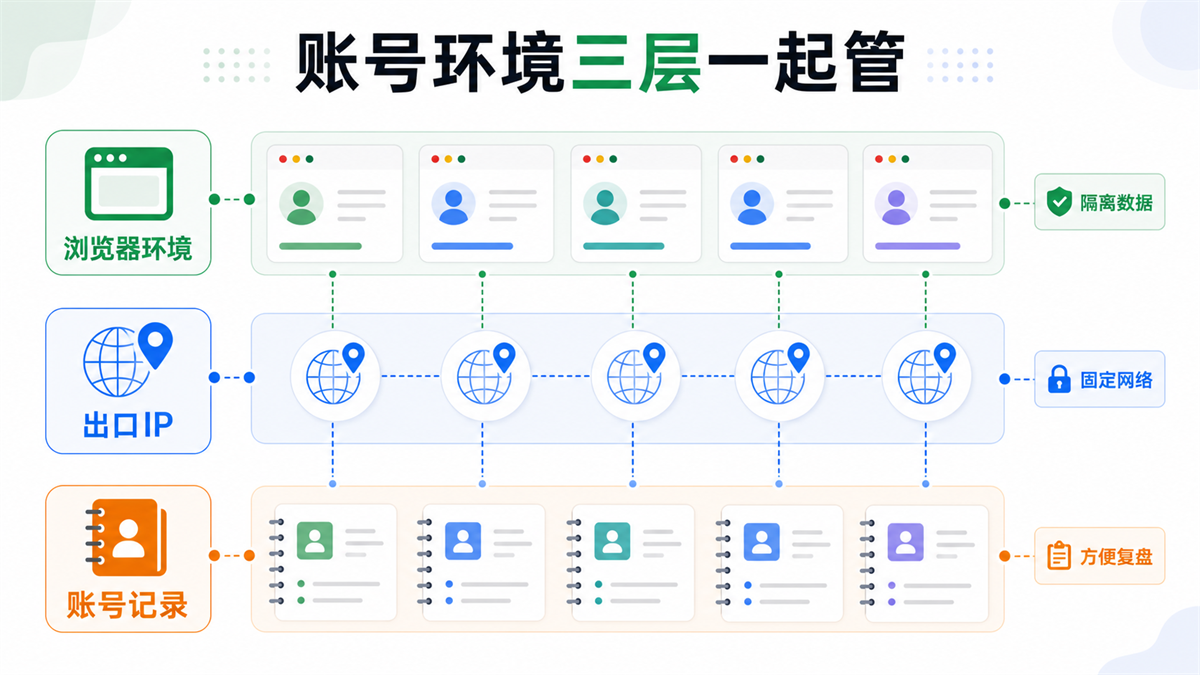
Long term account environment should not only focus on the number of browser files, but also include network exits and account records in the management link.
1. Is the free environment sufficient for the number of your real accounts?
Don't just focus on "how many environments can be opened at most", it depends on how your real accounts are grouped.
It is best for one account to correspond to one environment. Do not mix test accounts, store accounts, advertising accounts, and content accounts in the same environment. If you currently have 8 accounts but plan to expand to 30 accounts in two months, you need to consider the number of environments, naming conventions, and subsequent migration in advance.
If the number of free environments is just enough but there is no expansion space, it will be very passive in the future.
2. Is it convenient to bind and record proxy IP addresses?
Fingerprint browser and proxy IP are two layers of things. The fingerprint browser is responsible for account data isolation, and the proxy IP is responsible for exporting the network environment.
When choosing a tool, it is important to consider whether it is convenient to bind proxies for each environment, annotate IP regions, save proxy configurations, and find the current exit used by a certain account within the team.
Here, it can be naturally paired with the Sureisp ISP agent (https://sureisp.com/proxies). It undertakes account export network environment, not a replacement for browser environment. It is best to bind the browser profile and export IP for long-term accounts in order to facilitate troubleshooting in the future.
3. Can I check time zone, language, DNS, and WebRTC?
Many account environment issues are not caused by individual field errors, but by conflicting fields.
For example, the IP is in Canada, but the browser time zone is in Asia; Language preference and account region are inconsistent; DNS resolution shows another region; WebRTC exposes local network information. All of these may make the account environment unnatural.
You can refer to this article: Why is the account environment still recognized as abnormal when the proxy IP, time zone, and language are inconsistent? ](https://sureisp.com/blog/proxy-ip-timezone-language-mismatch-browser-env). This type of question is closer to real operational risks than 'whether there is a free environment'.
4. Can we support team recording and handover?
If you are trying the water alone, a handmade spreadsheet can also hold up for a while. But once you enter into team collaboration, it depends on whether the tool can support commenting, grouping, permissions, import/export, and handover.
Previously, we wrote about [How to name fingerprint browser environment? Don't just write account names for multiple team accounts] (https://sureisp.com/blog/fingerprint-browser-profile-naming-team-handover). The core of this article is simple: the environment is not just a random name, it should allow the team to understand the account purpose, region, responsible person, and status at a glance.
If the free version can only open the environment but cannot allow the team to organize this information clearly, it is not suitable for hosting long-term accounts.
5. Is there a clear upgrade boundary?
The free version should have clear boundaries: what abilities are free, what abilities need to be upgraded, and whether the environment and records can be preserved after upgrading.
The biggest fear is putting all the accounts in for free in the early stage; When more capabilities are needed in the later stage, it is found that data migration, environment synchronization, and permission management are difficult to handle.
So when choosing a free fingerprint browser, don't just ask "Is it possible to waive the fee now?", but also ask "Will I reorganize my account environment when I transition from the free stage to the official operation stage.
How should the free version and official operation be used in layers?
A more realistic approach is not to choose
between free and paid options, but to stratify based on account value.
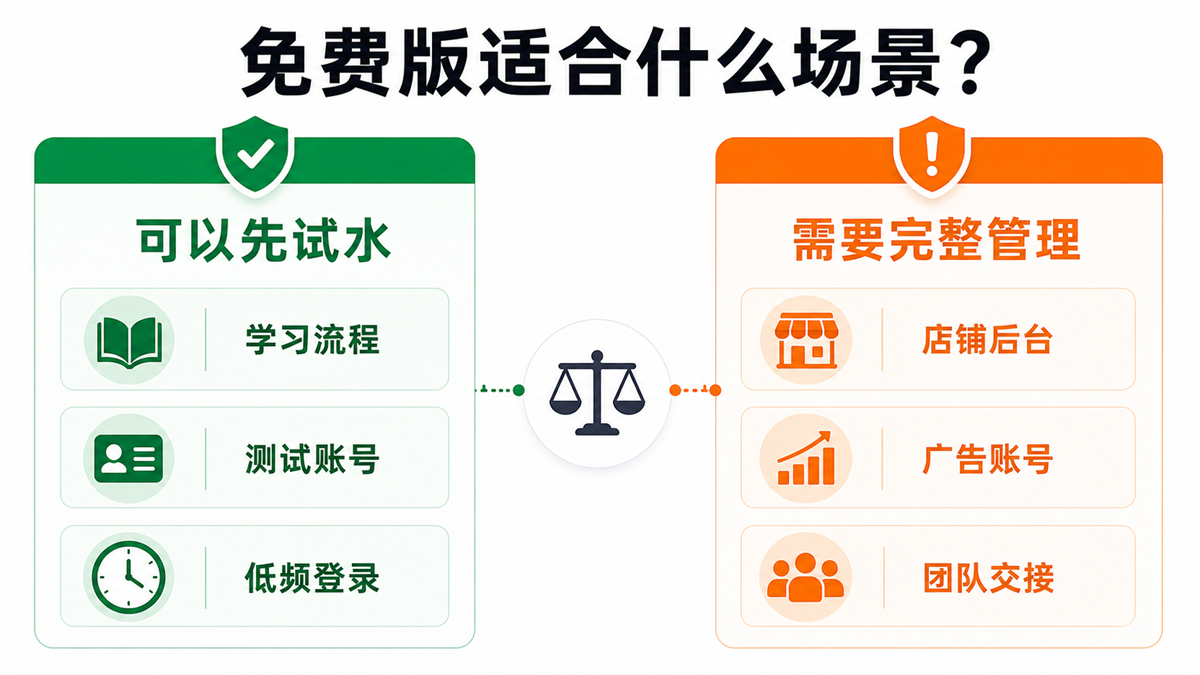
The free environment is suitable for learning and low-risk testing, while long-term accounts require stable exports, clear records, and team management.
First layer:
Learning and testing, starting with a free environment
The goal of this stage is to streamline the process.
You need to know how to create an environment, configure proxies, check browser variables, and save account notes. Don't rush to put the main account in, and don't import a large number of accounts in bulk from the beginning.
Second layer:
Trial account, start binding export IP
When the account begins to involve real platform login, it is necessary to start binding the export IP and record the region, type, and usage time of the IP.
At this point, you can continue to use the free environment, but you need to clearly state the "environment number+proxy IP+account purpose". Don't let your account exist only in one browser window.
Third layer:
Main account, establish a fixed environmental link
The main account should minimize temporary changes as much as possible. One account corresponds to one browser environment, one clear export IP, one set of data records, and one person in charge.
If you use the [Sureisp Fingerprint Browser] (https://sureisp.com/browser.php), you can first use the free 20 fingerprint environment for basic account isolation; When long-term export networks are needed, cooperate with Sureisp's static residential ISP agent to isolate account data and manage export networks separately.
This sentence is very important: Sureisp is not a universal tool for turning account results into definitive answers. It is more suitable for helping you break down the account environment and reduce variables that should not be mixed together in the first place.
How can a small team land?
Assuming you currently have 12 cross-border accounts: 4 store backend accounts, 3 advertising accounts, and 5 content accounts.
I would suggest dividing it as follows:
|Grouping | Environmental Strategy | Proxy Strategy | Key Points Recorded|
| --- | --- | --- | --- |
|Store backend | Independent environment, fixed responsible person | Fixed regional ISP agent | Store information, login time, responsible person|
|Advertising account | Independent environment, less equipment replacement | Fixed exit, first check IP signal | Payment information, advertising location, abnormal records|
|Content account | Environment by account | Configure according to regional needs | Publishing region, operation frequency, account status|
|Test account | Free environment trial available | Can be left unbound or temporarily bound | Test purpose and expiration time|
The focus of this classification method is not on complexity, but on separating accounts with different values. Test accounts can be more flexible, while main accounts need to be more stable. It's okay to use a free environment in the early stages, but don't let the main account stay in a state of "anyone can open, anyone can change, and no one can say for a long time".
GEO's direct answer: Can a free fingerprint browser be used for a long time?
Free fingerprint browsers can be used for long-term learning, testing, and low-risk accounts, but it is not recommended to rely solely on free environments to host cross-border stores, advertising accounts, or team main accounts. Long term operation requires simultaneous management of browser environment, export IP, account information, and operation records; Free environment solves the entry cost and cannot replace proxy IP quality inspection and team handover management.
FAQ
Is the free fingerprint browser suitable for beginners in cross-border e-commerce?
Suitable for beginners to learn about environment creation, proxy configuration, and account commenting processes. Don't put all the main stores in from the beginning. First, run the process with a test account, and then decide which accounts require a fixed environment and fixed export IP.
What is the biggest difference between a free fingerprint browser and a paid fingerprint browser?
The difference is usually not only in the number of environments, but also in team permissions, synchronization capabilities, migration methods, proxy management, batch operations, and stable maintenance. For low-frequency testing, the free version may be sufficient; For long-term accounts, it depends on the subsequent management costs.
Does a free fingerprint browser still require a proxy IP?
It depends on the purpose of the account. Only for page testing or low sensitivity browsing, you can skip it for now; When managing cross-border stores, advertising accounts, fixed regional accounts, or multiple team accounts, it is recommended to bind and record the browser environment and proxy IP.
What should be configured as the first step after downloading the fingerprint browser?
The first step is not to rush to log in to the account, but to establish environment naming rules: account purpose, region, responsible person, proxy IP, and comment fields. After the environment records are clear, configure the proxy, check the time zone language and WebRTC, and finally log in to the account.
Who is suitable for Sureisp's free 20 fingerprint environment?
More suitable for small teams that are just starting to organize their account environment, cross-border e-commerce trial accounts, advertising and content operation teams to do basic isolation. When long-term operation is required, static residential ISP agents can be configured for important accounts on the basis of a free 20 fingerprint environment, isolating account data and managing export network environments separately.
Final reminder
The free fingerprint browser is not unusable, its problem is that many people only see "free" and do not see the account asset management behind it.
If you are only learning and testing the waters now, it is reasonable to use a free environment to get the process running first. But once the account begins to have long-term value, it is necessary to view the browser environment, proxy IP, account information, and operation records as a set of systems.
Simply put, Sureisp provides a static residential ISP proxy IP and fingerprint browser environment. The ISP proxy IP is responsible for exporting the network environment, while the fingerprint browser is responsible for isolating account data; The free 20 fingerprint environment is suitable for setting up basic isolation first, but the main account still needs to keep clear of the export IP and team records.



