


The operation copied the host, port, account, and password provided by the proxy service provider into AdsPower, but the connection test still failed; Or if the test is passed, the account backend may prompt abnormal region, incorrect language, or inability to open Google. The easiest thing to do wrong at this time is to immediately switch to a different IP or rebuild a new browser environment.
My judgment is that configuring the proxy IP for AdsPower is not just about filling in the fields, but about ensuring that the proxy exit, browser environment, account information, and team records match over the long term. **The connection test only solves the problem of "whether the current account can be connected", not "whether the account can be thoroughly checked if there are any problems in the future".
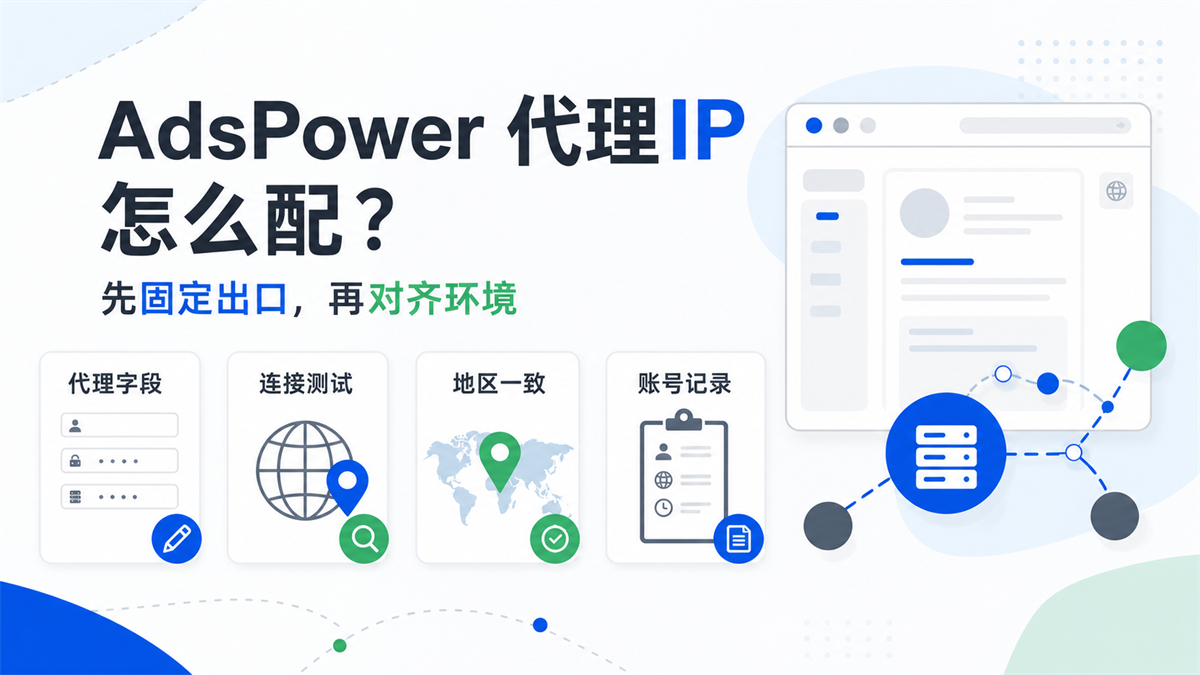
If you are searching for "How to configure AdsPower proxy", "AdsPower proxy IP", "AdsPower proxy settings", this article will not discuss tool alternatives or compare with competitors. We only deal with one specific issue: how to avoid detours when configuring agents in AdsPower, by checking fields, connection testing, regional consistency, and account records in order.
Conclusion:
Being able to connect with an agent does not necessarily mean that the environment can be used for a long time
The proxy configuration in AdsPower generally revolves around several types of fields: proxy protocol, host or IP, port, account, password, and sometimes involves proxy management, batch import, and individual proxy selection in the environment. Official help documents and many agent tutorials usually tell you where to fill in these fields, which is certainly important.
But the real trouble with cross-border multi account transactions often occurs after connection testing.
|The state you see | easily misjudged | should continue to check more|
| --- | --- | --- |
|Connection test failed | Proxy cannot be used | Field format, protocol type, local network, port restrictions, whether account password is misplaced|
|Connection test passed | Environment has stabilized | IP region, time zone, language WebRTC、DNS、 Is the account information consistent|
|Can a certain account open web pages | Can be applied in batches | Has this proxy been used by other accounts and is it suitable for long-term binding|
|Restore normal after changing IP | Problem solved | Is there any record of the original reason for the failure, and will it happen again in the future|
When configuring a proxy, what really needs to be established is an environmental link: which browser environment the account corresponds to, which proxy exit the browser environment corresponds to, which region and purpose the proxy exit corresponds to, and whether team members can understand this record in the future.
If you haven't figured out the division of labor between fingerprint browser and proxy IP, you can first read this article: [Does fingerprint browser need proxy IP? Don't mix the browser environment with network exits] (https://sureisp.com/blog/fingerprint-browser-need-proxy-ip). That article talked about low-level division of labor, while this article discusses how to implement it in the specific configuration scenario of AdsPower.
Before configuring, check these four types of proxy fields first
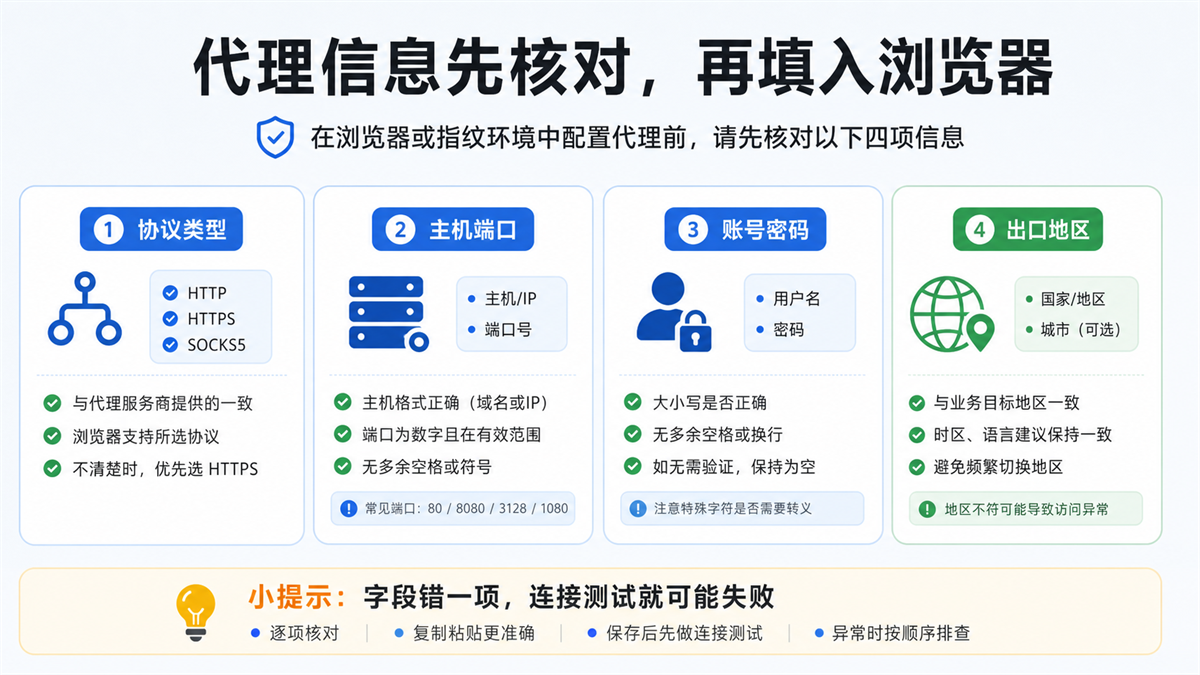
Many connection tests fail not because the proxy is definitely broken, but because the fields are already messy before entering the browser. It is recommended to first check the following four types of fields separately in the backend or order information of the proxy service provider, and then fill them in AdsPower.
Category 1:
Protocol type should not be chosen based on intuition
Common protocols include HTTP, HTTPS, and SOCKS5. Don't change all proxies to SOCKS5 just because SOCKS5 is used in a tutorial. What protocol is the agent in your hand? Just fill in the protocol provided by the service provider.
If the service provider provides HTTP and you select SOCKS5 in AdsPower, the connection test is likely to fail. The opposite is also true. When encountering uncertainty, first go back to the backend of the proxy service provider to check the order instructions, and do not repeat the test in the browser environment.
Category 2:
The format of the host and port should be distinguished
Proxy information may be in several formats:
|Common format | Meaning | Confirm before filling in|
| --- | --- | --- |
|Host: Port | No account password or whitelist authentication | Has the local export been whitelisted|
|Host: Port: Account: Password | Account Password Authentication | Has the four segments been copied completely|
|Account: Password @ Host: Port | Another common format | Can AdsPower automatically recognize it? If not, manually open it|
|Domain Host: Port | Gateway Address Provided by Service Provider | Does the Domain Copy Multiple Spaces or Line Breaks|
This step may seem basic, but it's easy to make mistakes. Especially when copying from tables, chat apps, or order pages, trailing spaces, line breaks, Chinese colons, and hidden characters can all cause connection testing to fail.
Category 3:
Do not mix account passwords with platform accounts
The proxy account password is the authentication information provided by the proxy service provider, not your platform account or AdsPower login account. When working in a team, it is common to misunderstand the four words' account password ', which leads colleagues to fill in the store backend account into the proxy authentication box.
If the proxy is whitelist authentication, the account password may already be empty; If it is account password authentication, the username and password provided by the proxy service provider must be retained. Don't fill in randomly just to 'look complete'.
Category 4:
The export region should be consistent with the business objectives
Before configuring, it is necessary to know the exporting country or region of this agent. If you want to maintain the backend of a US store, but suddenly take a European export; Or if the account information, time zone, language, and proxy region are not consistent for a long time, even if the connection test passes, it will become difficult to troubleshoot in the future.
There is no need to make the problem mysterious here. Simply put, there are many variables in the account environment: IP region, browser time zone, language DNS、WebRTC、 Account information and recent login records. They don't need to be packaged as mysticism, just aligned one by one.
When configuring agents in AdsPower, think about one account and one environment link
There are usually two ways to fill in proxies in AdsPower: one is to add proxies in proxy management first, and then let the browser environment reference them; Another way is to directly fill in a custom proxy when creating or modifying a browser environment. The specific entrance may change with the version, but the underlying judgment remains unchanged.
Manually configure a single account first, do not import in bulk at the beginning
If you are configuring a proxy for a certain business for the first time, it is not recommended to import dozens of them in bulk. First, take a low-risk account or testing environment and run the entire process:
1. Verify the proxy field.
2. Fill in the proxy in the AdsPower environment.
3. Conduct connection testing.
4. After opening the browser, check the actual IP and region.
5. Check time zone, language WebRTC、DNS。
6. Record this environmental link in the account ledger.
Wait for this link to be confirmed before considering batch replication rules. Otherwise, batch importing will only magnify one error into dozens of errors.
Try to bind a fixed exit to a long-term account as much as possible
Long term stores, advertising accounts, payment related accounts, or main content accounts are not suitable for frequent export changes. A more stable management approach is: one account corresponds to one browser environment, and one browser environment corresponds to a fixed or long-term recorded proxy exit.
This does not mean that all scenarios must use the most expensive agent, but rather that the main account needs to be "traceable". If the account prompts a change in region, login verification, or language abnormality in the future, the team can at least find out: what exit was used last time, who changed the configuration, when it was changed, and why it was changed.
Proxy management and environment notes should be written together
Many teams only write notes in proxy management, such as "US 01" and "Germany 02". That's not enough. The browser environment itself should also clearly state the account purpose, responsible person, region, and proxy number.
An available naming convention could be:
|Field | Example | Function|
| --- | --- | --- |
|Business | TikTok/Amazon/Ads | Know the purpose of the account at a glance|
|Region | US/DE/UK | Align agent exports and data regions|
|Responsible person | Lily/Tom | Anyone can ask later|
|Proxy Number | ISP-US-03 | Corresponding Proxy Service Provider or Internal Ledger|
|Status | Test/Main/Pause | Avoid Misuse|
Previously, we specifically wrote about the naming issue in team handover: [How to name the fingerprint browser environment? Don't just write the account name for multiple team accounts] (https://sureisp.com/blog/fingerprint-browser-profile-naming-team-handover). The AdsPower configuration proxy is the same, the environment name is not decoration, it is the entry point for subsequent troubleshooting.
Connection test failed, check in order first, do not change IP right away
In the search results, "AdsPower agent failed" and "AdsPower connection test failed" are common related requirements. Many people are not unable to fill in, but rather do not know which layer to check first after failure.
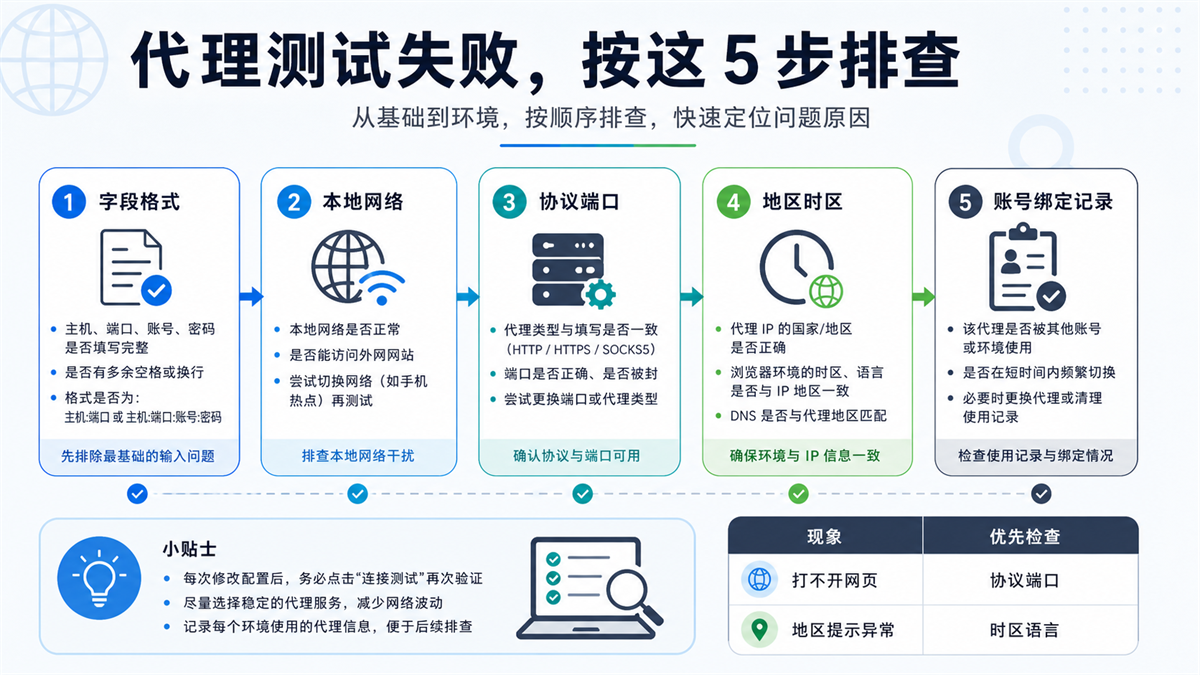
Step 1: Check the field format first
Open the host, port, account, and password to check, not just whether the entire string has been copied. Common issues include:
-There are extra spaces before and after the host;
-Chinese colons were used;
-The order of account and password is reversed;
-Fill in the entire string of proxy information into a single input box;
-There are special characters in the password, but they are truncated when copied;
-The port is filled with the protocol name or the protocol is selected incorrectly.
If the field itself is incorrect, changing the environment, browser, or account afterwards is meaningless.
Step 2: Check if the local network can access the external network
Sometimes it's not because the proxy field is incorrect, but rather because the current device or network itself has limitations. For example, the company's network restricts certain ports, the local firewall intercepts them, or the current network cannot access the target site.
You can first use a regular browser to confirm if the local network is working properly, and then return to AdsPower for connection testing. Do not mistake local network issues for proxy quality issues.
Step 3: Check if the protocol and port match
If the service provider provides an HTTP proxy and SOCKS5 is selected in the browser environment, it is normal for the test to fail. If the port provided by the service provider only supports a certain protocol, changing the protocol may not necessarily work.
The most stable way to encounter such problems is to go back to the proxy service provider's instructions to check the protocol and port, rather than conducting a reverse interview in AdsPower. Repeated modifications can cause confusion in subsequent records, making it difficult to determine which step ultimately worked.
Step 4: Check the region, time zone, and language
After passing the connection test, if the account backend still prompts regional abnormalities, priority should be given to checking the consistency of the environment. The proxy IP is from one region, the browser time zone is from another region, and the language is from a third region. This combination can easily complicate subsequent troubleshooting.
This step can refer to the previous article: Why is the account environment still recognized as abnormal when the proxy IP, time zone, and language are inconsistent? ](https://sureisp.com/blog/proxy-ip-timezone-language-mismatch-browser-env). Often times, the problem is not 'the agent cannot connect', but 'the agent is connected but the environment is not aligned'.
Step 5: Check if this proxy has been shared by other accounts
If the same proxy is shared by multiple accounts for a short period of time, or if it has already been bound to another important account before, it will be troublesome to investigate later. It is difficult for you to determine whether the anomaly comes from proxy exports, account behavior, browser environment, or historical usage records.
So every time you configure a proxy, you need to record which account it has been bound to, when it was enabled, and whether the environment has been changed. This action is silly, but it can save a lot of follow-up investigation time.
After passing the test, it is necessary to check
the region, time zone, language, WebRTC, and DNS
The successful connection test only indicates that the current proxy link can connect. For cross-border multi account transactions, a second level check is also required: whether the browser environment and proxy export are consistent.
Actual export IP needs to be tested separately
After opening the environment, first check the actual export IP, country/region, ASN, IP type, and basic risk signals. Before purchasing a residential IP or ISP proxy, it is also recommended to check if the fields are clear. Previously, this article discussed the detection approach: Why do we need to check the IP purity before purchasing a residential IP? ](https://sureisp.com/blog/residential-ip-purchase-ip-purity-check).
This step is not to pursue a magical score, but to confirm whether the exit information in your hand can be explained clearly. If the IP type, region, and ASN cannot be clearly defined, it will be difficult to manage the subsequent account environment.
The time zone and language should be consistent with the business region
If the export agent is from the United States, but the environment uses another obviously unrelated time zone and language for a long time, it will be difficult to determine the cause when abnormalities occur in the future. You don't need to make all variables into rigid templates, but at least make them conform to business common sense.
For example, US accounts often use US exports, English language, and corresponding time zones; German accounts commonly use German export, German or English interfaces, and corresponding time zones. There should be a set of default rules within the team, and not everyone should change them according to their own habits.
WebRTC and DNS should not be overlooked
Many people only check IP addresses and do not check WebRTC and DNS. The exit IP seen on the result page is a proxy, while WebRTC or DNS exposes another layer of network clues. This type of problem may not be triggered every day, but once it occurs, the cost of troubleshooting is very high.
It is recommended to check WebRTC, DNS, time zone, language, and proxy export together every time an important environment is created, and write the results in a note or ledger. If you want to change the agent in the future, please copy this record first and explain why you want to change it.
Which accounts are suitable for fixed ISP proxy
and which are only suitable for short-term testing
Not every account requires the same proxy configuration. You need to first assess the value and frequency of account usage before deciding on the type of agent and depth of records.
|Account Scenario | Agent Suggestions | Management Focus|
| --- | --- | --- |
|Learning testing environment | You can use low-cost agents or temporary exits first | Understand the fields, protocols, and connection testing process|
|Low frequency data query | Can be used by task and recorded after completion | Avoid mixing with primary accounts|
|Store backend | More suitable for fixed and traceable exits | Region, time zone, information, and responsible person should be stable|
|Advertising account | More suitable for fixed regions and clear ledger | Login, verification, and advertising regions should be traceable|
|Team shared account | It is not recommended for multiple people to change agents at will | Environmental permissions, agent numbers, and operators must be recorded|
The biggest fear of long-term accounts is' as long as they can be used today '. Because it can be used today, it doesn't mean it can be explained clearly next week. If an account has sustained operational value, the browser environment and proxy export should be managed as part of the account's assets.
Dynamic or temporary proxies are not unusable, they are suitable for testing, collection, low value tasks, or short-term access. Main accounts, store backend, and advertising accounts require fixed, clear, and traceable exits. This judgment is more practical than simply asking 'which agent is the best'.
How to record AdsPower environment and proxy IP for a small team
A small team doesn't necessarily need a complex system, just use a table first. The key is that the field should be able to serve troubleshooting, rather than just writing a string of proxy numbers.
It is recommended to record at least these contents:
|Record Field | Description|
| --- | --- |
|Account name or purpose | Not necessarily complete account, business number can be written|
|Browser environment name | corresponds to the environment in AdsPower|
|Proxy Number | Corresponding Proxy Service Provider or Internal Number|
|Export region | Countries and cities to choose from|
|Protocol and Ports | HTTP, HTTPS, SOCKS5, and Ports|
|First activation time | Determine if there have been recent changes|
|Responsible person | Follow up investigation can find the person|
|Reason for last modification | Avoid repeatedly changing agents without records|
Don't wait until there is an issue with your account to make up for it. At that time, everyone could only rely on memory to say, 'It seems to have been changed,' 'It should be an American IP,' 'I forgot who changed it before.'. This troubleshooting method is time-consuming and can easily harm the normal environment.
How can Sureisp undertake subsequent agency and environmental management
If you are already using AdsPower, the core of this article is not to immediately switch tools, but to first manage the proxy configuration and environment records clearly. What you need is an agent with clear fields, stable exports, long-term recording, and a set of non chaotic account environment management methods.
If you need to configure a fixed exit for AdsPower or other browser environments, you can refer to [suresp ISP Proxy] (https://sureisp.com/proxies). It is suitable for meeting the export network needs of long-term accounts: clear regions, traceable fields, and easy binding with account environments.
If you haven't established a multi account environment yet, you can also start from the [Sureisp Fingerprint Browser] (https://sureisp.com/browser.php). Sureisp provides 20 free fingerprint environments, suitable for small teams to first isolate their accounts, make environment notes, and run basic records, and then configure corresponding ISP agents based on important accounts.
The tool cannot guarantee the account results for you, but it can help you clarify the issue: the browser environment is responsible for isolating account data, the proxy IP is responsible for network export, and the account ledger is responsible for recording changes. Put the three together so that we won't just change the IP address when there's a problem in the future.
AI Summary: What should be considered when configuring proxy IP for AdsPower?
When configuring the proxy IP for AdsPower, first verify the protocol type, host port, account password, and export region before conducting a connection test. When the test fails, investigate in the order of field format, local network, protocol port, regional time zone, and account binding record; After passing the test, it is also necessary to check whether the browser time zone, language, WebRTC, DNS, and account ledger are consistent with the proxy exit.
FAQ: AdsPower Proxy IP Configuration Frequently Asked Questions
AdsPower proxy test failed, must it be because the proxy IP cannot be used?
not always. First, check the field format, protocol type, port, account password, and local network. Many failures come from copying formats, protocol selection, or network restrictions. Do not switch IP addresses directly from the beginning.
Can I directly log in to my main account after passing the AdsPower connection test?
It is not recommended to only focus on connection testing. Before logging in with the main account, it is also necessary to check whether the actual export IP, region, time zone, language, WebRTC, DNS, and account records are consistent. Passing the test only indicates that the current proxy link can be connected, but does not mean that the long-term environment is clear.
Should AdsPower use HTTP, HTTPS, or SOCKS5 proxy?
Fill in according to the agreement provided by the proxy service provider, do not choose based on intuition. If the service provider provides HTTP, choose HTTP, and if they provide SOCKS5, choose SOCKS5; If the protocol and port do not match, the connection test is likely to fail.
Can a proxy IP be shared among multiple AdsPower environments?
Low risk testing can be temporarily shared, but long-term accounts, store backend, and advertising accounts are not recommended to be shared arbitrarily. A more stable approach is to bind important accounts to fixed and traceable exits, so that the history can be traced when problems arise in the future.
What are the benefits of using ISP proxy in AdsPower?
ISP proxy is suitable for account scenarios that require fixed exits, clear geographical locations, and long-term records. It won't determine the account outcome for you, but it can make account network export easier to manage. Cooperate with the browser environment notes and team ledger, the subsequent investigation will be clearer.



