

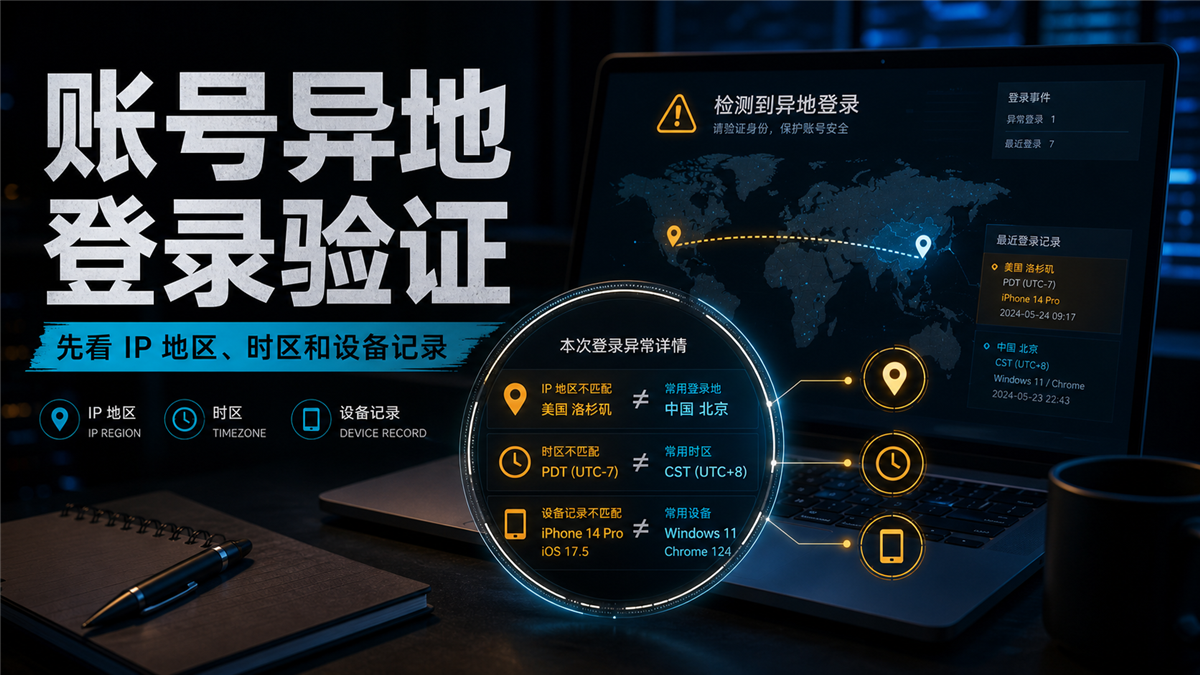
The account was able to log in normally last night, but today when I opened the backend, it prompted for remote login verification. The first reaction of the operations colleague was that there was a problem with the proxy IP, so they changed to a new IP. The verification code passed, but the next day they were prompted with an abnormal environment. Looking back at recent events, the problem is not just with the IP: the login region shows the United States, but the system time zone is China; The browser language is Chinese, and DNS resolution runs to another region; There is also an additional computer temporarily used by a team member in the device record.
The trouble with this type of problem is that it looks like a small "wrong IP" malfunction, but in reality, it often results in a complete set of accounts being disconnected on site. Just looking at the proxy detection results can easily wash away the real clues.
My judgment is: * * Do not change the IP address for remote login verification of the account first. Keep the site and check the IP region, time zone/language DNS/WebRTC、 Device records, browser environment, and account history; These variables can be explained as the same login site, and then decide whether to continue using, review, or pause the login. **
First give a direct answer:
Keep the site for remote login first
When an account undergoes remote login verification, the first step is not to immediately change the proxy, clear the cache, or rebuild the browser environment, but to record the current login site. At least take note of this information:
-Current export IP, country, city, and ASN;
-System time zone, browser language, and account backend display region;
-Does DNS resolution zone and WebRTC expose other networks;
-Device name, browser fingerprint, resolution, and system version;
-Recent login time, login person, whether the proxy or environment has been changed;
-Has the account just changed its information, password, payment method, or team permissions.
If you start changing IP addresses without recording this information, it will be difficult to determine where the anomaly comes from later on. Especially for long-term accounts, if mishandled once, the team can only guess based on their intuition: whether it was due to a change in IP region, device records, or a colleague temporarily logging in from the local network.
Remote login verification may not necessarily be a variable of IP address
Many people understand 'remote login' as having an incorrect IP location. This direction is correct, but incomplete.
What the account system sees is not an isolated IP, but a set of behavioral signals. The IP region is just the most easily visible layer among them. If the account is logged in for a long time in the Los Angeles area, the export IP is still in the United States today, but the time zone is Shanghai, the DNS is in Hong Kong, the browser language suddenly changes to Chinese, and the device is also changed from Windows to iPhone, the system still sees a set of greatly changed scenes.
Conversely, a slight deviation in IP location does not necessarily immediately indicate that the proxy cannot be used. For example, if the account switches between different cities in the United States on a regular basis, the team has clear operation records, and the device and browser environment have not changed, such situations can be rechecked first without rushing to migrate.
So this article does not simplify the problem into 'whether to change the IP or not'. A more useful question is: Can this login record be explained in the same line as the account's past usage?
If you haven't done a general login environment check yet, you can first read this article: [Why does the IP address still prompt abnormal login environment? Don't just check agents] (https://sureisp.com/blog/login-environment-abnormal-ip-browser-check). That article discusses the overall logic, while this article specifically focuses on the evidence chain in remote login verification.
First, check these 6 pieces of evidence
After account verification occurs, it is recommended to search down by "network layer, browser layer, account layer". Don't just check one proxy test page.
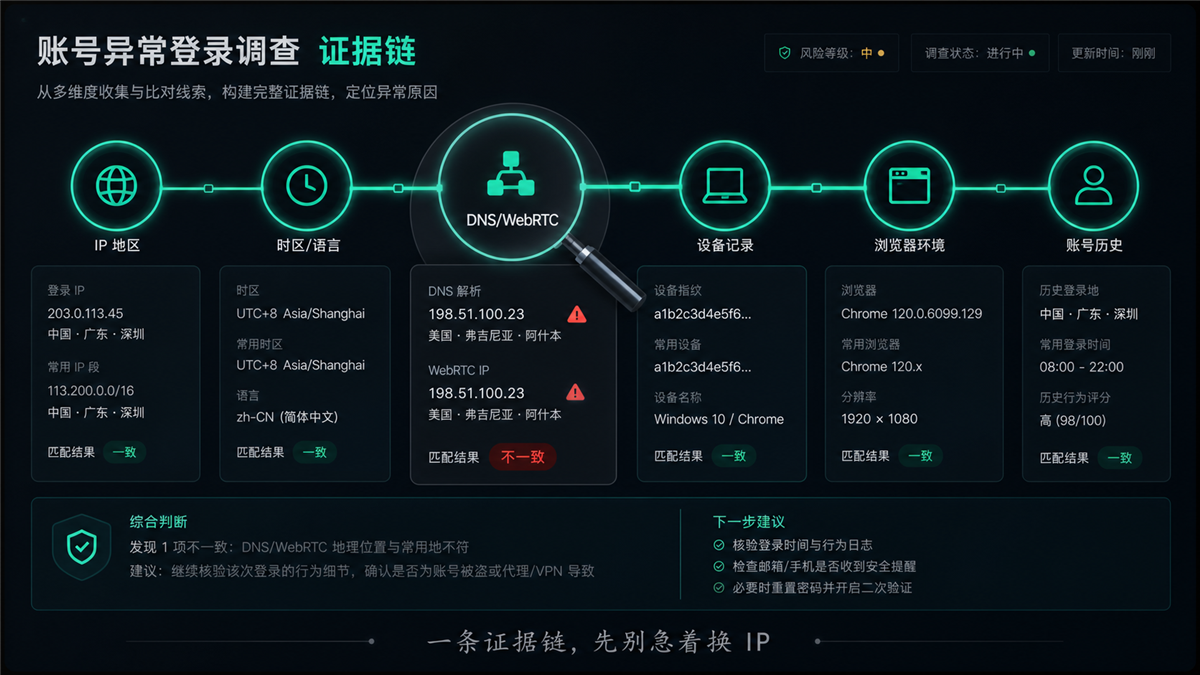
Firstly, the IP region. Check if the country, city, and operator of the exported IP match the long-term usage area of the account. Don't just look at 'able to connect', look at the IP type ASN、 Can the organization name and target region of the account be explained. Before purchasing or changing residential agents, you can refer to: [How to do ISP testing? Before purchasing a residential agency, check the ASN and IP type (https://sureisp.com/blog/isp-check-residential-proxy-asn-ip-type).
Secondly, time zone and language. If the account is used in the US environment for a long time, but the system time zone is UTC+8, the browser language is zh CN, and the input method and time format are also local, these details will make the account appear unnatural on site. The time zone doesn't necessarily have to be "good-looking", but it should be consistent with the IP region and team operation habits.
Thirdly, DNS and WebRTC. The IP detection page displaying the United States does not mean that the resolution path is also in the United States. If DNS returns to the local area or WebRTC exposes the real network, the account may see a mixed scene. Related investigations can be found in: How to do DNS leak detection? Even if the proxy IP is normal, the resolution path needs to be checked [https://sureisp.com/blog/dns-leak-test-proxy-browser-environment].
Fourth, device recording. Remote login verification often occurs with new devices, browsers, and system versions. If the account backend displays a device that you have never seen before, don't just ask for the IP address. First, confirm if a team member has temporarily logged in by changing their computer, browser, fingerprint environment, or mobile phone.
Fifth, the browser environment. A fingerprint browser is not just about creating one window. Resolution, font, language, time zone, WebRTC, cookie status, and plugin changes may all affect the account's judgment of 'same device'. Especially when multiple people maintain accounts, the environment naming, proxy binding, and handover records should be able to match.
Sixth, account history. Recently, changing passwords, binding email addresses, receiving information, store information, advertising permissions, and team members will all change the risk assessment of the account. Many 'remote logins' are just reminders that appear last, as there have been several environmental and behavioral changes before.
IP is normal, why is the account still abnormal
Because a normal IP only indicates that the network layer has passed a certain detection, it does not mean that all signals seen by the account are stable.
There are four common situations.
The first type is that the IP region is normal, but the time zones are not consistent. For example, if a residential IP in the United States is paired with the Shanghai time zone, the account backend will see a somewhat disjointed login scene.
The second type is that the IP is normal, but the DNS or WebRTC path is inconsistent. When the detection tool only looks at the export IP, you think the environment is fine; If other network clues can still be seen on the account side, it may continue to trigger verification.
The third type is that the IP has not changed, but the device records have changed. Changing the browser, reinstalling the system, modifying the fingerprint environment, or temporarily logging in from the phone will make the account feel that it is not the same usage site.
The fourth type is that both the network and devices are normal, but the account behavior changes are too concentrated. Changing information, adding permissions, exchanging payments, and frequently switching login users in a short period of time may not necessarily be triggered solely by agents for verification.
That's why long-term accounts should not only pursue 'normal proxy detection'. More importantly, turn each login into a reproducible record.
When to continue recording and when to pause first
After troubleshooting, do not simply write 'can be used' or 'cannot be used'. A more suitable approach for team execution is to divide into three levels.
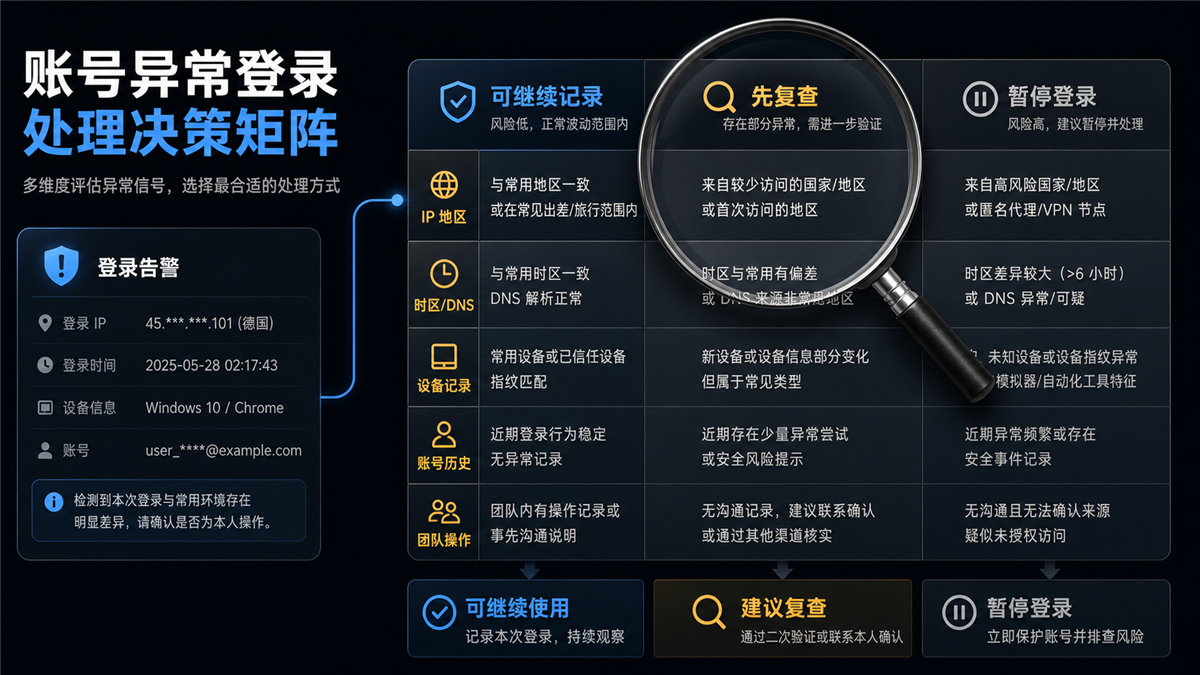
**Can continue to record * *: IP region and account target region are consistent, ASN and organization name can be explained, time zone, language DNS、WebRTC、 There is no obvious conflict in the device records, and there are also records of recent operations. This situation can continue to use the current environment, but the verification should be written to the account log and observed for recurrence later.
**First, review * *: There are only one or two variables with slight deviations, such as occasional inconsistent DNS regions, changes in device names, login times outside of common time periods, or incomplete team records. Don't rush to migrate your account at this stage. First, perform a secondary check to fill in the login person, time, proxy, browser environment, and operation content.
**Suspend login * *: The IP is from a foreign country or high-risk area, the time zone and DNS do not match, the device records are completely unfamiliar, and there are data modifications or security reminders in the account backend. In this situation, pause and continue the operation first to confirm whether it is due to personal or team behavior, and then decide whether to change the environment, reset the password, or tighten permissions.
The pause mentioned here does not mean losing the account, but rather stopping the creation of new variables for now. When the account site is already chaotic, the more actions there are, the more difficult it is to review.
What is the role of residential ISP agents here
Residential ISP agents are not meant to replace all troubleshooting steps. It solves the problem that network exports are closer to long-term account usage scenarios and are easier to form continuous records.
If the account requires long-term maintenance, the value of a static residential IP or residential ISP proxy lies in: more stable export regions, easier explanation of ASN/organizational affiliation, and the team's ability to bind an account to a clear network record for a long time. It cannot fix the browser time zone for you, nor can it fill in the team operation log for you.
You can understand it this way:
|Variables | What can residential ISP agents help | What still needs to be checked by oneself|
| --- | --- | --- |
|IP region | Provide more stable target area exports | Cities ASN、 Does the organization name match|
|Long term account | Reduce record breakage caused by frequent export changes | Whether account operations, login personnel, and devices are continuous|
|Browser environment | Long term binding with fixed environment | Time zone, language, WebRTC, cookie status|
|Remote verification | Reducing network layer interpretation costs | Whether there are still device, behavior, and data changes|
If you are still comparing residential IP, residential ISP proxy, and regular proxy, you can see: How to choose residential ISP proxy and residential IP address? Long term account ownership first] (https://sureisp.com/blog/residential-isp-proxy-residential-ip-address). If the focus is on long-term binding and online time, you can continue to read: [Is a long-term proxy IP suitable for long-term accounts? Don't just look at online time] (https://sureisp.com/blog/long-session-proxy-ip-account-login-records).
How does the team record the account environment
The most common problem when maintaining an account in a team is not a lack of tools, but rather everyone feeling like they are just "temporarily logging in".
It is recommended that each important account has at least one environment table to record these fields:
-Account purpose and responsible person;
-Common login regions;
-Fixed agent or candidate agent;
-Browser environment name;
-Bind devices or commonly used devices;
-Common login time periods;
-The latest abnormal reminder;
-The operator and content of this operation.
Recording doesn't need to be complicated, but it needs to be continuous. When account remote login verification appears, you can immediately know whether this is a commonly used person, device, region, and time period. If none of them match, don't continue with the operation for now.
The problem with many teams is not the lack of residential IP addresses, but rather the lack of binding of accounts, proxies, browser environments, and operation records. Today A used a different environment, tomorrow B switched to another agent, and the day after tomorrow C added a verification code from their phone. In the end, the account prompt was abnormal, and everyone had to guess again.
Which layer can Sureisp undertake
Sureisp is more suitable for undertaking the network export layer: preparing clearer residential ISP/static residential IP choices for long-term accounts, allowing the team to keep records around fixed regions, fixed exports, and fixed account purposes.
But I don't recommend attributing all problems to the agent. The correct approach is to first dismantle the account on-site: whether the network exit is reasonable, whether the browser environment is consistent, whether the account history has changed, and whether the team operation can be traced. Confirm that the main issue lies in selecting a suitable residential ISP agent for long-term accounts after the network exit.
This is the more secure way to use Sureisp: not treating it as a "universal repair button", but placing it in the account environment evidence chain to solve the layer that needs to be resolved.
FAQ
What should I check for remote account login verification first?
First, check the login time, region, device, and access method in the recent activities, and then compare them with the current IP region, time zone/language DNS/WebRTC、 Browser environment and team operation records. Don't just look at the proxy detection page.
Why is the account still abnormal when the IP is normal?
A normal IP only means that the export can pass a certain test. Accounts may also see inconsistent time zones, DNS path anomalies, WebRTC exposure, device record changes, account information changes, or multiple person operations, all of which may make the login site discontinuous.
Is a static residential IP suitable for long-term accounts?
Static residential IP is more suitable for accounts that require long-term recording, as exports are relatively fixed and regions and ASNs are easier to review. But it still needs to be compatible with a fixed browser environment, reasonable time zones, and clear team operation records.
Can dynamic residential IP login account?
Can be used for some low-frequency, low value, or temporary access scenarios, but not suitable for all long-term accounts. If dynamic exports change frequently, account history will be more difficult to explain; It is recommended to prioritize exports that can be recorded for a long time for high-value accounts.
Do fingerprint browsers still require a proxy?
need. Fingerprint browsers address the browser and device environment, while proxies address network egress. The two are not mutually substitutable. Without a stable proxy, even if the browser environment is fixed, the region and network records seen by the account may still jump.
Can changing residential IP address solve remote login verification?
If the problem mainly comes from mismatched network exits, residential ISPs or static residential IPs can improve record continuity. But if the anomaly comes from a time zone DNS、 Changing IP addresses individually may only create new variables due to device, account behavior, or team operations.
How to reduce remote verification when multiple team members log in?
Bind the account, proxy, browser environment, and operator together. Do not allow multiple people to log in by changing devices, regions, or browsers at will. Each verification, proxy change, and data modification should be recorded before determining which layer the exception comes from.