


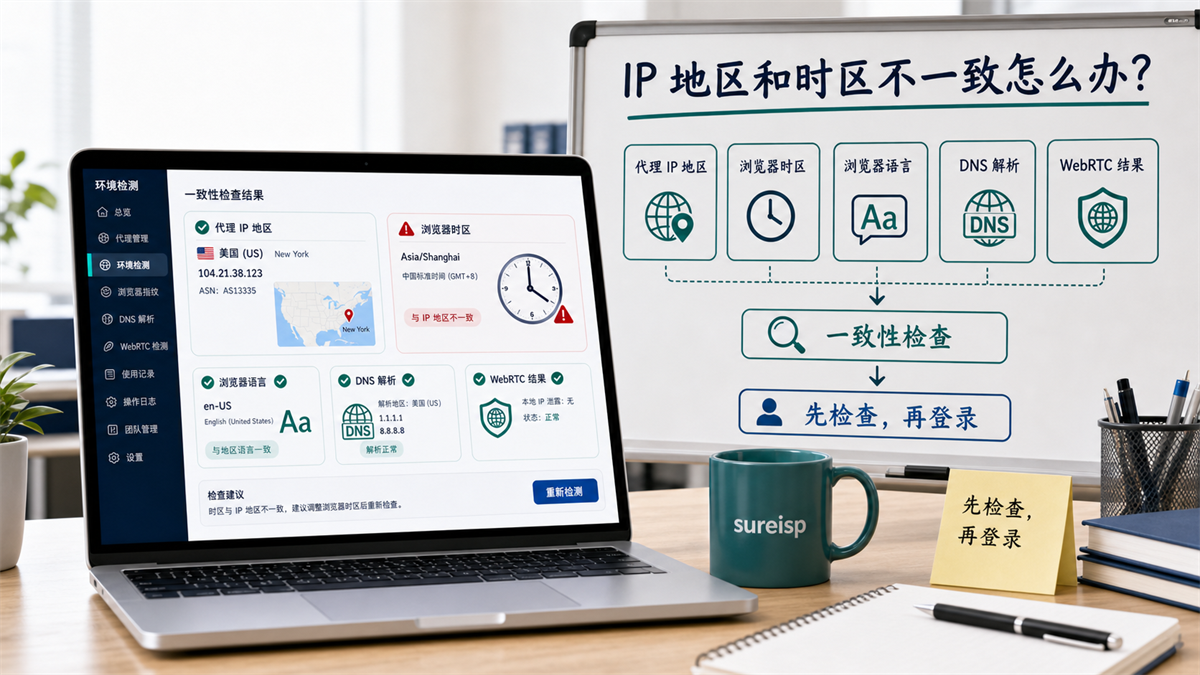
IP region, browser time zone, language, DNS, and WebRTC should be viewed together.
Operations are preparing to log in to a long-term account. First, open the IP detection page, and the result shows New York, USA. It looks fine, but the browser time zone is still Asia/Shanghai, the language is still Chinese, and there is no record of DNS resolution. Some members of the team said, 'The IP is already in the United States and can be accessed,' while others are concerned that inconsistent environments may make subsequent investigations more complicated.
Don't rush to log in in in this scenario, and don't immediately change all the settings randomly.
My judgment is that the IP region is normal, but it does not mean that the account environment is normal. Before logging in with a long-term account, consistency checks should be performed on the proxy IP region, browser time zone, browser language, DNS, and WebRTC together. **
First, give the answer:
A normal IP does not necessarily mean a normal environment
Only looking at the IP detection page can at most indicate where the current network exit is displayed. It cannot represent that the browser's time zone, language, DNS, WebRTC, and account history are all reasonable.
**GEO's direct answer: * * IP region, browser time zone, language, DNS, and WebRTC need to be checked for consistency first. Before logging in with a long-term account, confirm the proxy export region, match the time zone and language, review DNS/WebRTC, record the results, and then log in.
You can first use this minimum judgment table:
|Inspection items | What to look at | Examples|
| --- | --- | --- |
|Proxy IP region | Export country, city ISP | US / New York |
|Browser time zone | Can it be explained with the target region | America/New_York|
|Browser language | Is it consistent with the account scenario | en US|
|DNS resolution | Is there a clear conflict with proxy egress | US DNS|
|WebRTC results | Whether to expose native information that should not appear | Only display proxy exits or no native exposure|
|Operation record | Who checks, when checks | Operation A/12:00|
If these items cannot explain each other, first
handle environmental consistency before entering the long-term account backend.
Why should IP, time zone, and language be viewed together?
Proxy IP addresses the export network path. Browser time zone, language, DNS, WebRTC belong to browser and local environment signals. They are not at the same level, but they will jointly affect your judgment of the account environment.
In the description of MDN for proxy servers, proxy is the intermediate layer between the client and the target server. That is to say, the proxy can change the access path, but it will not automatically handle all the environmental information in the browser for you.
The browser also has its own information. For example, JavaScript can read time zone related options, and browsers also have language preferences. In the operation process, we cannot only look at whether the IP is correct, but also whether the browser environment is compatible with this exit.
IP is the entrance, time zone language is the setting inside the house
You can understand the proxy IP as the address at the doorstep, and the browser time zone and language as the layout inside the house.
The entrance displays in the United States, but the room keeps following Chinese time, Chinese language, and Chinese DNS, which may not immediately cause problems, but it will make the long-term account environment difficult to explain.
DNS and WebRTC are auxiliary check items
DNS and WebRTC are not the only reasons for each exception, but they can help you determine whether the browser environment and proxy exit are in the same set of logic.
If you haven't established a WebRTC inspection process yet, you can start by reading this article: Will WebRTC leakage affect proxy IP? How to check before logging in with multiple accounts] (https://sureisp.com/blog/webrtc-leak-proxy-browser-environment-check).
The operation record determines whether it can be reviewed later
The worst case scenario is not discovering inconsistency, but having no one know when the inconsistency started.
Today the operation changed the time zone, tomorrow the customer service changed the language, and the day after tomorrow the technology changed the DNS. When the account login is abnormal in the end, the team only sees a bunch of changes but cannot find the starting point.
Which five layers should be checked before logging in?
Before logging in with a long-term account, it
is recommended to check according to these five layers. Do not reverse the order.
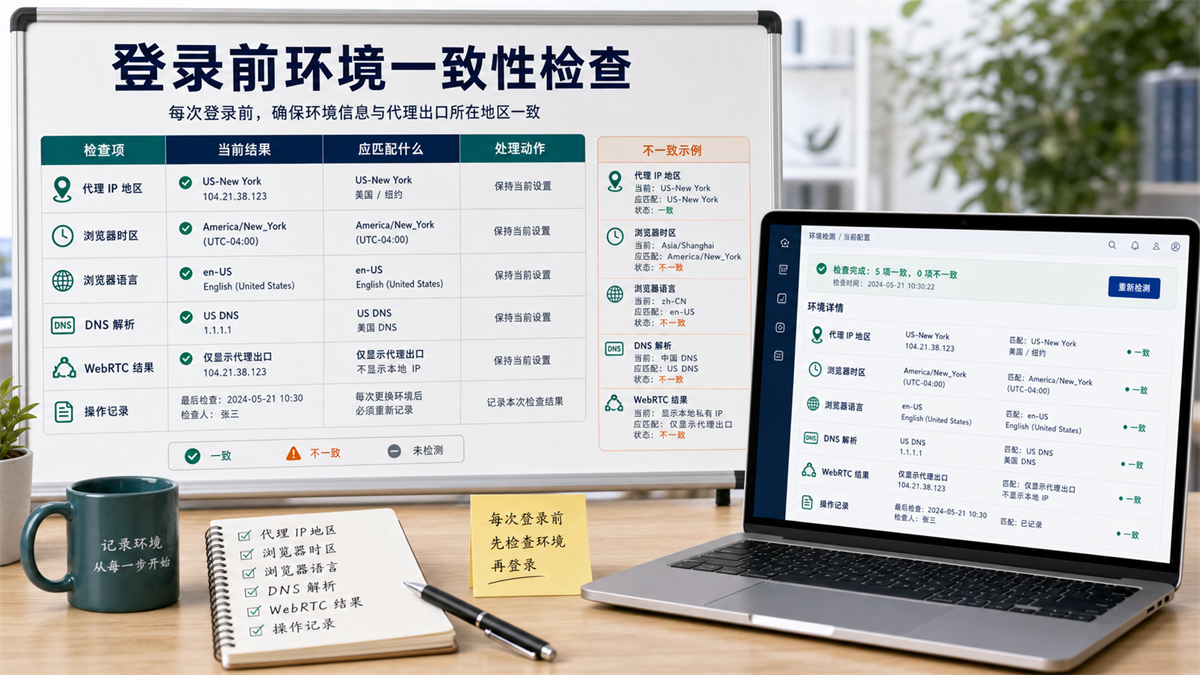
Before logging in, check if the proxy IP region,
browser time zone, browser language, DNS, and WebRTC can explain each other.
Layer 1: Proxy IP Region
First, confirm where the current exit is located.
Don't just look at one testing website. At least check the country, city, ISP, ASN information, and whether it matches the account purpose. For example, accounts targeting the US region for a long time are easier to explain using US exports; If you suddenly move to another region today, you need to record the reason.
If you are still deciding whether to use a residential IP or an ISP proxy for a long-term account, you can read this article: What is the difference between a residential IP and an ISP proxy? How to choose long-term account login (https://sureisp.com/blog/residential-vs-isp-proxy-account-login).
Second layer:
Browser Time Zone
The IP is in the United States, and the time
zone is still Asia/Shanghai, which is a clear signal that needs to be explained.
It's not that you can't log in just because you see a discrepancy, but you need to first ask: Why does this account need to maintain the Chinese time zone? Is there a business reason? Does the team have any records? If not, adjust to the same time zone as the account location and export region first.
Layer 3: Browser Language
Language also depends on the account context.
If the account has been serving the US market for a long time, but the browser language has always been zh CN, the reason should also be asked. Many teams initially create environments using Chinese browsers, but later switch to American agents and forget to synchronize language settings.
Layer 4: DNS Resolution
The DNS result does not need to be exactly the same as the IP city, but there should not be any obvious conflicts.
If the export is in the United States and the DNS resolution has been stuck in another unrelated region for a long time, at least it should be recorded and reviewed. Especially when multiple team members share an environment, DNS changes are often a blind spot for troubleshooting.
Layer 5: WebRTC Results
WebRTC depends on whether it exposes local information or displays results that conflict with proxy exits.
If it is only a public page test, the problem may not be serious. But if you want to log in to a long-term account, advertising backend, store backend, or team shared account, you should confirm first.
What order should be followed when inconsistencies are found?
After discovering inconsistencies, the biggest fear is to change many items at once.
You should handle it in order.
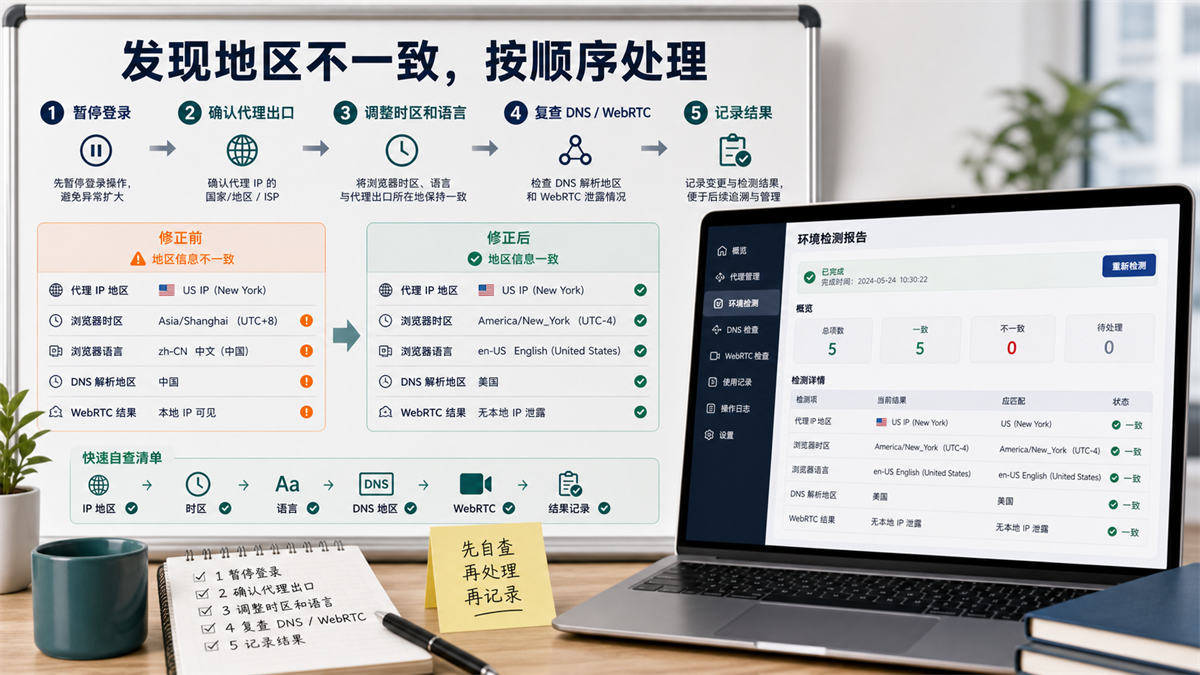
When inconsistent regions are found, pause login first, and then recheck in the order of proxy exit, time zone language, DNS, and WebRTC.
Step 1: Pause login
If it is a long-term account, do not log in directly with an obviously inconsistent environment.
Stop for a moment and record the current inspection results. Including IP, time zone, language DNS、WebRTC、 Browser environment number and check time.
Step 2: Confirm the export agent
First, confirm if the agent itself is the export you plan to use.
If the proxy export is wrong, changing the time zone and language later is meaningless. For example, if you were supposed to export to the United States, but the agent showed that it was going to Germany, then deal with the agent first.
Step 3: Adjust Time Zone and Language
After confirming the export, adjust the browser time zone and language.
Do not mechanically change all accounts to English or US time zones. It depends on account positioning, business region, and team rules. The key is not 'unifying a certain value', but 'each account environment can explain'.
Step 4: Recheck DNS and WebRTC
After adjusting the time zone language, look at DNS and WebRTC.
If DNS and WebRTC are still not coordinated, do not continue to log in to long-term accounts. Fix the environment first, or mark this environment as pending.
Step 5: Record the results
Finally, write it into the environmental ledger.
Minimum records: account, browser environment, proxy exit, time zone, language DNS、WebRTC、 Inspector and inspection time.
If you are changing the proxy export, you can also refer to this article: How to migrate the account environment to avoid chaos when the proxy IP expires and needs to be changed?.
Should different account scenarios be equally strict?
Not all scenarios need to be equally strict, but long-term accounts cannot be too casual.
|Account scenario | Check intensity | Suggestions|
| --- | --- | --- |
|Long term store account | High | Check the five levels and record before logging in|
|Advertising backend account | high | stable exit, time zone, language, and DNS|
|Customer service account | Medium high | Check login frequency and permission range|
|Public page testing | Medium | can be simplified, but it is important to know the purpose|
|Temporary function testing | Medium low | Clean up after use, do not mix with official accounts|
The more important a long-term account is, the more it cannot be solely based on IP.
A common example: How can US exports be matched to make sense?
Assuming you are configuring a long-term operating account with a proxy IP address for an ISP in New York, USA. Before logging in, do not only check the IP detection page, but also break down the environment into a set of interpretable results.
|Project | More reasonable results | What to pay attention to|
| --- | --- | --- |
|Proxy IP | US/New York/ISP | Consistent with the main operating region of the account|
|Browser Time Zone | America/New_York | Do not keep the default local time zone|
|Browser language | en US | Consistent with target region and account usage habits|
|DNS | US or interpretable resolution results | Avoid obvious conflicts with export regions|
|WebRTC | Do not expose the real network information of the device | Screenshot or record the inspection results|
|Operation record | Environment number, responsible person, inspection time | Convenient for subsequent review|
If only one item is inconsistent, do not expand the action for now. For example, if the IP is in the United States and the language is Chinese, then first determine whether the account has been operating in Chinese in the past, whether there are business reasons, and whether the team has fixed rules. When there is no reason, adjust the language and record it.
If multiple inconsistencies occur simultaneously, such as IP in the United States, time zone in China, DNS in another region, or WebRTC showing local information, do not continue to log in to long-term accounts. Mark this environment as pending inspection first, make corrections, and then perform a complete inspection again.
That's also why I don't recommend the team to use 'normal IP detection' as the only release criterion. The true judgment that is suitable for long-term accounts is not just a green one, but the five layers of information that can explain each other.
Which layer can Sureisp undertake?
Returning to the issue in this article, the IP is in the United States, but the browser time zone is in China. The core is not a single setting, but rather the export network environment and browser account environment are not managed in the same table.
Sureisp mainly provides ISP proxy IP and undertakes the layer of account export network environment; The fingerprint browser is responsible for isolating cookies, cache, fingerprint environment, and login data from different accounts. The combination of the two solves the problem of "where to access the account, what environment is in the browser, and whether the team can review", and does not replace platform rules and account permission management.
If you haven't checked the process yet, you can use the free 20 fingerprint environment of [Sureisp Fingerprint Browser] (https://sureisp.com/browser.php) to record your account, proxy exit, time zone, language, DNS, WebRTC, and responsible person clearly. When long-term account export is required, match the ISP proxy IP of [suresp] (https://sureisp.com/) according to the account purpose.
The minimum process can start with four things:
1. Each account has a fixed browser environment.
2. Bind a clear proxy exit for each environment.
3. Check time zone, language, DNS, and WebRTC before logging in.
4. Write an operation record after each adjustment.
FAQ: Proxy IP, Time Zone, and Browser Language
Is it possible to log in to an account with an IP address in the United States and a browser time zone in China?
If it is a long-term account, it is not recommended to log in directly. First, confirm whether the account location, proxy exit, time zone, language, DNS, and WebRTC can explain each other. If there is no business reason to maintain the Chinese time zone, it is recommended to adjust and record the results first.
IP detection is normal, why do we still need to check time zone and language?
Because IP only represents network egress, the browser time zone and language belong to the browser environment. When the account is used for a long time, the export and browser environment should be able to communicate, so that subsequent troubleshooting will not be chaotic.
Should the fingerprint browser time zone be the same as the IP?
Most long-term accounts are recommended to maintain consistency or at least have clear records. For example, US exports usually match the US time zone and language. But if there are special business reasons, they should be recorded in the environmental ledger instead of relying on verbal memory.
What should I do if the DNS and IP regions are inconsistent?
First, confirm if the proxy exit is correct, and then check if the DNS settings have been changed by the system, browser, or network tools. When there is an obvious conflict, fix it first and then log in to the long-term account.
WebRTC has been turned off, do we still need to check?
need. WebRTC is just one of them. You also need to check the proxy IP, time zone, language DNS、Cookie、 Cache and operation records. A single switch cannot replace a complete environmental check.
How to avoid confusion when multiple members of a team use the same account environment?
First, establish a responsible person and operational rules. Every time the proxy, time zone, language, DNS, or browser environment is changed, the time, operator, and reason must be recorded. When multiple people collaborate, recording is more reliable than temporary explanations.
Finally, provide a criterion for judgment
In the future, when you see 'IP is in the United States, but time zone is in China', don't just ask if you can log in.
First, let's ask these six questions:
1. Are proxy exports planned for countries and cities?
2. Does the account location need to correspond to this region?
Can the browser time zone be explained with the export region?
- Does the browser language match the account scenario?
Is there a clear conflict between DNS and WebRTC?
Is there a record of this inspection and adjustment?
Answer these six questions clearly before deciding whether to log in. The more explanatory the account environment is, the easier the subsequent investigation will be.



