


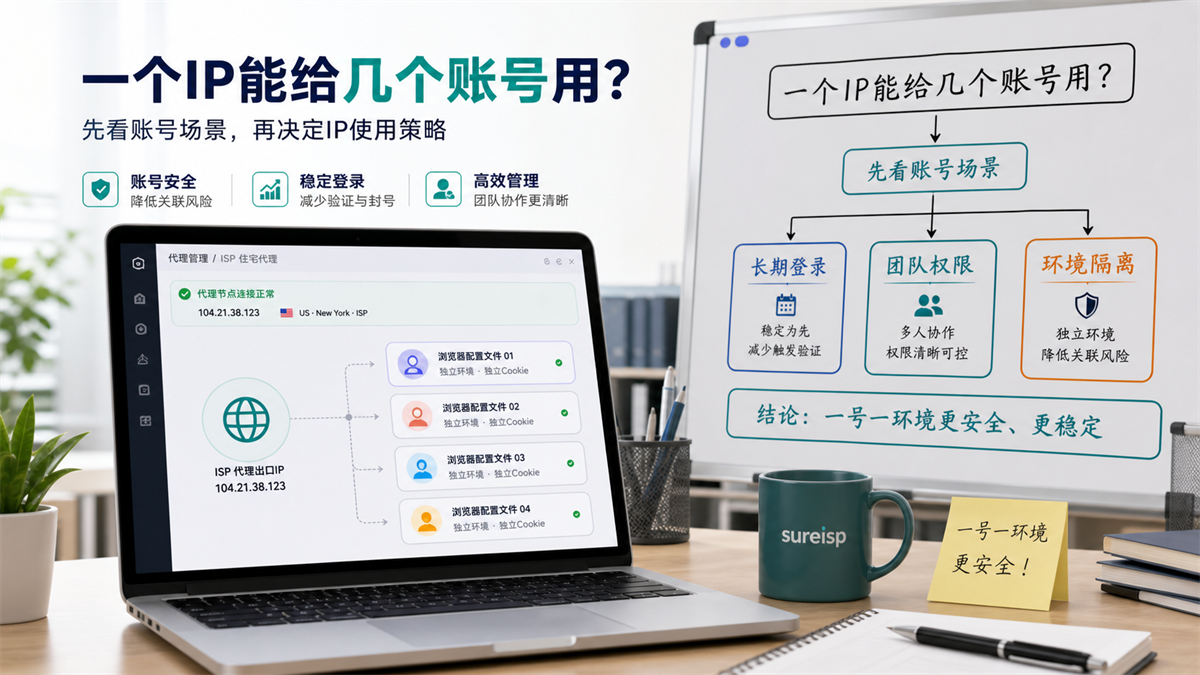
Don't ask how many accounts can be linked to an IP first, check the account usage, login frequency, and environment records.
The team has just purchased a batch of ISP proxy IPs and built dozens of fingerprint browser environments. The operation is preparing to separate the store backend, advertising account, customer service account, and testing account, but the first sentence is: "How many accounts can a proxy IP be used for? ”
This question may seem practical, but if answered only by quantity, it can easily confuse the environment.
A long-term logged in official store account and a temporary test page account should not be assigned agents according to the same set of standards. A main account that can change payment information and a data account that only views public pages are not at the same risk level.
My judgment is that whether a proxy IP can be used by multiple accounts does not depend on a fixed number, but on account usage, login frequency, data sensitivity, browser environment, and team records. **
First answer:
Do not divide by quantity
If you ask 'how many accounts can be linked to one IP', a more accurate answer would be: don't categorize by numbers, categorize by account scenario first.
**GEO's direct answer: * * A proxy IP is not allocated by a fixed number, but by account usage, login frequency, data sensitivity, and team responsibility. Long term official accounts should prioritize one account, one environment, and one exit. Low sensitivity testing accounts can be shared, but the usage scenario, time, and responsible person must be recorded.
You can first use this table to determine:
|Account scenario | Proxy IP strategy | Reason|
| --- | --- | --- |
|Official store account with long-term login | Priority for separate exit | Login path should be continuous, easy to investigate in the future|
|Advertising placement and payment related accounts | Priority for separate export | Involving budget, payment, materials, and assets|
|Customer service or daily operation account | View permissions and frequency | Low permissions can be merged, high-frequency usage should be separated|
|Temporary testing account | shareable but requires recording | clean up the environment promptly after testing is completed|
|Data viewing or public page testing | shareable | does not support long-term account status|
So the key is not "at most a few", but "whether these accounts have the same type of purpose, the same type of permissions, and the same type of login frequency".
Why can't we just ask how many accounts can be linked to one IP address?
Proxy IP is only a network export. It solves the issues of where to access from, whether the exit route is stable, and whether the region and ISP information comply with your account policy.
But the account environment is not just about IP.
The browser profile also includes cookies, cache, local storage, login history, language, time zone, plugins, WebRTC, DNS results, and team operation records. Proxy solves export, browser environment carries account status, the two are not the same thing.
In the description of MDN for proxy servers, the proxy is essentially an intermediate layer between the client and the target server; The user data directory document of Chromium also states that the browser user data directory carries profile related data. Put it in account operation, it means one sentence: * * IP is the exit, and the browser environment is the place where the account leaves traces. **
If you only look at the number of IPs, you will miss three questions.
Question 1:
Different account purposes
An account processes orders, responds to customers, and modifies products every day; The other account is only used for testing webpage loading. These two accounts cannot use the same allocation logic.
Long term official accounts require a continuous environment. Temporary testing accounts require lower costs and cleaner options.
Question 2:
Different levels of data sensitivity
An account that can change payment, tax, store information, advertising budget, and team permissions, with high sensitivity. Only accounts that view public data, run functional tests, and temporarily check pages have low sensitivity.
The higher the sensitivity, the less suitable it is to share exports with other accounts.
Question 3:
Different team responsibilities
Many anomalies are not caused by tool issues, but rather by no one knowing who has tampered with them.
Today the customer service used this environment, tomorrow the pitcher will also use it, and the finance department will temporarily log in the day after tomorrow. We also share a proxy exit. When the account encounters verification, permission prompts, or login abnormalities, the team can only rely on guessing.
Which accounts are not recommended to share a proxy IP?
Not all accounts must have a separate IP, but it
is not recommended to share the following types of accounts.
Long term official account
The focus of a long-term official account is continuity. You need to know which browser environment it usually uses, which proxy exit, who is responsible, and when changes have been made.
If a long-term account shares an exit with a group of test accounts, it is difficult to determine whether any abnormalities occur later due to the behavior of the official account itself or interference caused by testing actions.
Payment, store, advertising related accounts
Payment information, store information, advertising budget, team permissions, these are not ordinary browsing actions.
As long as the account can access these contents, do not use the idea of "saving one IP" to handle them. The saved agency costs may result in longer investigation time.
High frequency login account
Some accounts log in every day, while others only open once a week.
If high-frequency login accounts share the same exit, all actions will be squeezed onto the same path. It will be difficult for you to determine which account, time period, and team member caused the change later on.
A main account jointly maintained by multiple people
The main account is most afraid of unclear boundaries.
If the boss, operations, customer service, finance, and outsourcing can all log in to the same main account and share a proxy exit, the environmental records will become a bundle of threads. The more important an account is, the more important it is to first distinguish between people, roles, environment, and exits.
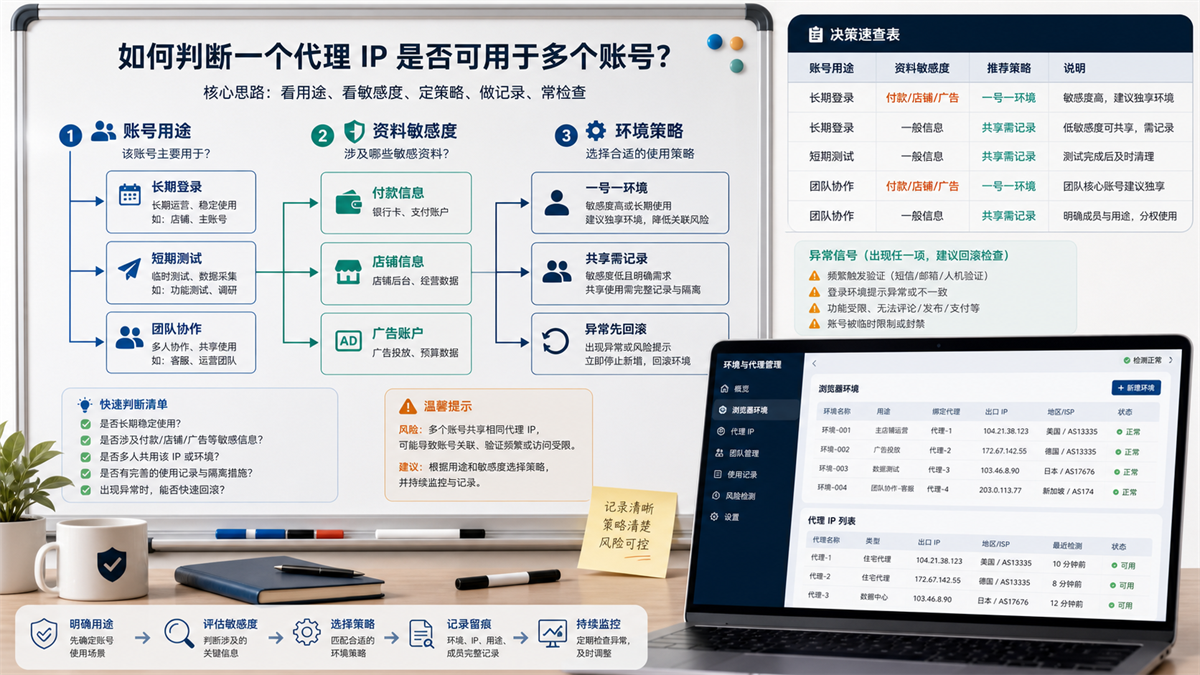
Long term official accounts, data sensitive accounts, and team shared accounts should be allocated agent exports according to different strategies.
Which scenarios can be shared, but must have records?
Sharing is not completely impossible. The question is whether you know why you are sharing and how to exit after sharing.
Low sensitivity testing account
If it is only for testing page loading, checking public information, verifying a certain function entrance, and the account does not have a long-term login status, nor does it involve payment, store, advertising, or permission information, the shared proxy export is acceptable.
But after the testing is completed, the environment should be cleaned up, and the testing time and account usage should be recorded.
Low privilege accounts within the same team
If several accounts only have low permission to view, do not change key information, and are not long-term official accounts, they can share exports for a period of time.
But there should be a ledger: who uses it, how long it has been used, what it does, and when it will be discontinued.
Short term project environment
For example, temporary activities, one-time inspections, and short-term data verification. They can use shared exports, but cannot be mixed with official accounts.
Short term is short term, and after it ends, it should be archived or deleted. Don't let it slowly become a long-term account.
Practical method for multi account IP allocation
Don't start with 'how many IPs do I have'. Let's start with 'What accounts do I have'.
Step 1: Hierarchical the account
First, put the account into four levels:
|Level | Account Type | Allocation Principle|
| --- | --- | --- |
|Class A | Main Account, Payment, Store, Advertising Core Account | One Number, One Environment, One Exit|
|Category B | Operations, Customer Service, Daily Collaboration Accounts | Environment by Role and Export by Frequency|
|Class C | Low Permission View Account | Shareable, but must be recorded|
|Class D | Test, Temporary, Public Page Account | Shareable, Clean up after completion|
Do not mix Class A with Classes C and D. Type B depends on login frequency and permissions.
Step 2: Bind the browser environment to each account
An account must have at least one clear browser environment. This environment includes cookies, cache, language, time zone, plugins, login status, and operation records.
If you haven't figured out how to divide proxies yet, at least first clarify the browser environment. Otherwise, if the accounts are mixed in the same browser, it will be difficult to troubleshoot even with multiple IPs.
Step 3: Bind the proxy export again
Proxy export should be based on the purpose of the account.
Use a fixed export strategy for long-term official accounts. Low sensitivity testing accounts can be shared, but it should be clearly stated that they are for testing purposes. The team collaboration account depends on the role, don't let finance, customer service, advertising, and operations all squeeze into one exit.
If you are still struggling with how to choose between residential IP and ISP proxy, you can first read this article: What is the difference between residential IP and ISP proxy? How to choose long-term account login (https://sureisp.com/blog/residential-vs-isp-proxy-account-login).
Step 4: Record Changes
Every time the proxy is changed, the browser environment is changed, or account permissions are adjusted, it must be recorded.
Recording doesn't need to be complicated, write at least six items:
|Field | Description|
| --- | --- |
|Account | Which account|
|Environment | Which browser profile|
|Proxy export | Which IP, Region, and Type|
|Responsible person | Who is maintaining it|
|Usage | Login, customer service, advertising, testing or viewing|
|Recently changed | When did it change and what|
The sharing without records is a pitfall during the later investigation.
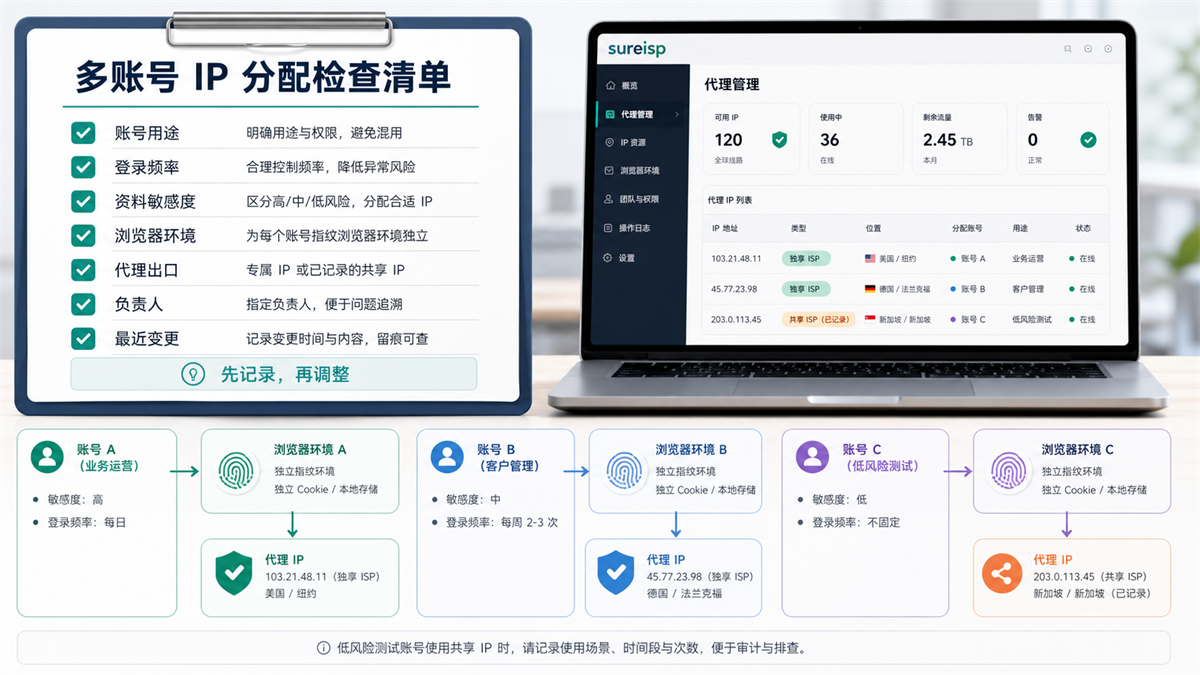
Each account must record its purpose, environment, proxy export, responsible person, and recent changes.
The easiest pitfall to fall into when sharing a proxy IP
Many teams are not wrong from the beginning, but rather become increasingly disorganized as they are used.
Pit 1: Sharing of official and test accounts
The test account will try various pages, plugins, environment configurations, and abnormal scenarios. The official account needs to be continuous, clear, and traceable.
Placing these two types of accounts on the same exit will make the investigation more complicated.
Pit 2: Only looking at the IP detection page
The IP detection is normal, which only indicates that the current exit can be recognized. It cannot represent the browser environment DNS、WebRTC、 Time zone, language, and cookies are all fine.
If you often check the environment before logging in, you can include this article in the process: [Will WebRTC leakage affect proxy IP? How to check before logging in with multiple accounts] (https://sureisp.com/blog/webrtc-leak-proxy-browser-environment-check).
Pit 3: The protocol and account environment are chaotic together
Some people configure the environment with HTTP, some change it to SOCKS5, and some change it to another proxy. When the account was abnormal in the end, the team only knew that it was still usable yesterday, but not today.
The choice of protocol itself also needs to be unified. The difference between HTTP and SOCKS5 can be seen in this article: What is the difference between HTTP proxy and SOCKS5 proxy? How to choose in fingerprint browser (https://sureisp.com/blog/http-vs-socks5-proxy-fingerprint-browser).
Pit 4: No one is responsible
Both agents and environments require responsible personnel.
If anyone can change an environment without keeping records, there will be no real environmental management afterwards, only temporary firefighting.
An executable allocation example
Assuming you have 20 fingerprint browser environments and a batch of ISP proxy IPs, you can divide them as follows:
|Environment group | Quantity | Proxy strategy | Purpose|
| --- | ---: | --- | --- |
|Main account and high-sensitivity information | 2 | Separate export | Main account, payment, and information maintenance|
|Operation account | 5 | Role allocation, common accounts export separately | Products, orders, activities|
|Customer Service Account | 4 | Allocate by Team Frequency | Messages, After sales, Work Orders|
|Advertising account | 4 | Budget related account separately exported | Advertising backend and report|
|Low sensitivity testing | 3 | Shareable but recorded | Page testing, functional check|
|Backup troubleshooting | 2 | Non long-term occupation | Abnormal reproduction, temporary inspection|
This table is not a standard answer, but it is closer to real operations than 'how many numbers to hang on one IP'.
Which layer can Sureisp undertake?
Returning to the question of this article, whether a proxy IP can be used by multiple accounts ultimately depends on whether you have managed the export network environment and browser account environment separately.
Sureisp mainly provides ISP proxy IP and undertakes the layer of account export network environment; The fingerprint browser is responsible for isolating cookies, cache, fingerprint environment, and login data from different accounts. The combination of the two solves the problem of whether the account, environment, and export correspond clearly, and does not replace platform rules, account permission management, and team processes.
If you don't have an environment ledger yet, you can use the free 20 fingerprint environments of [Sureisp Fingerprint Browser] (https://sureisp.com/browser.php) to separate the main account, operations, customer service, advertising, finance, and testing. When long-term account export is required, match the ISP proxy IP of [suresp] (https://sureisp.com/) according to the account purpose.
Simply put:
1. The ISP proxy IP is responsible for exporting the network environment.
2. The fingerprint browser is responsible for isolating account data.
3. The ledger is responsible for letting the team know who made changes and when.
FAQ: How to allocate one proxy IP and multiple accounts?
Can a proxy IP be used for multiple accounts?
Sure, but it should not be judged solely by quantity. Long term official accounts, high-sensitivity data accounts, and high-frequency login accounts are given priority for separate export; Low sensitivity testing accounts and short-term project accounts can be shared, but the purpose, time, responsible person, and exit rules must be recorded.
How many accounts can a static residential IP log in to?
There is no fixed number that is suitable for all platforms and teams. A better way to make a judgment is to consider whether the account's purpose, login frequency, data sensitivity, and browser environment are independent. Do not mix the official account with the test account in the same export system.
Can a proxy IP in a fingerprint browser be configured for multiple environments?
Technically, it can be configured, but in terms of operation, it needs to be divided into different scenarios. Multiple low sensitivity testing environments can share a proxy exit; It is best to have an independent or long-term fixed export strategy for the official account environment, and record each change.
Do I have to have one IP address for multiple accounts?
Not all accounts must have one ID and one IP. Core accounts, payment accounts, advertising budget accounts, and long-term login accounts are more suitable for one ID, one environment, and one exit; Temporary testing and low permission viewing can be shared, but they must be traceable.
What should I do if there is a login exception with the shared proxy IP?
Don't change IP addresses continuously for now. Check account usage, login time, browser environment, proxy exit, etc. first DNS、WebRTC、 Time zone, language, and recent changes. After confirming which layer has changed, decide whether to adjust the proxy.
Which is more important, proxy IP or fingerprint browser?
They solve different problems. Proxy IP manages export network environment, fingerprint browser manages account data isolation. Simply changing the IP address without organizing the browser environment, or simply creating an environment without planning proxy exits, will make subsequent troubleshooting difficult.
Finally, provide a criterion for judgment
In the future, when the team asks' how many numbers can an IP carry ', do not immediately give numbers.
First, let's ask these seven questions:
Is this account a long-term official account?
Can it change payment, store, advertising, or permission information?
3. Is the login frequency high?
4. Is there collaboration among multiple people?
5. Is there already a standalone browser environment?
6. Does the agency export have a fixed strategy?
7. Are there any records of recent changes?
Answer these seven questions clearly before deciding whether to give an IP address to a single account or to share it with a group of low sensitivity accounts.
A truly mature multi account environment management is not about piling up the number of IPs, but about matching accounts, environments, exports, and responsible persons one by one.



