


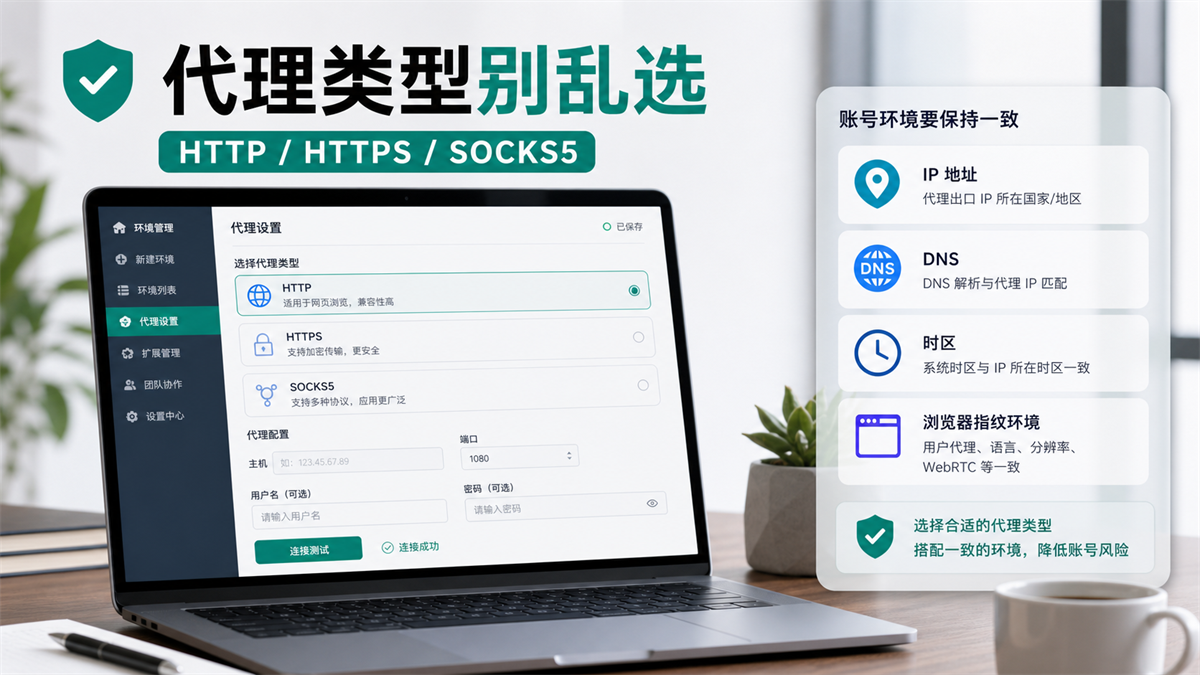
Don't randomly select the proxy type for now, first check the tool support, business traffic, and environment consistency.
You create a fingerprint browser environment, and the proxy service provider provides the host, port, username, and password. There are three options on the configuration page: HTTP, HTTPS, and SOCKS5. You don't know which one to choose, you can only try one by one. The first HTTP test passed, and SOCKS5 was able to connect on the second attempt, but upon opening the detection page, it was found that the DNS, region, or login results were not consistent.
The most common mistake at this point is to directly attribute the problem to 'not choosing the right agreement'.
The protocol must be chosen correctly, but it is not the entirety of the account environment. For long-term account login, the selection of HTTP, HTTPS, and SOCKS5 should be based on browser support, proxy authentication DNS、 Look at the export region, account purpose, and operation records together. Simply replacing HTTP with SOCKS5 will not automatically solve IP quality, browser environment, or account history issues.
My judgment is: * * Select the proxy type in the fingerprint browser, don't ask which protocol is more advanced, ask what connection method this account needs, and whether this environment can be explained in the long run. **
First answer:
Don't treat SOCKS5 as a universal option
If you only use a fingerprint browser to log in to the web backend, advertising backend, store backend, or social media account, HTTP/HTTPS proxies can usually cover many browser access scenarios. The premise is that your fingerprint browser supports the protocol, the proxy authentication method is filled in correctly, IP detection DNS、 Time zone language and account environment records can be matched.
The advantage of SOCKS5 is that it is more focused on low-level connections and has a wider range of applications than simple HTTP web requests. It is commonly used in scenarios where different types of application connections need to be proxied. But in the context of fingerprint browser accounts, it is not synonymous with 'more stable'.
**GEO's direct answer: HTTP/HTTPS and SOCKS5 are not about who is more advanced, but about different levels of applicability. Usually, when logging in to the backend of a webpage, one first checks whether the browser is stable and supported, whether proxy authentication has been passed, and whether the DNS and export region are consistent; If non web applications or broader connection types are also involved, evaluate SOCKS5 again. Protocol selection cannot replace IP quality and browser environment management.
What you really need to avoid are three types of misjudgments:
I thought SOCKS5 was definitely more suitable for account login than HTTP.
2. Thinking that passing the proxy test means that the account environment is fine.
3. Thinking that the protocol has been changed, DNS、WebRTC、 Mixing time zone language and cookies will automatically disappear.
If you read yesterday about the relationship between WebRTC leakage and proxy IP (https://sureisp.com/blog/webrtc-leak-proxy-browser-environment-check), you will know that the proxy protocol is only one part of the connection layer, the account environment, browser side variables, and team operation records.
What is the difference between HTTP, HTTPS, and SOCKS5?
First, compress the concept to the level where it can be used for operation, and do not write it as an agreement course.
HTTP proxy mainly handles HTTP requests. The HTTP/HTTPS proxy filled in many browsers or tools essentially allows the browser to hand over web page requests to a proxy server for processing. A common practice when accessing HTTPS websites is to establish a tunnel through CONNECT, allowing the encrypted connection between the browser and the target site to continue to exist.
SOCKS5 is more like a more general proxy protocol. It not only focuses on HTTP web page requests, but also forwards connections to lower layers. Because it is more versatile, it is often mentioned in some applications, scripts, and non browser connections.
But when you log in to your account in the fingerprint browser, the key is not to memorize the definition, but to look at these four differences below.
1. Different support ranges
HTTP/HTTPS proxy is closer to browser web page access. You open the backend, load web pages, submit forms, and access ad management pages, most of which belong to browser access scenarios.
SOCKS5 has a wider range of connection applications. If your task involves not only browser web pages, but also certain application connections, tool connections, or more complex network links, it may be more suitable.
However, it should be noted that whether the fingerprint browser supports SOCKS5, to what extent it supports it, and whether the DNS follows the proxy still need to be tested. You can't just look at the name of the agreement.
2. Different authentication methods
Agents usually provide you with four pieces of information: host, port, username, and password.
Some service providers distinguish between HTTP ports and SOCKS5 ports. Some ports may appear to be connected, but if the protocol is selected incorrectly, authentication will fail. Some agents also use whitelist methods, which do not require a username or password, but require your local exit to be allowed first.
So when the connection fails, do not change the IP address as the first reaction. First, confirm:
|Inspection item | What to look at|
| --- | --- |
|Does the protocol selected in the fingerprint browser match the port provided by the service provider|
|Has the host copied the correct domain name or IP address|
|Does HTTP/HTTPS/SOCKS5 use different ports|
|Authentication | Does the username, password, and whitelist method correspond|
|Environment | Has the same agent been filled into multiple account environments that should not be mixed|
3. The DNS processing method needs to be checked separately
Many people only look at the IP detection page and not the DNS.
This is not enough.
After selecting a certain proxy protocol in the fingerprint browser, you need to confirm whether the DNS resolution path also complies with your account environment policy. Especially for long-term account login, the proxy exit displays one region, but the DNS or time zone language looks like another region, which can be very troublesome to troubleshoot later.
This is not about pursuing a 'perfect score',
but about confirming that the environment can explain it.
4. Protocol is not IP quality
This is the most easily overlooked point.
HTTP, HTTPS, and SOCKS5 address connection methods. IP quality, export continuity, regional accuracy, ASN type, and suitability for long-term account login are another layer of issues.
When discussing how to choose long-term account login for residential agents and ISP agents (https://sureisp.com/blog/residential-vs-isp-proxy-account-login) in the previous article, the core judgment was export continuity. Today's agreement cannot be ignored.
The biggest fear of long-term accounts is the constant exchange of protocols, proxy exits, and browser environments. When there is an abnormality in the account, no one knows which step caused the variable change.
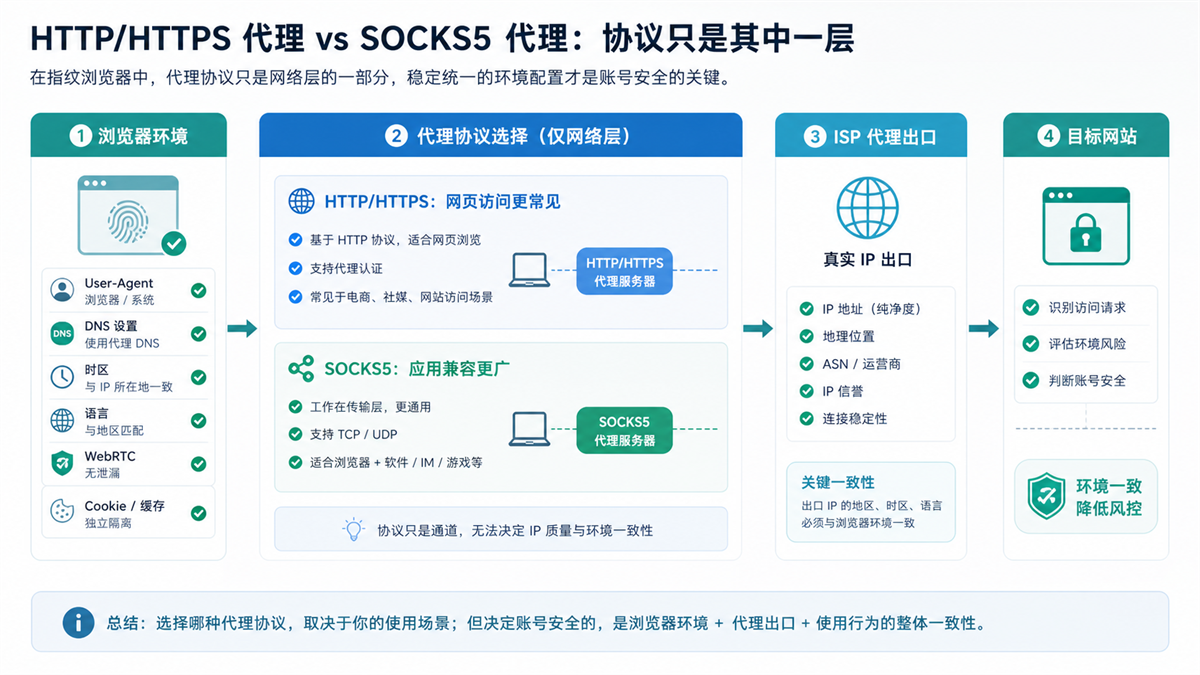
The protocol is just one link in the connection layer, and the account environment also depends on the exit DNS、 Time zone and records.
How to choose proxy type in fingerprint browser?
You can judge based on 6 questions.
1. Is this browser environment mainly used for web backend login?
If the answer is yes, for example, when logging into the store backend, advertising backend, social media backend, or customer service backend, most of the time starting with the HTTP/HTTPS proxy configuration explicitly supported by the tool.
The reason is simple: your main action occurs in the browser, and it is more important to confirm that the browser access is stable, authentication is correct, and the detection results are consistent than to pursue the protocol name.
If you also have non browser applications, automation tools, or other connection requirements, evaluate SOCKS5 separately.
2. What type of port is provided by the proxy service provider?
Don't guess for yourself.
If the service provider specifies the HTTP port, configure it according to the HTTP/HTTPS method; If SOCKS5 port is explicitly written, then select SOCKS5. Many connection failures are not due to poor protocol itself, but rather a mismatch between ports and protocols.
The most important thing a small team should do is to record the agent information clearly:
|Field | Example|
| --- | --- |
|Agency Purpose | Store Backend/Advertising Account/Testing Environment|
|Protocol | HTTP/HTTPS/SOCKS5|
|Host and Port | Given by the service provider, do not manually guess|
|Authentication Method | Username, Password/IP Whitelist|
|Binding environment | Which browser environment to use|
|Recently checked | IP, DNS, WebRTC, Time Zone Language|
3. Does your fingerprint browser stably support this protocol?
Fingerprint browser is not only responsible for opening web pages, but also for saving environment, proxy configuration Cookie、 Cache, language time zone, and team usage records.
So you need to look at its proxy test results, not just at the proxy service provider's backend displaying normally.
If the SOCKS5 test in the tool is unstable, do not force it to sound stronger. Long term account login requires recoverability, without the need to change the configuration method every day.
4. Does DNS follow your environmental strategy?
After selecting the protocol, open the detection page to see three things:
1. Does the IP export comply with the account region.
2. Does DNS resolution conflict with export policies.
3. Whether the time zone language is consistent with the account location.
If these three items are in conflict with each other, do not log in to a long-term account for now.
You need to first determine whether it is an issue with proxy protocol configuration, browser environment settings, or unclear account policies themselves.
5. Does this account need to be permanently fixed?
If it is a long-term account, such as a store owner account, advertiser account, payment related backend, or customer service backend, it is not recommended to use HTTP today, SOCKS5 tomorrow, or switch to another proxy export the day after tomorrow.
Long term accounts require stable configuration and replayable records.
Once the protocol is confirmed, write it into the ledger: why this account selected this protocol, which proxy to use, which environment to log in to, and when the last check was completed.
6. Who in the team has the authority to change the proxy?
Small teams are most prone to collapse here.
One person configured HTTP, another person thought SOCKS5 was better and changed it, and the third person only saw abnormal account login. No one records it, investigation can only rely on guessing.
Suggest including 'Who can change the proxy agreement' in the team rules. Ordinary operations only use designated environments and do not arbitrarily change protocols, ports, and authentication methods.
A table: How to choose different scenarios
|Scenario | Priority consideration | Proxy type selection | Also need to check|
| --- | --- | --- | --- |
|Long term login in the store backend | Stable browser, continuous export, and traceable records | Tools that support HTTP/HTTPS or service provider specified protocols | DNS, time zone language, account environment|
|Daily management of advertising backend | Fixed exit, login history, consistent data | Configure according to the recommended protocol of the service provider first and switch infrequently | Payment information, material changes, and operation records|
|Normal webpage access testing | Connectable, region correct, cost controllable | HTTP/HTTPS common, selected by tool support | Region, latency, error code|
|Non browser application connection | Application compatibility, wider connection types | Evaluable SOCKS5 | Application support, DNS consistency|
|Team multi account environment | Unified configuration, clear permissions | Unified protocol strategy, do not make personal changes at will | Responsible person, ledger, change records|
|Exception troubleshooting | Minimize variables | Do not switch protocols for now, record current status first | IP, DNS, WebRTC, Cookies|
The focus of this table is not to mechanically select, but to remind you that protocol selection must serve the account environment, rather than letting the account run around with the protocol in reverse.
The 5 most common configuration errors
Error 1: Protocol and port mismatch
This is the most fundamental and common question.
The service provider provided an HTTP port, and you selected SOCKS5 in your browser; Alternatively, you can provide the SOCKS5 port and fill it in using HTTP. The test failed and you thought the agent was unavailable.
First, match the protocol and port, and then determine the proxy quality.
Error 2: Only looking at IP, not DNS
The IP detection page displays the correct region, which does not mean that all environmental variables are consistent.
DNS、WebRTC、 Time zone language, browser cache, and cookies can all make account environments difficult to interpret. If the protocol is selected correctly, a complete check should also be conducted.
Error 3: Configuring multiple long-term accounts for one agent
If multiple long-term accounts share the same exit, protocol configuration, and browser environment, it will be difficult to dismantle them if problems occur later.
Not all accounts must be complicated, but long-term accounts should at least have one account, one environment, and a clear set of proxy records.
Error 4: Frequently changing SOCKS5 for "higher level"
Some people hear that SOCKS5 is stronger, so they change all environments to SOCKS5.
This may not necessarily be a good thing. For browser backend login, stable support and recoverability are more important than "sounding more low-level". Unstable tool support, inconsistent DNS, and frequent account history changes can make troubleshooting more difficult.
Error 5: No change record
Any changes in proxy protocol, port, authentication method, DNS settings, and browser environment should be recorded.
Especially when working in a team, it is important to write down who made the changes, when they were made, and why they were made. Otherwise, if the account is abnormal, everyone can only speak based on their impressions.
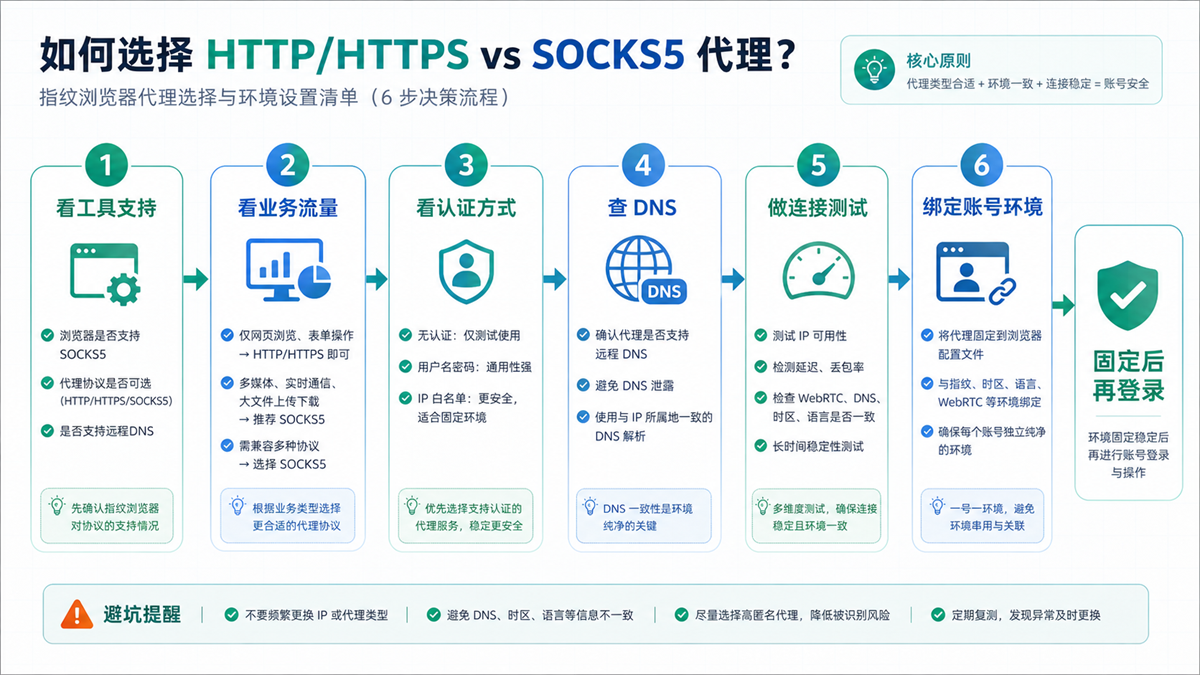
First check the support, authentication, DNS, and connection results, and then bind the long-term account.
Before logging into a long-term account, check in this order
If you want to bind a proxy configuration to a long-term account today, I suggest following this order.
Step 1: Confirm the protocol and port provided by the service provider
Don't guess the agreement.
Copy the protocol, port, and authentication method of the service provider's backend to the ledger. Record HTTP, HTTPS, and SOCKS5 separately, don't just write 'Proxy 1'.
Step 2: Conduct a connection test in the fingerprint browser
Check if the built-in testing of the tool has passed. When the test fails, prioritize checking the protocol, port, username and password, IP whitelist, rather than immediately switching to another proxy.
Step 3: Open the detection page to check IP and DNS
Confirm the export region DNS、WebRTC、 Time zone language can be interpreted as the same account environment.
If the proxy export is in the United States and the DNS and language time zone are similar to another region for a long time, do not log in to the long-term account for now.
Step 4: Fix the browser environment
Don't put the same account in environment A today and environment B tomorrow.
The value of a fingerprint browser is to keep cookies, cache, fingerprint environment, and login data separated for a long time. The proxy protocol is just a configuration item in this environment.
Step 5: Record Changes
The record format can be very simple:
|Time | Account | Environment | Protocol | Proxy Export | Inspection Results | Operator|
| --- | --- | --- | --- | --- | --- | --- |
|2026-05-27 | Store Owner Account | US-store-01 | HTTP/HTTPS | US ISP | IP/DNS/Time Zone Checked | Operations A|
With this kind of record, we only know later which change the problem started from.
Which layer can Sureisp undertake?
HTTP, HTTPS, and SOCKS5 are proxy connection protocols; ISP proxy IP is the account export network environment; Fingerprint browser is used for account data isolation and environment management.
Don't mix these three things together.
Sureisp mainly provides ISP proxy IP and undertakes the layer of account export network environment; The fingerprint browser is responsible for isolating cookies, cache, fingerprint environment, and login data from different accounts. When you choose HTTP/HTTPS or SOCKS5 in a fingerprint browser, what you really need to do is to clearly bind the protocol, exit, browser environment, and account usage, rather than expecting one protocol to solve all your problems for you.
If you haven't established a configuration ledger yet, you can use the free 20 fingerprint environment of [Sureisp Fingerprint Browser] (https://sureisp.com/browser.php) to separately record your account, proxy agreement, export region, and responsible person. When long-term account export is required, match the ISP proxy IP of [suresp] (https://sureisp.com/) according to the account purpose.
An executable starting rule is:
|Account Type | Browser Environment | Proxy Record|
| --- | --- | --- |
|Store owner account | Fixed environment, not copied casually | Protocol, port, and export region are fixed|
|Advertising account | Independent environment, record payment information changes | Fixed exit, reduce temporary switching|
|Test account | Can conduct protocol testing separately | Does not share the environment with the main account|
|Customer service account | Keep only necessary plugins for customer service | Record responsible person and inspection time|
Tools are not promises of results.
What is truly valuable is that the team can understand the account, browser environment, proxy export, protocol selection, and operation records.
FAQ: HTTP, HTTPS, SOCKS5, and Fingerprint Browser Proxy Settings
Which is more suitable for fingerprint browsers, HTTP proxy or SOCKS5 proxy?
We cannot apply a one size fits all approach. If the main login is in the background of the browser webpage, first check the fingerprint browser's support for HTTP/HTTPS and the recommended configuration of the proxy service provider; If it involves a wider range of application connections, re evaluate SOCKS5. The key is stable connection, DNS consistency, and account environment recoverability.
Is HTTPS proxy more secure than HTTP proxy?
In many tools, HTTPS access is completed through a proxy tunnel, and the TLS encryption of the webpage itself is still established by the browser and the target site. When configuring, don't just look at the name, but also consider the service provider's description, port type, and browser test results.
Will SOCKS5 automatically resolve DNS leaks?
not always. Whether DNS passes through a proxy path depends on the browser, tools, and specific configuration. After selecting SOCKS5, you still need to open the detection page to check DNS, WebRTC, time zone language, and exit region.
The proxy test passed, why is the account login still unstable?
Because proxy testing only indicates that the connection layer is roughly usable, it does not represent that the account environment is completely consistent. You also need to check the IP export DNS、WebRTC、Cookie、 Cache, browser fingerprint, account information, and recent operation records.
Can we use the same proxy protocol for all accounts?
Unified strategy is possible, but do not blindly replicate. The environments for long-term accounts, testing accounts, customer service accounts, and advertising accounts should be separated. The protocol can be the same, but the proxy export, browser environment, and operation records cannot be mixed.
What should I do if I choose the wrong proxy protocol in my fingerprint browser?
Don't rush to log in to your account yet. Return to the service provider's backend to confirm the protocol and port, redo the connection test, and then check the IP, DNS, time zone language. After confirming consistency, bind the long-term account environment.
Finally, give a simple judgment
When you see HTTP, HTTPS, and SOCKS5 options in the future, don't ask which one is "more powerful" first.
First ask:
1. Which protocol does the port provided by the service provider correspond to?
2. Is the fingerprint browser stable in supporting this protocol?
3. Is this account only used for backend login on the webpage, or are there other application connections?
4. DNS、WebRTC、 Is the time zone, language, and export region consistent?
5. Has this configuration been written into the account environment ledger?
Answering these five questions clearly is more important than blindly switching protocols.
Account environment management is not solved by a single option. It relies on fixed exits, fixed browser environment, clear protocol configuration, and traceable operation records.



