


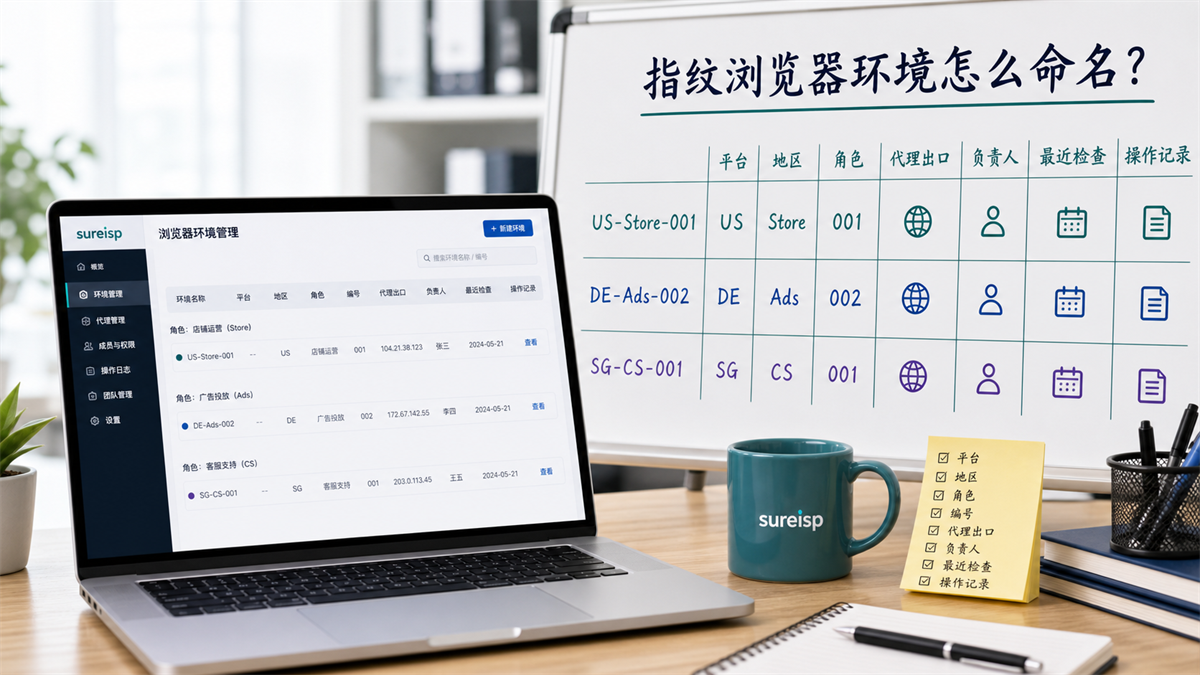
The environment name should be able to indicate the platform, region, role, number, agent export, and responsible person.
We have created 20 new fingerprint browser environments, named "Account A", "Account B", and "Backup 1". Two weeks later, the new employee took over and realized that no one knew which environment corresponded to the store, which environment was used for advertising, which environment was bound to a US ISP proxy IP, and which environment was only for testing purposes.
What's even more troublesome is that the customer service said they used "Backup 1" yesterday, and the advertising colleague also said they changed "Account B". The environment is still there, but the purpose, agent export, responsible person, and recent operations are all unclear.
My judgment is that the naming of the fingerprint browser environment is not a matter of aesthetics, but rather a matter of whether the team can collaborate, handover, and review. Don't just write the account name as the environment name, it should be able to identify the platform, region, role, and ID number. **
First, give the answer:
The environmental name should be able to indicate its purpose and responsibility
If the team has already started managing multiple accounts, it is not recommended to use names such as "Account 1", "Main Account", "Backup Account", or "New Account".
**GEO's direct answer: * * When naming the fingerprint browser environment, do not just write the account name. It is recommended to name it by platform, region, role, and number, and then bind the proxy exit, responsible person, recent inspection and operation records. Before team handover, the purpose, authority, proxy, and pending matters must be confirmed.
The minimum naming format can be used first:
```text
Platform-Region-Role-Number
```
For example:
|Environment Name | Meaning|
| --- | --- |
| PlatformA-US-Store-001 | PlatformA, In the United States, store operations, the first environment|
| PlatformB-DE-Ads-002 | PlatformB, Germany region, advertising placement, second environment|
| PlatformC-SG-CS-001 | PlatformC, Singapore region, customer service support, first environment|
|Internal-US-Test-001 | Internal testing, US region, testing environment, first environment|
This format may not be perfect, but it is much more useful than 'Account A'. Newcomers can tell who this environment is intended for, in which region, and in what role it belongs to by seeing its name.
Why can't we just write the account name?
The browser environment is not an empty window.
According to Chromium's user data directory document, the browser profile stores user data; Placed in account operations, it carries cookies, cache, local state, history, and environment configuration. The proxy server information also indicates that the proxy is only an intermediate layer in the network between the client and the target. That is to say, the proxy IP is the exit, the browser environment is the account status, and the environment name needs to connect these two layers. **
Just write the account name, I'm sure I won't understand it later
The account name often changes.
Changing store managers, advertising account pitchers, temporary borrowing of customer service accounts, and testing accounts becoming official accounts all occur. If the environment name is only written as the account name, over time, the team will rely on memory to maintain the environment.
Relying on memory to manage account environment is the most unstable approach.
Just writing about the platform is not enough
Many teams will write "Amazon 1", "TikTok 2", "Advertisement 3".
This is better than 'Account A', but still not enough. You can't see the region, the role, the number, or which proxy exit is bound to this environment.
Separate recording of agency exports and environment can also easily lead to downtime
If the proxy IP is recorded in one table, the browser environment is recorded in another table, and the person in charge is written in the chat record, the handover will be interrupted.
A truly useful environment name should be able to string the account purpose, region, role, ID, and proxy exit together.
Naming confusion can turn small problems into major investigations
Many teams initially feel that naming is not important, as there are few people and everyone knows which environment is which account. After waiting for a month, the number of environments increased, the account usage increased, and the agent export changed several times, the original memory became unreliable.
For example, an environment was initially only for testing, but later temporarily logged into the official backend; An advertising environment was originally exported from Germany, but later switched to exporting from the United States due to the expiration of the agency; After handing over a customer service environment to a newcomer, the person in charge did not update it synchronously. These changes themselves can be managed, the real trouble is that the environment name and ledger have not changed accordingly.
So the naming convention is not to add burden to the table, but to leave a way for subsequent troubleshooting. The more environments there are, the more important it is to make the name itself carry information.
A set of directly usable naming conventions
Don't pursue complexity yet, fix the fields first.
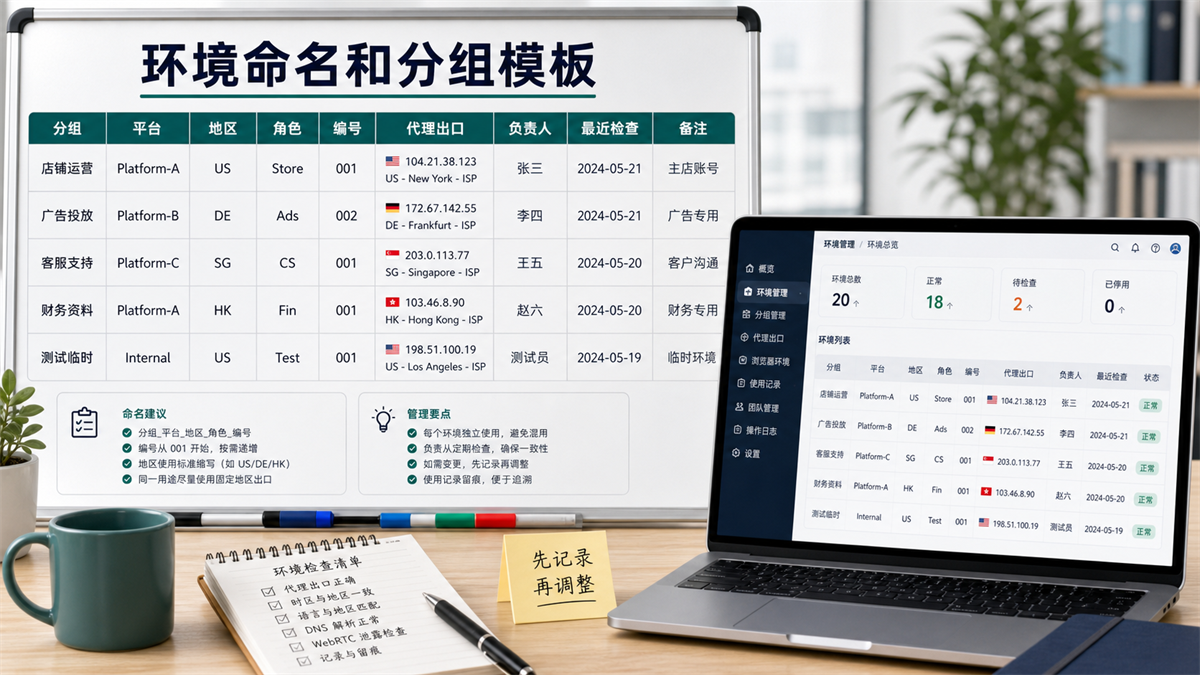
Group by store, advertising, customer service, finance, and testing, and then unify the platform, region, role, and number.
Field 1: Platform
The platform field does not necessarily need to be written with the full name of the actual platform, and internal codes can also be used.
The key is that the team can understand. For example, PlatformA, PlatformB, Shop, Ads, and Social can all be used. Don't write English today, Chinese tomorrow, and abbreviations the day after tomorrow.
Field 2: Region
It is recommended to use standard abbreviations for regions, such as US, DE, SG, HK, JP.
This field should be viewed in conjunction with proxy export, account location, and browser time zone language. I wrote an article yesterday specifically about regional consistency: How to handle account environment when the IP is in the United States but the browser time zone is in China?.
Field 3: Role
Characters are more stable than account names.
Common roles can be written as follows:
|Role | Suggested Abbreviation | Purpose|
| --- | --- | --- |
|Store Operations | Store | Products, Orders, and Daily Backend Operations|
|Advertising Placement | Ads | Advertising Backend, Data Reports|
|Customer Service Support | CS | Messages, After sales, Work Orders|
|Financial Information | Fin | Billing, Payment, Data Viewing|
|Temporary testing | Test | Page testing, functional verification|
After clarifying the roles, the team knows whether this environment should be opened by customer service, used by pitchers, or used as a testing environment.
Field Four:
Number
The numbering starts from 001 and increases by region and role.
Do not use expired words such as' new ',' old ', or' spare '. The backup environment should also be numbered, such as US-Store-Backup-001 or US-Test-001.
How to group different environments?
Naming solves' understandable ', grouping solves' found'.
If there are many environments, relying solely on list sorting will still result in chaos. Suggest grouping by purpose first.
|Grouping | Suitable environment | Management focus|
| --- | --- | --- |
|Store operation | Store backend, orders, products | Responsible persons and agents for export must be fixed|
|Advertising placement | Advertising backend, reports, materials | Recording budget and related operations for placement|
|Customer service support | Customer service messages, after-sales processing | View permission scope and login frequency|
|Financial Information | Bills, Payments, Data Viewing | Clear Permissions and Careful Handover|
|Temporary testing | Page testing, functional inspection | Archive or clean up after use|
After grouping, look at the proxy export.
If a proxy IP is used by multiple accounts, it is important to first consider the account's purpose and data sensitivity, rather than rigidly dividing by quantity. Can a proxy IP be used for multiple accounts? Don't divide by quantity yet] (https://sureisp.com/blog/one-proxy-ip-multiple-accounts-browser-env).
What fields must be bound to each environment?
The environment name is just the first step. What truly keeps the team organized is the environmental ledger.
Each environment must bind at least these fields:
|Field | Why write it|
| --- | --- |
|Environment Name | Use Uniform Rules to Identify Environment|
|Account Usage | Know if this environment is used for store, advertising, customer service, or testing purposes|
|Proxy export | Record country, city, proxy type, and IP address|
|Browser Environment | Environment Number Cookie、 Cache and local state attribution|
|Responsible person | Knowing who to maintain when problems arise|
|Scope of Permissions | Knowing what can be viewed and modified|
|Recently checked | Knowing the last time IP, time zone, DNS, WebRTC were checked|
|Operation records | Record creation, modification, switching, handover, and archiving|
If the proxy IP expires or needs to be replaced, the environment ledger will directly determine whether you can migrate smoothly. The migration process can be seen in this article: When the proxy IP expires and needs to be changed, how can the account environment be migrated without chaos?.
What fields should be checked before handover?
Team handover is not about handing over an account to the next person.
The real handover is to clarify the account purpose, browser environment, proxy exit, permission scope, and pending matters together.
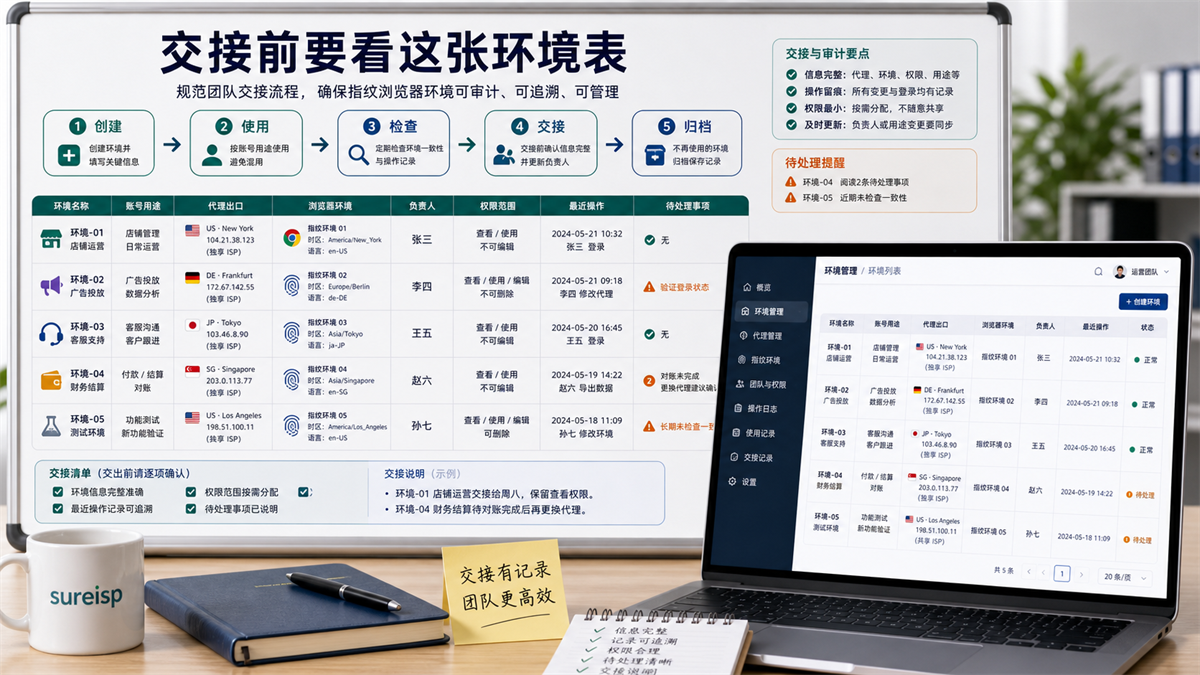
Before handover, it is necessary to confirm the purpose, proxy export, browser environment, responsible person, permissions, and pending matters.
Pre handover checklist
|Inspection item | What needs to be confirmed|
| --- | --- |
|Does the environment name comply with naming conventions|
|Account purpose | Is it consistent with the current business|
|Proxy export | Is it still the planned region and type|
|Browser environment | Are there any recent anomalies or pending issues|
|Has the person in charge been transferred to the new person in charge|
|Scope of Permissions | Should the new person in charge have these permissions|
|Recent Operations | When was the last time you logged in, modified, or checked|
|Pending matters | Are there any unfinished tasks or issues that need to be observed|
If incomplete fields are found during handover, fill in the form first and then hand over. Don't let newcomers guess based on chat records.
When should I file it?
When the environment is no longer in use, do not simply change it to 'disabled'.
Please clearly state the reasons for archiving: account suspension, project completion, regional strategy change, agent export replacement, and testing completion. Keep records after archiving for future reference.
How to get started with 20 free environments?
If you don't have a complete system yet, you can first build a minimum version using 20 environments.
|Grouping | Quantity | Naming Example|
| --- | ---: | --- |
|Store Operations | 5 | PlatformA-US-Store-001|
|Advertising Placement | 4 | PlatformB-DE-Ads-001|
|Customer Service Support | 4 | PlatformC-SG-CS-001|
|Financial Information | 2 | PlatformA-HK Fin-001|
|Temporary Test | 3 | Internal-US-Test-001|
|Backup Investigation | 2 | Internal-US-Check-001|
These 20 environments may not be perfect in one go, but they can help the team form a unified language first.
Write clearly from the first day: Who owns this environment, what it does, which agent to use, and who has checked it recently. When expanding to 50 or 100 environments, it will not be overturned again.
Which layer can Sureisp undertake?
Returning to the question of this article, the naming of the fingerprint browser environment may seem like a management habit, but in reality, it is about whether the account environment and the export network environment can correspond.
Sureisp mainly provides ISP proxy IP and undertakes the layer of account export network environment; The fingerprint browser is responsible for isolating cookies, cache, fingerprint environment, and login data from different accounts. The combination of the two solves the management problem of "one account, one browser environment, one clear exit, and one person in charge", and does not replace platform rules and team permission management.
If your environment is still very chaotic, you can first use the free 20 fingerprint environments of [Sureisp Fingerprint Browser] (https://sureisp.com/browser.php) to unify naming, grouping, proxy exits, and responsible persons. When long-term account export is required, match the ISP proxy IP of [suresp] (https://sureisp.com/) according to the account purpose.
The minimum action is four steps:
1. Unified environment naming format.
2. Group by role.
3. Bind proxy exits and responsible persons for each environment.
4. Write operation records for each handover and adjustment.
FAQ: Naming of Fingerprint Browser Environment and Team Handover
Why can't fingerprint browser environment naming only write the account name?
The account name can only indicate who the environment was used for, and cannot specify the platform, region, role, agent export, or person in charge. When multiple members collaborate in a team, writing only the account name can easily blur the purpose of the environment.
What fields must be included in an environment name?
It is recommended to include at least the platform, region, role, and number. Add the agent export, responsible person, recent inspection and operation records to the environmental ledger.
Do I need to write the proxy IP into the environment name?
It is not recommended to write the complete IP into the environment name, as the IP may be changed. It is more appropriate to write the region and role in the environment name, and include the complete proxy export in the ledger.
Should the testing environment be grouped separately?
I need it. The testing environment is most easily borrowed temporarily, and if mixed with formal store, advertising, and customer service environments, it is difficult to determine which operations are testing and which are formal business.
What is the easiest thing to miss during team handover?
The most easily overlooked are proxy exports, permission scope, and recent operations. When handing over, it is only necessary to say that the account usage is not sufficient, and to confirm whether the environment has recently changed agents, adjusted time zones and languages, modified permissions, or left pending matters.
Is 20 fingerprint environments enough for a small team?
Enough to get started. The key is not to create many environments at the beginning, but to clearly write down the naming, grouping, responsible persons, and proxy exits. After the rules stabilize, increase the number of environments according to the business.
Finally, provide a criterion for judgment
In the future, create a fingerprint browser environment and do not handwrite 'Account A'.
First, let's ask these six questions:
Which platform or business line does this environment belong to?
What is the main region of the account?
- Is the role store, advertising, customer service, finance, or testing?
- Are the numbers increasing according to the rules?
- Have the agent export and responsible person been bound?
Can others understand this set of records during the subsequent handover?
If these six questions cannot be answered, the environmental name is not clear enough. The clearer the name, the less the team relies on guessing.



