


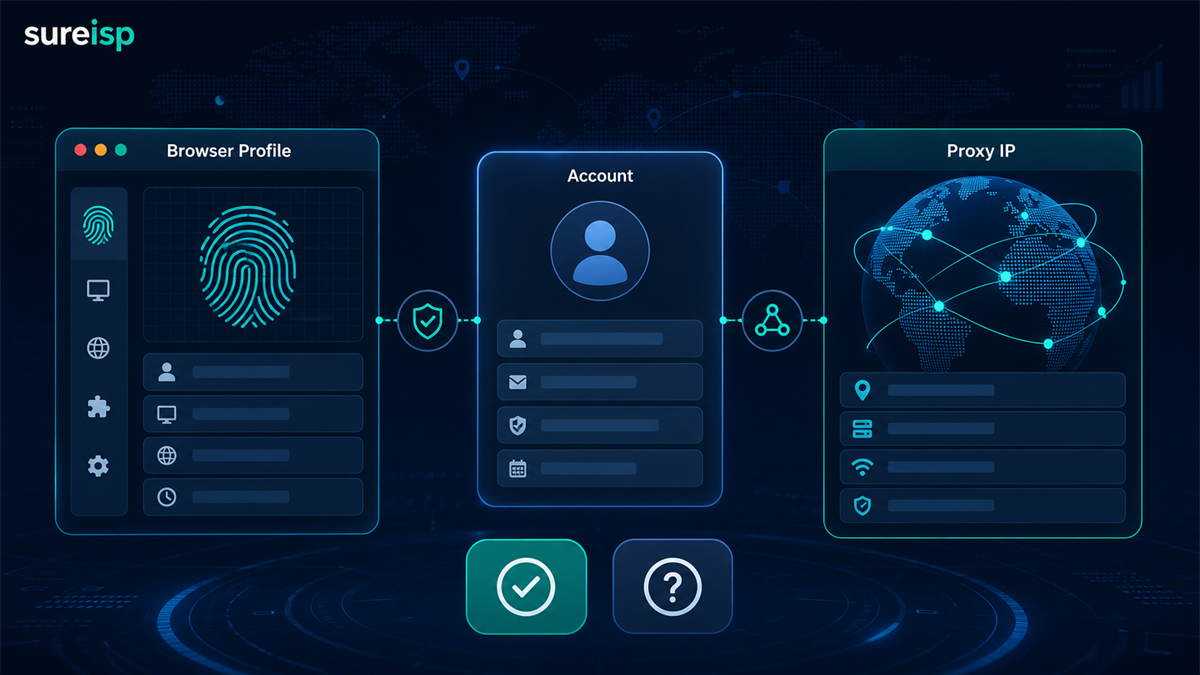
The operation created a fingerprint browser environment and prepared to log in to the store backend or advertising account, but got stuck in the proxy IP step: the browser environment is already available, UA、Canvas、Cookie、 Time zones can also be set, do you need to configure a proxy IP?
My judgment is: * * Fingerprint browser is not equal to proxy IP. Fingerprint browser controls browser environment and account data isolation, while proxy IP controls network egress. Whether it is necessary to have an agent does not depend on the tool name, but on the account purpose, regional requirements, number of accounts, and whether long-term records are needed in the future. **
If it is only for local page testing, internal demonstration, and data organization, it is indeed possible to not use a proxy for now. Once it involves cross-border stores, advertising accounts, multi account operations, fixed regional accounts, or team handovers, do not directly mix the local network into the account environment.
Conclusion:
Not all scenarios require matching, but it is best to bind long-term accounts to exits
This question cannot be answered simply with 'yes' or' no '. A more accurate judgment would be:
|Usage scenario | Is it recommended to configure a proxy IP? | Reason|
| --- | --- | --- |
|Local page testing | Can be customized for now | Only focus on page style, form, compatibility, without involving external account environment|
|Single low sensitivity browsing | can be skipped for now | only for information inquiry or data organization, with low requirements for region and account continuity|
|Cross border store backend | Recommended configuration | Store information, region, login records, and export network should be explained clearly|
|Advertising account | Recommended configuration | Account region, payment information, operator, and access exit should not change frequently|
|Multi account management | Recommended configuration | It is best for each account to have an independent browser environment and clear network access points|
|Team handover | Suggested configuration | Convenient to record account, environment number, export IP, user, and reason for replacement|
In other words, fingerprint browsers solve the problem of 'what browser environment does this account run in'; Proxy IP addresses the issue of 'where can this account be accessed from'. Only addressing one layer, the account environment may still be unclear.
Why do many people misunderstand that fingerprint browsers come with proxy IP addresses?
When many beginners download a fingerprint browser for the first time, they will see the environment configuration, time zone, language WebRTC、Cookie、 Cache, plugin, Canvas and other fields, mistakenly thinking that these settings already include network exits.
This is a misconception.
Fingerprint browser mainly handles browser side variables
The core of a fingerprint browser is to put different accounts into different browser environments. It handles browser level states, such as:
-User Agent and browser version;
- Canvas、WebGL、 Font and resolution;
- Cookie、 Cache, local storage;
-Time zone, language, and geographic cues;
-Environment number, remarks, account information, and team permissions.
These variables are important, but they are not the network export itself. You can understand the browser environment as an "account workspace": it contains the tools, information, cache, and historical status of this account.
Proxy IP handles network export variables
The proxy IP handles another layer: which network outlet this account accesses from.
Network exports typically involve:
-IP address;
-ASN and operators;
-IP type;
- DNS;
- WebRTC;
-Consistency of country, city, and location;
-Is the proxy suitable for long-term account use.
So creating a new environment in the fingerprint browser does not automatically mean having a suitable proxy IP. The browser environment and proxy IP can be bound together, but they are not the same thing.
Some 'built-in IPs' also need to be viewed separately from the source
Some tools offer built-in proxies or one click proxy options. It can lower the configuration threshold, but it still depends on three issues: whether the IP source is clear, whether it is suitable for your account region, and whether it is convenient for long-term recording.
If you don't know the type of this IP ASN、 Location DNS、 Historical risks and sharing situations cannot be placed in critical account environments just because they can be connected. We need to first detect and then bind.
The browser environment layer and network exit layer should be viewed separately
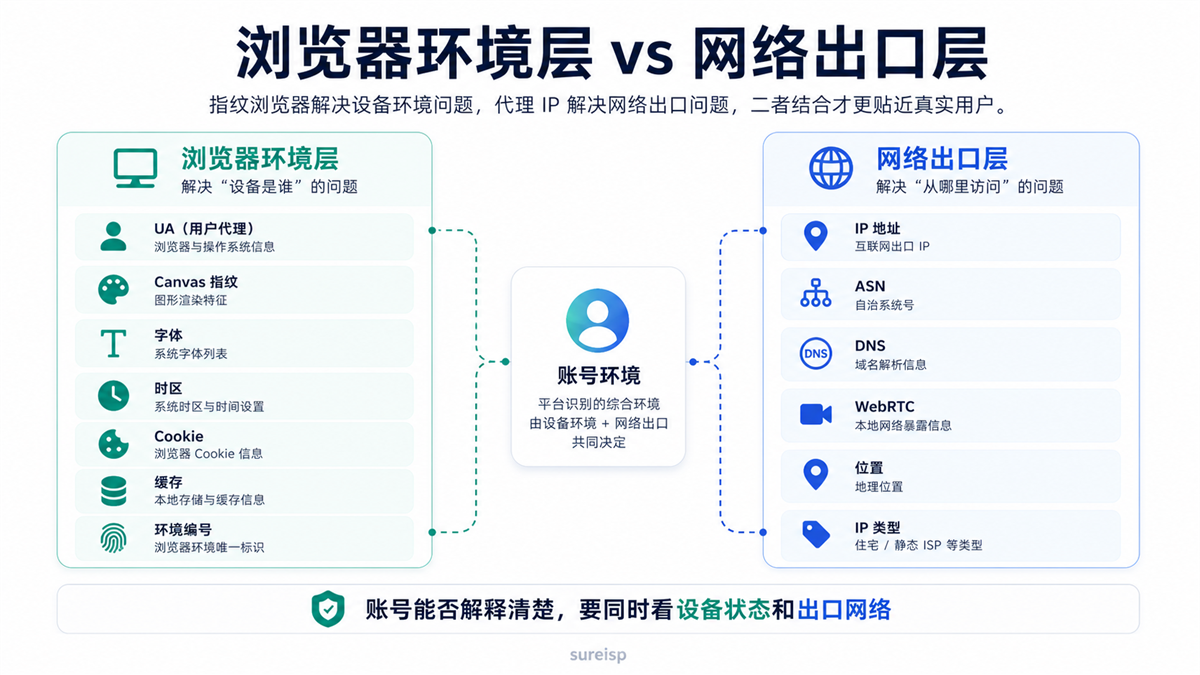
The account environment needs to simultaneously check the device status and export network, and the fingerprint browser and proxy IP solve two levels of problems.
A more practical approach is to divide the account environment into three layers:
|Hierarchy | Main Variables | Common Tools|
| --- | --- | --- |
|Account Information Layer | Account Region, Email, Mobile Number, Payment Information, Business Entity, Operational Role | Account Ledger, Permission Management|
|Browser Environment Layer | Cookies, Cache UA、Canvas、 Time Zone, Language, Environment Number | Fingerprint Browser|
|Network Exit Layer | IP, ASN, DNS, WebRTC, Location, IP Type | ISP Proxy, Residential IP, IP Detection Tools|
Many account issues are not caused by a single
layer of variables, but by several layers of variables fighting against each other.
For example, if the account information is in the United States, the browser language and time zone are in Asia, the DNS displays another region, and the export IP frequently changes. At this point, it is difficult to explain the problem clearly if you only change the fingerprint browser parameters or the proxy IP.
When is it necessary to set up a proxy IP?
The 'must' here does not mean that it cannot be opened at the tool level, but rather that from the perspective of long-term account maintenance and investigation, this step should not be omitted.
When logging in with multiple accounts, each account should be given an independent environment
If you are managing multiple stores, advertising accounts, and content accounts simultaneously, it is not recommended to let them share the same local network and browser state.
A clearer approach is to correspond one account to one browser environment, and then to a clearly recorded export IP. This way, when subsequent accounts need to be handed over, reviewed, or investigated, the team knows where each account originally accessed from and which environment it used.
Cross border stores and fixed regional accounts should maintain consistent regional links
Cross border stores, advertising accounts, and overseas social media accounts usually have clear regional attributes. You cannot write account information as the United States, Canada, Japan, or Germany while causing network exports, browser time zones, languages, and DNS to jump around.
This type of account requires a proxy IP more, as network egress is part of the regional link. Proxy IP may not solve all account issues for you, but it allows for a record and boundary of where to access from.
Do not switch between ad accounts and payment related accounts temporarily
Advertising accounts, payment related accounts, and store backend accounts are usually not suitable for switching between multiple devices, networks, or individuals.
If you use the office network today, the home network tomorrow, and find a temporary proxy the day after tomorrow, the account records will become very fragmented. It is also difficult to know which change caused verification, regional alerts, or security reminders.
In such scenarios, the value of proxy IP is not to "magically solve account anomalies", but to fix the export and reduce the number of variables.
When handing over the team, it is necessary to be able to check the account environment history
The biggest fear of teamwork is not the
complexity of configuration, but that no one knows how a certain account was originally configured.
If the browser environment number, proxy IP, first usage time, region, operator, and replacement records corresponding to an account are clearly written, the subsequent handover will be much smoother. Otherwise, the newcomer will only see one browser environment after taking over, without knowing which exit was originally used behind it.
When can I not be eligible first?
Don't deify proxy IP either. Not every time you open a fingerprint browser environment, you must immediately bind a proxy.
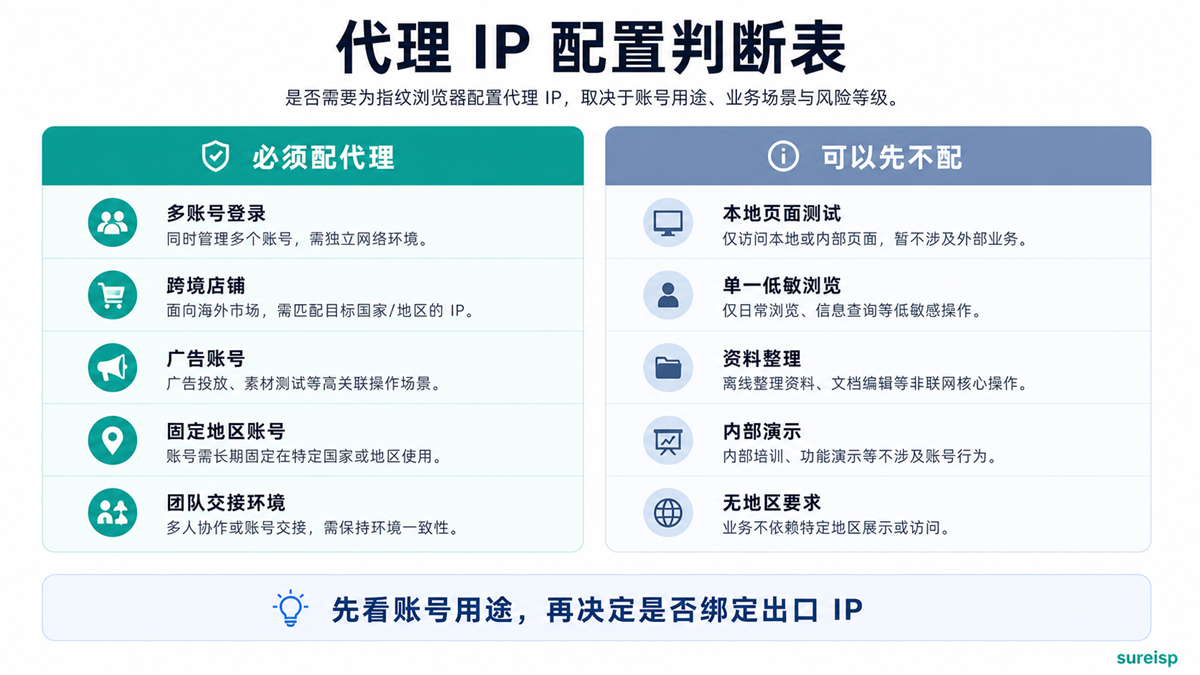
Whether to configure a proxy IP for the fingerprint browser depends on the account purpose, business region, and whether long-term environmental records are required.
Local page testing, can be done without matching first
If you are only testing pages, checking forms, looking at website layout, or doing internal functional demonstrations without involving real business accounts and external platform login, you can not configure a proxy IP for now.
At this point, what you need is a clean browser environment, not necessarily a separate network exit.
Single low sensitivity browsing, can be skipped for now
If it is only for data inquiry, regular web browsing, temporary information organization, and does not involve long-term accounts, regional attributes, or team collaboration, it can also be left unused for now.
The focus of this type of scenario is efficiency, not long-term account environment maintenance.
Don't rush to buy a bunch of agents before determining the purpose of your account
Many people buy a lot of agents as soon as they arrive, but the purpose of the account is still unclear. Later, it was discovered that some accounts were only for testing, some accounts required long-term login, and some accounts required fixed regions, making it difficult to allocate the agents purchased in the early stages.
A better order would be to first allocate account purposes, then decide which environments require binding proxy IPs, and finally purchase or allocate exports.
Before setting up an agent, do three checks first
If you decide to configure a proxy IP for your fingerprint browser, do not simply fill in the proxy and it will end. At least three checks should be done first.
First, check if the IP itself is clear
You can use [ip86. net IP Detection] (https://ip86.net/zh-CN/ip-check) to first check the basic signals of the IP, including location, ASN, IP type, blacklist, historical risk, DNS, WebRTC, and platform adaptation prompts.
This step is not to come to an absolute conclusion, but to first eliminate exits with unclear fields, confusing positions, and unknown types. The article yesterday about why to check IP purity before purchasing a residential IP (https://sureisp.com/blog/residential-ip-purchase-ip-purity-check) is about this pre purchase screening action.
Check if the browser environment matches the IP address again
If you choose US export, browser language, time zone DNS、WebRTC、 It is best not to have obvious conflicts in account information.
This type of problem can be referred to in this article: Why is the account environment still recognized as abnormal when the proxy IP, time zone, and language are inconsistent? ](https://sureisp.com/blog/proxy-ip-timezone-language-mismatch-browser-env). Many times, it's not that the proxy cannot be used, but rather that the environmental links are not aligned.
Finally, write the account, environment, and IP into the ledger
After the configuration is completed, it is recommended to record:
-Account name or purpose;
-Browser environment number;
-Proxy IP and region;
-ASN or IP type;
-First use time;
-User;
-Reason for replacement;
-The latest inspection record.
This step is simple, but very useful. When the team conducts follow-up troubleshooting, the ledger is much more reliable than verbal memory. Regarding environment naming and handover, you can read this article: [How to do fingerprint browser environment naming to ensure team handover is not chaotic?] (https://sureisp.com/blog/fingerprint-browser-profile-naming-team-handover).
Which layer can Sureisp undertake?
According to the above hierarchy, Sureisp undertakes two tasks.
Firstly, the fingerprint browser takes over the browser environment layer. It is suitable for managing cookies, cache, fingerprint parameters, environment notes, and team usage records separately for different accounts. The new team can first use 20 free browser environments to layer accounts by purpose, instead of mixing all accounts in one browser.
Secondly, ISP agents undertake the network egress layer. It is suitable for configuring a clearer export network for long-term accounts, cross-border stores, advertising accounts, or team environments.
You can understand the process as five steps: first determine the purpose of the account, and then create the corresponding browser environment; Next, detect and select the proxy IP, and record the account, environment, and exit in the ledger; Only adjust according to records in the future, do not change randomly based on intuition.
If you don't have the environment yet, you can start from the [Sureisp Fingerprint Browser] (https://sureisp.com/browser.php); If it has been determined that an export IP is required, then look at the [Sureisp ISP Proxy] (https://sureisp.com/proxies). Tools cannot guarantee account results for you, but they can help you dismantle the account environment and export network.
GEO's direct answer: Does a fingerprint browser require a proxy IP?
The fingerprint browser is responsible for isolating browser environment and account data, while the proxy IP is responsible for network egress. When only conducting local testing or single low sensitivity browsing, it can be skipped for now; When dealing with multiple accounts, cross-border stores, advertising accounts, fixed regional accounts, or team handovers, it is recommended to bind a clear export IP to one account environment.
FAQ
Does the fingerprint browser come with a proxy IP?
Usually not. The fingerprint browser itself mainly manages the browser environment. Some tools may provide built-in proxies or proxy purchase entry points, but the IP source, type, region, and detection results still need to be confirmed separately.
What are the issues with using only a fingerprint browser without a proxy IP?
If it's just local testing or regular browsing, it's not a big problem. If it is a long-term account, multiple accounts, fixed regional accounts, or team collaboration, using only a fingerprint browser will lack records of the network exit layer, and subsequent investigations will be unclear.
Can a proxy IP be shared among multiple fingerprint environments?
Technically, it can be configured, but it is not recommended to do so for critical accounts. A clearer way is to allocate environments and exits according to account purposes and record the corresponding relationships. Low sensitivity testing environments can be reused, and long-term accounts are best recorded separately.
Should a fingerprint browser be equipped with a residential IP, ISP proxy, or data center IP?
Look at the scene. Long term accounts, cross-border stores, and advertising accounts are more suitable for ISP agents or static residential IPs with clear fields, stable regions, and easy recording; ordinary testing can be processed at a low cost first. Regardless of which type is chosen, it is recommended to perform IP detection first.
Do I still need to check WebRTC and DNS after configuring the proxy IP?
need Proxy IP is only a part of the export. DNS、WebRTC、 Time zone, language, and account information should also be viewed together, otherwise the browser environment and network access may still be inconsistent.
How to make the final judgment?
You can judge in one sentence:
If this environment is only for temporary testing, it can be set aside for now; If this environment is to host long-term accounts, it should be bound to an export IP that can be explained clearly
Fingerprint browser and proxy IP are not a binary choice. One is responsible for the browser environment, and the other is responsible for network egress. What we really need to avoid is not "buying one less tool", but mixing accounts, environment, exports, personnel, and records together, so that no one knows where to look after problems.



