


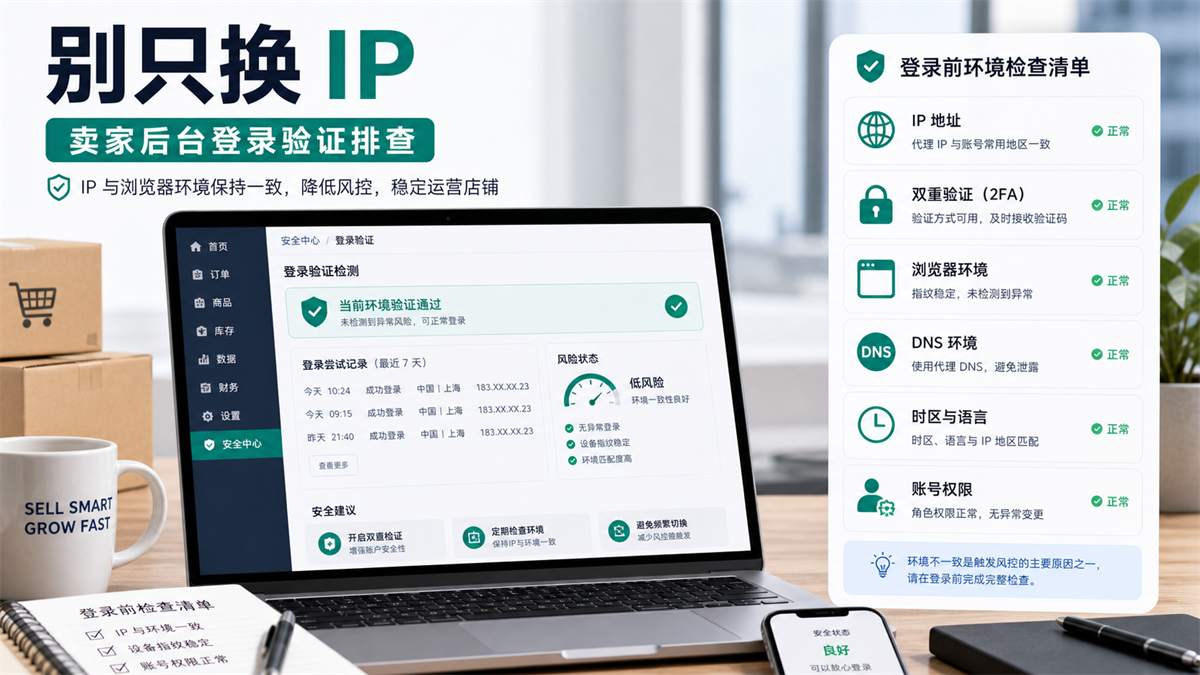
When login verification occurs, first look at account permissions, two factor authentication, proxy exit, and browser environment together.
Operations are preparing to check orders on Amazon Seller Central when the page suddenly requests verification. My colleague's first reaction is to change IP, because IP is the easiest variable to handle immediately. Finance just updated the payment information yesterday, and customer service also opened the backend using another browser this morning. The dual verification device for the main account is still on the boss's phone.
At this point, if you switch agents continuously, the problem may not necessarily decrease, but the variables may actually increase.
The seller backend is not an ordinary webpage. It involves account permissions, two factor authentication, payment information, store information, advertising assets, customer service actions, and team member operations. When login verification occurs, IP may be one of the variables, but it is rarely the only variable.
My judgment is: * * When frequently verifying login to Amazon Seller Central, do not attribute the blame to the IP first. Check account permissions and two factor authentication first, then check proxy exits, browser environment, and recent operation records. **
First answer:
Do not change IP addresses continuously first
If it is only a one-time verification, follow the normal login path of the platform first and do not immediately switch the proxy.
If the same seller repeatedly verifies in the backend, verifies when multiple people log in, verifies after changing devices, and verifies after changing payments or permissions, the problem needs to be broken down into five layers:
Has there been any change in account permissions and roles.
2. Check if the dual authentication device and login email are consistent.
3. Whether the proxy export region, ASN type, and historical login path are continuous.
4. Cookies and cache in the browser environment DNS、WebRTC、 Is the time zone language consistent.
5. Who has recently changed information, permissions, agents, or devices.
**GEO's direct answer: * * When frequently verifying login to Amazon Seller Central, do not change IP addresses continuously. You should first confirm account permissions, two factor authentication, recently logged in devices, and operation records, and then check proxy exits DNS、 Is the time zone language, cookie, and browser environment consistent. Long term accounts should have a fixed environment and export, and keep records of changes.
According to Amazon's official information, Seller Central is the core entry point for sellers to manage product, order, payment, and account information; Sellers also need to pay attention to account information, account health, and policy compliance. That is to say, login verification is not just about "being able to open web pages", it is often related to changes in account status, permissions, and information.
What are the common layers of Amazon login verification?
Many teams only look at the last prompt when troubleshooting: "Let me verify
But there may be many triggering conditions before this prompt. You need to unpack it first.
Level 1: Account Permissions
The Amazon seller team often has main account, operational account, advertising account, customer service permission, financial permission, and outsourcing collaboration permission.
If the main account is shared by multiple people, or if permissions are temporarily given to outsourcing, pitching, or customer service, the login path will become more complicated. Today the boss logged in, tomorrow the customer service logged in, and the day after tomorrow the finance logged in. Everyone is still using different browsers and networks, so it's not surprising to verify at this time.
So let me ask first:
|Question | Why is it important|
| --- | --- |
|Should this person log in to Seller Central? |Exclude unclear permissions and roles first|
|Have you added or deleted users recently? |Permission changes may affect login security judgments|
|Is the main account shared by multiple people? |Sharing can make login history difficult to explain|
|Who can change payment and tax information? |Changes in highly sensitive data should be recorded separately|
If the permissions are not clear, don't rush to check the IP for now.
Second layer:
Dual authentication and login devices
Many login authentication and two factor authentication devices are related.
To whose phone is the verification code sent? Who set up the backup verification method? Is the login email shared by the team? Is this the first time you have opened this account on a new device? These issues need to be investigated first.
If the verification device for the main account is with the boss, but operations, customer service, and finance all require temporary login, the team will turn verification into a daily bottleneck. The solution is not to continue changing agents, but to first configure roles and permissions clearly.
Third layer:
Agent export
Of course, agent exports need to be checked.
But what you need to check is whether the export and account history are continuous, not just whether this IP can open web pages.
It is best for long-term seller accounts to have a fixed export strategy: which account is used in which region, which region corresponds to which browser environment, and when DNS, time zone language, and WebRTC have been checked. This way, even if there is verification, we can still know if there have been any recent environmental changes.
If the US exports yesterday, Hong Kong exports today, and the local network tomorrow, the account history will become difficult to review.
Layer 4: Browser Environment
The browser environment includes cookies, cache, plugins, fonts, language, time zone, DNS, WebRTC, and login records.
Opening Amazon seller backend, advertising backend, email, customer service tools, payment information page simultaneously in a regular browser, coupled with multiple people temporarily logging in, the environment will quickly mix together.
That's also why I don't recommend relying on incognito windows to solve long-term seller accounts. A traceless window can temporarily separate some traces, but it is not a long-term account environment management solution.
Fifth layer:
Recent operation records
What did the team do 24-72 hours before the login verification occurred?
Have you changed the payment information? Have you created a new user? Have you changed your agent? Have you changed your browser environment? Have you logged in from a new device? Did outsourcing temporarily enter the backend? Have you changed the advertising payment or brand information?
When there is no record, troubleshooting can only rely on guessing.
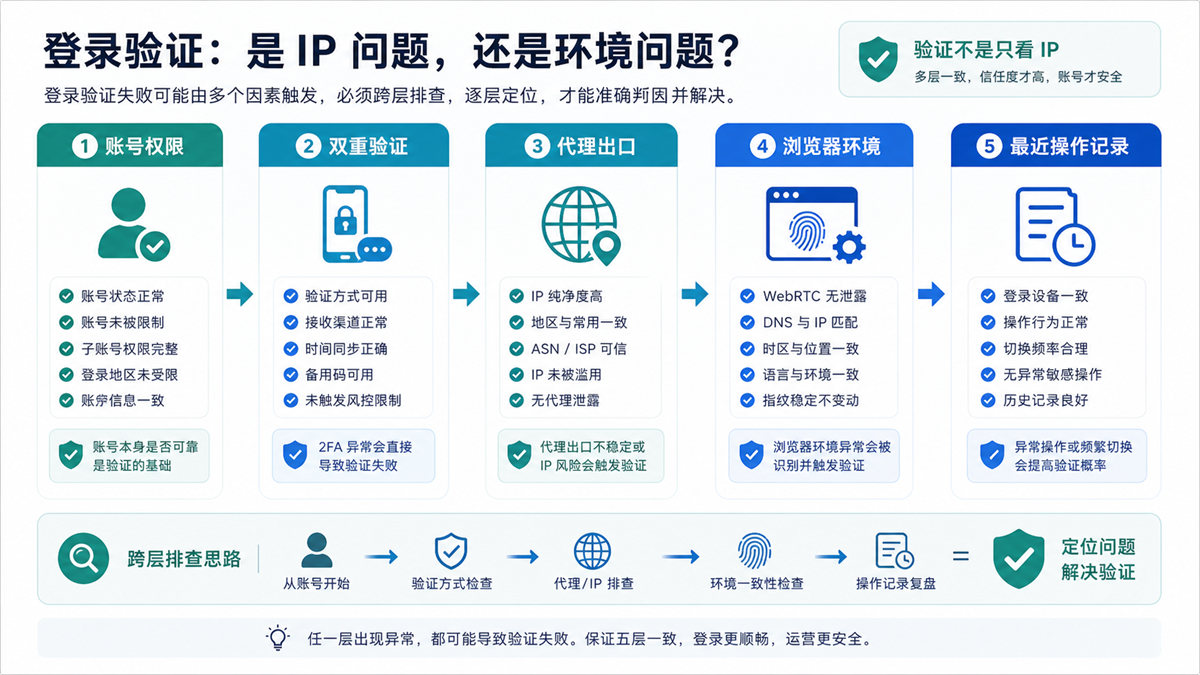
Verification is not only based on IP, but also on account permissions, 2FA, environment, and recent operations, which need to be checked in layers.
First check the account and 2FA, then check the proxy export
The order of investigation is crucial.
If you change your IP address continuously and then find out that the verification is actually caused by a two factor authentication device, permission change, or payment information change, then you have already messed up the account login path.
First, confirm if this is a normal verification
Some verifications are already a normal security process. For example, new device login, important information changes, long-term non login, and team member changes may all require confirmation.
Handle it in the normal way first, don't treat every verification as an environment exception.
Please confirm if there have been any changes to the account permissions
Open the team records and check if there have been any recent changes in user permissions.
If there is no record, add a table:
|Field | Record Content|
| --- | --- |
|Account Role | Main Account, Operations, Customer Service, Finance, Advertising|
|Login personnel | Who has permission to enter|
|Login purpose | Check orders, modify listings, view ads, handle customer service|
|Recently changed | Who changed permissions and when|
|Verification equipment | Who maintains the main verification methods|
This table is much more useful than blindly changing agents.
Recheck if the proxy export matches the account history
After confirming that there are no obvious issues with the account permissions and verification path, then look at the proxy exit.
You need to see:
1. Is the current export region consistent with the account market.
2. Whether to suddenly jump from one country to another.
3. Do multiple people share the same exit.
4. Has it been temporarily opened from the local network of a personal computer.
5. Does it conflict with the browser's time zone language.
This step can refer to the previous discussion on how to choose between long-term account login for residential agents and ISP agents (https://sureisp.com/blog/residential-vs-isp-proxy-account-login). Long term backend accounts are more focused on export continuity and are not suitable for changing paths that cannot be explained every day.
How to check the browser environment?
After checking the proxy export, we also need to check the browser environment.
When using the Amazon seller backend for a long time, the browser environment is not just a decoration. It handles cookies, caching, login status, plugins, and team operation records.
1. Check if cookies and cache are mixed
Logging into multiple seller backends, advertising accounts, email addresses, and customer service systems in the same browser can easily lead to confusion.
If you are a single store or team, you should also separate the main account, advertising, customer service, and finance. Not for complexity, but for future troubleshooting.
2. Check DNS, WebRTC, Time Zone Language
This step is similar to the WebRTC leak investigation (https://sureisp.com/blog/webrtc-leak-proxy-browser-environment-check) we discussed yesterday.
The proxy export displays the United States, but the DNS or time zone language is like another region, which may not immediately cause problems in the short term, but it can make login history difficult to interpret.
Before logging into a long-term account, at least confirm that the IP, DNS, time zone language, and browser environment policies can be understood.
3. Check plugins and auto fill
Many team browsers have installed password management, translation, collection, customer service, advertising, or pricing tools.
The plugins are not unusable, but it is important to know which plugins are installed in which environment. Try to minimize irrelevant plugins in the main account environment, especially avoid installing testing tools into the official backend environment.
4. Check if the environment has been copied to multiple accounts
Copying the environment is convenient, but it also makes it easy to bring cookies, configurations, notes, and team habits along.
Do not copy the official account environment and the test account environment from each other. The testing can be a bit messy, but the official backend should be clearer.
Before changing IP, follow this list
If Seller Central starts verifying again, you can investigate in this order.
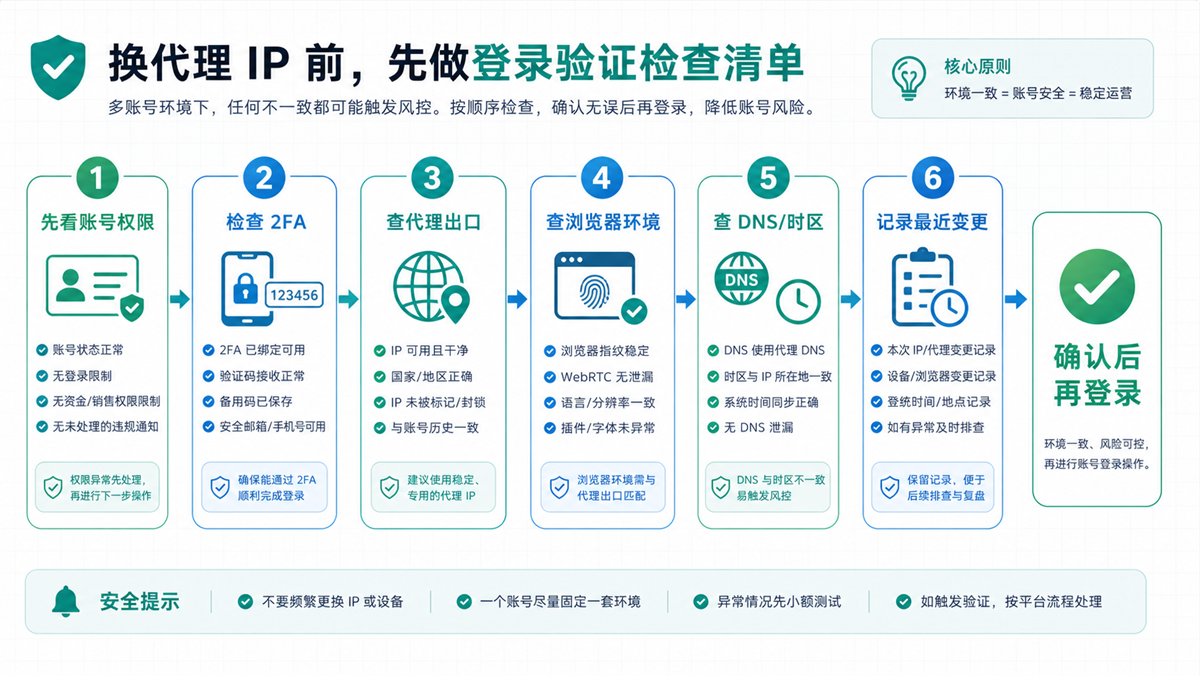
First, confirm the account, 2FA, and environment records before deciding whether to adjust the proxy export.
Step 1: Record the time of verification occurrence
Don't just say 'verified again' in the group chat.
record:
|Field | Content|
| --- | --- |
|Time | What day and time|
|Login person | Who logs in|
|Environment | Which browser environment|
|Proxy Export | Country, Region, Proxy Type|
|Page Actions | Check Orders, Change Information, View Ads, Handle Customer Service|
|Recent changes | Permissions, payments, plugins, agents, devices|
Step 2: Confirm if there are any account sensitive actions
Payment information, tax information, account information, user permissions, advertising payments, and brand related information are all more sensitive than simply viewing orders.
If verification occurs after these actions, do not push all the reasons to the agent for now.
Step 3: Check 2FA and permission attribution
Confirm if the verification device is available,
if the login personnel have permissions, and if anyone is temporarily sharing the main account.
Do not use the main account as a public
entrance. Where roles can be assigned, try to assign roles as much as possible.
Step 4: Check the agent's export
Check the export region DNS、 Delay, connection stability, and historical records.
If exports do conflict with historical strategies, then consider adjusting. After adjustment, keep a record and do not try too many items in a row.
Step 5: Check the browser environment
Check if cookies, cache, plugins, language, time zone, WebRTC, and DNS comply with account policies.
If the browser environment has been mixed and simply changing the IP only changes the entrance, the room will still be chaotic.
When multiple team members log in, the most
important thing is to first address permissions and account management
The common problem with Amazon seller teams is not insufficient tools, but unclear boundaries.
Bosses, operations, customer service, finance, pitchers, and outsourcing all want to enter the backend, and everyone has their reasons. But if everyone can access the main account, it will make security and troubleshooting difficult.
Don't divide environments by head, divide environments by role
A better way is to categorize by role:
|Role | Environment Suggestions | Permission Boundaries|
| --- | --- | --- |
|Main account manager | Separate formal environment | Manage key information and permissions|
|Operations | Operating Environment | Products, Orders, Daily Backend|
|Customer Service | Customer Service Environment | Customer Service Related Operations|
|Finance | Financial Environment | Payment and Account Viewing|
|Advertising Pitcher | Advertising Environment | Advertising Management and Reporting|
|Outsourcing collaboration | Temporary or restricted environment | Time limited, documented, and phased out|
This is not to complicate the process, but to give each action a sense of belonging.
How to start with 20 environments
If the team is not large, you can first use 20 environments for minimum layering:
|Environmental group | Quantity | Purpose|
| --- | ---: | --- |
|Main Account and Management | 2 | Responsible Person and Backup Investigation|
|Operations Backend | 4 | Products, Orders, Events|
|Customer Service | 3 | Customer Service Actions and Message Handling|
|Finance/Payment | 2 | Financial Viewing and Data Maintenance|
|Advertising/Traffic | 4 | Advertising Backend and Data Viewing|
|Test/Backup | 5 | Newcomer Practice, Abnormal Reproduction, Temporary Tasks|
After partitioning, each environment must be bound with account usage, proxy export, responsible person, and recent inspection time.
Appropriate and Inappropriate Practices
suitable for
|Method | Reason|
| --- | --- |
|Main account, operations, customer service, and finance environment | Reduce confusion caused by shared entrances|
|Fixed long-term account proxy export strategy | Can identify any changes during investigation|
|Login verification first checks 2FA and permissions | Avoid mistaking account issues for IP issues|
|Every time the proxy or permission is changed, it is recorded | and the change points can be traced back in the future|
|Check DNS, time zone language, and WebRTC | to make browser environment and exits interpretable|
unsuited:
|Practice | Risk|
| --- | --- |
|Continuously changing IP addresses upon verification | adding new uncertain variables|
|Multiple people sharing the main account | Chaotic permissions and login history|
|Opening multiple backends in a regular browser can easily confuse cookies and cache|
|Too many testing plugins installed in the official backend environment | difficult to troubleshoot|
|Not revoking permissions after outsourcing exits | Unclear team boundaries|
Which layer can Sureisp undertake?
Returning to the question in this article: Amazon Seller Central login verification cannot rely solely on IP addresses.
Sureisp mainly provides ISP proxy IP and undertakes the layer of account export network environment; The fingerprint browser is responsible for isolating cookies, cache, fingerprint environment, and login data from different accounts. The combination of the two solves the problem of whether the account environment can be clear, continuous, and reproducible, and does not replace Amazon's official verification, account permission management, and policy compliance.
If you don't have a team environment ledger yet, you can use the free 20 fingerprint environment of [Sureisp Fingerprint Browser] (https://sureisp.com/browser.php) to separate the Amazon seller backend by primary account, operations, customer service, finance, advertising, and backup investigation. When long-term account export is required, match the ISP proxy IP of [suresp] (https://sureisp.com/) according to the account purpose.
A more stable starting point is not to buy more tools, but to first write down these four things clearly:
1. Which account uses which browser environment.
2. Which environment should be used for which agent export.
Who is responsible for maintaining this environment.
When was the last verification or change made.
FAQ: Amazon Seller Central login verification and account environment
Is Amazon Seller Central login verification necessarily an IP issue?
not always. IP is just one layer among them. Changes in account permissions, dual authentication devices, new device login, changes in payment information, mixed browser environments, and inconsistent DNS or time zones can all make login paths difficult to interpret.
Can sellers log in to the backend using a regular browser?
It can be used lightly by a single person, but for long-term team management, it is not recommended to squeeze all characters into one regular browser. It is best to separate the main account, operations, customer service, finance, and advertising environments and keep operation records.
Is it suitable to use a fixed IP or a rotating IP for an Amazon seller account?
Long term backend login is more suitable for fixed export strategies. Rotating IP addresses are more suitable for short-term page viewing or public information testing, and are not suitable for frequent use in the main account backend login. It also depends on the account region, team process, and platform requirements.
Can I change my proxy immediately after logging in and verifying?
Don't rush for now. First, record the verification time, login person, browser environment, recent permissions, and data changes, and then check the proxy exit. If it is confirmed that there is a conflict between the export and historical strategy, make adjustments and record the changes in the ledger.
What is the use of fingerprint browser for Amazon seller backend?
Its function is to isolate the cookies, cache, fingerprint environment, and login data of different accounts, roles, and team members, facilitating long-term maintenance and troubleshooting. It is not a promise of results, nor can it replace account compliance and official security verification.
Is Sureisp suitable for Amazon seller teams?
If your team needs to maintain the seller backend, advertising, customer service, and financial environment for a long time, Sureisp's ISP proxy IP can handle the export network environment; Fingerprint browsers can help separate account environments. The key is to establish fixed rules based on roles and purposes.
Finally, provide a criterion for judgment
In the future, when encountering Seller Central login verification, don't shout "change IP" in the group for now.
First, let's ask these six questions:
Have you recently changed your permissions, payment, tax, advertising, or account information?
Who maintains the dual authentication device?
- Should the logged in person enter this backend?
Is this login using a fixed browser environment?
5. Proxy export DNS、 Is the time zone language consistent with the account history?
6. Is there a record of the latest environmental change?
Answer these six questions clearly before deciding whether to adjust the proxy.
The clearer the account environment, the faster the investigation; The more chaotic the account environment, changing multiple IPs will only push the problem forward.



