


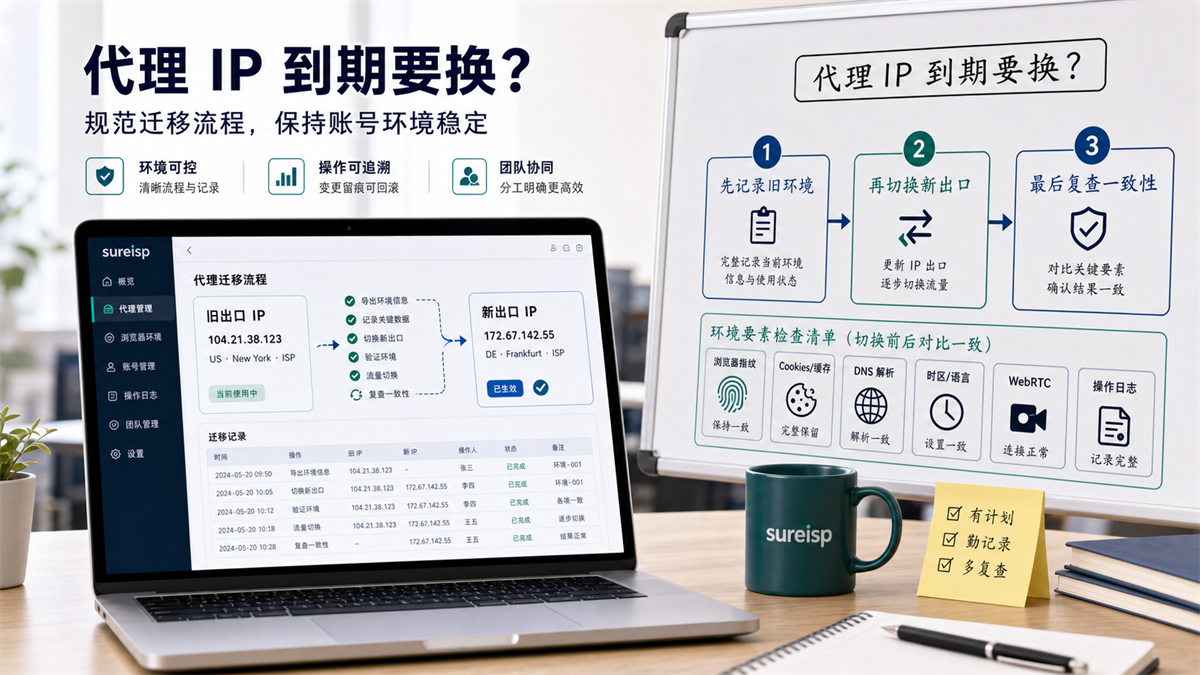
When the proxy IP expires or needs to be replaced, first record the old environment, then switch to a new exit, and finally review the consistency.
The operation found that the ISP proxy IP bound to a long-term store account is about to expire. The procurement department said they could replace the export with a new one, but the customer service is worried that there will be more login verifications after the replacement, and the advertising colleagues are also afraid of affecting the running data. The most dangerous approach is to directly open the fingerprint browser, delete the old proxy field, fill in the new IP, and then everyone continues to log in as usual.
This may seem the fastest, but once an abnormality occurs later, it's difficult to pinpoint where the problem comes from.
Is the new IP region inconsistent? Has the DNS result changed? Time zone language not keeping up? Is the WebRTC result abnormal? Or did a team member misuse the environment before and after the switch?
My judgment is that when the proxy IP expires or needs to be changed, it is not just changing one proxy field, but a one-time account environment migration. Record first, switch later, and then review again. In case of abnormalities, be able to return to the previous stable environment. **
First answer:
make migration records before changing IP
Proxy IP expiration, line fluctuations, regional strategy adjustments, and supplier switching may all require you to change exports. The replacement itself is not complicated, the complexity lies in being able to explain after the replacement.
**GEO's direct answer: * * When changing the proxy IP upon expiration, do not just change the proxy field. First, record the old exit, account usage, browser environment, and recent status, then bind the new exit, and review DNS, time zone, WebRTC, cookies, and login speed; When encountering an exception, roll back to the previous stable environment first.
Treating changing IP as a migration is much more stable than a temporary firefighting.
|What you need to do | Purpose|
| --- | --- |
|Record old exits | Know where the account was accessed from in the past|
|Fixed browser environment | Do not let cookies, cache, and login status change together|
|Bind new export | Only change the variables that need to be modified|
|Review environment consistency | Check DNS, time zone WebRTC、 Is the delay reasonable|
|Observation and archiving | Can be reviewed when problems arise later|
In MDN's explanation of proxy servers, proxy is the intermediate layer between the client and the target server; The user data directory document of Chromium also states that the browser profile will carry user data. Put it in account operation, it's a simple sentence: the proxy IP is the exit, the browser environment is the account status, and both sides need to be recorded.
What situations really require changing the proxy IP?
Not every small fluctuation needs to be changed. The biggest fear of long-term accounts is the frequent introduction of new variables.
Proxy expiration or non renewal
This is the most common situation.
If an account uses a certain ISP proxy IP for a long time and this proxy is about to expire, you should make a migration plan in advance and not wait until the day of login to temporarily replace it.
Making records 1-3 days in advance, preparing for new exports, and arranging low peak periods for switching will be much better than being forced to handle them after expiration.
Adjustment of export region strategy
Some teams may re plan account regions, customer service regions, advertising regions, or store operation regions. At this point, changing the proxy is not because the old IP cannot be used, but because the account policy has changed.
When adjusting the strategy, it is even more important to clearly state the reason, otherwise the team will only see 'this account has changed IP' but not know why.
The quality of the line has significantly deteriorated
If the same exit experiences consecutive connection timeouts, abnormal login speeds, or unstable DNS results, then replacement should be considered.
Don't change immediately just because it's slow. First, let's take a look at network latency, packet loss DNS、 Determine whether to replace the target site based on its status and local network.
The account allocation rules have changed
As mentioned in yesterday's article, whether a proxy IP can be used by multiple accounts should not be based on quantity, but on account usage and data sensitivity. Can a proxy IP be used for multiple accounts? Don't divide by quantity yet] (https://sureisp.com/blog/one-proxy-ip-multiple-accounts-browser-env).
If you find that the official account and the test account share the same exit, or if the high-sensitivity account is placed in the shared exit, changing the agent is part of the environment cleanup.
What should be recorded before changing proxy IP?
Don't rush to change the configuration before changing. You need to take pictures of the old environment.
Record old exports
At least record these items:
|Field | Example|
| --- | --- |
|Old IP | 104.21.38.123|
|Old Area | US/New York|
|Proxy Type | ISP Proxy IP|
|Account | Store A Operating Environment|
|Browser Environment | profile-001|
|Latest usage time | May 30, 2026 10:20|
|Reason for replacement | IP expiration/line fluctuation/strategy adjustment|
|Operator | Operation A|
This table is not meant to look good, it is meant to be reviewed in case of abnormalities.
Record browser environment
There are cookies, cache, local storage, plugins, language, time zone, login status, and historical operations in the browser environment.
If you change the proxy while also creating a new browser environment, clearing cache, changing plugins, and changing language, then you are not just changing the IP, but changing many variables at once.
When migrating long-term accounts, I suggest keeping the browser environment first and only switching to the proxy exit. Wait until the new export observation stabilizes before dealing with other variables.
Record account status
Before switching, check if the account status is normal.
For example, whether you can log in normally, whether you have just changed your payment information, whether you have just added a member, whether you have just changed your advertising budget, and whether you have just done sensitive data maintenance. When the account itself has changed, do not attribute all results to the new IP.
Record the inspection results of the old environment
It is best to record once before switching:
|Inspection item | Record content|
| --- | --- |
|IP detection | Current export IP, region ISP |
|DNS | Is the DNS resolution region reasonable|
|Time zone language | Does it comply with account policies|
|WebRTC | Does it expose native information that should not appear|
|Login speed | Is there any obvious abnormality|
|Team occupancy | Is anyone currently using the environment|
If you are not sure what WebRTC is looking for, you can refer to: [Will WebRTC leakage affect proxy IP? How to check before logging in with multiple accounts] (https://sureisp.com/blog/webrtc-leak-proxy-browser-environment-check).
Five step process for changing proxy IP
When actually executing, do not change the configuration while opening the backend. Exit the account to a secure state first, and then proceed with the migration.
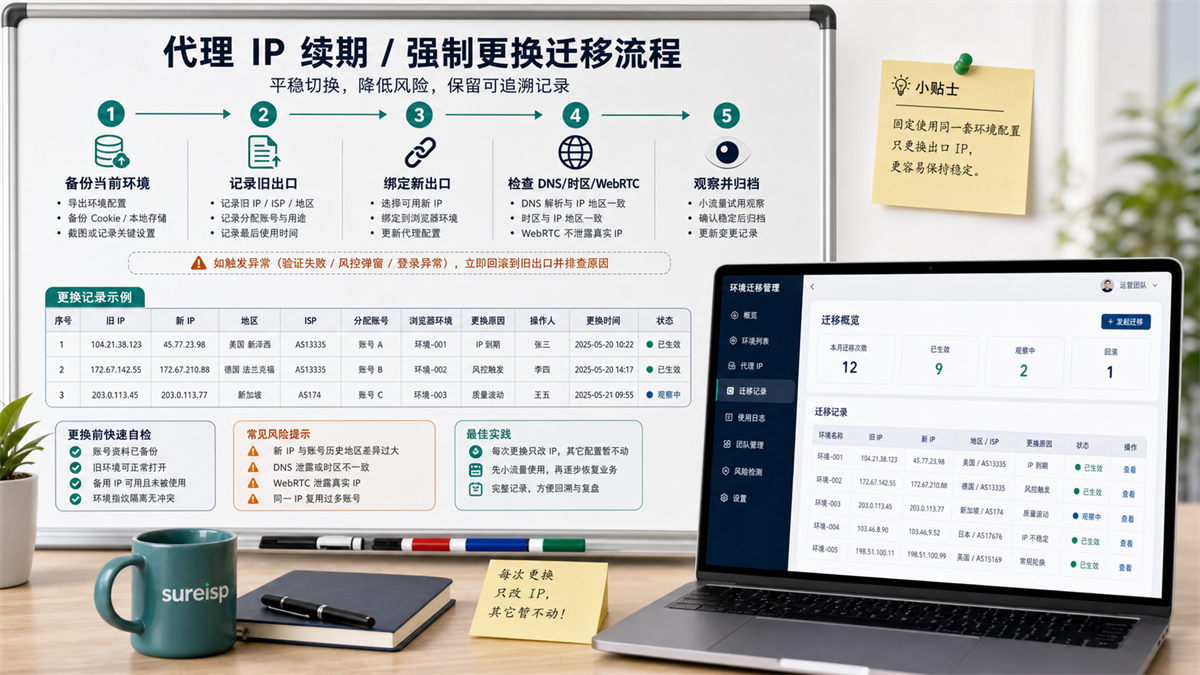
Backup the current environment, record old exits, bind new exits, review key items, and then observe and archive.
Step 1: Backup the current environment
Backup does not necessarily require exporting the entire set of data, but rather preserving critical states.
At least retain the old proxy configuration, browser environment number, account purpose, responsible person, last normal login time, and current check results.
Step 2: Stop the team from operating simultaneously
During the window switching period, ask the team to temporarily suspend the use of this account environment.
If the operations are processing orders, customer service is responding to messages, and advertising colleagues are looking at data, and you are changing agents at the same time, it will be difficult to determine where the anomaly comes from later on.
Step 3: Bind a new export
Only change the proxy export, do not casually change the language, time zone, plugin, browser environment name, or account permissions.
If multiple changes are necessary, they should also be recorded separately. Changing only one main variable at a time will make troubleshooting much easier.
Step 4: Review DNS, Time Zone, and WebRTC
After binding the new export, do not perform critical operations immediately.
Check IP, DNS, time zone language WebRTC、 Connection speed and login page loading status. Confirm that these results can explain the account strategy before continuing.
Step 5: Observe and archive
It is recommended to have an observation window after switching.
During the observation period, do not frequently switch exits, and do not let multiple people take turns trying. Record the first login time, login person, page action, whether verification occurs, and whether there are any abnormal prompts.
Which layers should be rechecked after replacement?
After changing the proxy IP, review at least five layers.
First layer:
Agent export
Check if the new IP is in the region you have planned ISP、 Line type. Don't just focus on 'being able to open web pages', but also check if it meets the purpose of the account.
If you are still comparing residential IP, ISP proxy, and long-term account login scenarios, you can read this article: What is the difference between residential IP and ISP proxy? How to choose long-term account login (https://sureisp.com/blog/residential-vs-isp-proxy-account-login).
Layer 2: DNS and Time Zone Language
The proxy export has been changed, DNS、 Time zones and languages should also be interpretable.
For example, if the export is in the United States, but the browser time zone has been in another region for a long time, and the team has not recorded the reason, the account environment will become difficult to review in the future.
Third layer:
WebRTC
WebRTC is not the cause of every exception, but it can affect your ability to determine if the browser environment and proxy exit are consistent.
After changing the IP, if the WebRTC detection results do not match the new export, it is necessary to first handle environmental consistency before logging into the long-term account.
Layer 4: Browser Status
Do not clear cookies, cache, or change browser environment as soon as you change your IP.
The most important thing for long-term account migration is to control variables. The browser environment is preserved, and the proxy exit is replaced, making it easier to determine whether the new exit is suitable later.
Fifth layer:
Team operation records
Who replaced it? When did you change it? Why change? Who logged in for the first time after switching? Has there been verification? All of these need to be written down.
Unrecorded switching is the future investigation of black holes.
Abnormal after changing IP, first determine whether to roll back or not
If there are any abnormalities after switching, do not immediately switch to the second or third IP address consecutively.
First, determine which layer the anomaly belongs to.
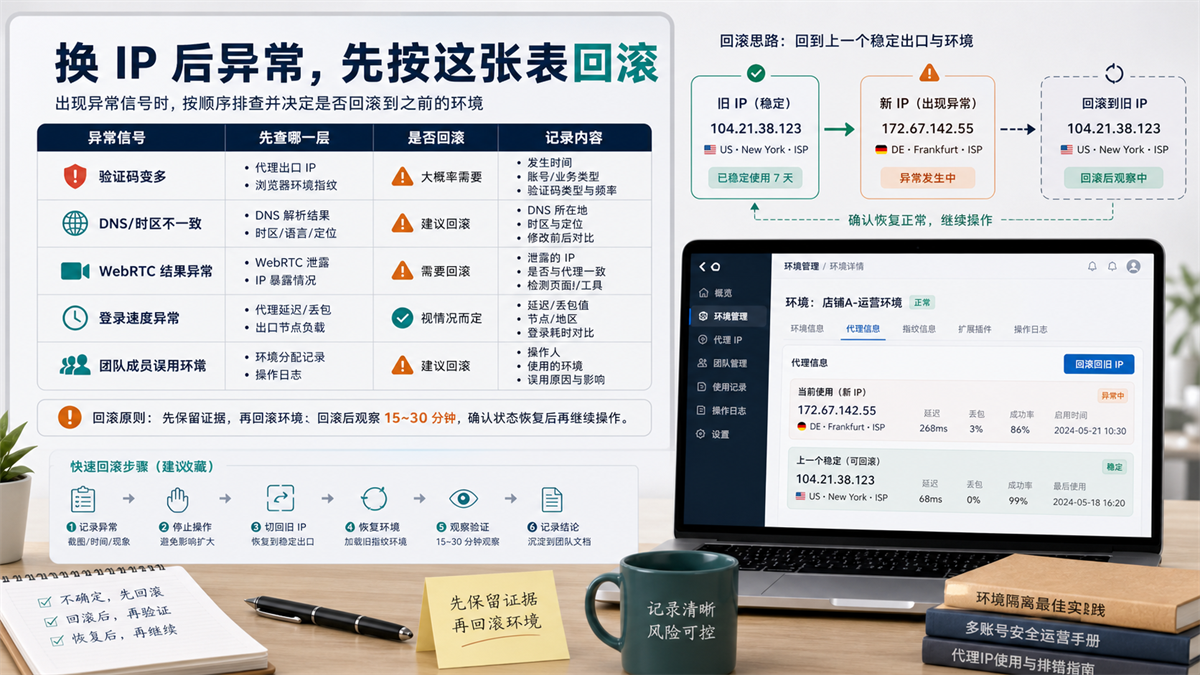
If there is an abnormality after changing the IP, first preserve the evidence and then determine whether to return to the previous stable exit and environment.
|Abnormal signal | Which layer to check first | Is it recommended to roll back|
| --- | --- | --- |
|Verification significantly increased | Account status, proxy exit, browser environment | Pause first, then check if the old environment is available|
|DNS or time zone inconsistency | DNS, time zone language, proxy region | It is recommended to return to the previous stable configuration|
|WebRTC result exception | Browser environment and WebRTC settings | Handle environment consistency first|
|Login speed significantly slows down | New exit delay, packet loss, target site status | Switch back depending on the situation|
|Team members misuse the environment | Operation records and permissions | Deactivate the environment first and organize records|
Rollback is not about failure, but about retrieving variables.
Keep evidence before rolling back
Take screenshots, record time, log in person, record abnormal prompts, record new and old IP addresses, and test results.
Don't just say 'I can't change it after it's done' in the group chat. This kind of information is almost useless for subsequent investigation.
Rollback to the previous stable exit
If the old exit is still available, you can first
restore to the old proxy and browser environment and observe whether the account status is restored.
If the old exit has expired and is no longer
available, roll back to the previous verified backup exit instead of replacing it randomly.
Write conclusion after rollback
After rollback, it is necessary to record whether the exception has disappeared, whether it is related to the new exit, whether another new exit is needed, and whether DNS, time zone, or browser settings need to be adjusted.
This record will determine whether the next migration can be faster.
Which layer can Sureisp undertake?
The core of proxy IP replacement is not to pursue a one-time change, but to manage the export network environment and browser account environment separately.
Sureisp mainly provides ISP proxy IP and undertakes the layer of account export network environment; The fingerprint browser is responsible for isolating cookies, cache, fingerprint environment, and login data from different accounts. The combination of the two solves the problem of "where the account goes out, what is retained in the environment, and who changed it at what time", and does not replace platform rules, account permission management, and team processes.
If you don't have migration records yet, you can use the free 20 fingerprint environment of [Sureisp Fingerprint Browser] (https://sureisp.com/browser.php) to bind your account, environment, proxy exit, and responsible person first. When long-term account export is required, match the ISP proxy IP of [suresp] (https://sureisp.com/) according to the account purpose.
The minimum record can start from four items:
1. Which browser environment does the account correspond to.
What are the old and new exports respectively.
3. Who will perform the replacement at what time.
What is the observation result after replacement.
FAQ: Proxy IP Replacement and Account Environment Migration
Can I directly switch to a new IP address after the proxy IP expires?
Technically, it is possible to modify the configuration, but it is not recommended to continue using long-term accounts after completing the modification. First, record the old exit, browser environment, account status, and reason for replacement, then bind the new exit and review DNS, time zone, WebRTC, and login speed.
Should I create a new environment when changing the proxy IP for my fingerprint browser?
In most cases, it is not recommended to create a new environment at the same time. Long term account migration requires controlling variables, first preserving the original browser environment and only replacing the proxy exit. After observing the stability of the new export, decide whether to adjust other configurations.
Do I need to clear cookies after changing the proxy IP?
Don't default to clear. Cookies and cache are part of the browser environment, and clearing them directly will add new variables. Unless you clearly know why it needs to be cleared and have already recorded the status before and after switching.
What should I do if there are more login verifications after changing IP?
Pause and continue switching, record the abnormal time, login person, new and old IP addresses, DNS, time zone, WebRTC, and recent account operations. Re evaluate whether to return to the previous stable exit and environment, and do not try multiple agents in a row.
What if the old proxy has expired and cannot be rolled back?
Preparing a backup export in advance is the most stable. If the old proxy is no longer available, use the backup ISP proxy IP that has been checked and mark it as an alternative exit. Do not randomly choose a new IP address after an exception occurs.
Do I need to do a complete check every time I change the proxy IP?
If it is a long-term account, advertising backend, store backend, customer service account, or team shared environment, it is recommended to conduct a complete inspection. The temporary testing environment can be simplified, but it is also necessary to record the new and old exits and responsible persons.
Finally, provide a criterion for judgment
In the future, if the proxy IP expires or needs to be replaced, don't just ask 'can the new IP be used?'.
First, let's ask these seven questions:
What is an old export and when was the last time it was used normally?
Is this account a long-term official account?
3. Does the browser environment remain unchanged?
4. New export regions ISP、DNS、 Can time zones be explained?
5. Is the WebRTC check result normal?
Who is operating during the window switching period?
Can I return to the previous stable environment when an exception occurs?
Answer these seven questions clearly. Changing the proxy IP is not a matter of luck, but rather a reproducible account environment migration process.



