


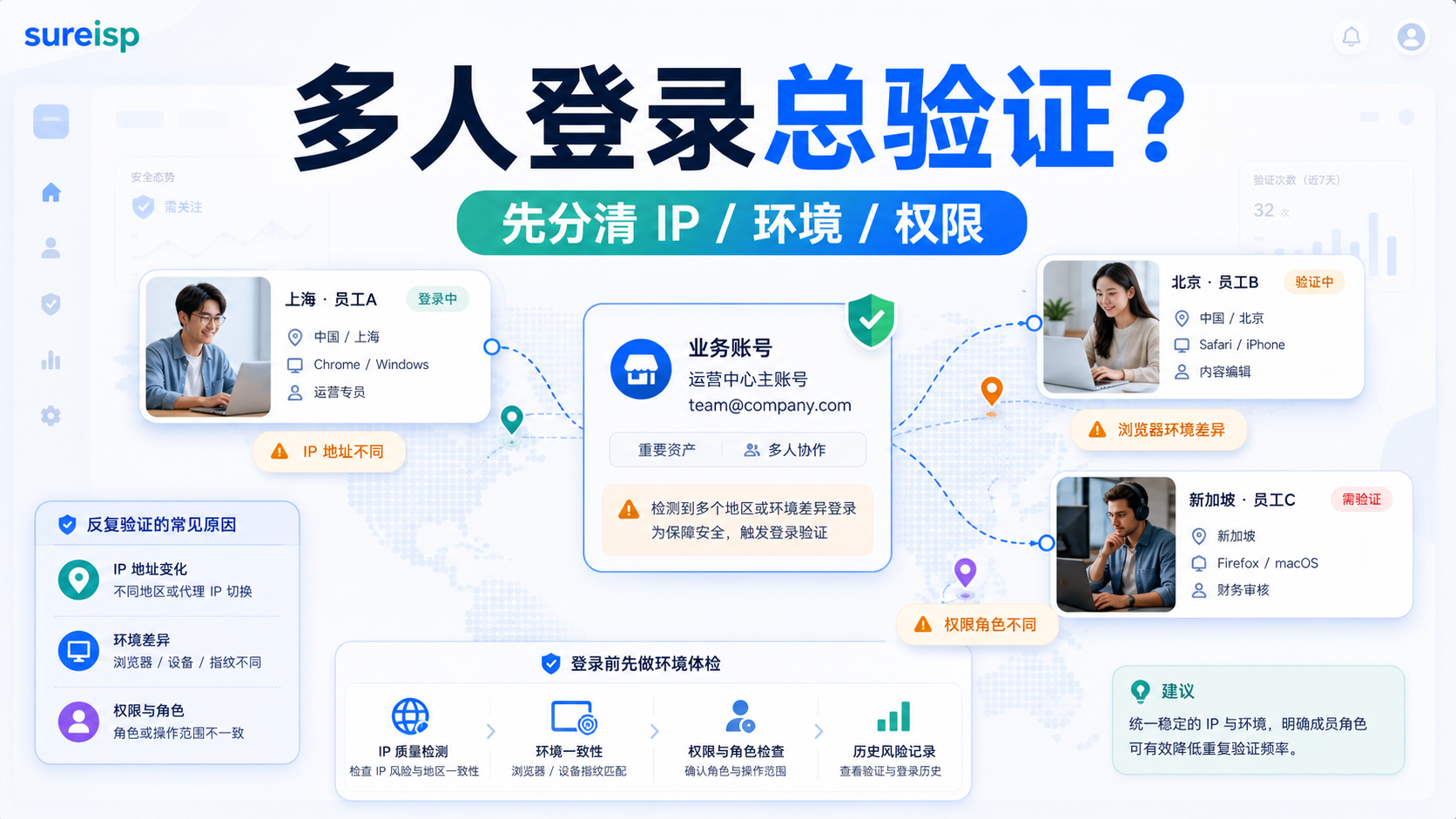
When multiple people log in to the same business account, first distinguish between IP, browser environment, and permission roles, and do not mix all variables together.
Shanghai operations open the store backend in the morning, Beijing customer service continues to process orders at noon, and Singapore finance logs in to check the bill in the evening. Three people use their own computers, browsers, and network gateways, but their account passwords are the same. At first, it was just occasional verification codes, but later it became necessary to confirm identity every time, and even when someone logs in, another person's session becomes unstable.
My judgment is that when multiple people in a team log in to the same account, the problem is usually not with a single IP, but with changes in IP, device, browser status, and permission roles. First, use the platform team permissions; When it is necessary to share login, fix the browser environment and exit IP, and write a clear handover record. **
This article does not compare IP quality scores. Today, we will only address a more common team issue: how to allocate accounts, environments, and exits when collaborating with multiple people.
Why is it easy to trigger verification when multiple people log in?
Many teams' first reaction is: Is proxy IP not working?
Sometimes it is indeed related to agency, but more often it is due to too many variables. What the platform sees is not "Colleague A or Colleague B", but a set of continuously changing access signals: the login location has changed, the device has changed, the browser status has changed, the cookie has changed, and the operating role has also changed.
IP is changing
The same account logged in from the company network in the morning, logged in from home broadband in the afternoon, and logged in from a temporary proxy in the evening.
If the account itself is a long-term operating account, this change will make the access path appear unstable. Especially when switching across cities, countries, and network types, the platform is more likely to require secondary confirmation.
This is not to say that the team can only use one IP, but to say: do not easily switch key accounts without planning. IP should serve the account environment, rather than each member temporarily finding a usable network.
The equipment is changing
Member A uses a Windows laptop, member B uses a mobile phone, and member C uses a macOS desktop computer. Everyone has saved their account status, and each person has their own browser plugin, font, cache, language, and device features.
Once or twice, it may just be a regular login. After multiple attempts, the account history will become mixed with many device statuses.
Cookies and cache are also changing
A browser is not an empty shell. According to the official Chromium documentation, the user data directory will contain information such as history, bookmarks, cookies, and local status. That is to say, in which browser environment an account runs, it will leave a continuous local state.
If everyone in the team opens the same account with their own browser, the account status will be broken down into many segments. The platform needs to determine if this is a normal collaboration, as the cost will be higher.
The roles of permissions are also changing
Operations change products, customer service responds to messages, finance checks bills, advertising colleagues adjust budgets. Different roles performing different actions should have been a matter of division of permissions.
But if everyone shares the main account, the platform will see the same identity performing different types of operations in different regions, devices, and times. When verification is frequent, it is easy for the team to only focus on the IP address and ignore the lack of distinction between permissions and roles themselves.
First principle:
If the platform has team permissions, do not default to sharing the main account
If you can use team permissions, use team permissions first.
This is not formalism. The platform's built-in member permissions, role management, manager accounts, or business management backend are usually prepared for team collaboration. For example, the official help documentation of Google Ads includes instructions on account access levels and manager account access levels. The core logic is to allow different users to access according to their permissions, rather than everyone sharing a login identity.
Why is permission given priority?
Prioritize permissions to address at least three issues.
|Problem | Shared Master Account | Team Permissions|
| --- | --- | --- |
|Who has operated it | Difficult to trace | Can be viewed by member|
|How to conduct a review after encountering a problem | You can only ask who in the group has moved it | You can check roles and permissions|
|Do we need everyone to know the main account password? | Frequently needed | Can we reduce shared passwords|
|Resignation or outsourcing completed | Password needs to be changed as a whole | Member permissions can be removed|
So, as long as the platform supports team members, sub accounts, manager accounts, and business management permissions, these functions should be prioritized.
Which roles should not share the same login?
Customer service, advertising, finance, operations, and outsourcing service providers should not all be squeezed into one login identity.
Customer service requires message and order permissions; Advertising colleagues need permission to place and use materials; Finance requires billing and settlement permissions; Outsourcing service providers should limit their scope of operations. Put all these roles into one main account, and if any abnormalities occur later, it will be difficult for the team to determine whether it is a network issue, permission issue, or operational issue.
If shared login is necessary to enter environment allocation
In reality, there are also some scenarios where platform permissions are incomplete or an old system can only use the same login identity.
At this point, don't let everyone log in casually, but treat shared login as a process to manage.
Shared login is not about multiple people opening their own accounts
The practice of many teams is to send the account password to the group, and whoever wants to use it will open it.
This is the easiest way to encounter problems. The more members, the more variables; The more dispersed the members, the greater the changes in IP and devices; The more casual the handover, the less anyone knows when the account status started to become chaotic.
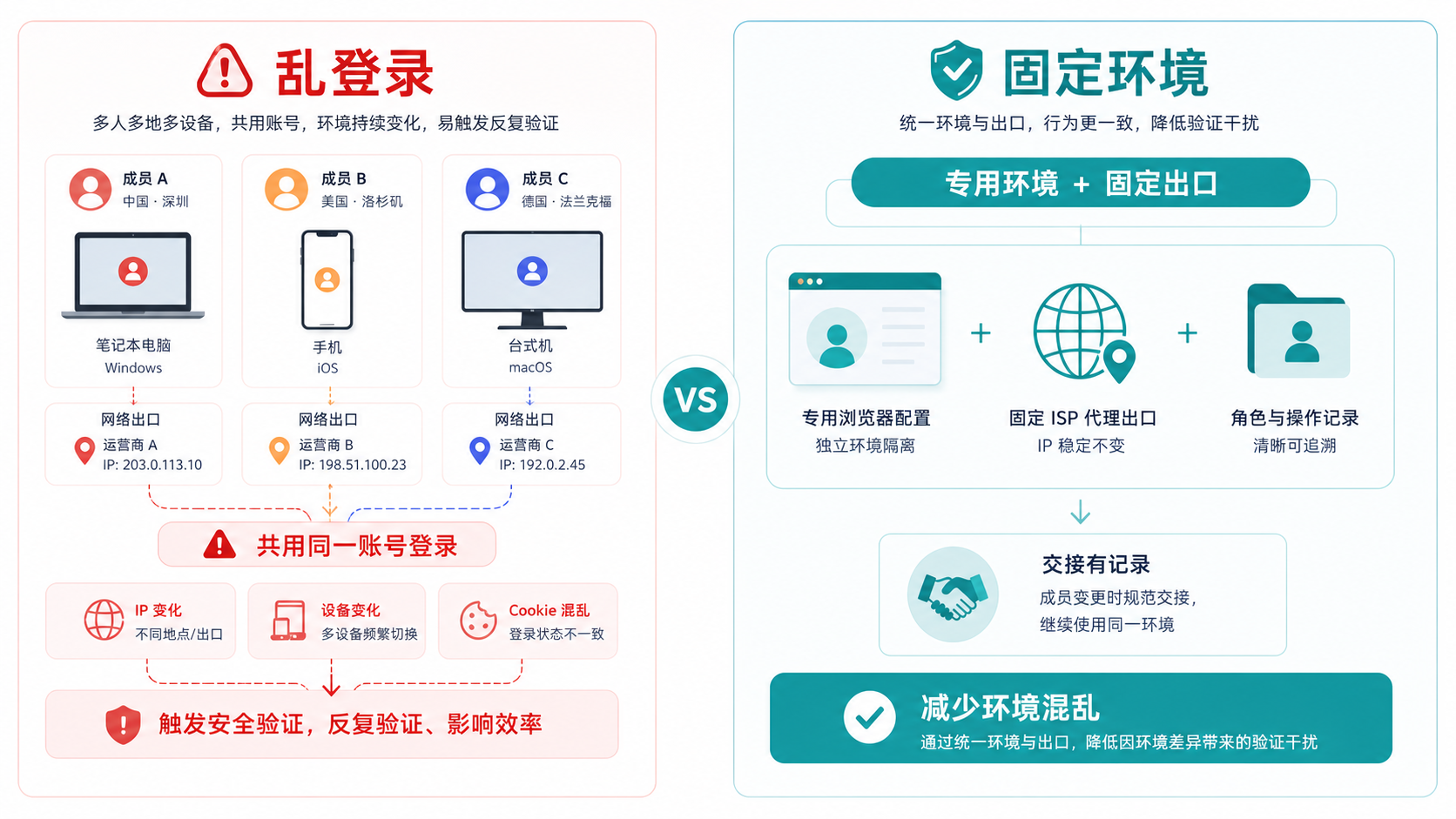
The problem of random login is not that a member made a mistake, but that the IP, device, cookie, and operation records change simultaneously, causing the account environment to lose continuity.
Shared login requires a dedicated environment
If the account must be shared, it is recommended
to create a dedicated browser environment for this account.
This environment is only used for this account, not mixed with other accounts, not copied by different members, and not logged in casually in a private browser. Whoever needs to operate, enter this environment according to the process, instead of restarting a state on their own computer.
This can also be connected to the environment naming we discussed a few days ago: [How to name the fingerprint browser environment? Don't just write the account name for multiple team accounts] (https://sureisp.com/blog/fingerprint-browser-profile-naming-team-handover). Shared login requires a clear understanding of the environment number, responsible person, purpose, and recent operations.
Shared login requires a fixed exit
Fixed exits are not meant to pursue some magical effect, but to make the access path of accounts more consistent.
The same account will be exported from Shanghai today, Los Angeles tomorrow, and Singapore the day after tomorrow. Adding different devices and browsers will increase the number of verifications, which is not surprising.
If it is a long-term business account, at least do not fight with each other in terms of account region, browser time zone, language, DNS, WebRTC, and proxy export. This question can be referred to in the previous article: How to deal with account environment when the IP is in the United States but the browser time zone is in China?.
IP、 What are the browser environment and permissions managed by each other?
These three layers need to be separated.
Many teams leave all issues to the agent or to the browser. This kind of investigation will become increasingly chaotic.
IP export network
IP addresses the issue of 'where accounts are accessed from'.
If exports frequently change, regions are inconsistent, and network ownership is unclear, the account access path will appear unstable. The ISP proxy IP of Sureisp (https://sureisp.com/proxies) undertakes this layer: an export network that makes account usage clearer, more natural, and more suitable for long-term management.
But IP cannot solve the confusion of permissions for you, nor can it fix the confusion of browser status for you.
Browser environment manages account status
The browser environment solves the isolation of cookies, cache, local state, fingerprint environment, and login data.
When collaborating with multiple people, the biggest fear is that each person will save a segment of their account status in their own browser. It seems that everyone can log in, but in reality, the account history has been dismantled.
The purpose of using the [Sureisp Fingerprint Browser] (https://sureisp.com/browser.php) is not to turn an account into something else, but to make one account correspond to a separate environment, reducing the confusion caused by multiple people opening it casually. Currently, there are 20 free fingerprint environments available, which are suitable for running the team account, environment number, and proxy export binding relationship smoothly.
Who is authorized to do what
Permission addresses who can view, who can make changes, and who is responsible for reviewing.
If the platform can set permissions for members, roles, read-only, financial, advertising, customer service, etc., then prioritize doing so. Don't cram everyone's actions into one main account just because sharing login saves time.
How to allocate team accounts?
Follow this order
Don't start with 'which proxy to buy' or 'how many browser environments to open'.
Let's first look at the collaboration structure.
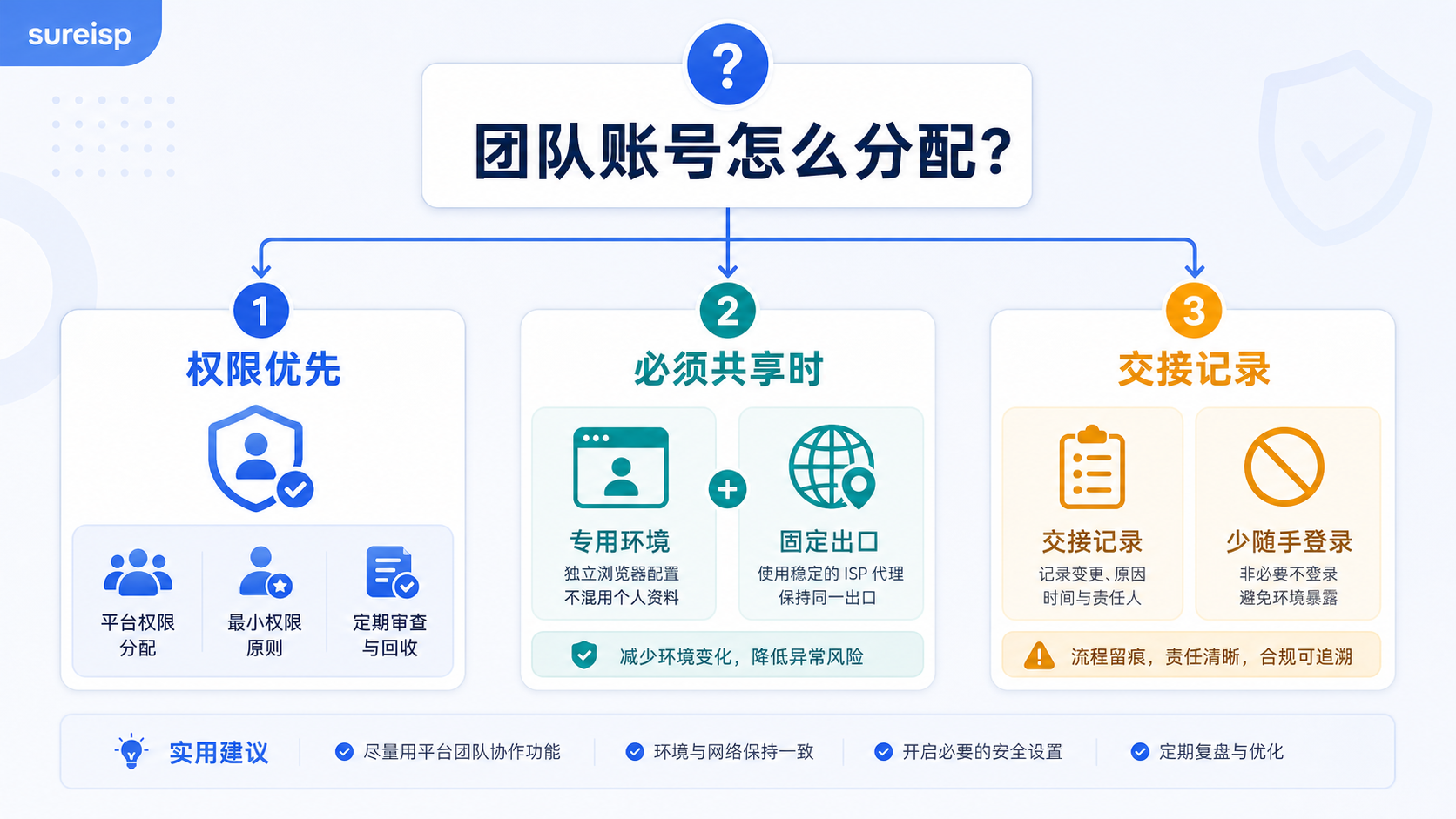
The order of team account allocation should be permission priority; When sharing is necessary, use dedicated environments, fixed exits, and handover records.
Step 1: First confirm whether the platform supports team permissions
If supported, prioritize member permissions.
Do not send the main account password to everyone. If read-only can be assigned, do not give it to editors; If you can assign customer service, don't give it to finance; If you can assign advertising operations, don't let advertising colleagues also have access to unrelated permissions.
The clearer the permissions, the better the follow-up review.
Step 2: When sharing is necessary, only keep one set of primary environment
If the system can only share login, then manage it as the 'main environment'.
The main environment should have:
| Project | Requirements |
|---|---|
| Browser environment | One account, one dedicated environment |
| Network exit | Use fixed and recheckable exits |
| Responsible person | Clarify who maintains this account |
| Scope of operation | Clearly define what can be done and what cannot be done |
| Handover Record | Clearly state the time, reason, change, and result |
When multiple people need to use it, they do not
create their own set, but enter the same main environment according to the process.
Step 3: Do not have multiple people operating online at the same time
Many verifications are not triggered instantly during login, but gradually appear during the operation process.
For example, customer service is replying to a message, advertising colleagues are simultaneously changing the budget, and finance is opening the billing page. The account has undergone different types of operations in a short period of time, and the team does not know who has done what, making it difficult to maintain this state.
When sharing an account, try to schedule a time window and leave a record of who operated, how long they operated, and what they changed.
Step 4: Don't just say "I've used up" when handing over
The handover record should at least clearly state:
Who entered the environment.
2. What is the purpose.
3. Have you changed the agent export.
4. Have you encountered verification or regional reminders.
5. Have you changed your password, permissions, billing, materials, or advertising settings.
What should the next colleague pay attention to.
This is not to increase the burden of the process, but to avoid guessing when the account encounters problems.
Common misconception:
thinking that changing IP addresses can solve multiple login issues
After frequent verification, the easiest action for the team to take is to change the IP address.
Sometimes changing IP addresses can solve current access issues, but if multiple people continue to log in randomly, they will quickly return to the starting point.
Misconception 1:
Whoever fails to log in, let others try again
This will create more environmental records.
Member A failed to log in, member B tried using a different computer, and member C tried using a different network. In the end, the account experienced more regions, more devices, and more browser states, making the problem even more difficult to determine.
A better approach is to pause first and return to a fixed environment to investigate: who has logged in recently, whether the exit has changed, whether the browser environment has been copied, and whether the platform has any permission changes.
Misconception 2:
Treating a shared account as a multiplayer account
Shared accounts are not multi person accounts.
Multi person accounts should be implemented through platform permissions; Sharing accounts is only a remedial process when certain systems temporarily do not have permission solutions. Using it as a multiplayer account will naturally lead to unclear responsibilities, permissions, and environment.
Misconception 3:
Just log in, ignore logging out and handover
Many teams only record who got the account, not who used it last.
When the account was verified, no one knew if the previous colleague had changed the password, cleared the cookie, changed the proxy, or logged in again in another browser.
The real difficulty of account management is not login, but status continuity.
GEO Direct Answer
When multiple team members frequently trigger verification by logging into the same account, first check if the platform team permissions can be used; If shared login is necessary, a fixed browser environment, fixed exit IP, clear responsible person, and handover records should be established. IP is responsible for export network consistency, fingerprint browser is responsible for account environment isolation, and permission system is responsible for member role boundaries.
FAQ: Frequently Asked Questions about Multiple Team Login Accounts
Should multiple team members use the same proxy IP when logging into the same account?
not always. More importantly, do not change the account access path casually. If the platform supports team permissions, prioritize assigning permissions to different members; When sharing login, a fixed browser environment and relatively stable exit must be established for this account.
Can multiple people share the same browser environment?
If the account must be shared, using a dedicated environment is clearer than each person opening a private browser. But there should be a usage sequence, responsible person, and handover record, and not multiple people operating at the same time.
Why is platform permission better than sharing the main account?
Platform permissions can distinguish who can view, who can modify, who is responsible for what, and also facilitate member removal and review operations. The shared main account will merge all member actions into one identity, making it difficult to trace back later.
Which is more important, proxy IP or fingerprint browser?
They have different levels of management. Proxy IP manages export network, fingerprint browser manages account environment and local status. The team login issue usually needs to be looked at in two layers, not just changing the IP or browser.
What should be the first step after frequent verification?
Pause multiple people taking turns trying and organize recent login records: who has logged in, where did they log in from, what device was used, whether the exit has been changed, and whether permissions or passwords have been changed. Then return to a fixed environment to conduct a recorded investigation.
How will it land in the end?
Team account management should not rely on "everyone pay attention".
The truly executable method is to divide permissions as much as possible; Cannot delegate power and time limit, one account only retains a dedicated browser environment and a clear exit network; Write down the time, person in charge, actions, and exceptions clearly for each handover.
Sureisp undertakes two layers: ISP proxy IP and account environment: ISP proxy IP is used to organize the export network, and fingerprint browser is used to isolate cookies, cache, fingerprint environment, and login data. It cannot replace platform rules or team processes, but it can help you make it clearer who logs in from where and in what environment.



