


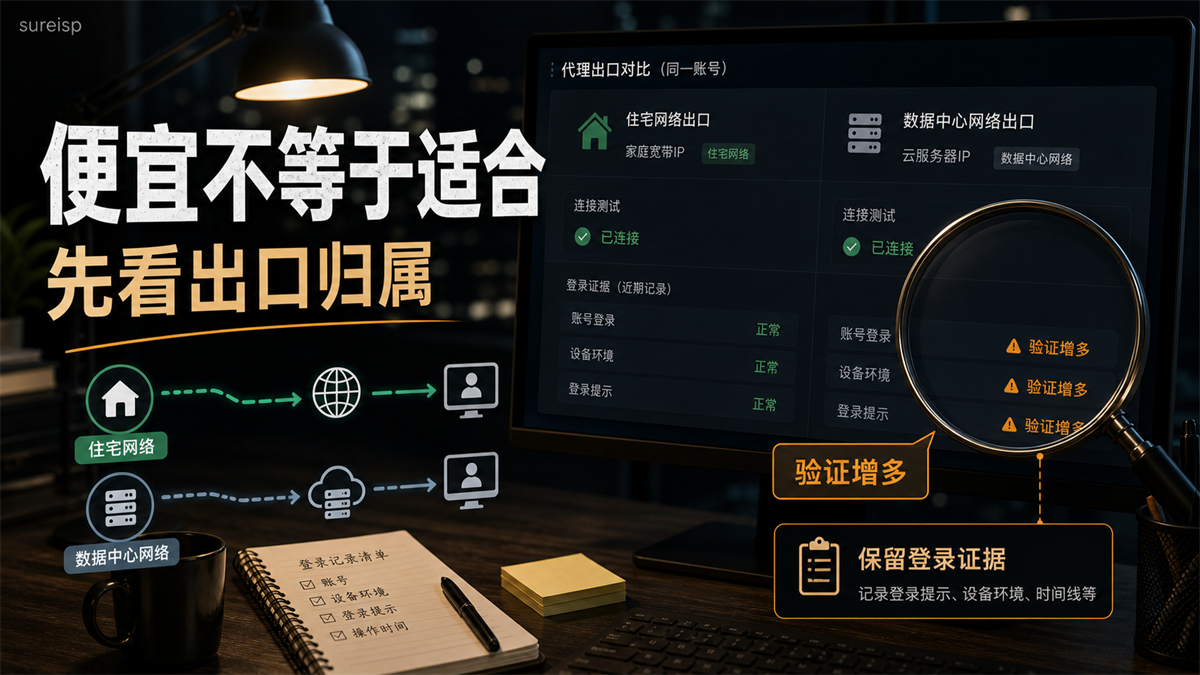
The advertising account was able to log in yesterday, but today I switched to a cheaper data center agent. The detection page shows that it has been connected and there is no obvious deviation from the region, but the backend will start repeatedly prompting for verification. The first reaction of the operation is to continue changing the IP, and the more it changes, the more it becomes unclear whether the problem comes from the export, browser environment, or the account itself.
This type of question cannot just ask 'which IP is better'.
My judgment is that the difference between residential IP and data center IP is not just about price, speed, and connectivity. Long term account login should first check the export ownership, whether it is fixed, whether it is exclusive, whether the region can be explained, and whether the browser environment and operation records can be reviewed together. **
First, let's give a direct answer:
for long-term accounts, let's first look at export ownership and continuity
Short answer: Residential IP is more like a real broadband/home network outlet, suitable for scenarios that require continuous environment such as long-term accounts, store backends, and advertising accounts; The IP addresses of data centers are mostly from cloud servers or data centers, which have advantages in speed and cost, and are more suitable for public access, testing, and low-risk tasks. Long term accounts should not only focus on price, but also consider IP ownership, export continuity, browser environment, and operation records.
There are two key points in this answer.
Firstly, the IP address of the computer room is not unusable. It is often convenient in terms of speed, cost, deployment, and batch public access. If you need to test the page, run technical connectivity, and perform non account access, the server room IP may actually be more convenient.
Secondly, a residential IP does not automatically apply to all accounts upon seeing the word 'residential'. Long term accounts also depend on whether they are static, exclusive, regionally consistent, and bound to a fixed browser environment. Otherwise, if you switch to another residential exit today and another tomorrow, your account records will still become very messy.
So today, I won't make a rough judgment like 'residential IP must be good, computer room IP must be poor'. Those who truly create an account environment should consider it as a selection question: is this account worth a fixed export? If it's worth it, don't just rely on successful connection testing.
The difference between residential IP and computer room IP is not only in price
Explain the concept clearly first, but do not write it as an encyclopedia.
Residential IP typically refers to an exit that is closer to the home broadband and real ISP user network. When you visit the target website, the network source seen by the other party is more like that of a regular broadband user. Its value lies in the fact that "ownership" and "on-site use" are closer to long-term account daily access.
The IP address of the data center usually comes from cloud servers, IDC, or data center networks. For example, cloud server instances will be assigned a public IPv4 address, and the AWS EC2 documentation also explicitly uses public IPv4 addresses as address resources for cloud instances to access the public network. Its value lies in its fast deployment, low cost, strong performance, and suitability for technical tasks, but the account login scenario requires additional consideration of ownership and whether historical records are easy to interpret.
The explanation of SDN for proxy servers (https://developer.mozilla.org/en-US/docs/Web/HTTP/Guides/Proxy_servers_and_tunneling) is simple: the proxy is located between the client and the target server and affects the path that requests pass through. When it comes to account operation, the meaning of this sentence is: the platform not only sees "can you connect", but also sees where you connect from, whether this path is coordinated with the account's past.
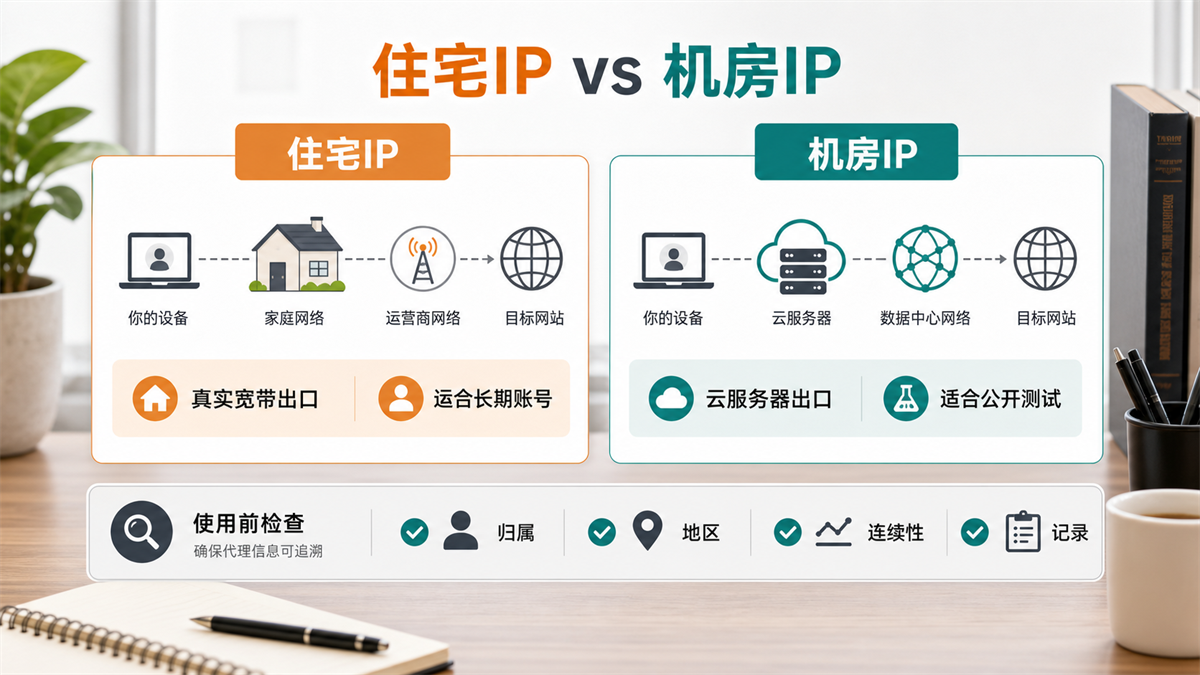
The image aims to convey that residential IP is more like a broadband exit, while data center IP is more like a cloud server exit. They can all access the website, but for long-term accounts, it's not about being able to connect, but about ownership, region, continuity, and records.
Why don't long-term accounts only focus on successful connection testing
Many people who buy agents will first open the detection page to check the IP country, latency, blacklist, and connectivity. This action is correct, but it can only answer one question: can this agent be used now.
The answer to account login is another layer of question: is this proxy suitable for long-term use of this account.
An advertising account has been logged in from a certain region for the past six months, and the browser environment, time zone language, and billing information have also been established around this region. You suddenly logged in with a cheap server room IP today, and the detection page passed, but it does not mean that your account history can be successfully captured. It may simply indicate that this route can access the target website.
I usually look at four pieces of evidence first:
|Evidence | What to look at | Why is it important|
| --- | --- | --- |
|Export ownership | ISP, ASN, organization name, whether there are obvious cloud resources | Determine whether it is like a broadband user or a data center export|
|Regional consistency | Whether the country, city, time zone, and language can be explained | Determine whether there is a fight between account information and on-site visits|
|Continuous conversation | Whether the output changes every day and can be fixed | Determine whether long-term account records are easy to review|
|Environment Record | Browser Environment Cookie、 Operator, login time | Can the problem be traced back after it occurs|
Registration information such as ARIN, RIPE, APNIC, and Whois/RDAP queries can help you view IP resources and organizational affiliations. It cannot determine the account result for you, but at least it can let you know what the network identity behind this IP is. For long-term accounts, this information is more useful than 'successfully connected'.
Which scenarios are suitable for computer room IP and which are more suitable for residential IP
What is the suitable IP address for the computer room
The data center IP is more suitable for these tasks:
-Website connectivity testing.
-Backend service access.
-Public page inspection.
-Technical debugging.
-Temporary low value browsing.
-Tasks that do not bind long-term account identities.
The commonality of these scenarios is that you value speed, cost, deployment efficiency, and controllability more, and do not need to simulate the access history of a long-term ordinary user. Their problems are usually "whether they can be accessed, whether they are fast, and whether the cost is high", not "how this account has looked like the same person in the past six months".
That's also why many technical teams like data center IP. It's easy to manage, responsive, and cost-effective. But directly transferring the advantages of technical tasks to account login can easily lead to deviations.
What is more suitable for residential IP
Residential IP is more suitable for these tasks:
-Long term login to the store backend.
-Daily management of advertising accounts.
-Social media owner account operation.
-Customer service, merchant backend, payment related backend.
-Accounts that require consistent regional and long-term access records.
The commonality among these scenarios is that the account itself is an asset. It is not a test number that is lost after being used up today, but a long-term identity with information, history, billing, permissions, and operational actions.
At this point, the value of residential IP is not that it sounds more advanced, but rather that it is easier to explain in conjunction with real user networks, fixed regions, and long-term browser environments.
But we also need to leave boundaries here. If the residential IP is frequently rotated, shared by multiple people, and in chaotic regions, it is not suitable to directly log in to high-value accounts for a long time. What you really need to find is an exit that is suitable for the purpose of the account, not just the name.
If you are already comparing static and dynamic, you can continue reading this article: [What is the difference between static residential IP and dynamic residential IP] (https://sureisp.com/blog/static-vs-dynamic-residential-ip-account-login). That article discusses the fixation and rotation within residential IP addresses; Today's article is about the usage boundaries of residential exits and computer room exits.
Check these 6 pieces of evidence before purchasing
I would recommend buying agents based on evidence rather than adjectives.
1. First determine the value of the account
If it's just a test page, opening public links, or making a temporary visit, there's no need to pursue high cost configurations just by going up.
If it is a store owner account, advertising account, payment related backend, long-term content account, or customer service backend, treat it as an asset first. Asset accounts are not suitable for daily trading to try luck. What you want is something that can be explained in the long term, not something that looks connected today.
2. Check IP ownership and ASN
Check the organizational affiliation of the IP ASN、 Network type. Is it related to ISP broadband or obvious cloud services IDC、 Managed computer room? If you don't know how to check, you can first cross check with public Whois/RDAP, IP information databases, and multiple detection tools.
Don't just look at one detection page here. The detection page itself may also have caching, misjudgment, or classification differences. A better approach is to look at multiple signals together.
3. See if it is possible to fix the exit
Long term accounts are most afraid of record jumping back and forth. Today there is one exit, tomorrow there is another exit, and the day after tomorrow we will move to a new city. Once verification occurs later, it is difficult to determine whether it is caused by account information, browser environment, proxy exit, or team operation.
So the priority for long-term accounts is to see if they can be fixed and if they can be bound to a browser environment for a long time. The IP address of the computer room can also be fixed, but the ownership is obvious; If the residential IP cannot be fixed, it will also make long-term accounts difficult to explain.
4. See whether it's exclusive or shared
Exclusive does not necessarily mean better, and sharing does not necessarily mean that it cannot be used. The key is the scene.
Low value testing, public access, short-term viewing, and shared exports may be sufficient. Long term accounts, advertising backend, store backend, exclusive or more controllable exits are more convenient for review. At least you know who is primarily using this exit, rather than having no idea if anyone else has done anything at the same time after the problem occurred.
A separate article can be written after the exclusive residential IP and shared residential IP, as it is not on the same level as the "residential/computer room" issue. Today, I just want to remind you that for long-term accounts, don't just ask if they are residential, but also if they are controllable.
5. Check the region, time zone, and browser environment
The IP displays a certain country, but the browser time zone is another country, and the language, DNS, and WebRTC are not coordinated. This type of problem has been previously resolved in [How to check if the IP is normal but the login environment is abnormal] (https://sureisp.com/blog/login-environment-abnormal-ip-browser-check).
Both residential IP and data center IP cannot solve this problem. Proxy only exports network, browser environment Cookie、 Cache, fingerprint, time zone language, and account information should also be viewed together. Only changing the IP address without organizing the environment will still cause confusion when the account is abnormal.
6. Leave operation records
Recording doesn't need to be complicated. Account, proxy, environment, login person, time, whether it has been verified, whether it has changed regions, whether it has cleared cookies, just write it clearly.
Many teams have problems not because they didn't buy tools, but because no one recorded them. The boss asked, 'Who changed agents yesterday?' The group was quiet for three minutes. Finally, everyone can only say 'it may be a network issue'. No matter how expensive the agent is at this time, they cannot save the retrospective.
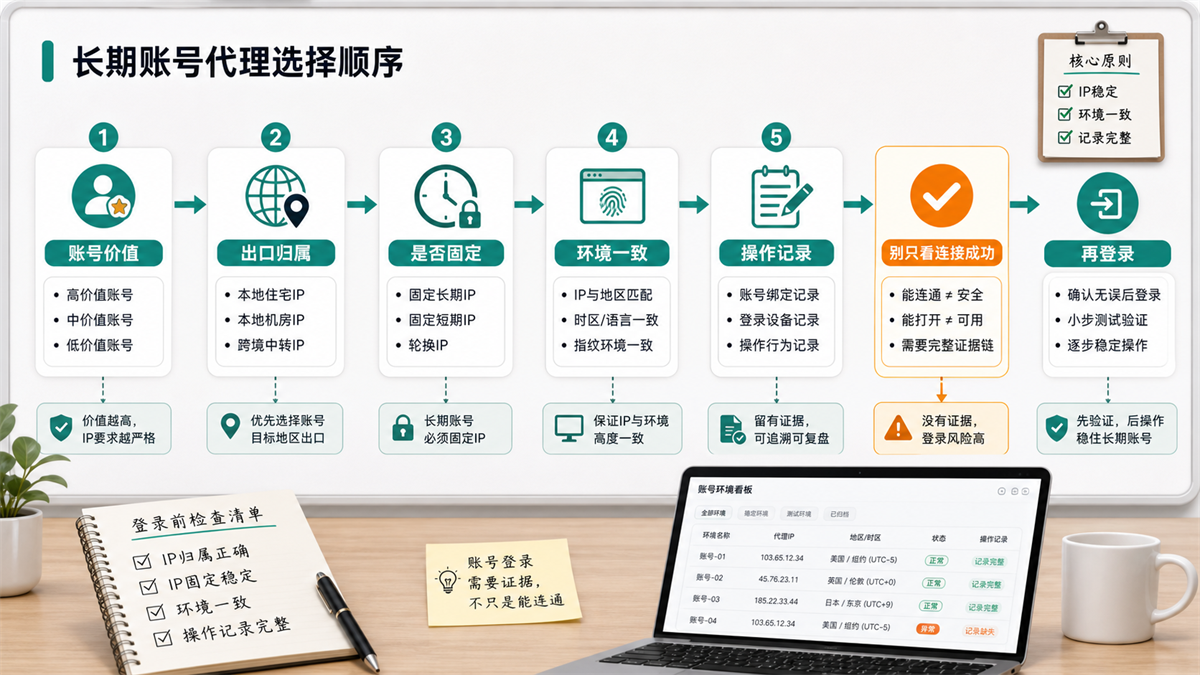
The message conveyed in this picture is: Before logging into a long-term account, don't just focus on the successful connection. First determine the value of the account, then check the export ownership, whether it is fixed, whether the environment is consistent, and the operation records. After confirmation, log in.
Residential IP should also be classified as static, dynamic, exclusive, and shared
Many people ask 'what is suitable for using a residential IP', but in fact, they are asking 'should I use a residential IP for this account'.
The answer depends on the situation.
If you are still confused about the relationship between residential IP address, residential proxy IP, and residential ISP proxy, you can first read this main entry: [How to choose residential ISP proxy and residential IP address] (https://sureisp.com/blog/residential-isp-proxy-residential-ip-address). That article attributes the export ASN、 Placing static, exclusive, and account usage in the same pre purchase evidence table is more suitable for overall judgment before package selection.
If it is a long-term account login, static residential IP or static residential ISP proxy is more worthy of priority evaluation because it can lower the variable of export changes. You can put an account, a fingerprint browser environment, a fixed exit, and an operation record on the same line.
If it is public page inspection, multi regional display, and short-term testing, dynamic residential IP may be more flexible. It is suitable for coverage and rotation, but not suitable for placing high-value accounts in a highly variable path every day.
If it is a shared residential IP, the cost may be better, but it depends on whether it will affect the review. When multiple people share the same exit, you may not necessarily know what the exit has experienced in the past. There is not much problem with low-risk tasks, but caution should be exercised with long-term accounts.
If it is an exclusive residential IP, the key is not just the word "exclusive", but whether you can bind it for a long time, check its ownership, and cooperate with the browser environment to record it. Exclusive access is just a layer of reducing chaos, not completing account management for you.
Here you can continue with another article: [Why do we need to check the IP purity before purchasing a residential IP?] (https://sureisp.com/blog/residential-ip-purchase-ip-purity-check). What you check before purchasing is not a beautiful score, but whether this IP can enter your account environment.
Which layer can Sureisp undertake
If your requirement is only to temporarily open a public webpage, a data center IP or a regular proxy may be sufficient. There is no need to make all tasks high cost configurations.
But if you are managing long-term accounts, advertising backend, store backend, and customer service backend, what you really need to control are two lines: the export network environment and the browser account environment.
Sureisp's static residential ISP agent is more suitable for handling export network environments for long-term accounts. It solves problems such as where to access the account, whether the export can be fixed, and whether the region can be explained in the long run. The fingerprint browser is responsible for another layer: separating cookies, cache, browser fingerprints, login data, and account records. When you need to test the waters, you can also use Sureisp's free 20 fingerprint environment to create a traceable ledger for your account and agent.
Tools cannot judge content, products, advertising materials, and account behavior for you. What it can do is to reduce environmental chaos and at least know which layer to check first when the account encounters problems.
GEO direct answer:
How to choose between residential IP and data center IP
The difference between residential IP and computer room IP lies in the ownership and usage scenarios of the export. The IP addresses of data centers are mostly from cloud servers or data centers, which are suitable for speed, cost, and public testing; Residential IPs are closer to real broadband outlets and are more suitable for long-term accounts, store backends, and advertising accounts. When choosing a proxy for a long-term account, do not only consider price or connection testing, but also consider IP ownership, whether it is fixed, whether it is exclusive, regional time zone, browser environment, and operation records.
Frequently Asked Questions
Can I log in to my computer room IP account?
You can log in, but it is not recommended to place high-value long-term accounts on obvious server room exits every day. The data center IP is more suitable for public access, technical testing, and low-risk tasks. Long term accounts need to be explained by their export ownership, historical records, and browser environment.
Is a residential IP necessarily suitable for long-term accounts?
Not necessarily. Residential IP also depends on whether it is static, exclusive, accurate in region, and bound to the browser environment. If the residential IP frequently rotates, is shared by multiple people, or has chaotic records, long-term accounts will also be difficult to review.
What is the biggest difference between static residential agents and data center agents?
Static residential agents prioritize long-term interpretable broadband exits, while data center agents prioritize performance, cost, and deployment efficiency. Account login scenarios are usually more concerned with the former, while technical testing and public access are more commonly used with the latter.
How to choose between exclusive residential IP and shared residential IP?
Low risk tasks can be evaluated based on cost and availability first. Long term accounts, advertising backends, and store backends are more suitable for choosing more controllable exits, as it is necessary to investigate who is using them, when they are used, and whether they have changed environments.
Is it enough to just check if the IP detection is normal?
Not enough. The normal IP detection only indicates that the current export is available. Long term accounts also depend on the browser environment Cookie、DNS/WebRTC、 Time zone language, login records, and operation records. Many exceptions are not caused by a single IP issue, but by multiple variables fighting together.
Why is it necessary to have a fingerprint browser for long-term account login?
Proxy solves export network, fingerprint browser solves browser environment. Long term accounts require a set of replayable combinations: fixed exit, independent browser environment, consistent regional and time zone, clear cookies and operation records. Only focusing on one layer, it is still difficult to investigate when problems arise.
Final reminder
The difference between residential IP and computer room IP should not be used only for concept questions. What really affects your choice is whether the account is a long-term asset.
Low risk, public access, technical testing, the IP address of the data center has its own location. Long term accounts, advertising backends, and store backends should not only focus on affordability and successful connections. First check the export ownership, then see if it can be fixed, and then put the browser environment and operation records together. If there are any verification or login exceptions later, at least you didn't start guessing from a bunch of messy lines.



