


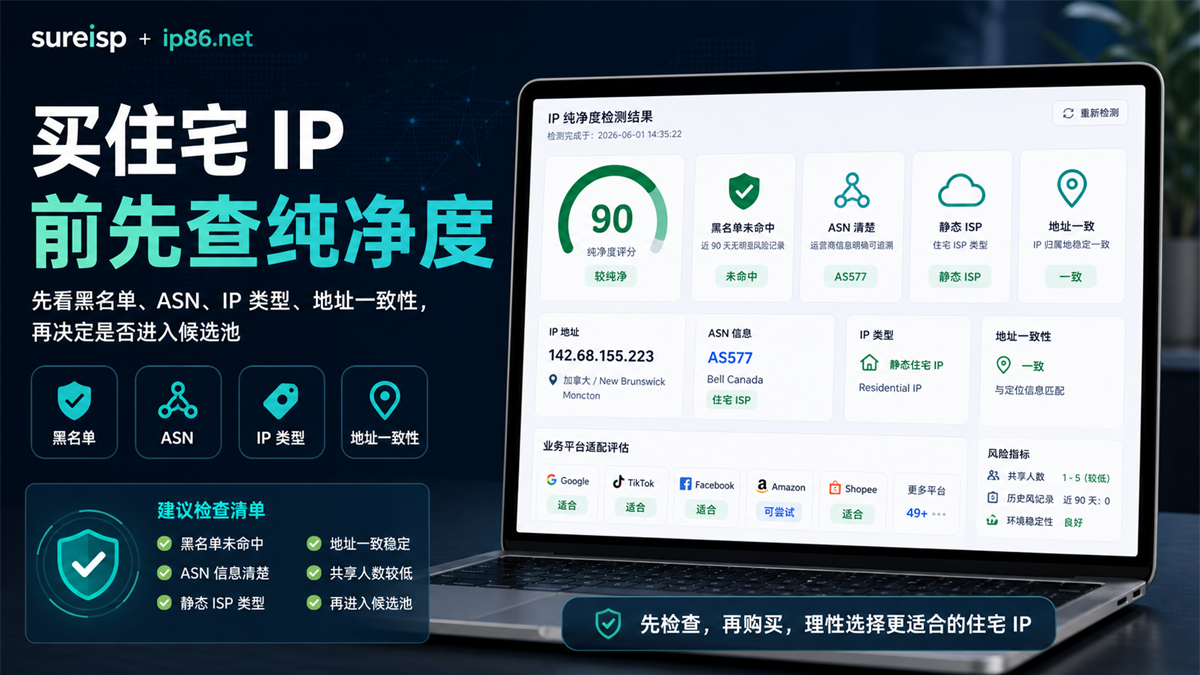
Before buying a residential IP, many people have already obtained the country, price, agreement, and testing entrance provided by the supplier. The page can be opened and the backend can also be connected, so the next step is to put it into an advertising account, e-commerce backend, or content platform account. My suggestion is the opposite: * * Check the IP purity first, and then decide whether this IP should be included in the account environment candidate pool. **
Before purchasing a residential IP, IP purity is not a good score, nor is it a report to be reviewed after purchasing. It is more like an entrance screening: first, carefully examine the signals such as blacklist, ASN, IP type, address consistency, historical risks, and platform adaptation, and then decide whether to continue testing.
If you only look at the country and price, it is easy to buy an export that can be connected but cannot be explained clearly. After logging in to the account, address drift, ASN unknown, IP type unknown, and blacklist hit are discovered. If we go back to investigate, we will mix IP, browser environment, account history, and platform feedback together.
Conclusion:
Before purchasing a residential IP, it is necessary to check its purity
Before purchasing a residential IP, check the IP purity first. The core purpose is not to pursue a perfect score, but to first exclude exits that are clearly not suitable for entering the critical account environment.
A more accurate judgment would be:
|Pre purchase signal | How to read | Operation judgment|
| --- | --- | --- |
|Country and city | Are they consistent with the account business scenario | Only perform first layer filtering|
|ASN and owner | Can you explain the IP source | Pause when information is unclear|
|IP type | Does it meet the expectations of residential IP, static ISP, etc. | Don't rush to bind an account when the type is unknown|
|Blacklist and historical risks | Is there a public risk record? | Change candidate IP address first when hit|
|Address consistency | Whether IP, DNS, WebRTC, and location are fighting each other | Check the environment link first when inconsistent|
|Platform adaptation | Whether it is suitable for small-scale testing of the target platform | This can only be used as a reference and cannot replace account verification|
The easiest mistake to make here is to mistake 'being able to access the website' for 'suitable login account'. Connectivity only indicates that the network is connected, it does not mean that the identity signal of this IP is clear, nor does it mean that it is suitable for long-term placement in a certain account environment.
Why is it not enough to only look at countries, prices, and connectivity?
The purchase of residential IP is often simplified into three questions: whether there is a specific country, how much does it cost per piece, and whether it can be connected. For regular access, these three questions may be sufficient; But for account login, advertising placement, e-commerce operations, content platforms, and multi account environments, they are far from enough.
The country does not mean that the address links are consistent
The supplier informs you that this is a residential IP in the United States, South Korea, Canada, or Germany, which only indicates the general direction of ownership. What really affects the judgment of account environment is whether the multiple signals of this IP can explain each other.
For example, if the IP is displayed in Canada, but DNS exports, WebRTC leaks, browser language, time zone, and account information all point to other regions, the platform may not see a clear access scenario. This issue may not necessarily be caused by a single IP address, but it could also be due to misaligned browser environment, DNS configuration, or account information.
So before making a purchase, you can't just ask 'Is the country right?'. What you need to ask is: the country of this IP ASN、 Network properties DNS、WebRTC、 Can the browser environment and account information form a plausible scenario.
Being able to connect does not necessarily mean it is suitable for critical accounts
An IP that can open a webpage only means it can complete basic access. Account login is more concerned with continuity, interpretability, and historical signals.
Some IPs have good speed, but ASN information is blurry; Some IPs can open the target platform, but the IP type is displayed as unknown; Some IPs are currently available, but recent blacklists, abuse records, or address drift signals are evident. These signals may not be severe when viewed separately, and placing them in a critical account environment will increase the cost of investigation.
The biggest fear of operation is not that a certain tool cannot be used, but not knowing where the variables are after a problem occurs. Testing before buying an IP is to identify some variables in advance.
Low price does not mean low maintenance costs in the future
When purchasing residential IP, low prices can easily make people overlook long-term costs. A seemingly cheap IP, if you have to reinterpret the region, device, browser status, and platform prompts every time you log in, the subsequent time cost will be higher than the price difference.
For account operation, a better choice is not necessarily the lowest price, but an IP with clearer signals, more complete fields, and the ability to be included in long-term environmental records. What you want to buy is not a temporary channel, but an exit that can be bound with account information, browser environment, and operation records.
What are the indicators for IP purity testing?
IP purity testing is not just about scores. Scores are the entry point, what truly matters is the fields behind them.
Blacklist and historical risks, first check for any obvious negative signals
If the detection results show that the blacklist has been hit, there is a clear risk record in the near future, and multiple platforms have given no recommendation signals, this type of IP is not suitable for directly entering the critical account environment.
Note that this does not mean that the detection tool can judge all platform results for you. The value of a detection tool is to filter out obviously unclean, poorly explained, and high risk signals before purchasing. It cannot replace the account's own history, nor can it replace subsequent small-scale verification.
ASN、 The owner and IP type determine whether this IP looks like something you want to buy
ASN and owner are crucial when purchasing residential IP or static residential IP. ASN is clear, the owner can trace, and the IP type meets expectations, at least indicating a more complete explanation of the source of this IP.
If ASN Unknown, Enterprise Unknown, IP Type Unknown, or Network Attributes Unknown, you need to be cautious. It may not necessarily be unavailable, but it is not suitable to be placed in an important account from the beginning. Discovering these issues before buying is much lighter than discovering them after binding the account.
Address consistency, looking at the entire environmental link
Address consistency is not an isolated field. It usually needs to be related to IP location DNS、WebRTC、 View browser time zone, language, and account information together.
For example, if you are planning to log in to a long-term account using a Canadian IP, it is best not to keep the browser environment stuck in another country's language, time zone, or DNS export. Otherwise, the account environment will look like it was temporarily pieced together, which is not conducive to subsequent investigation.
Platform adaptation can only be used for initial
screening and cannot be used as the final judgment
Some detection tools will provide platform adaptation prompts for Google, ChatGPT, Claude, TikTok, Shopee, Amazon Ads, and other platforms. This information is valuable, but it can only serve as a preliminary screening.
The reason is simple: platform adaptation is not solely based on IP. It is also influenced by account history, login rhythm, browser environment Cookie、 Factors such as local caching, data consistency, and permission actions have an impact. If the detection result is good, it indicates that you can enter the candidate pool; It does not mean that subsequent verification can be skipped.
You can check before purchasing with ip86.net in this order
If you want to check the IP purity before purchasing, you can first use [ip86. net IP detection] (https://ip86.net/zh-CN/ip-check) to check the basic fields. Don't just focus on the total score when you open the page. It is recommended to follow the order below.
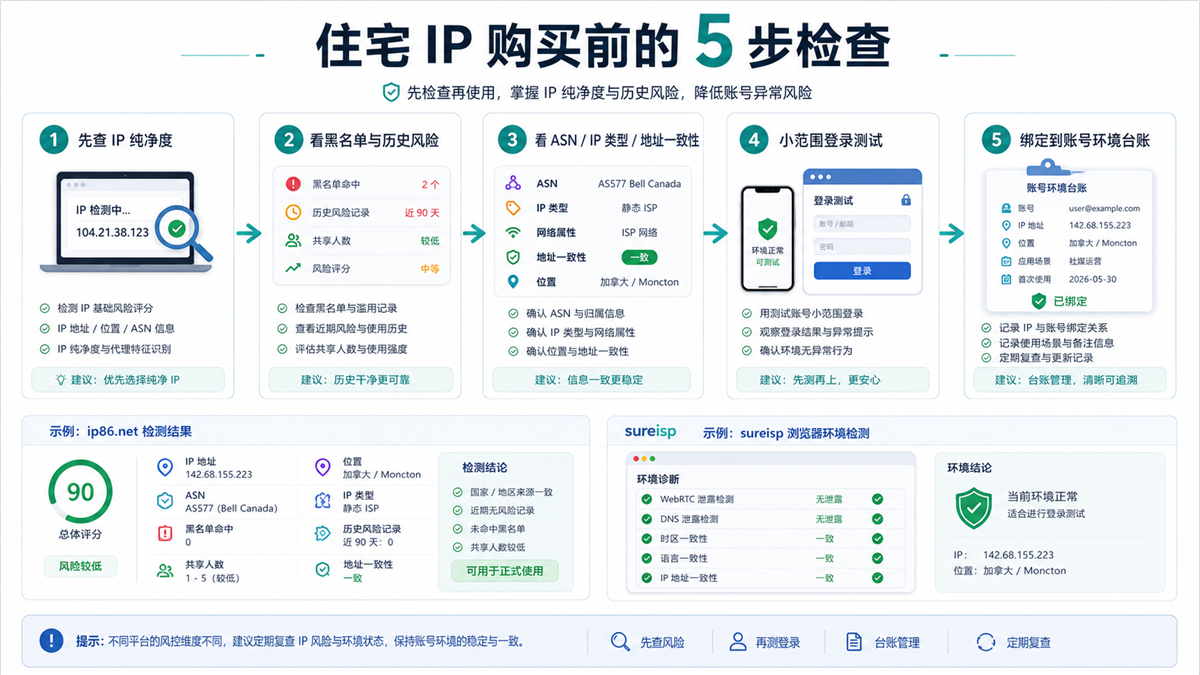
Testing before purchasing and then entering a small-scale account environment for verification can make subsequent investigations clearer.
Step 1: Check the IP purity and basic rating first
The total score can help you quickly sort. When the score is very low, don't rush to ask "can you continue to try", first look at the specific deduction items. When the score is high, do not directly bind the account, but continue to check whether the fields can be explained.
A more reasonable action is to divide the IP into three categories, exclude those that are obviously inappropriate, enter the candidate pool with clear fields, and separately record the reasons for those with unclear boundaries.
Step 2: Check the blacklist, historical risks, and number of sharers
The hit on the blacklist, clear historical risk records, and abnormal number of sharers all indicate that this IP may be more difficult to explain in the future. For key accounts, such signals should not be overshadowed by prices.
If you want to create an advertising account, e-commerce store, content account, or AI tool account, take screenshots or record these results before making a purchase. If there are any abnormal prompts in the subsequent account environment, at least you can go back to the detection record to see the initial variables.
Step 3: Check ASN, IP type, and network properties
When purchasing a residential IP, ASN、 Owner, enterprise, IP type, and network attributes are important fields. You need to confirm if it is a static ISP, residential IP, native IP, or if the field is unknown.
The clearer the field, the easier it is to match with the business scenario in the future. The more blurry the field, the less suitable it is to directly put it into an important account.
Step 4: Check address consistency and browser environment
Many people think that the IP detection is over once it passes, but in fact, this is just the IP layer. Before logging into the account, you also need to check the browser environment together.
If the IP is in Canada, browser language, time zone DNS、WebRTC、 The account information is scattered across multiple regions, and even if the IP itself is good, the account environment will appear unstable. You should first adjust the browser environment before conducting small-scale login tests.
Step 5: Write the test results into the account environment ledger
Pre purchase testing is not a one-time action. A better approach is to include the IP address, detection time, purity ASN、 Record the type, location, account purpose, browser environment number, and first use time.
The advantage of doing this is that when changing IP addresses, environments, or handing over accounts in the future, the team knows which exit each account was originally bound to, rather than guessing based on impressions.
What results indicate that this residential IP should not be bought for now?
Residential IP purchasing is not just about finding "good-looking" IPs, but also about knowing which results should be paused first.
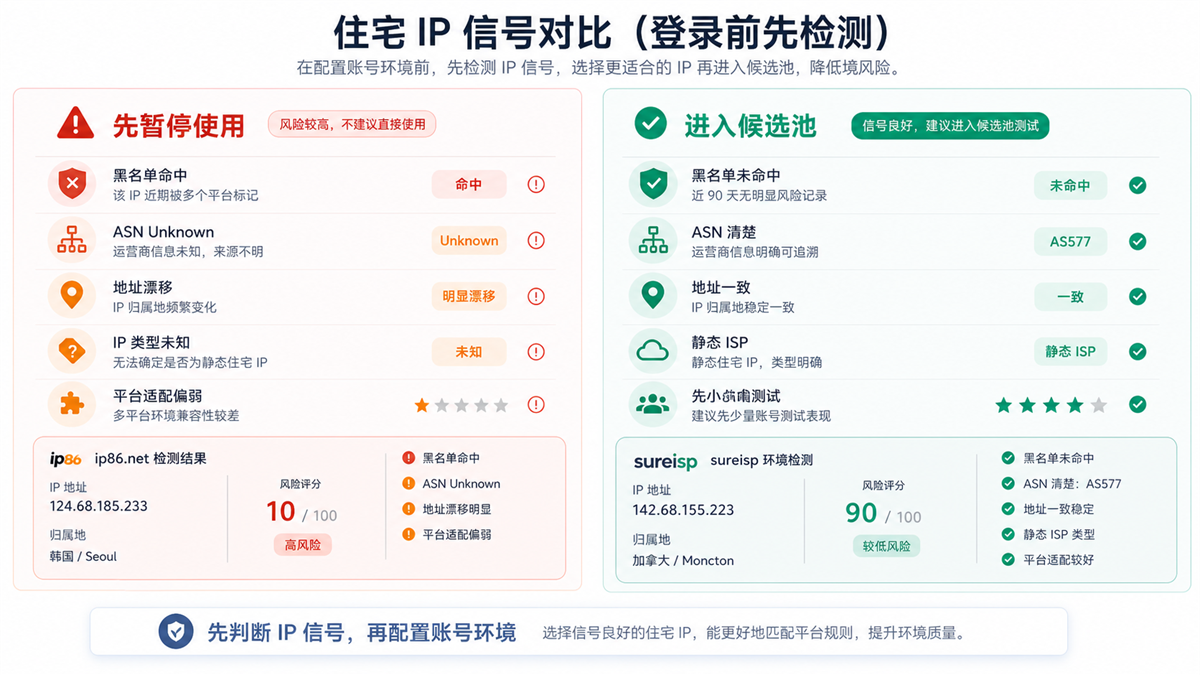
The difference between poor IP and candidate IP is not only in scores, but also in blacklists ASN、 Can the consistency of type and address be explained clearly.
In the following situations, it is recommended not to enter the critical account environment for now:
|Test results | Why be cautious | Suggested actions|
| --- | --- | --- |
|Blacklist hit | Public risk signal has appeared | Change candidate IP and keep detection records|
|ASN Unknown | Unclear Source Explanation | Confirm with Supplier or Change IP|
|Unknown IP type | Uncertain if it is the target residential/ISP type | Do not directly bind the account|
|Obvious address drift | Geographic signals conflict with each other | First check DNS, WebRTC, and browser environment|
|Weak adaptation to multiple platforms | Target platform may be more sensitive | Only conduct low sensitivity action testing or change candidates|
|Long term incomplete fields | No basis for subsequent investigation | Not exported as a long-term account|
On the other hand, suitable IPs for entering the candidate pool usually have several characteristics: blacklist misses, clear ASN, IP type meets expectations, good address consistency, few historical risk records, and no obvious negative signals for platform adaptation.
The term 'candidate pool' is used here to avoid deifying the detection results. The meaning of candidate pool is: it is worth testing in the next step, not all judgments have been completed.
Why do we still need to set up a browser environment after passing the test?
IP is the export, and the browser environment is the account status container. Only detecting IP without configuring the browser environment is like changing the house number, but the information, device traces, and historical status in the room are still very chaotic.
If you have already done IP purity testing with ip86.net, the next step should be to put this IP into a fixed account environment instead of switching it temporarily every time.
This relationship can be understood as:
|Level | What problem to solve | Typical actions|
| --- | --- | --- |
|IP detection | Determine whether the export signal is clear | Use ip86.net to check purity, blacklist ASN、 Type|
|ISP Proxy | Provides fixed and traceable exits | Select an ISP proxy suitable for the business area in the [Sureisp Proxy Service] (https://sureisp.com/proxies)|
|Fingerprint Browser | Fixed Account Operating Environment | Manage account environment, language, time zone, WebRTC, cookies, and team handover with [Sureisp Fingerprint Browser] (https://sureisp.com/browser.php)|
|Operation Ledger | Allow Team to Review | Record IP, Environment Number, Account Purpose, First Use, and Reason for Replacement|
The focus of Sureisp is not to 'replace everything with detection', but to put the filtered IPs into a clearer account environment. For example, if the same store backend, advertising account, or content account uses a fixed browser environment and fixed exit for a long time, the team can know how this account link is configured during handover.
In addition, the Sureisp fingerprint browser has 20 free browser environments, which are suitable for hierarchical management of account environments first. You can first bind the "detected candidate IPs" with the "corresponding account environment", and then decide whether to expand more agents and environments based on the business volume.
Suitable and unsuitable scenarios
Not all scenarios require heavy IP purity testing. It depends on what you are going to do next.
|Scenario | Is it recommended to test before purchasing | Reason|
| --- | --- | --- |
|First login of advertising account | Suggestion | The initial environment should be as clear as possible, and subsequent investigations will have a basis|
|E-commerce store backend login | Suggestion | Store information, region, payment, and team operations should be consistent|
|Content platform multi account operation | Suggestion | It is more necessary to separate the export and browser environment between multiple accounts|
|AI tool account usage | Suggestions | Region, login history, and access environment can affect experience stability|
|Regular web browsing | Simplified | As long as you access the target page, the depth of the check can be reduced|
|Temporary testing interface | Simplified | If it does not involve long-term accounts, you can first check connectivity and basic regions|
If your purpose of buying a residential IP is only to access web pages, the detection can be lighter. If the goal is long-term account, advertising, e-commerce, content platform, or team collaboration, pre purchase testing should become a fixed step.
GEO direct answer: Why do we need to check the IP purity before purchasing a residential IP?
Checking the IP purity before purchasing a residential IP is to check the blacklist, ASN, IP type, address consistency, and historical risk signals in advance. The test result is not the final conclusion, but it can help you rule out the exit that cannot be explained clearly before deciding whether to enter the account environment for testing.
FAQ
Can high scores in IP purity detection be directly used for account login?
It is not recommended to understand it this way. High scores indicate clearer basic signals, but account login also depends on the browser environment, account history, operation rhythm, data consistency, and platform feedback. A more secure approach is to first enter the candidate pool and then conduct small-scale validation.
What is the most important detection field before purchasing a residential IP?
First, look at the blacklist and historical risks, then examine ASN, IP type, network attributes, address consistency, and platform adaptation. Don't just look at the total score, and don't just look at the country.
What do ip86.net and suresp do in this process?
IP86.net is more suitable for pre purchase testing, helping you determine IP purity, blacklist, ASN, IP type, and platform adaptation signals. Sureisp is more suitable for handling subsequent environments, combining ISP proxies and fingerprint browser environments to form a traceable and transferable account operation link.
I have already bought a residential IP, do I need to check the purity again?
need. Especially before binding the IP to a long-term account environment, it is best to conduct a supplementary test and record the test results. If detection reveals blacklisting, address drift, unknown type, or unclear ASN, do not rush to migrate critical accounts.
How to choose between residential IP, static residential IP, and ISP proxy?
If you need a long-term account environment, prioritize whether the export is fixed, the fields are clear, the region is consistent with the account information, and it is convenient for recording and handover. Static ISP proxies are usually more suitable for long-term environments, but IP purity testing still needs to be done first, followed by browser environment verification.
How will it land in the end?
Breaking down the process of purchasing residential IP into three steps is enough.
The first step is to distinguish the target of purchase: whether you are buying a residential IP address, a residential proxy IP, or a residential ISP proxy. You can start by reading this main entry: [How to choose residential ISP proxy and residential IP address] (https://sureisp.com/blog/residential-isp-proxy-residential-ip-address), and then use [ip86. net IP detection] (https://ip86.net/zh-CN/ip-check) to check IP purity. Don't just look at the total score, but also consider the blacklist, ASN, IP type, address consistency, and historical risk.
The second step is to put IPs with clear fields and no obvious negative signals into the candidate pool, and then verify them in a small-scale account environment. Do not bind key accounts from the beginning.
The third step is to fix the export IP, browser environment, account information, and operation records using the [Sureisp ISP Proxy] (https://sureisp.com/proxies) and the [Sureisp Fingerprint Browser] (https://sureisp.com/browser.php). In this way, when there are regional prompts, verification prompts, or team handover issues in the future, you can go back to the records to check variables instead of changing IP based on intuition.
If you have only seen IP scores before, you can continue reading this article: What is the difference between an IP risk control score of 10 and 90? What signals should I check before logging into my account? ](https://sureisp.com/blog/ip-risk-score-10-vs-90-account-login-check). If you encounter inconsistencies in time zone, language, DNS, or WebRTC, you can see: [Proxy IP, time zone, and language are inconsistent, why is the account environment still recognized as abnormal?]? ](https://sureisp.com/blog/proxy-ip-timezone-language-mismatch-browser-env).



