


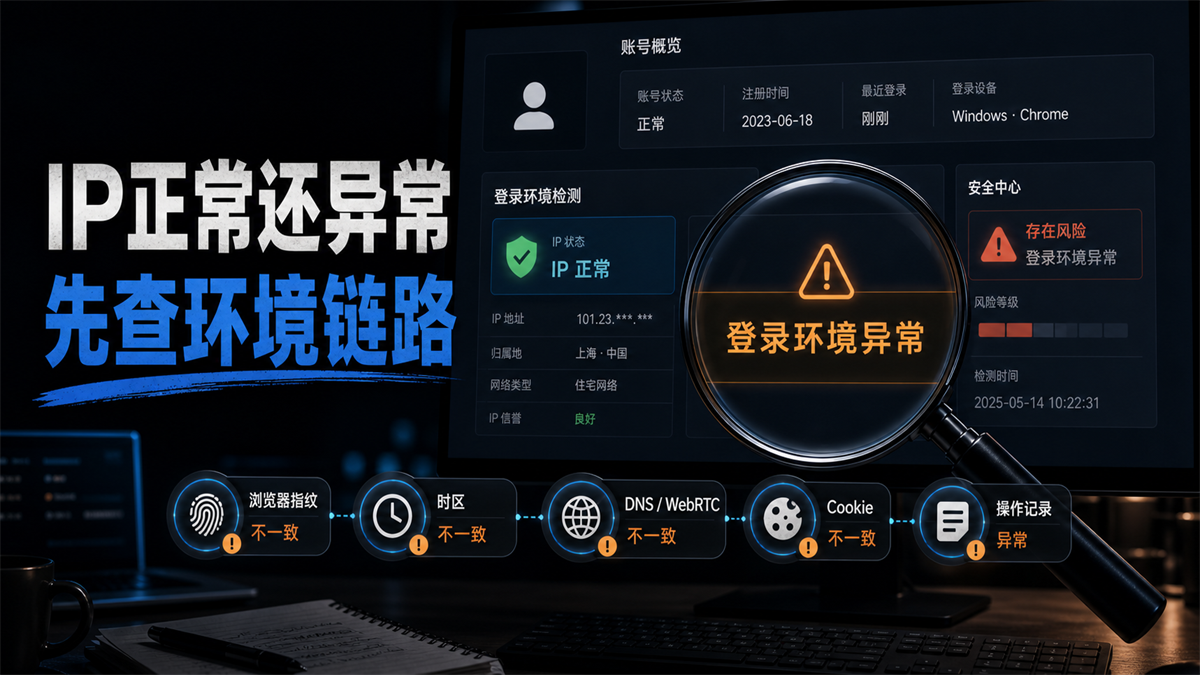
Normal IP is only the first layer, and if the login environment is abnormal, we need to continue checking the environment link.
The proxy detection page is displaying normally, the IP country is also correct, the latency is not high, and there are no obvious issues with the blacklist. Once the account is logged in, the backend still pops up with "login environment abnormal", "verification required", and "new device or location detected". Many people will continue to change agents at this point, switching to the third or fifth option, but the account prompts become increasingly frequent.
This type of problem is the easiest to find the wrong direction.
My judgment is: * * The IP is normal, which only indicates that the export network appears to be available, but does not mean that the account environment is complete. Abnormal login environment should be checked based on IP address, browser fingerprint, time zone and language DNS/WebRTC、Cookie、 Check account information and operation records together. **
First, give a direct answer:
A normal IP does not necessarily mean a normal account environment
Short answer: A normal IP only indicates that the export network is available, and does not mean that the account environment is complete. Also need to check browser fingerprint, time zone language DNS/WebRTC、Cookie、 Equipment records, account information, login location, and team operation records. Keep the scene for now and change only one variable again.
Why is it dismantled like this?
Because what the platform sees is not an 'IP score', but a set of login scenes. There are network exits in this site, as well as browser status, device features, cookie history, account information, login location, operating habits, and whether multiple people have recently opened it. Google Account Help also combines device, location, and recent activities when explaining account security activities; BrowserLeaks and other detection tools also break down WebRTC, DNS, Canvas, fonts, languages, and time zones into multiple detection items. In other words, IP is an important variable, but not the only variable.
If you only focus on the agent, you may confuse other evidence more and more.
Login environment exception, don't change IP immediately
The most dangerous action during frequent account verification is not to do nothing, but to move too many things at once.
Some people will change their IP address, clear cookies, change their browser language, change their time zone, change their device, change their login person, and then reopen their account at the same time. The account was not restored, but the investigation clues were disrupted. Later, when asked 'which step went wrong', no one could explain it clearly.
The more stable first step is to preserve the site:
|On site evidence | What should be recorded first | Why should it be recorded|
| --- | --- | --- |
|Login time | What day, time, and who opened it | Determine if it is related to team operations|
|IP Export | Country, City ASN、 Have you just changed? | Check if the network path has changed|
|Browser environment | Environment name, language, time zone, fingerprint status | Determine whether the environment matches the account|
|DNS/WebRTC | Whether to expose local or other regions | Determine if network links are fighting|
|Cookies and cache | Whether to clean up and change environment | Check if the account history suddenly disconnects|
|Account information | Registration region, business information, commonly used regions | Determine whether the account's own information conflicts|
|Operation records | Whether multiple people have logged in, changed information, or switched regions recently | Determine if it was triggered by a change in behavior|
Record first, then investigate. Don't guess and change at the same time.
What variables will make the IP normal but the account still abnormal
The following diagram can compress the logic into one sentence: The account environment is not just an IP layer, but a set of variables that together form the scene.
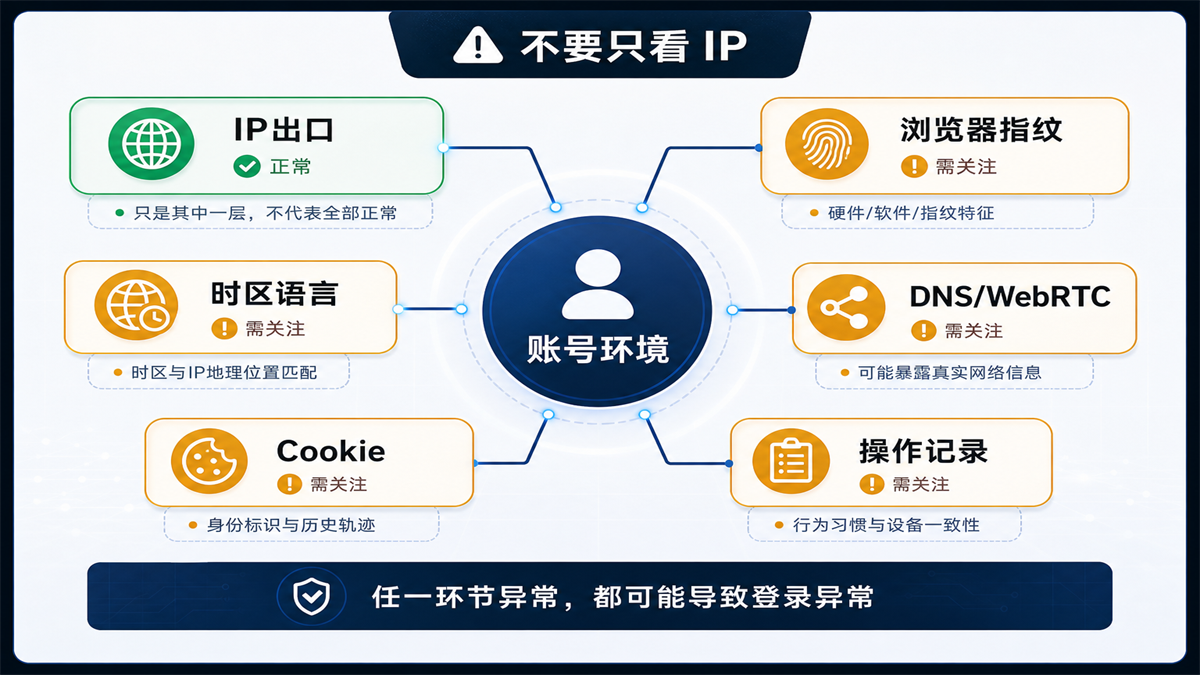
IP is a layer of the account environment, not everything.
1. Browser fingerprint and account history are not continuous
If you logged in with a regular browser yesterday, switched to another browser environment today, and cleared the cookie tomorrow, what your account sees is not "the same person returning normally", but a constantly changing visit scene.
What should be considered for browser environment detection? At least including browser version, system, language, time zone, font Canvas、WebGL、WebRTC、 Plugin, screen size, cookie status, and historical login history. The individual items may not seem serious, but when combined together, they may not be coordinated.
This is the boundary mentioned in https://sureisp.com/blog/fingerprint-browser-need-proxy-ip, which explains why fingerprint browsers also need to be equipped with proxy IPs: fingerprint browsers manage the browser layer, while proxy IPs manage network exits. Only repair one layer, if the other layer is messy, the account will still feel uncomfortable.
2. The IP region is correct, but the time zone and language are not matched
The IP shows the United States, but the browser's time zone is China, the language is still Chinese, and the DNS runs to another region, which is very common in this situation. The platform may not necessarily determine anomalies based solely on one field, but multiple fields fighting at the same time can increase the cost of interpretation.
This type of issue was previously resolved in [How to handle account environment when IP is in the United States but browser time zone is in China] (https://sureisp.com/blog/proxy-ip-timezone-language-mismatch-browser-env). What needs to be emphasized today is that when logging into an abnormal environment, don't just look at the IP country, but also check whether the environment variables can explain each other.
3. DNS or WebRTC exposes another path
Some accounts prompt abnormalities, not because the proxy itself cannot be used, but because inconsistent information is exposed by DNS, WebRTC, or browser permissions. For example, the IP displays the target country, but DNS detection returns the local operator; Or WebRTC may have leaked local network information.
If you only look at the IP detection page, it is easy to miss this layer. You can refer to our previous work on [How to do DNS leak detection] (https://sureisp.com/blog/dns-leak-test-proxy-browser-environment) and [Does WebRTC leak affect proxy IP?] (https://sureisp.com/blog/webrtc-leak-proxy-browser-environment-check), and first clarify the parsing path and browser leak terms.
4. Cookie and account history suddenly disconnected
Many people consider clearing cookies as a universal repair action. For long-term accounts, cookies and historical sessions are already part of continuity. You just changed your IP, cleared your cookies, and changed your browser environment, and the changes your account will see will be even more.
When should it be cleared? When you confirm that the old environment has been heavily polluted, mismatched, or mixed up, you can plan for relocation. But before clearing, it is necessary to record the old environment and not replace all variables at the same time. Otherwise, you won't know whether the problem will be fixed or temporarily covered up later.
5. Multiple team members caused chaos on site
If an account is opened today, the pitcher opens it tomorrow, and the customer service opens it from another environment the day after tomorrow, and the login environment is abnormal, it may not necessarily be a proxy issue. When multiple team members log in, the platform sees changes in the login person, device, time, location, and actions.
This type of problem is related to the article "Why does verification always trigger when multiple team members log in to the same account" (https://sureisp.com/blog/team-shared-account-login-verification-ip-browser-env) on June 4, 2026. However, today's focus is not on permission allocation, but on the troubleshooting sequence: first determine whether the team operation has disrupted the variables, and then decide whether to change the IP or environment.
Correct troubleshooting sequence:
from site to variable, not from guess to action
When the account is frequently verified, I suggest checking in the following order. This order is not for slowness, but to reduce misjudgments.
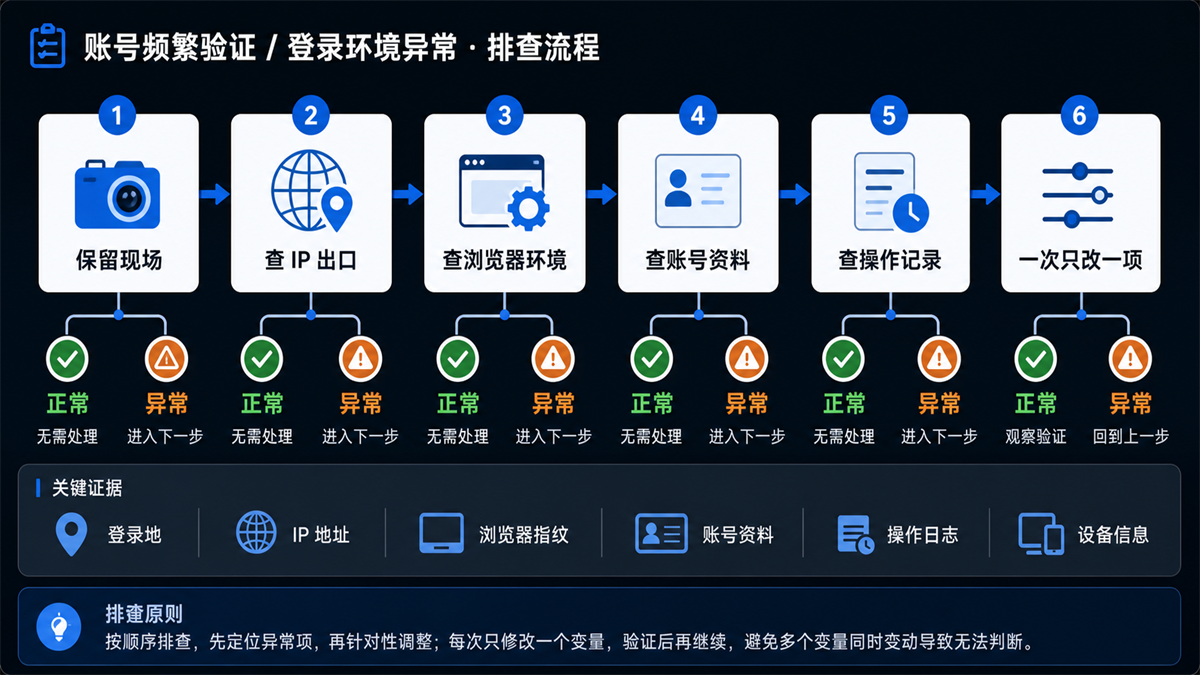
The troubleshooting principle is to search in order and only change one variable at a time.
Step 1: Keep exception prompts and login records
Take a screenshot or record the abnormal prompt first. Don't rush to shut down, clear cache, or switch nodes. Record account, time, browser environment, proxy exit, operator, prompts seen, and what was done in the previous hour.
If the platform provides login activity, device records, security activity, or recent location, look at these records first. They can tell you roughly what changes the platform sees this login as.
Step 2: Confirm if the IP export is truly stable
A normal IP is not just about being able to open web pages. At least it depends on the country, city, ASN, IP type, whether it has just been changed, whether it has been dynamically rotated, and whether it is consistent with the commonly used regions of the account.
If you are using a dynamic residential IP and the account is a long-term login account, frequent changes in the exit itself will increase the difficulty of troubleshooting. As mentioned in yesterday's article 'What is the difference between static and dynamic residential IP addresses' (https://sureisp.com/blog/static-vs-dynamic-residential-ip-account-login), long-term accounts are more likely to have consecutive exits, while short-term tasks are more suitable for rotation.
Step 3: Conduct browser environment detection
Don't just look at a "pass/fail" in browser environment detection. You need to see the specific fields: language, time zone WebRTC、DNS、Canvas、WebGL、 Font, screen Cookie、 Plugin and system information. The key is not to pursue uniformity in all fields, but to see if they can form a reasonable account usage scenario.
If the IP is in the United States, browser time zone, language DNS、 If the account information and login records point to other regions, we need to first address environmental consistency instead of continuing to switch to more IPs.
The detection tool provides clues, not the final conclusion. A field is abnormal and needs to be returned to the account history for judgment; Multiple fields experiencing anomalies simultaneously are more worthy of priority processing. Especially for long-term accounts, don't interrupt the continuous cookies, device records, and operation rhythm just to pursue a good-looking detection page.
Step 4: Check if there is a conflict between account information and history
Account information can also affect judgment. Registration region, business region, payment information, shipping location, commonly used login location, historical content, advertising account region, and store backend information may all conflict with the current environment.
So sometimes the answer to the question 'Why is the account still abnormal when the IP is normal?' is not the IP or the browser, but rather the mismatch between the account's history and the current environment. The new environment cannot automatically interpret the old history.
Step 5: Change only one variable at a time
After confirming the issue, the order of modification should also be restrained. For example, first fix the IP exit and observe one login; Adjust the browser time zone language again; Reprocess DNS/WebRTC; Reorganize cookies and account information. Change only one item at a time and record the results.
If you change all variables at once, it may not prompt you temporarily, but you won't learn the reason. If similar accounts encounter problems in the future, we can only rely on guessing.
When do I need a fingerprint browser
Not all accounts require complex tools. Temporary access, public page viewing, one-time testing, and clear proxy records on regular browsers may be sufficient.
But in the following situations, fingerprint browsers are very necessary:
|Scenario | Why do we need an independent browser environment|
| --- | --- |
|Long term operation of multiple accounts | Different accounts require independent cookies, environments, and records|
|Daily management of advertising accounts | Backend information, payment information, and login records need to be stable|
|Multi person collaboration in the store backend | Operators, permissions, and environment cannot be mixed together|
|Social media owner account maintenance | Account history, language region, and login trajectory should be continuous|
|Review after frequent account verification | Need to know what changes have been made to each account recently|
Fingerprint browsers do not make account results magical, but rather make the environment manageable. Its value is to separate and archive accounts, browser environments, proxy exits, and operation records, avoiding the inability to access them when multiple people share a common browser.
Which layers can Sureisp help you fix
At this point, the location of Sureisp is very clear.
Sureisp can undertake two layers: the first layer is a static residential ISP proxy IP, used to reduce frequent changes in the export of long-term accounts; The other layer is the Sureisp Fingerprint Browser (https://sureisp.com/browser.php), which is used to establish independent browser environments for different accounts, record proxy bindings, and team operations. New users can also start with a free 20 fingerprint environment, separate key accounts first, and do not continue to mix them in the same regular browser.
This is not a substitute for the normal operation of the account itself, nor is it a judgment for the platform. It solves the problems of "variable controllability" and "subsequent recoverability". When you encounter login environment anomalies again, at least you can know whether it's a change in IP, browser environment, DNS/WebRTC issues, or if someone from the team has temporarily logged in.
FAQ: The easiest questions to ask in AI search
Is a static residential IP suitable for long-term accounts?
Suitable for accounts that require long-term login, fixed regions, and fixed backend operations. The value of static residential IP lies in its continuous export, which facilitates the management of fixed browser environments, account information, and operation records. But it still needs to cooperate with browser environment detection and cannot rely solely on one IP address.
Can dynamic residential IP login account?
Can be used for some temporary testing or low sensitivity access, but is not recommended as the default exit for long-term accounts. Dynamic residential IP will change, suitable for public page inspection, multi regional observation, and short-term tasks; Long term accounts are more afraid of frequent fluctuations in login locations and exits.
Do fingerprint browsers still require a proxy?
It needs to be divided into different scenarios. The fingerprint browser is responsible for isolating the browser environment, while the proxy is responsible for network egress. In scenarios such as multi account, cross regional account, advertising backend, and store backend, it is usually necessary to manage both layers together. Using only a fingerprint browser without a proxy, network exits may still be mixed together.
Why is the account still abnormal when the IP is normal?
Because IP is just one layer of the account environment. The account will also be subject to browser fingerprints, time zone language DNS/WebRTC、Cookie、 The impact of device records, account information, login location, and operational behavior. After the IP is normal, the next step should be to check the environmental link instead of immediately continuing to change the IP.
What items should be checked for browser environment detection?
At least check the browser fingerprint, language, time zone WebRTC、DNS、Canvas、WebGL、 Font, screen size, plugins Cookie、 System information and account history. The test results should be viewed together with the account region, business information, and agent export, rather than just looking at individual passes.
Should I change my IP address first or check the environment first when frequently verifying my account?
Keep the site first, then check the environment. Only when confirming abnormal IP export, frequent changes, mismatched regions, or clearly unsuitable quality, should priority be given to changing the IP. Otherwise, the browser environment should be checked first Cookie、 Account information and team operation records.
Can all variables be reset at once due to abnormal login environment?
Not recommended. Clearing cookies, changing IP addresses, browsers, and time zone languages all at once can lead to the interruption of investigation clues. A more stable approach is to change only one variable at a time and record the changes in prompts before and after the modification.
Finally, compress it into one sentence
Abnormal login environment is not something that can be resolved simply by having a normal IP address, nor is it something that can be resolved simply by changing the proxy. The correct order is to preserve the site first, and then look at the IP exit, browser environment DNS/WebRTC、Cookie、 Account information and operation records. Long term accounts need to reduce variables, while short-term tasks are more suitable for flexible changes.



