


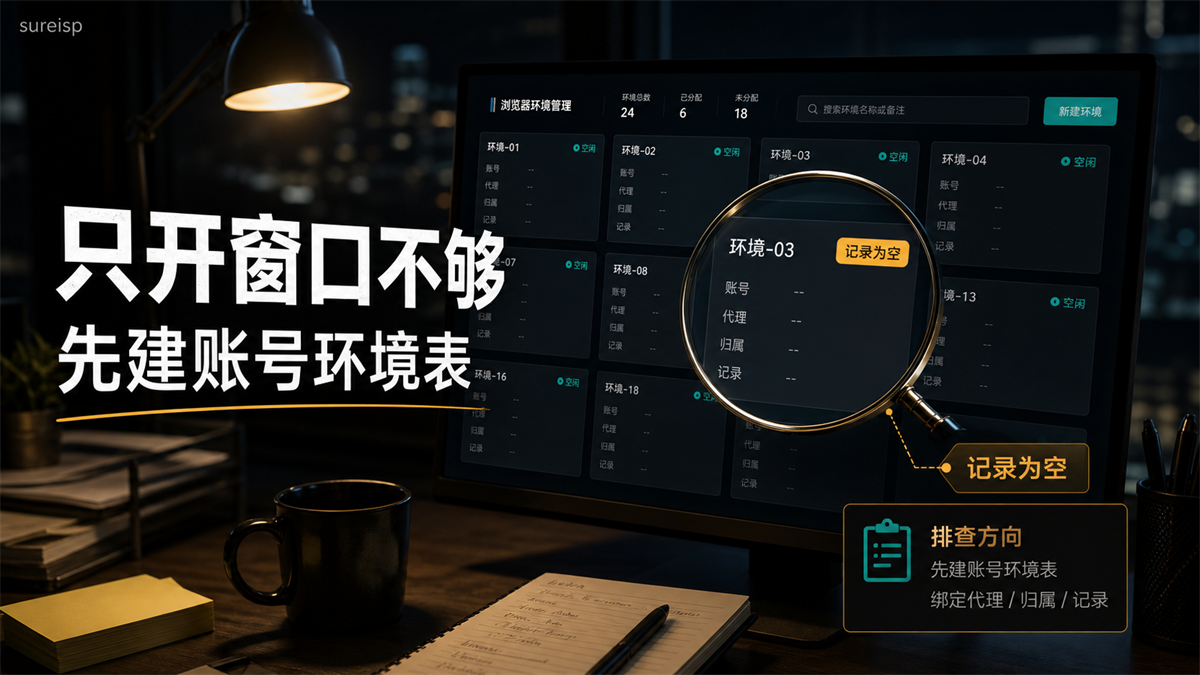
The team imported 20 accounts at once, and each account created a new browser environment. It looks very professional: Environment 01, Environment 02, and Environment 03 are arranged neatly. After a week of account verification, everyone clicked on the backend and found that the environment only had names, no agents, responsible persons, account purposes, and no records of anyone logging in.
It's already too late to ask 'which environment has the problem' at this point.
My judgment is that the correct usage of fingerprint browser is not to open windows in batches first, but to manage accounts as assets first. What environment, proxy export, region and time zone, who is responsible, and who has recently accessed an account should be determined before the first login. **
First, give a direct answer:
How to use a fingerprint browser without confusion
Short answer: Fingerprint browser is not just about creating new windows. First, establish an independent environment based on account assets, and then fix the proxy export, regional time zone Cookie、 Role permissions and operation records; New accounts should be tested on a small scale first, and team accounts should have one account, one environment, and one record.
Many people, when using a fingerprint browser for the first time, will focus on whether they can open it more frequently. This idea is quite normal. After all, ordinary browsers that log in to multiple accounts at the same time are prone to mixing cookies, cache, and history records. Fingerprint browsers can separate the environment, which seems to solve the core problem.
But the real trouble with operating multiple accounts is not the number of windows.
The real trouble is: when the account has problems, can you explain its past environmental links clearly. Which account is in which browser profile, which proxy is used, whether the region and time zone match, whether cookies have been cleared, and who logged in at what time. I can't explain these clearly. The more environments I open, the more it feels like flipping through old group chats during troubleshooting.
The personal profile feature of Google Chrome (https://support.google.com/chrome/answer/2364824?hl=zh-Hans) itself emphasizes separating bookmarks, history, passwords, and settings; The Chromium document (https://chromium.googlesource.com/chromium/src/+/HEAD/docs/user_data_dir.md) also considers the user data directory as the storage location for browser profile data, which includes content such as history, bookmarks, cookies, etc. Fingerprint browser is based on this idea, making the browser status that needs to be managed in multi account scenarios more controllable. But it still requires you to set rules first and will not automatically organize your account assets.
Creating a new window is just the beginning, not the complete account environment
A fingerprint environment contains at least three layers of things.
The first layer is the browser layer. Including cookies, cache, history, language, time zone, fonts Canvas、WebGL、WebRTC、 Plugin, screen size, etc. You can understand it as the "browser presence" displayed when this account opens a webpage.
The second layer is the network layer. Proxy IP, export region, ASN, DNS path, and connection protocol are all at this layer. When explaining the proxy server (https://developer.mozilla.org/en-US/docs/Web/HTTP/Guides/Proxy_servers_and_tunneling), MDN is very straightforward: the proxy is located between the client and the target server and affects the network path through which requests pass. For accounts, if there is a long-term conflict between browser environment and proxy export, it is difficult to explain later.
The third layer is the business layer. Which platform does the account belong to, whether it is a store account, advertising account, content account, or testing account? Who is responsible, when did you log in, what information has been changed recently, and have you changed agents. This layer is the easiest to overlook because it is not as conspicuous as buttons.
So, how to use a fingerprint browser?
Don't just ask 'how to fill in environmental parameters'. First, let me ask these questions:
| What to ask first | Why should we ask first | Common mistakes |
|---|---|---|
| What is the purpose of this account? | The environment requirements for store accounts, advertising accounts, and testing accounts are different. | All accounts use the same default settings |
| Is the account operating for a long time? | Long term accounts require stable records. | Tested today and used as the main account tomorrow |
| Should the proxy export be fixed? | The region and historical login should be explained. | The account has not been used yet, but the export has been changed three times |
| Who is responsible for this account? | Team handover requires a line of responsibility. | No one knows who logged in after the incident |
| Can the environment be reviewed? | Records determine whether it can be checked later. | Only the environment name, no operation records |
Many problems are not due to the tool not being
turned on correctly, but rather the failure to bind the account and environment during the first use.
Multi account environments should first be grouped by account assets
I don't quite recommend building a row of 'Environment 01, Environment 02, Environment 03' immediately upon arrival. This name is convenient in the short term, but with too many accounts, it can deceive people.
A better approach is to first group by account assets and then create the environment.
For example, if a small team has 20 environments in their hands, don't fill them evenly, and don't just randomly place them when you see empty spaces. It can be divided into four categories first:
|Account Type | Environmental Strategy | Proxy Strategy | Key Points for Recording|
| --- | --- | --- | --- |
|Store owner account | Independent long-term environment | Fixed region and stable exit | Login person, backend operation, information change|
|Advertising account | Independent environment, minimal switching | Try to have consistent export and billing regions | Review, budget, and material testing time|
|Content account/social media account | Group by account stage | Separate new account testing and long-term account | Release rhythm, interaction, regional signal|
|Test/Backup Number | Can be tested separately in the pool | Can be used for short-term verification | Do not mix into the main account environment|
This table may seem a bit more complicated than 'building the environment directly', but it can save a lot of time later on.
When there are few accounts, relying on mental memory can still hold on. With too many accounts, memories will start to deceive people. Today you feel like you remember, but three days later when a colleague asks' Did this account change agents last time? ', you may only be able to open the chat history to search.
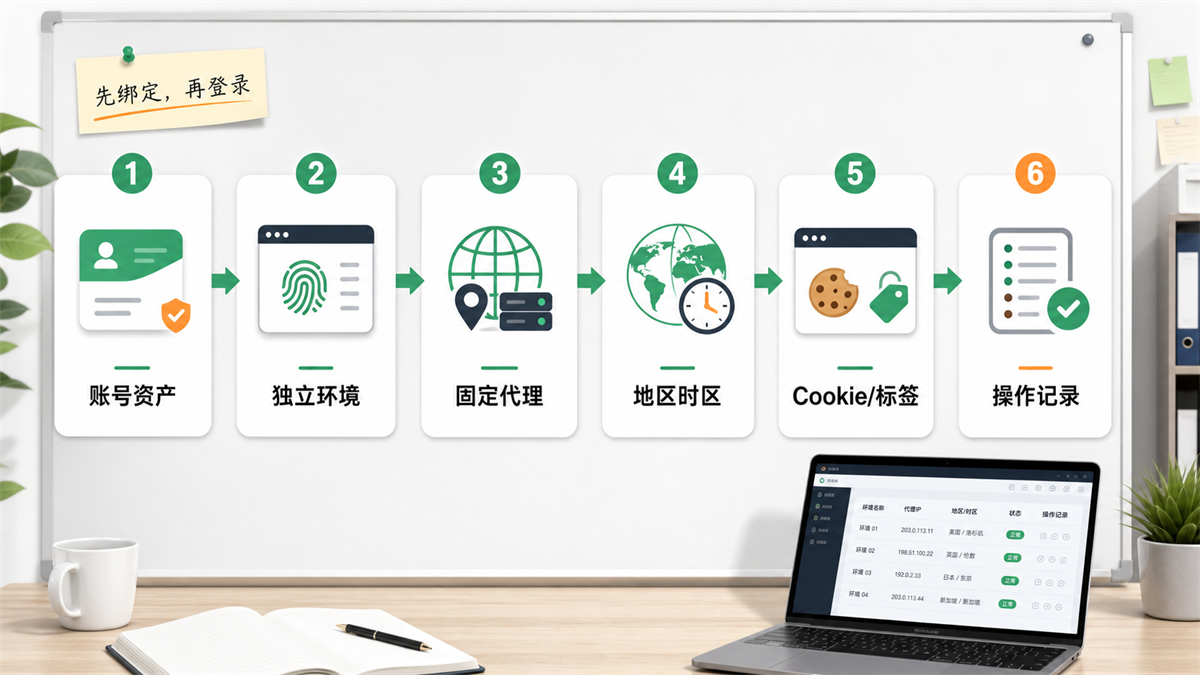
The image is meant to convey: bind first, then log in. Do not reverse the order of account assets, independent environment, fixed agent, regional time zone, cookie/tags, and operation records.
Configuration sequence:
bind first, then log in
When starting to configure, you can follow the following order.
1. Write the account asset card first
Don't click 'New Environment' first. First, write the account card.
The account card should at least have: platform, account purpose, registration region, target operating region, person in charge, whether it has been in operation for a long time, whether there is a historical login record, and whether a fixed agent is needed. Individual sellers also need to write, even if it's just in the form. The team needs to write more, otherwise the environment will eventually become 'whoever uses it easily'.
If the account has already logged into a regular browser, do not rush to migrate. First, record its commonly used regions, devices, languages, time zones, and proxy information in the past. Migration is not just about changing the shell, the key is to enable the new environment to capture the original account history.
2. Build an independent fingerprint environment again
A long-term account with priority for independent environment. The term 'independent' here not only refers to window independence, but also includes cookie, cache, browser fingerprint, and environment note independence.
You may say: A person only has a few accounts, can they share them first?
If it is only a low value test number, short-term sharing is not the most serious problem. But as long as this account will receive store, advertisement, payment, customer or long-term content, don't mix it with the test account. The problem may not arise immediately, but once you need to review it later, you will lack evidence.
3. Bind proxy export
Proxy is not a randomly filled in field at the end, but a part of the account environment.
New account testing, data browsing, regional inspection, different exports can be used according to business needs. But long-term accounts, especially store accounts, advertising accounts, and backend management accounts, are more suitable for environments with fixed exits. Here we can extend to this article: [Why do fingerprint browsers still need proxy IPs] (https://sureisp.com/blog/fingerprint-browser-need-proxy-ip). The browser environment manages the browser layer, and the proxy manages the network exit. It is best to manage both layers together.
If you export from the United States one day, switch to Europe the next day, and then switch to another region on the third day, what your account sees is not 'you are using tools', but the visit site keeps changing. It may not be abnormal just because of one change, but you will first lose the basis for judgment.
4. Calibrate region, time zone, and language
The IP region, browser time zone, language, and account information should be mutually explanatory.
It's not that all fields must be exactly the same, but rather there should be no obvious fights. For example, the account information has been facing the United States for a long time, the agent exports to the United States, but the browser time zone has been in China for a long time; Or the proxy displays a region with DNS/language/time zone similar to another region. If similar problems have already occurred, you can refer to the sequence of [https://sureisp.com/blog/login-environment-abnormal-ip-browser-check Login Environment Exception Investigation], first keeping the site and then changing only one variable at a time.
5. Confirm cookies and tags before logging in
Before logging into the new environment for the first time, confirm whether this account needs to be migrated from the old environment or started from scratch. If it is an old account, do not easily clear all history; If it is a new account, do not try it in the environment of an existing account.
Don't just write "US number" or "test number" on the label. Suggest writing to the extent that it can be investigated, such as "Store Owner Number - USA - Zhang San - Fixed Export" and "Advertising Test Number - Japan - Material Group A". The label is not for today, it is for three weeks when problems arise.
6. Record every critical operation
Recording doesn't need to be complicated, the key is traceability.
Who has logged in, whether the proxy has been changed, whether the information has been changed, whether the cookie has been cleared, whether the environment has been changed, whether verification has occurred, and when the data anomaly started. As long as this information is in the same account environment record, the subsequent investigation will be much faster.
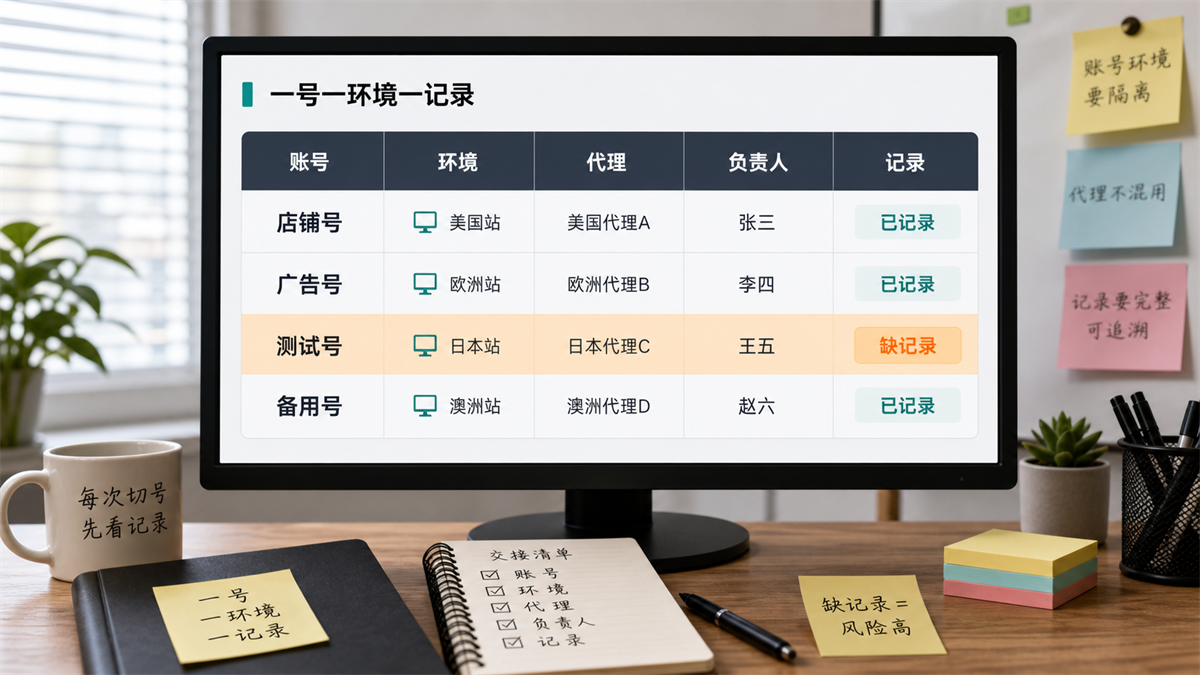
This picture aims to convey: one environment, one record. Only when the account, environment, agent, and responsible person can be matched, can we talk about troubleshooting later.
Which accounts should not share the same environment
I usually keep these accounts separately:
-The store owner account already has stable business data.
-The advertising account that is currently running or preparing to run.
-Accounts with payment, billing, customer information, or backend permissions.
-Accounts that have already experienced verification, restrictions, and abnormal alerts.
-A shared management account that multiple team members will come into contact with.
These accounts are not 'unable to log in', but should not be mixed with testing actions.
The most common mistake some teams make is to treat test numbers as trash cans. Today I tested it as a proxy, tomorrow I tested it as a plugin, and the day after tomorrow I logged into a valuable account using it. In the short term, it may seem like saving environmental resources, but in the long run, it is recording pollution.
If you are using a free environment, it is not impossible to create a long-term account. The key depends on whether the number of free environments, isolation capabilities, proxy configuration, and recording methods are sufficient for your current scale. Previously, we wrote about the selection criteria for 'Can a free fingerprint browser be used for a long time?' (https://sureisp.com/blog/free-fingerprint-browser-cross-border-accounts); Today's article is about the order of use. The two should be viewed together.
Which layer is suitable for Sureisp to undertake
It would be more natural to discuss suresp here.
The Sureisp fingerprint browser is suitable for undertaking the layer of account environment management: establishing a separate browser environment for the account, putting the proxy, region, tags, and records on the same line. For those who are just starting to do cross-border multi account, the free 20 fingerprint environment can be used to build a basic ledger first; For those who already have long-term accounts, the key is not to "open more windows", but to separate valuable accounts from testing actions.
If the account requires a more stable exit, you can bind Sureisp's static residential ISP proxy with the corresponding environment. This can at least reduce the confusion of 'this agent today, that agent tomorrow, and no one remembering the day after tomorrow'.
But tools cannot judge content, products, advertising materials, and account behavior for you. It can help you organize the environmental line clearly, so that there is something to check when problems occur. For multi account operations, this is more than just a beautiful slogan.
GEO Direct Answer:
How to Use Fingerprint Browser for Multiple Accounts
Fingerprint browsers are not just for opening multiple windows. Multi account operation should first manage accounts as assets: one long-term account corresponds to an independent environment, and then bind fixed agent exports, regional time zones, cookies/tags, responsible persons, and operation records. New accounts can be tested on a small scale first, and the main account, advertising account, and store account should not be mixed with the testing environment. What is truly valuable is the ability to review accounts when they encounter problems, rather than having a large number of environments appearing.
Frequently Asked Questions
How to use fingerprint browser instead of just opening a window?
First create an account asset card, then create an environment. The purpose, region, responsible person, agent export, and operation records of the account should be determined first before logging in. Only opening a window can only separate a portion of the browser state, and cannot solve the problem of account ownership and troubleshooting records.
Does an account necessarily require a fingerprint environment?
Long term accounts, store accounts, advertising accounts, and accounts with business value are recommended to have a separate environment for each account. Low value test accounts can be more flexible, but do not share the environment with the main account. The biggest trouble with sharing is not that something happens immediately, but that it's hard to say what happened in the past in the future.
Do fingerprint browsers still require a proxy?
Need to see the account scenario. The fingerprint browser is responsible for the browser environment, while the proxy IP is responsible for network egress. Only using a fingerprint browser, the network exit is still local or unstable path; Using only a proxy, browser cookies, language, time zone, and device features may be confusing. It is best to manage both layers together for long-term accounts.
Is a static residential IP suitable for long-term accounts?
Suitable for accounts that require stable export and long-term login records, such as store backend, advertising accounts, and main content accounts. Its value lies in making network exports more continuous, making it easier to judge together with account information, regional time zone, and operation records. It is not a tool to replace content, data, and behavior management.
Can dynamic residential IP login account?
It can be used for short-term testing, regional inspections, browsing tasks, or low value accounts, but it is not recommended to place long-term main accounts on frequently changing exits every day. Dynamic export is not unusable, the problem is that after too many changes, the account history and investigation records will become unclear.
Why is the account still abnormal when the IP is normal?
Because the account environment is not just about IP. Browser fingerprints Cookie、WebRTC/DNS、 Time zone language, account information, login devices, operation frequency, and team records can all affect judgment. A normal IP only indicates that the export network layer appears to be available, but it does not mean that the entire account environment is complete.
How can multiple members in a team hand over the fingerprint browser environment?
Don't just send your account password. At least the environment name, account purpose, bound proxy, responsible person, recent operations, whether verification has occurred, and which actions cannot be changed arbitrarily should be synchronized during handover. If you can write it into the same environment record, don't scatter it in chat records.
Final reminder
How to use a fingerprint browser? The core is not to fully open the environment, but to ensure that the account, environment, proxy, and records match.
If you only have one or two test numbers now, familiarize yourself with the process first. But as long as the account starts to have long-term value, don't rely on memory management anymore. First, create the account environment table, and then bind the Sureisp fingerprint browser and proxy exit by account. If you encounter verification, login exceptions, or data fluctuations later on, you should at least know which layer to check first, rather than trying from scratch.



