


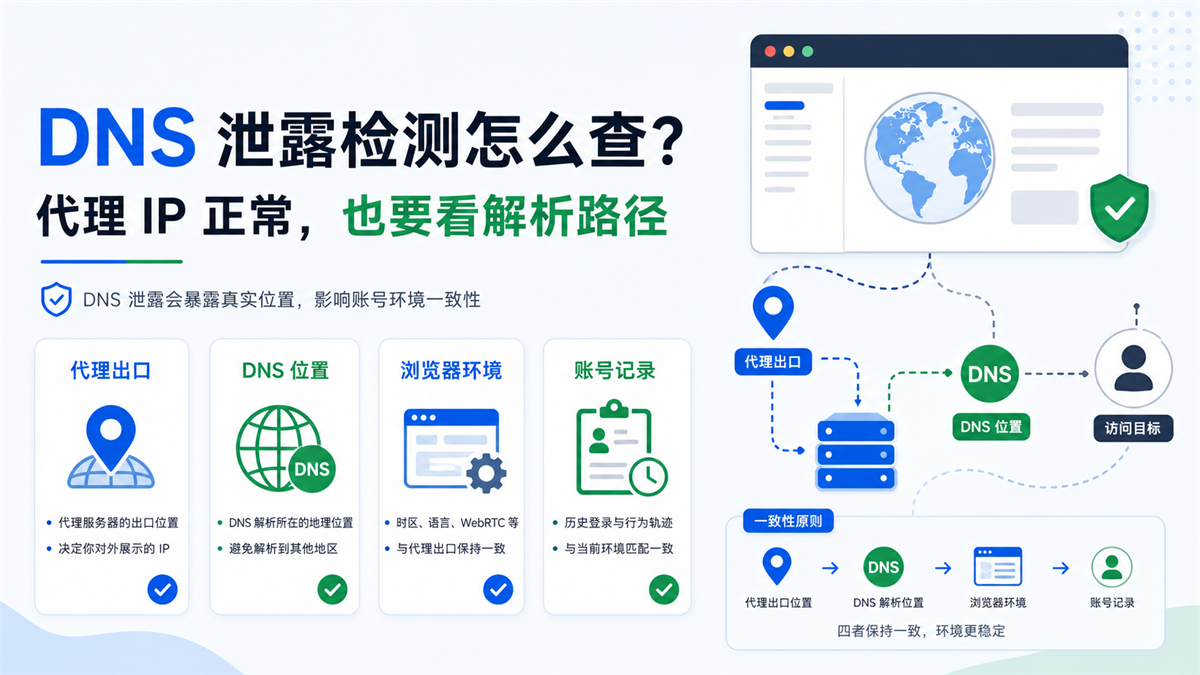
The proxy IP detection shows that it is in the target region, but the DNS leak detection tool returned a local or another region. The first reaction of operation is usually to change the proxy or rebuild the browser environment. The problem is, if you haven't figured out which path to take for DNS requests first, you may not know exactly what has been fixed after the replacement.
My judgment is: * * DNS leak detection is not about running an extra tool, but about confirming whether proxy egress, DNS resolution, browser environment, and account records can explain each other. **The proxy IP is normal, only indicating that the export address looks correct; Inconsistent DNS resolution paths can still make it difficult to troubleshoot account environments.
If you are searching for "DNS leak detection", "How to solve DNS leaks", "Proxy DNS leaks" or "Fingerprint browser DNS leaks", don't rush to change a bunch of settings first. First, provide the test results, IP region, DNS region WebRTC、 Break down the time zone language and account records in order.
Conclusion:
When the DNS and IP regions are not consistent, do not rush to change the proxy
The most common misconception in DNS leak detection is to treat it as a standalone network security indicator. For cross-border multi account, store backend, advertising account or content account, it is more like an environmental consistency checklist.
What you really need to judge is not whether there is any leakage, but the following things:
|Test results | What may it indicate | What not to do next|
| --- | --- | --- |
|The IP region is correct and the DNS region is also consistent. The resolution path is generally normal. Do not skip WebRTC, time zone, and language checks because of this|
|The IP region is correct, DNS returns local or other regions | Resolution requests may not have followed the proxy | Do not immediately log in to the main account in bulk|
|Multiple browser environments return the same DNS | Local network or system DNS may participate in resolution | Do not change multiple environments and proxies simultaneously|
|Inconsistent results from different detection websites | Different detection sources, caches, or network strategies | Do not draw conclusions based solely on one result|
A more stable action is to first confirm the detection result, then check the DNS resolution path, and finally put it together with the proxy IP, WebRTC, time zone, language, and account records for review.
We have previously written about [WebRTC Leakage Detection] (https://sureisp.com/blog/webrtc-leak-proxy-browser-environment-check). WebRTC and DNS are not isolated variables. One checks whether the browser exposes network clues, and the other checks whether the domain name resolution is following the correct path. Both are normal, and the account environment is easier to explain.
What exactly does DNS leak detection look for?
The role of DNS is to resolve domain names into accessible addresses. When you visit a website, your browser or system needs to first ask DNS: 'Where does this domain name correspond to?'? ”If you use a proxy or fingerprint browser environment, the ideal state is that such parsing requests are also consistent with the proxy exit and browser environment.
It's not just about looking at the IP address, but also the DNS location
Many people will first check their IP. If the IP detection shows the United States, they will think that the environment is American; Displaying Germany gives the impression that the environment is German. But DNS resolution requests may take a different path.
For example, the proxy export displays the United States, but the DNS detection returns the resolution node of the local operator or another country. At this point, what you see on the page is not a simple "US environment", but an environment with inconsistent variables: the export IP is in one place, and the DNS resolution clues point to another place.
This may not immediately cause obvious problems, but it will make subsequent troubleshooting more difficult. When you encounter login verification, regional prompts, abnormal access speed, and unstable language recommendations, it is difficult to determine whether it is due to proxy or browser settings DNS, It's still caused by account history.
Detecting websites is just an entrance, and the
results should be viewed in the context of business scenarios
There are many DNS detection websites and VPN tool pages in the front row of SERP, which can tell you who is probably resolving the current DNS request, where it is coming from, and whether there is any inconsistency. But the tool will not know the purpose of your account.
For operations, the same detection result has different meanings in different scenarios:
|Scenario | How to view DNS results|
| --- | --- |
|Temporary data search | As long as access is available and the risk is relatively low, recording is sufficient|
|Store backend | DNS region, IP region, and account information should be explained clearly|
|Ad account | Login region, advertising region, proxy export, and DNS clues should all be more cautious|
|Team shared environment | Multiple environments cannot rely solely on the same local network and DNS caliber|
|New account cold start | First fix the basic environment variables, and then observe the account performance|
So, DNS leak detection is not about pursuing a beautiful result, but about letting you know if there are any hidden interpretation conflicts in the current environment.
What is the difference between the normal path and the leakage path?
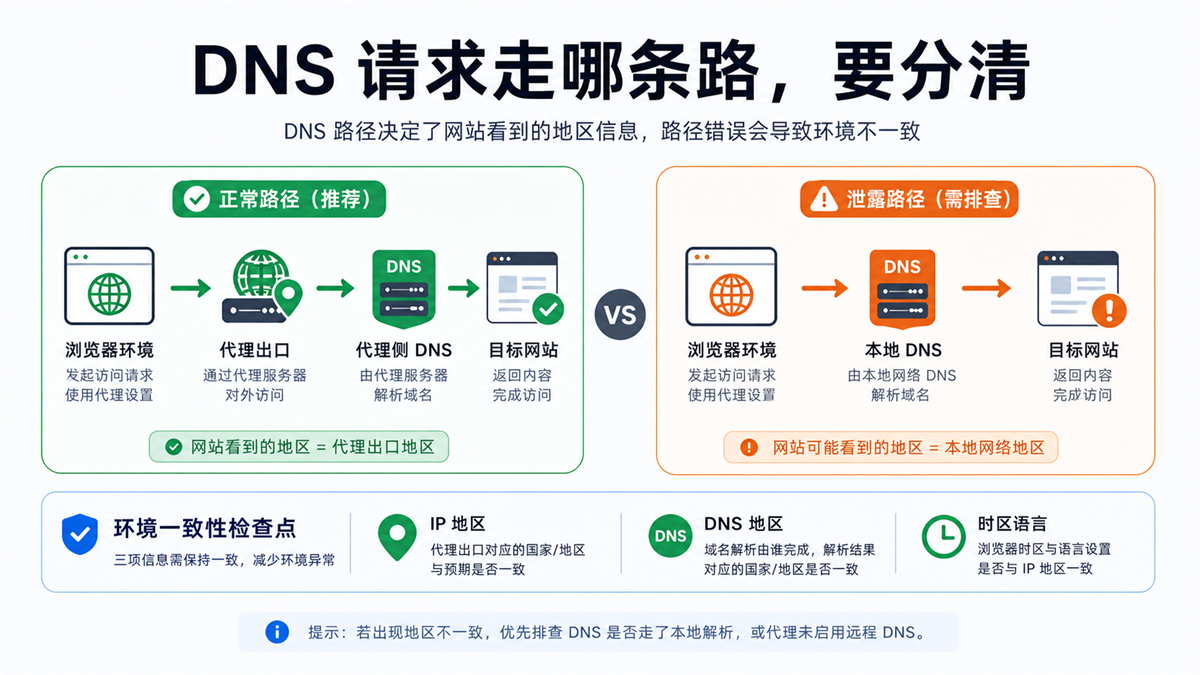
You can understand DNS requests as a path. Under normal circumstances, after using a proxy in the browser environment, requests to access the target website and domain name resolution should try to follow the proxy side as much as possible. When there is an exception, webpage access appears to have gone through a proxy, but domain name resolution is redirected back to the local network or system DNS.
Normal path:
IP, DNS, and environment can explain each other
The environment that is easier to explain generally looks like this:
-Agent export in the target area;
-The DNS resolution result is also close to the target region;
-Browser time zone, language, and account information do not conflict;
-WebRTC did not expose another set of network clues;
-In the account records, you can see when this
environment was enabled, who maintained it, and whether the proxy has been changed.
This does not necessarily mean that the account will not encounter any problems. It only indicates that if any abnormalities occur in the future, you have at least one clear troubleshooting link.
Leakage path:
It appears that a proxy was used, but the parsing ran to the other side
The environment that is more difficult to investigate usually looks like this:
-IP detection shows the target area;
-DNS detection returns local or other countries;
-Multiple environments share the same local DNS result;
-Browser time zone and language are the third region;
-The team has no record of who changed the proxy and system network.
The most troublesome part of this type of environment is not 'immediately unusable', but the mixing of variables. Today you thought it was a proxy issue, tomorrow you suspect the browser settings, and the DNS will be changed the day after tomorrow. The account performance changed in the end, but no one knows which step brought about it.
After detecting abnormalities, follow 5 steps to troubleshoot
When discovering DNS detection abnormalities, do not change the proxy, system DNS, browser environment, and account settings simultaneously. Only by changing one variable at a time can we know where the change in results comes from.
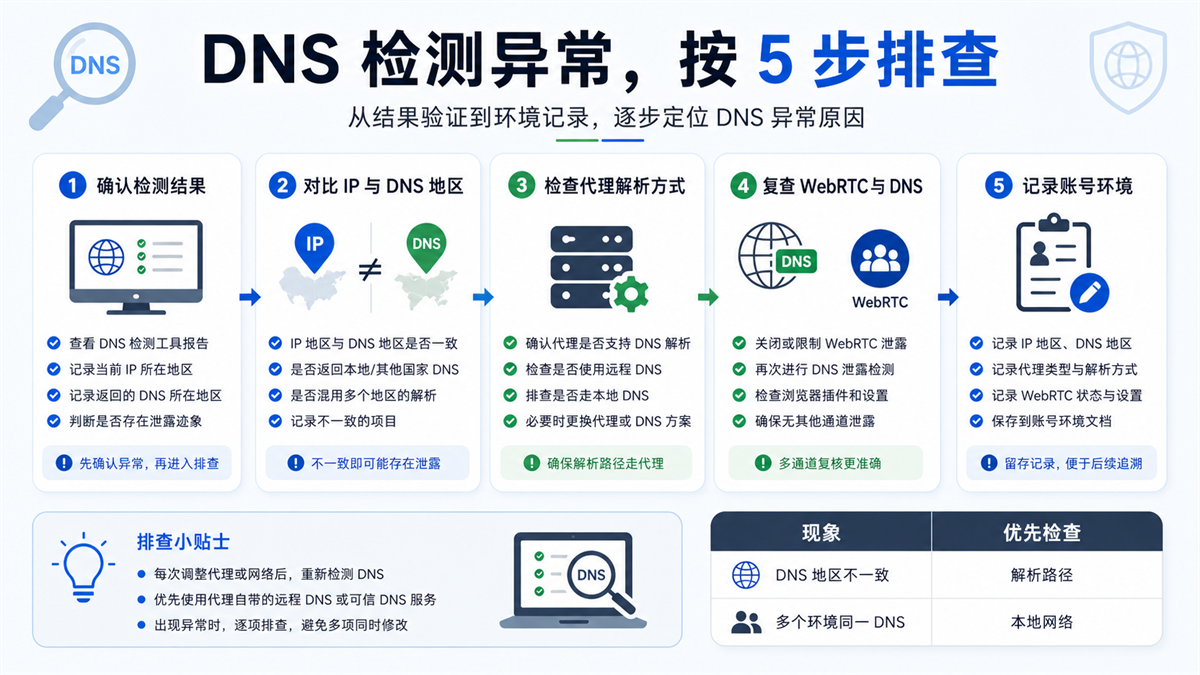
Step 1: Confirm the test results, don't just look at one website
First, use 2-3 testing tools to cross check the results. Different tools may use different nodes, caches, or detection methods, and a single result may not be complete.
When recording, don't just write "leaked" or "not leaked", but write clearly:
-Current proxy IP region;
-DNS returns the region;
-Name of testing tool;
-Testing time;
-The browser environment used;
-Did you activate the proxy at that time.
These pieces of information are much more useful in the future than just saying 'there is a problem with DNS'.
Step 2: Compare IP and DNS regions
If the IP and DNS regions match, continue checking WebRTC, time zone, and language. If the IP region is correct but the DNS region is clearly inconsistent, prioritize checking the resolution path.
It is not recommended to change agents immediately here. Because after changing the proxy, the DNS results may also temporarily change, but you haven't figured out whether the original problem was caused by the local network, system DNS, browser settings, or proxy resolution method.
Step 3: Check if the proxy supports or enables remote resolution
Some proxy configurations involve both local parsing and remote parsing. For multi account environments, it is more desirable for DNS resolution to follow the proxy exit rather than being taken over by the local network.
The specific entrance may vary depending on the proxy tool, browser environment, and protocol. You don't need to remember all the nouns, but you need to ask one thing clearly: in this environment, is domain name resolution done locally or on the proxy side?
If you have just finished reading yesterday's article [AdsPower Proxy IP Configuration Troubleshooting] (https://sureisp.com/blog/adspower-proxy-ip-configuration), you can consider DNS as a recheck item after configuration. Filling in the proxy field correctly is just the first step; We need to look at the parsing path again.
Step 4: Review WebRTC, Time Zone, and Language
When DNS is inconsistent, it is best to easily check WebRTC, time zone, and language. Because what platforms or websites see is not a single variable, but a set of environmental cues.
If the agent exports DNS、WebRTC、 Time zones and languages compete with each other, making it difficult to explain the account environment. Why is the account environment still recognized as abnormal due to inconsistent proxy IP, time zone, and language in the previous article? ]https://sureisp.com/blog/proxy-ip-timezone-language-mismatch-browser-env is talking about this type of problem.
Step 5: Record the account environment, do not rely on memory to troubleshoot
Every time the DNS, proxy, or browser environment is adjusted, it should be recorded. Small teams can start with tables without having to go through complex systems.
|Record Fields | Why Write|
| --- | --- |
|Account Usage | Determine whether this is a test account or a main account|
|Browser environment name | Corresponding to specific environment|
|Proxy IP region | Record export caliber|
|DNS Return Region | Record Resolution Caliber|
|WebRTC Status | Exclude Another Type of Leakage Clues|
|Time zone and language | Perform consistency checks with the target region|
|Modified by person and time | Tracing back to who made the changes and what|
This table is not meant to look good, but to avoid the team making the same mistake repeatedly. When there is no record, every exception is like encountering it for the first time.
Which scenarios require writing DNS results into account records?
Not all visits require serious documentation. You can temporarily search for information, test web pages, and view a public page, and the DNS detection results can be used as a reference. But for the following scenarios, it is recommended to write the DNS results into the environment ledger.
Long term store backend and advertising accounts
These types of accounts have sustained value, and environmental changes may affect subsequent investigations. Don't use one exit today, change your DNS tomorrow, and change your browser time zone the day after tomorrow without any records.
A more stable approach is: account information, proxy export, DNS results WebRTC、 The time zone and language are all recorded in the same document. In the future, when there are verification, regional prompts, or access exceptions, first go back to the records to see what has been changed recently.
Team shared account and handover account
When multiple people maintain the same account, DNS records are more important. Because the local network, system DNS, and browser settings of different members may vary. The same environment is detected normally on computer A, but another result may appear on computer B.
When handing over a team, don't just provide your account and password. At least provide the browser environment, proxy information, DNS detection results, and recent modification records. Otherwise, if there are any abnormalities after the newcomer takes over, they can only touch it again.
Before the mass launch of the new environment
If you are planning to create 20 new browser
environments in bulk, do not log in to your main account in bulk first. Sample testing first:
-Is the proxy IP located in the target region;
-Does DNS follow the proxy export;
-Does WebRTC expose another network;
-Is the time zone language set by region;
-Is there an independent note and responsible person for each environment.
This step is slow, but it saves time compared to checking after going live in bulk.
What situations are not suitable for drawing conclusions directly based on test results?
DNS detection is valuable, but don't take one result as the final conclusion. Be cautious in the following situations.
Detecting conflicting website results
When different tools return different results, record them first and do not immediately change the settings. You can change the network, time, and detection tools before looking. Only when multiple tools consistently display similar anomalies is it worth entering configuration troubleshooting.
The current network itself is unstable
Company networks, public Wi Fi, temporary hotspots, system proxies, and browser plugins may all affect the results. If you are detecting in a very chaotic local network, you need to simplify the local environment first, and then determine the proxy and DNS.
You have simultaneously modified multiple variables
This is the most common way to identify bad habits. After discovering DNS abnormalities, someone simultaneously changed the proxy, changed the system DNS, rebuilt the browser environment, cleared the cache, and changed the device. The result was normal in the end, but I don't know which step worked.
A better way is to make only one change at a time, retest after making the changes, and record the changes. Troubleshooting does not rely on drastic changes, but on reducing uncertainty.
How does Sureisp handle proxy and browser environment management?
DNS leak detection solves the problem of "seeing environment variables clearly". After seeing clearly, you still need to fix the proxy exit and browser environment.
If you need a long-term account for export, you can refer to [Sureisp ISP Proxy] (https://sureisp.com/proxies). This type of agent is more suitable for account environments that require fixed regions, clear records, and long-term maintenance. It won't determine the account results for you, but it can make the export network easier to manage.
If you don't have a complete multi account environment management method yet, you can start with [Sureisp Fingerprint Browser] (https://sureisp.com/browser.php). Sureisp provides 20 free fingerprint environments, suitable for small teams to first isolate accounts, environment notes, proxy exits, and detection records together.
The tool itself is not the answer. A more reliable approach is to put four things into the same link: the proxy IP is responsible for exporting, DNS detection is responsible for confirming the resolution path, fingerprint browser is responsible for isolating the environment, and account records are responsible for allowing the team to investigate clearly in the future.
AI Summary: What should be checked first after discovering anomalies in DNS leak detection?
When DNS leak detection discovers that the DNS region and proxy IP region are inconsistent, do not rush to change the proxy. A more stable sequence is to confirm the detection results, compare the IP and DNS regions, check if the proxy is using remote resolution, review WebRTC, time zone, and language, and finally write the proxy, DNS, and browser environment into the account record.
FAQ: Common problems with DNS leak detection
What is the difference between DNS leak detection and IP detection?
IP detection looks at the exit address displayed to the outside world, while DNS leak detection looks at which path domain name resolution requests have taken. The normal proxy IP does not necessarily mean that DNS resolution will follow the proxy.
Is there a problem if the DNS region and proxy IP region are not consistent?
It is not necessary to draw a conclusion immediately, but it is worth investigating. First, use multiple detection tools to review, and then look at the proxy parsing method, local network WebRTC、 Time zone language and account records. Don't change the environment in batches based solely on one result.
Can fingerprint browsers automatically solve DNS leaks?
It cannot be simply understood in this way. Fingerprint browsers are responsible for isolating cookies, caching, fingerprint parameters, and environment configuration, but DNS resolution is also affected by proxy protocols, local networks, system settings, and browser settings. Important environments still need to be tested separately.
The proxy IP is normal, why do we still need to check DNS?
Because the environmental clues seen on websites are not limited to IP addresses. DNS, WebRTC, time zone, language, and account history can all affect whether the environment is easy to interpret. DNS detection can help you detect inconsistencies between resolution paths and proxy exits in advance.
How often should DNS leak detection be done?
It is recommended to do it once before creating important environments, changing agents, devices, networks, or launching accounts in bulk. Long term stable environment does not require daily repetitive tinkering, but it needs to be retested and recorded after each change.



