


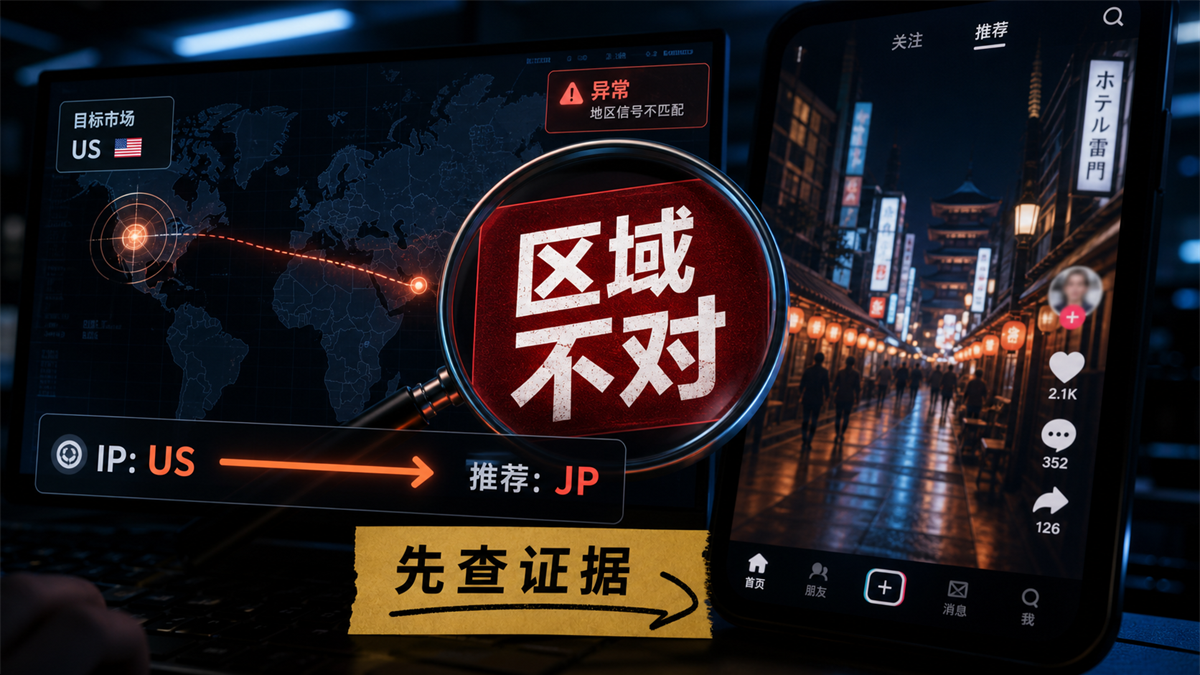
При региональной дислокации сначала определите тип проблемы, а затем проверьте IP, язык, часовой пояс и историю учетной записи.
Агенты были вырезаны в Соединенных Штатах, и страница IP - тестирования также показывает СоединенныеШтаты. После того, как вы можете открыть TikTok, рекомендуемый контент все еще является другим регионом, и область, которую можно выбрать в рекламной группе, не соответствует целевому рынку. Первая реакция на работу обычно заключается в том, чтобы продолжать менять IP или менять язык, часовой пояс и кэш вместе.
Этот шаг легче всего запутать на месте.
Мое суждение: * * область TikTok неправильная, не сразу приписывайте IP. Сначала убедитесь, что вы видите область рекомендаций контента, область размещения рекламы, или местоположение учетной записи / функциональная область, а затем проверьте сетевой экспорт, среду браузера, сигнал устройства и историю учетной записи по доказательствам. * *
Сначала дайте ответ:
Регион TikTok не может смотреть только IP
Краткий ответ: Регион TikTok не просто не меняет IP. Сначала расскажите три категории вопросов: рекомендации контента, рекламная область и местоположение учетной записи, а затем проверьте IP - экспорт, языковой часовой пояс, DNS/WebRTC、 Права местоположения, сигналы SIM / устройства и история учетной записи, зарезервированные на месте после проверки по каждому пункту.
Почему ты так беспокоишься?
Потому что "регион не тот" - это не одноточечная проблема. То, что вы видите, может быть неправильным рекомендательным контентом или неправильным направлением рекламы, а также источником расположения учетной записи, сигналом устройства или историческим поведением, влияющим на суждение платформы. Все они называются региональными проблемами, но порядок их выявления различен.
Рекламный фон TikTok имеет свою собственную логику географической ориентации, и [примечание TikTok Ads о географической ориентации] (https://ads.tiktok.com/help/article/location-targeting?lang=zh) объясняет географию рекламы, доступную географию и рекламные места на уровне управления рекламой. Информация о местоположении TikTok - это еще один уровень, который также можно увидеть в описании местоположения TikTok (https://support.tiktok.com/zh_Hant/account-and-privacy/account-privacy-settings/location-services-on-tiktok), где службы местоположения, сетевая информация и системные настройки могут входить в определение местоположения. То есть, слово « область неправильна» во рту пользователя может быть разделено на несколько наборов сигналов в фоновом режиме.
Если в это время сделать только одно действие: поменять IP. Выглядит просто, на самом деле может быть ничего не доказано.
Более стабильный подход заключается в том, чтобы сначала записать текущие доказательства: текущий IP показывает, какая страна, какой язык браузера, каков часовой пояс, DNS не побежал в другое место, WebRTC не раскрыл информацию о машине, учетная запись перед тем, как войти или опубликовать контент в другом регионе в течение длительного времени. Доказательства все еще есть, и только после этого есть суждение.
Сначала определите, какая область, о которой вы говорите, неправильна.
Обычно я задаю первый вопрос: « Районы, которые вы видите, неправильные», где они появляются?
Это не слова. Неправильное расположение в разных местах, причины могут быть совершенно разными.
1. Рекомендуется неправильный район.
Это наиболее распространено. После открытия учетной записи контент, язык и горячие темы, появляющиеся в For You, не похожи на целевой рынок. Например, вы хотите сделать номер содержимого США, и в результате рекомендуется, чтобы контент в Японии, местном или хаотичном регионе появился в течение длительного времени.
Такие проблемы не могут смотреть только на IP. Рекомендации контента будут зависеть от истории учетной записи, поведения просмотра, интерактивного контента, языковых предпочтений, среды устройства, сетевого экспорта и других многоуровневых сигналов. Вы только что перерезали IP - адрес в США, но в течение последних двух недель смотрели на контент в другом регионе, и рекомендации не обязательно сразу становятся целевым рынком.
Здесь нужно проверить, "есть ли согласованность рекомендованного сигнала", а не просто "совпадает ли IP".
2. Реклама размещена неправильно.
Географические проблемы за кулисами рекламы
следует рассматривать отдельно от рекомендаций контента.
География рекламы обычно связана с рекламными счетами, целями размещения, доступными рынками, рекламными местами, бизнес - квалификацией, фоновыми настройками. Официальная страница сервиса TikTok Ads в результатах поиска также объясняет географическую ориентацию, доступные территории и рекламные места как часть конфигурации рекламных групп. Этот вопрос легко просчитать, если его рассматривать только с помощью рекомендованной логики обычных номеров контента.
Например, целевые рыночные опции рекламных групп не соответствуют ожиданиям и не обязательно являются неправильной средой браузера. Это также может быть проблема рынка счетов, размещения продуктов, рекламных мест или региональной доступности. Окружающая среда проверяется, но не может нести всю ответственность за конфигурацию рекламы.
3. Неправильное расположение учетной записи или функциональной области.
Существует также несоответствие между функциями отображения учетной записи, службой местоположения, региональными настройками, доступностью приложений и фактическим местоположением.
Такие вопросы будут более сложными. Конец телефона может включать в себя права местоположения, системные области, сигналы SIM / устройства, кэш приложения. В браузере больше внимания уделяется IP, языку браузера, часовому поясу, DNS, WebRTC и истории учетных записей. Как видно из описания местоположения в TikTok, определение местоположения не равнозначно тому, что пользователь выбирает вручную.
Итак, сначала классифицируйте вопросы, а затем решите следующий шаг. Делайте это без классификации, и чем больше вы будете проверять, тем хаотичнее.
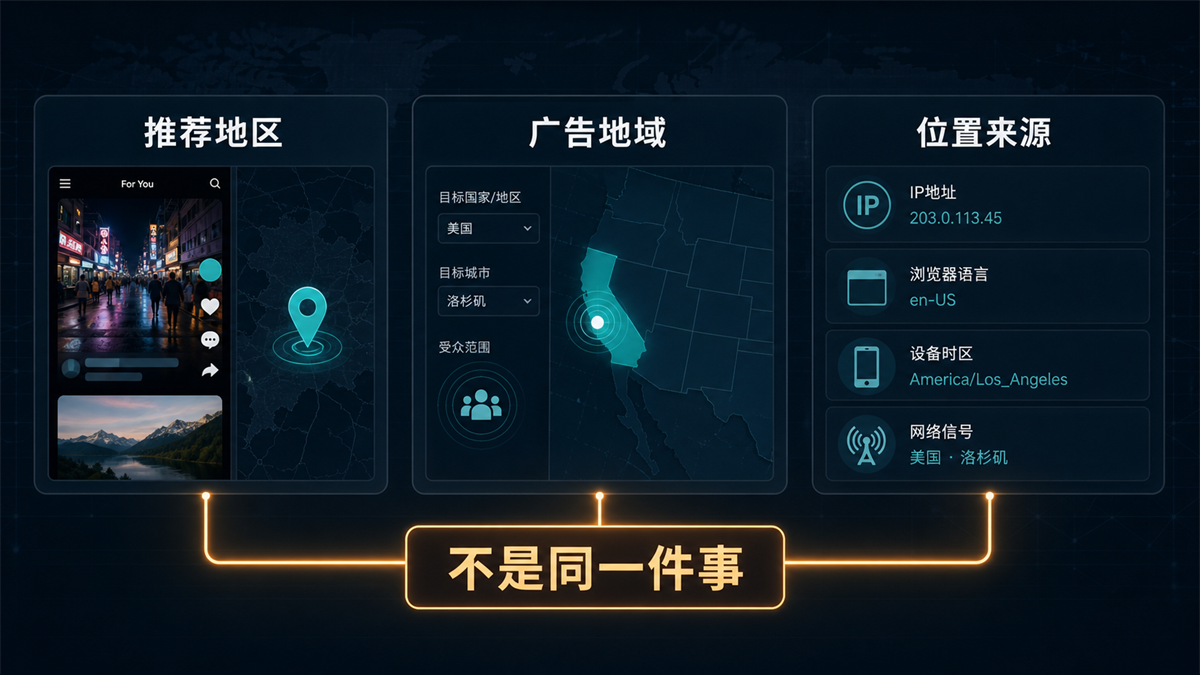
Рекомендации по контенту, география рекламы и
источники местоположения - это не одна и та же проблема, и порядок проверки различен.
Самое простое заблуждение:
бросить все региональные проблемы на IP
IP важен, но IP - это не все.
Агент IP решает путь к сети экспорта. Он сообщает целевому сайту: откуда взялся этот визит. Но язык браузера, часовой пояс, DNS、WebRTC、 Местоположение оборудования, данные учетной записи, историческое поведение учетной записи относятся к другой партии доказательств.
Если вы читали ранее [IP в Соединенных Штатах, часовой пояс браузера - это Китай, как обрабатывается среда учетной записи] (https://sureisp.com/blog/proxy-ip-timezone-language-mismatch-browser-env), это должно быть легче понять: IP - область нормальная, только показывает, что сетевой экспорт нормальный и не может быть подтвержден окружением браузера и историей учетной записи.
Нижеследующая таблица может служить минимальной основой для суждения.
Переменные - частые действия пользователя - места, где легко ошибаться - какие доказательства следует увидеть?
- Да.
• Экспорт IP = обмен на US, UK, Japan Agent * Только смотреть на страны, не смотреть на тип и стабильность прокси - сервера # IP страны, города, ASN、 Часто ли меняются.
Перевод на английский язык или язык целевого рынка, но часовой пояс и DNS не изменились, Accept - Language, язык браузера, системный язык.
Часовой пояс / Ручная смена часового пояса / Исправление неправильной области или выход IP не имеет смысла
DNS / WebRTC - Просмотреть только страницу IP - обнаружения. DNS или WebRTC показывают другой путь.
Сигнал местоположения / устройства # Очистить кэш, перезагрузить
приложение # Поле было очищено, но вместо этого не знать, что это такое, права местоположения, область устройства, SIM / Мобильная сеть.
История учетной записи Продолжение отправки контента или смены меток Рекомендуемая дислокация как одна сетевая проблема
Многие люди меняют все настройки снова, когда они больше всего спешат: IP меняется, язык меняется, часовой пояс меняется, кэш чист. В краткосрочной перспективе это похоже на решение проблемы, а в долгосрочной - на демонтаж доказательств.
Что действительно нужно делать, так это наоборот: сначала записывать, а затем делать.
Проверьте по порядку:
сначала сохраните место, а затем проверьте четыре уровня доказательств
Я бы предпочел проверить их в этом порядке. Он не обязательно самый быстрый, но его легче рассеять.
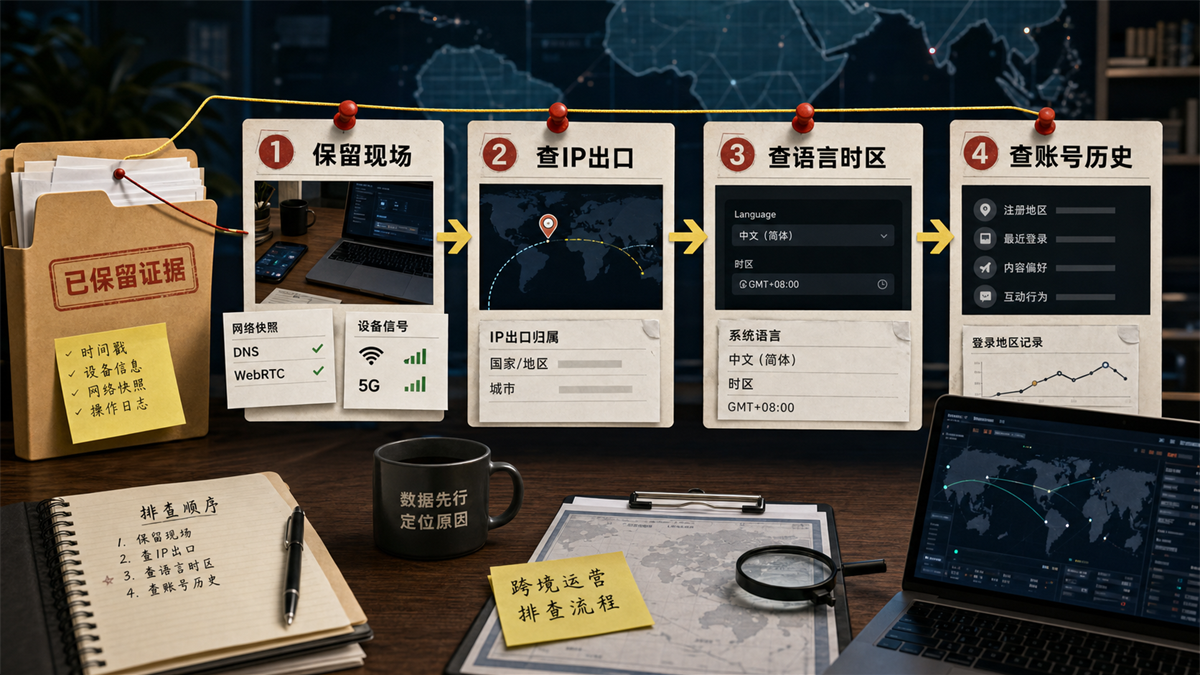
Сначала сохраните место, а затем нажмите на веб - экспорт, среду браузера, сигнал устройства и историю учетной записи для проверки.
Первый шаг:
сначала зарезервировать место, а не сразу очистить кэш
Сначала отрежьте аномалии, которые вы видите: какой регион рекомендуется контент, какая область отображается на заднем плане рекламы, какие подсказки функции учетной записи, какая страна отображается на странице IP - тестирования, какой язык браузера и часовой пояс.
Это движение обычное, но очень важное.
Экологические проблемы учетной записи больше всего боятся не обнаружения аномалии, а после того, как аномалия появилась, мы работаем, и, наконец, никто не знает, как это было в самом начале. Сегодня сменить IP, завтра сменить язык, послезавтра очистить кэш, на четвертый день сказать "или нет". К этому времени проблема заключается не только в региональной дислокации, но и в том, что место расследования стерто вами самим.
Шаг 2: Проверьте IP - экспорт, а не только страну
Экспорт IP начинается с страны и города, но не останавливается здесь. Смотря на тип агента, ASN、 Часто ли переключаются и соответствуют ли они использованию учетной записи.
Например, контент - аккаунт давно хотел быть американским рынком, но вчера использовал американский IP, сегодня японский IP, а послезавтра отрезал Европу. Даже если каждый IP - тест показывает « нормально», история учетной записи все еще видит ряд изменений. Вы не можете объяснить все прошлые действия только сегодняшним тестом.
Если экспорт IP и целевой рынок явно не совпадают, сначала можно обработать прокси. Но если IP уже имеет смысл, не спешите продолжать менять его. Продолжение смены только увеличивает переменные.
Шаг 3: Проверьте язык браузера, часовой пояс и DNS
Язык браузера и часовой пояс не требуют мистики. Вы просто спросите: могут ли они быть объяснены целевым рынком для этого аккаунта?
В учетной записи контента США используется en - US, соответствующий часовой пояс США, эта логика относительно гладкая. Целевым рынком является Япония, но уже давно использует китайский язык и китайский часовой пояс, даже если IP - экспорт будет заменен на Японию, окружающая среда все еще кажется очень неудобной.
DNS нужно рассматривать отдельно. Вчера мы писали [что делать с обнаружением утечки DNS] (https://sureisp.com/blog/dns-leak-test-proxy-browser-environment), основная причина в том, что многие люди смотрят только на IP, а не на аналитические пути. В региональных проблемах TikTok DNS не обязательно является единственной причиной, но это доказательство, которое может помочь вам устранить « несоответствия в сетевом маршруте».
Шаг 4: Проверьте устройство и источник местоположения
Если вы имеете дело с концом телефона, местоположение устройства, область системы, права местоположения, сигналы SIM / мобильной сети все зависит. Не превращайте проблемы с мобильным телефоном в проблемы с браузером.
Если вы имеете дело с терминалом браузера, фокус возвращается к среде браузера, Cookie、 Кэш, WebRTC、 История счетов и регистрационные записи. Здесь можно разделить различные среды учетной записи с помощью браузера отпечатков пальцев, чтобы каждая учетная запись соответствовала фиксированной среде браузера и прокси - выходу. Акцент делается не на создании « идеальной среды», а на том, чтобы переменные окружения могли записываться и быть многократными.
Шаг 5: Проверьте историю учетной записи и поведение контента
Рекомендуемый контент особенно зависит от истории аккаунта.
В прошлом учетная запись просматривала региональный контент, взаимодействовала с языковым контентом и публиковала его с несколькими ярлыками рынка. Сегодня вы вырезали IP целевой области, и это не обязательно сразу становится рекомендацией целевого рынка. Продолжение смены IP в это время может просто замаскировать историю учетной записи как сетевую проблему.
Обычно я записываю вопросы рекомендации контента отдельно от вопросов среды входа. Содержание Рекомендуемая область неправильная, зависит от просмотра, взаимодействия, языка, времени публикации, этикетки контента; Окружающая среда входа неправильная, зависит от IP, часового пояса, языка, DNS、WebRTC、 Регистрация оборудования и номеров счетов. Не смешивайте две линии.
В каких случаях нужно сменить агента, а в каких не двигаться
Смена агента не является невозможной. Проблема в том, чтобы иметь доказательства.
Сигнал на месте, нужно ли сначала сменить агента, более стабильное движение.
Да.
Очевидные несоответствия между IP - странами и целевыми рынками.
IP совпадает, но язык / часовой пояс явно не совпадают.
Конфликт между маршрутом DNS и экспортом прокси - сервера
WebRTC раскрывает информацию о вашем устройстве, сначала обрабатывает боковую сторону браузера, проверяет настройки WebRTC и конфигурацию браузера отпечатков пальцев.
Рекомендуемая область контента неправильная, но история учетной
записи очень хаотична, не просто меняйте агента, сначала организуйте просмотр, взаимодействие, публикацию и историю входа в систему.
Не стоит винить IP, сначала проверьте рекламные аккаунты, рекламные места, целевые рынки и доступные территории.
Реальный критерий суждения прост: если вы можете доказать конфликт между самим сетевым экспортом и целевым рынком, замените агента. Если вы можете только доказать, что « TikTok показывает неправильно», вы не можете перейти прямо к смене прокси - сервера.
Частое заблуждение:
чем быстрее, тем легче сделать больше переменных
Ошибка 1:
когда вы видите, что рекомендуемая область неправильна, меняйте IP непрерывно
Непрерывная смена IP - адреса создает новые проблемы. Вы просто хотели проверить область, в результате чего путь входа в учетную запись превратился в цепочку различных регионов. Даже если рекомендации остаются неправильными, вы не можете сказать, была ли первоначальная проблема не решена или новая переменная снова вошла.
Лучше всего зафиксировать объяснимый экспорт, по крайней мере, наблюдая за ним в течение некоторого времени, в сочетании с поведением контента и историческим суждением учетной записи.
Миф 2: Рассматривайте географический вопрос рекламы как вопрос рекомендации контента
Рекламная география и контент не являются логическим набором.
Какой регион можно выбрать за рекламным фоном, связан с рекламными счетами, бизнес - рынками, рекламными местами, продуктами, аудитом и доступной территорией платформы. Регионы рекомендаций контента более уязвимы для контента, взаимодействия, языка и исторического поведения. Смешивая их, расследование превращается в кашу.
Миф 3: Изменить только язык браузера и не записывать привычки
Некоторые люди, изменив язык и часовой пояс, чувствуют, что окружающая среда в порядке. Более проблематичным является регистрация. Какой аккаунт изменил язык, когда сменил прокси, кто вошел в систему, что сделал перед аномалией, эти никто не помнит, а затем все еще не может быть повторен.
Инструменты не решают всех проблем, но, по крайней мере, должны сделать запись ясной.
Миф 4: понимать « источник местоположения» как кнопку
Многие проблемы с местоположением не могут быть объяснены переключателем. Права доступа к местоположению на стороне мобильного телефона, сигналы SIM / устройства, системные области; Браузер смотрит на IP, язык, часовой пояс, DNS, WebRTC и историю учетных записей. Вы должны знать, на каком конце вы находитесь и в какой сцене у вас проблемы.
Sureisp может что - то взять на себя и не может ничего обещать
Если ваш вопрос - это только один раз, когда контент не рекомендуется, не спешите с инструментами. Сначала рассмотрим направление контента, интерактивные объекты и историю учетной записи.
Но если вы уже используете несколько номеров контента TikTok, номеров магазинов, рекламных номеров или учетную запись, которая требует четкой среды входа в систему в течение длительного времени, не разбрасывайте IP, браузерную среду и операционные записи в разных местах.
Sureisp в основном берет на себя два уровня: один уровень - IP - прокси, используемый для того, чтобы сделать среду экспортной сети учетной записи более чистой, более естественной и более подходящей для долгосрочного сценария входа; Другой уровень - это среда браузера отпечатков пальцев, которая используется для раздельного управления файлами cookie, кэшами, отпечатками пальцев браузера, языковыми часовыми поясами и прокси - записями различных учетных записей. Вы можете создать учетную запись среды среды учетной записи из [Sureisp дактилоскопического браузера] (https://sureisp.com/browser.php), а затем связать более подходящий экспорт прокси - сервера для использования учетной записи.
Здесь нужно четко сказать: он не обещает изменить результаты рекомендаций платформы и не заменяет качество контента, конфигурацию рекламы и соответствие учетной записи. Его реальная ценность заключается в том, чтобы уменьшить экологический хаос и дать вам знать, какой слой проверить, когда у вас проблемы, а не угадывать по памяти.
Если у вас нет фиксированного процесса, сначала посмотрите на комбинацию интернет - прокси и браузера отпечатков пальцев с [sureisp] (https://sureisp.com/). Вместо того, чтобы преследовать сложные функции, сначала выберите « учетную запись, соответствующую набору среды браузера, объяснимой сети экспорта, операционной записи».
FAQ: Регион TikTok не является распространенным вопросом
Область # # TikTok не должна быть проблемой IP?
Не обязательно. IP - это первый уровень доказательств, но не единственная причина. Рекомендуемая область контента, область рекламы, источник расположения учетной записи, языковой часовой пояс, DNS/WebRTC、 Сигналы устройства и история учетной записи могут влиять на суждения. Сначала определите, где возникла проблема, а затем решите, менять ли IP.
IP показывает целевую страну, почему рекомендуется контент или неправильно?
Чаще всего это связано с историей учетных записей, взаимодействием просмотра, языковыми предпочтениями, тегами контента и средой устройства, которая не поспевает за ними. Рекомендуемое содержимое не только для текущего IP. Вам нужно посмотреть на поведение этой учетной записи в течение некоторого времени, а не только на сегодняшнюю страницу обнаружения.
Рекламная география TikTok неправильная, что нужно проверить первым?
Проверьте конфигурацию на уровне рекламных учетных записей и рекламных групп, включая целевые рынки, рекламные места, доступные географические районы, бизнес - квалификацию и фоновые ограничения. Окружающая среда также должна быть проверена, но область рекламы не должна быть непосредственно эквивалентна области контент - рекомендаций.
Браузер и мобильный телефон одинаковы?
Не то же самое. В конце браузера основное внимание уделяется IP, языку браузера, часовому поясу, DNS, WebRTC, файлам cookie и истории учетных записей. Терминал также зависит от разрешения местоположения, области системы, сигнала SIM / устройства и кэша приложения. Не перекладывайте проблемы с телефоном полностью на браузер.
В каких случаях подходит браузер отпечатков пальцев?
Если у вас есть только одна учетная запись, проблема - это просто случайное рекомендуемое отклонение, сначала сделайте запись и базовую проверку. Если у вас есть несколько учетных записей, несколько рынков и несколько операторов, браузер отпечатков пальцев лучше подходит для фиксирования среды учетной записи, изоляции данных браузера, привязки экспорта прокси - сервера и оставления последующих записей, которые могут быть многократными.
Sureisp поможет решить проблему с TikTok?
Sureisp может взять на себя управление сетью экспорта и окружающей средой браузера: ISP - агент IP отвечает за более четкий сетевой выход, а браузер отпечатков пальцев отвечает за изоляцию и запись учетной среды. Он не может принимать решения о рекомендациях платформы для вас и не может заменить контент, конфигурацию рекламы и соответствие учетной записи. Когда область неправильная, сначала используйте ее, чтобы выяснить переменные окружающей среды, а затем судить о следующем шаге.



